
Forum Replies Created

Hi,
For Invalid File Type updating ( 3.1.17 or 5.3.7 ), you may face the following 2 issues:
- Upload is not working
- Showing “Invalid File Type” error when trying to download
Here is the reason and solution:
<hr/>
From WPDM Free 3.1.20 and WPDM Pro 5.3.7, we have changed the file type validation process during file upload and download. Now, you have to white file types to allow them to upload or download. You will find the option at Admin Menu ► Downloads ► Settings ► Basic Settings Tab ► Upload Settings section.
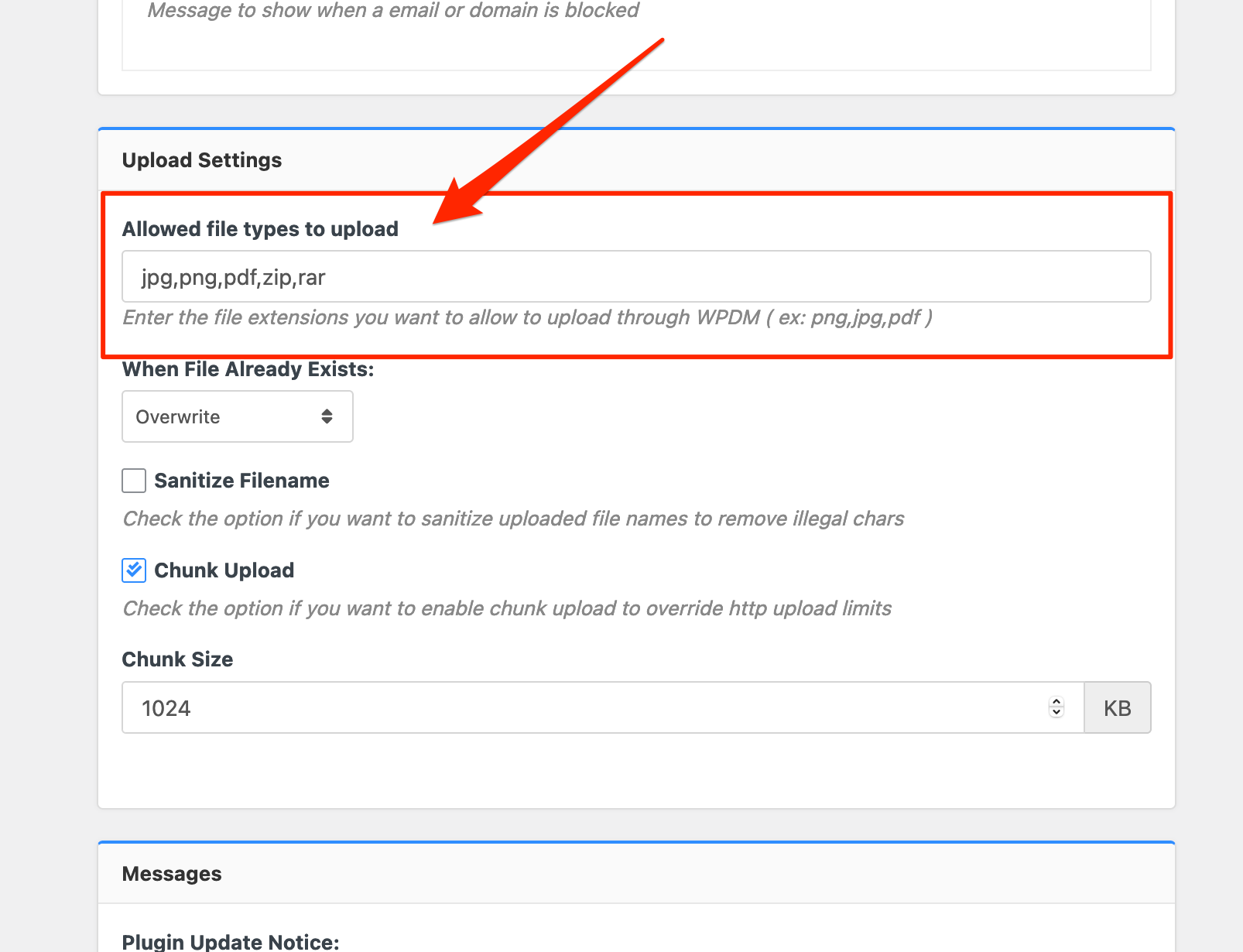
Please add file types ( texts, multiple texts separated by a comma ) as shown on the marked image. And then save settings. The shall resolve the issue.
or, Just Keep it Empty for WordPress default use as I image attached

thus it may resolve the issue
thanks
Hi,
please just removed this message from the Downloads > Settings > Basic
Download Limit Message:
<code><i class=”fa fa-exclamation-triangle”></i> Download Limit Exceeded!</code>
I hope this will work fine then
thanks
The contact form 7 with form lock is working fine from our side, https://wpdmpro.w3eden.com/download/wpdm-form-lock/, I have checked there are many plugins installed on your side, can you please enable/disable other plugins for checking, you may also switch theme to another for checking, please let me know then
thanks
please share your related URL, if possible, please, give your temporary wp-admin login details in a private reply for checking the issue
Thanks
For now premium-package-wordpress-digital-store-solution add-on is required for membership add-on, we shall soon look over this and try to make an update
thanks
Please, give your temporary wp-admin login details in a private reply for checking the issue.
Thanks
please check, the profile image has been adjusted. I have adjusted it from your theme style.css
thanks
please mail support@wpdownloadmanager.com, I hope you should get the help
thanks
Hi,
Please activate this add-on https://www.wpdownloadmanager.com/download/premium-package-wordpress-digital-store-solution/, for the pricing setting, thus the error will disappear
thanks
For add-on for now,
1 ) Download the latest version from here https://www.wpdownloadmanager.com/user-dashboard/?udb_page=purchases
2 ) Install the latest version
thanks
please adjust the download button size option as I image attached from Downloads > Settings > User Interface

I hope you should get the help
thanks
It can be an issue too for margin, padding among the images, please try to inspect the element from the browser. I hope you should get the resolution
thanks
please use [thumb_gallery_WxH] template tag instead of [gallery_WxH], it will returns all attached additional image thumbnails with specified width ( W ) and height (H) if available, every thumbnail is linked with original image
thanks
This message is showing while try to login as I image attached

please check
thanks
Does this problem only occur in the non-english language? please let me know
thanks
please your site login URL too
thanks
Are you trying to open a new tab, for this shortcode download package,
[wpdm_all_packages items_per_page=15 jstable=1 thumb=1 categories="dump-files" order_by="publish_date" order="DESC" cols="title,download_count,package_size|publish_date|download_link" colheads="File Name|Update Date|Download::155px"]
please let me know
thanks
please share your related URL, if possible, please, give your temporary wp-admin login details in a private reply for checking the issue.
Thanks
Sorry for that little confusion, we are adjusting it next upgrade
thanks
When you have set the Allow Access role to All Vistors, then it is giving User role to Guest as a download user, please let me know, how can I more help you
thanks
please share your related URL, if possible, please, give your temporary wp-admin login details in a private reply for checking the issue
Thanks
You can check this option as I image attached for Download > Settings > Basic

it will hide the download page for certain role
you can adjust the options too for certain roles,

I hope those may help you, please let me know if you need other clarification
thanks
You can also try updating the PRO plugin this way, please simply click the Save Settings again for the license key option from Downloads > Settings > License, which will regenerate the access token. Finally, go to the plugins page and the update will work fine this time
and for add-on for now,
1 ) Download the latest version from here https://www.wpdownloadmanager.com/user-dashboard/?udb_page=purchases
2 ) Install the latest version
thanks, I hope you have understood
For problem 1, you may use items_per_page for your related packages with the pagination,
For Problem 2, you may check adjusting Download > Settings > User Interface style/scripts settings
For Problem 3, Can you please share the related URL, please
thanks