
Forum Replies Created

Hello @cleartouch,
Hope you are well. Do you want the package name too for form entities with WPDM- Form lock add-on? please let me know
Thank you and regards
Hello @juan_ateb,
Hope you are well. I think you have been messed up with understanding with Billing Cycle Limit. It is a total number of recurring billing cycles for the level. If you want to make your membership product or service for a limited time you can do it with this feature. The members-only can take this limit of membership on your site. After that, the membership will expire. You can put 0 here if the membership you provide is not for a limited amount of time. I hope you have understood.
Thank you and regards
Hello @thehaiccna,
Please for now, please continue with version 5.1.6. If the problem again appears from others with version 5.1.7, we shall look over the issue. I hope it will not again make any inconvenience for your users
Thank you and regards
Hello @juan_ateb,
Sorry for the inconvenience. I shall try to check for the issue from different devices tomorrow.
Thanks for the appreciation
Hello @jrpajr,
Hope you are well. The code sample is here, the response code for any API should be like this,
The JSON response will look like the following example:
{
      "id": 6488,
      "title": "The Alchemist",
      "slug": "the-alchemist",
      "description": "The Alchemist follows the journey of an Andalusian shepherd boy named Santiago.",
      "excerpt": "The Alchemist is a novel by Brazilian author Paulo Coelho.",
      "author": 1,
      "status": "publish",
      "parent": 0,
      "tags": [
          "novel",
          "paulo-coelho"
      ],
      "categories": [
          16
      ],
      "thumbnail": "https://example.com/wp-content/uploads/2019/01/the-alchemist.jpg",
      "additional_previews": [
          "https://example.com/wp-content/uploads/2019/03/the-alchemist-cover.jpg",
          "https://example.com/wp-content/uploads/2019/03/the-alchemist-map.jpg"
      ],
      "version": "3.0.0",
      "link_label": "Download",
      "quota": 0,
      "download_limit_per_user": "100",
      "view_count": 80,
      "download_count": 14,
      "package_size": "811.84 KB",
      "access": [
          "guest",
          "subscriber",
          "administrator"
      ],
      "user_access": [
          "admin"
      ],
      "individual_file_download": "1",
      "cache_zip": "-1",
      "template": "link-template-calltoaction1",
      "page_template": "page-template-1col-flat",
      "files": {
          "1": "The Alchemist.pdf"
      },
      "fileinfo": {
          "1": {
              "title": "The Alchemist",
              "password": "",
              "license_price": {
                  "statdard": "",
                  "extended": "",
                  "unlimited": ""
              },
              "price": ""
          }
      },
      "package_dir": "",
      "publish_date": "2019-04-01 12:00 am",
      "expire_date": "2019-08-31 12:00 am",
      "terms_lock": "1",
      "terms_title": "Agree to terms",
      "terms_conditions": "You can't redistribute without prior authorization.",
      "terms_check_label": "Checkbox Label",
      "password_lock": "1",
      "password": "[123][456]",
      "password_usage_limit": "2",
      "linkedin_lock": "1",
      "linkedin_message": "LinkedIn Share Lock message",
      "linkedin_url": "https://www.wpdownloadmanager.com/",
      "tweet_lock": "1",
      "tweet_message": "Custom tweet message",
      "twitterfollow_lock": "1",
      "twitter_handle": "Shahriar",
      "facebooklike_lock": "1",
      "facebook_like": "",
      "email_lock": "1",
      "email_lock_title": "Subscribe To Download",
      "email_lock_msg": "",
      "email_lock_idl": "0",
      "icon": "https://example.com/wp-content/plugins/download-manager/assets/file-type-icons/arrow.png",

      "base_price": "12.00",
      "sales_price": "10.00",
      "sales_price_expire": "2019-08-31 12:00 am",
      "pay_as_you_want": "0",
      "license": {
          "statdard": {
              "active": "1"
          },
          "extended": {
              "price": "22",
              "active": "1"
          },
          "unlimited": {
              "price": "32",
              "active": "1"
          }
      },
      "discount": {
          "subscriber": "10",
          "contributor": "20",
          "author": "30",
          "editor": "40",
          "administrator": "50"
      },
      "enable_license": "1",
      "enable_license_key": "1",
      "free_downloads": [
              "/Applications/XAMPP/wpdm/wp-content/uploads/2019/04/The-Alchemist-free-sample.pdf"
          ],
      "meta_input":{
        "meta_key" : "Hello"
      }
  }
here file attach should be like this,
"files": {
          "1": "The Alchemist.pdf"
      }
And for this default format, the file should be residing in wp-content/uploads/download-manager-files, thus the package should create with fa file. Please let me know if you have other queries
Thank you and regards
Hello @aloette1978 again,
Hope you are well. Which version you are using now? please let me know
Thank you
Hello @cleartouch,
Yes, it is possible, you may keep an input box regarding package name. Thus you shall find the entries from Form Entries. And for gravity form, you can add a hidden field and use this tag [wpdm_package_id] as a default value, the tag will be replaced by package ID automatically when rendering a form. I hope you have understood
Thank you and regards
Hello @nguyenhung,
Hope you are well. I have been informed from our developer that,
sale-notification the same template will be used to send seller and admin notification. If you are facing for this issue, please, give your temporary wp-admin login details in a private reply for checking the issue.
Thank you and regards
Hello @lukehart,
Sorry for the issue. please select your package category for your latest created packages. Thus it will appear in current packages. please let me know if you have other queries
Thank you and regards
Hello @hheim,
Sorry, you can’t back up this file, it is a core file. you can backup the templates file only
thank you and regards
Hello @juan_ateb,
Hope you are well. Can you please check my attached video, Cart is working fine from my side
https://drive.google.com/file/d/1jy10vGezQoR1nKOOZ-cAMRoqaA1oDdhm/view
Can you please clear your cache and cookie from your side too, I hope it will resolve your issue. please check
Thank you and regards
Hello @thehaiccna,
Please share your login site URL too for checking the issue
Thank you and regards
Hello @gidantrip,
Hope you are well. And sorry for the inconvenience. Can you please share the related URL/file URL? if possible, please, give your temporary wp-admin login details in a private reply for checking the issue.
Thank you and regards
Hello @ipiyo,
For many users bulk apply, can you please check this add-on
please let me know
Thank you and regards
Hello @lukehart,
You can select images packages for image category, PDF for pdf category as I image attached,

Thus you may get the apprearance like here,

please let me know if you have any more query
Thank you and regards
Hi,
For Invalid File Type updating ( 3.1.17 or 5.3.7 ),
Here is the reason and solution:
From WPDM Free and WPDM Pro, we have changed the file type validation process during file upload and download. Now, you have to give file types to allow them to upload or download. You will find the option at Admin Menu ► Downloads ► Settings ► Basic Settings Tab ► Upload Settings section.
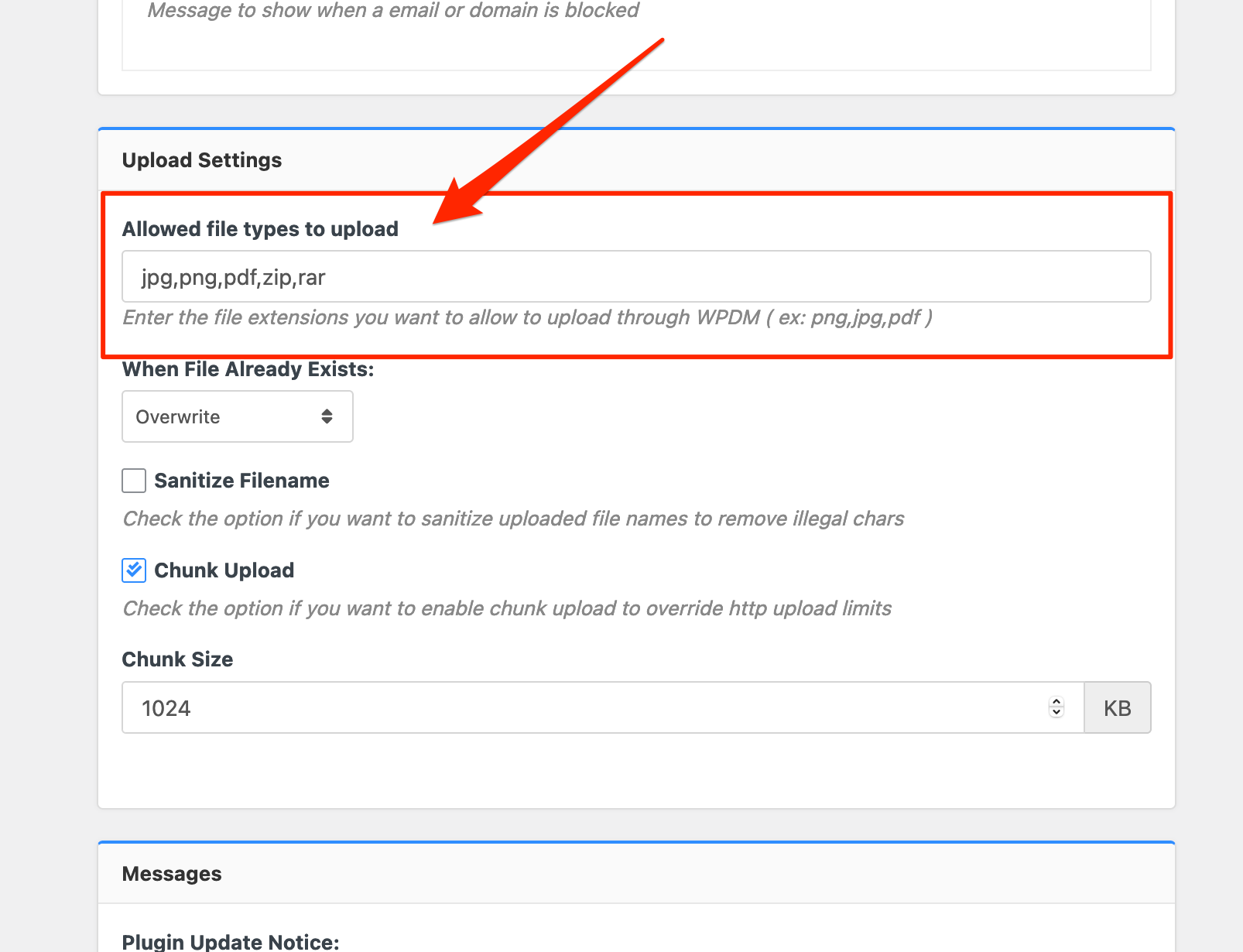
Please add file types ( texts, multiple texts separated by a comma ) as shown on the marked image. And then save settings. The shall resolve the issue.
or, Just Keep it Empty for WordPress default use , thus it may resolve the issue
thank you and regards
Hello @juan_ateb,
Sorry for the inconvenience. Can you please reactivate your login credentials or, give your temporary wp-admin login details in a private reply for checking the issue.
Thank you and regards
Hello @jrpajr,
Hope you are well. If you have already created a package. Then you will also be able to upload/attach files for that package. If you have kept just the file name you should keep the files in wp-content/uploads/download-manager-files dir too. And for local files, you will not be able to attach files from the local PC drive directly, or you may please attach a live server file URL there. It will also help you upload files properly. please check and let me know then
Thank you and regards
Hello @juan_ateb,
Hope you are well. Please activate/deactivate Premium Packages – Sell Digital Products Securely add-on again. you may also reinstall the add-on again. I hope it may resolve the issue from your side. please check
Thank you and regards
Hello @lukehart,
As per documentation, you have to use this shortcode [wpdm-accordion] any page/post editor. Thus you shall get the layout like this, https://demo.wpdownloadmanager.com/wpdmpro/accordion/. I hope you have understood
Thank you and regards
Hello @raajsajaniya,
It can be a copyright issue. If I clone the same layout from the reffered site, he can claim the issue. He is also our client. It is better to contact him directly for the same layout. I hope you should get the help.
Thank you and regards
Hello @hheim,
The text “has been added to your cart” reside in
plugins\wpdm-premium-packages\includes\libs\cart.php file
please check. I hope it may help you
Thank you and regards
Hello @studio-caprioglio,
Hope you are well. And sorry for the inconvenience. Can you please, give your temporary wp-admin login details in a private reply for checking the issue.
Thank you and regards