
Forum Replies Created

Hi there,
It should be available in a separate plugin folder name contain Directory Add-on.
Thanks.
Hi there,
Please send your login info in private message. Let me check the issue.
Thanks.
Hi there,
Please put the following code into your theme CSS file.
.w3eden .package-info-list {
              display: none;
}
Let me know if it helps.
Thanks.
Hi there,
When you upload the CSV file with the details of the package as demo CSV, it will be uploaded in the package and you will be redirected there.
Thanks.
Hi,
Could you please check if you turn the option on that requires user to login before download.
Else please send login in private reply to check the issue.
Thanks.
Hi,
please provide your license in private reply.
Thanks.
Hi there,
Sorry to hear that your license is expired. Actually we provide one year license for plugin updates and forum and support access.
You can always have the running version of the plugin in your site.
But if you want future updates and support please renew the license.
Thank you.
Hi,
I need to see the site. Can you give me login in private message?
Thanks.
Hi there,
Could you please post your license or order id in private reply?
Thanks.
HI there,
Thanks for your query. You can achieve this functionality with our WPDM Directory Add-on. For this you need to install this add-on as normal plugin and then activate it.
Now, For creating an advance search page with WPDM Directory Add-on, you have to use the shortcode.
[wpdm-search-page cols="1 or 2 or 3 or 4" items_per_page="10" link_template="link-template-id" position="top or left or right"]
Thanks.
Hi,
currently, we don’t have the feature to assign a single user to a specific file in bulk import, You can assign a group of users.
Thanks.
Hi there,
For stop download from single IP address, you can block the specific ip address from downloading. For this, go to settings and scroll down to “File Download” section. You can find there a box to put ip address to block them. You can paste the ip there and save the settings.
Or, You can use the premium plugin feature if you purchased the pro version. For every single package, there is “Download Limit”, so if any user cannot download more than the limit. Here, every single IP address used as an id for block the download.
We will look into the app bug.
Thanks.
Hi,
Can I look at your site? Can you please send login in private message?
Thanks.
Hi there,
Sorry, the individual download option will not work within the lock feature. In lock feature user have to download the whole package instead of an individual file.
Let me know if you need anything else. 🙂
Thanks.
Hi,
I will let you know about it soon.
Thanks.
Great to hear that both fixed.
Yes, they are the default. Currently, it does the only title search. Hope we will consider this feature in future updates.
Thank you.
Hi,
Are you using the latest version of the plugin?
A recent test result of “[wpdm_search_result init=1 template="link-template-calltoaction4" cols=4]” ,
Here
It seems fine with the latest version. did you cache your page already?
Though, there is the blank page appears for no result in search. We will look into it.
Please let me know.
Thanks.
Hi,
Thanks for notice it.
It would be good if I can see, but I will let you know if I could not find any solution without looking into your site, as it is private/local.
Thanks for patience.
Hi there,
Thanks for the query. It’s actually when the email lock feature is on the user need to give the email address on the form to unlock the download. So, you now can select a form where the user could give the email with any additional field information. Then have to click on download in order to download file or package. And any package contains multiple files will also be locked with the email lock together.
The file download button disappears in the lock option because a user could click on it and download it without unlocking the package cause it’s the direct download link.
It’s default.
Thanks.
Hi there,
I have looked into the site. The speed is good enough. Heres a test result: https://gtmetrix.com/reports/actionsoftware.com/oUtsGhkI
Also, maybe these plugins js files are not being cached which making site little slower.
https://platform-api.sharethis.com/js/sharethis.js (54.1KiB)
https://actionsoftware.com/wp-includes/js/jquery/jquery.form.min.js?ver=3.37.0 (12.1KiB)
https://actionsoftware.com/wp-content/plugins/contact-form-7/includes/js/scripts.js?ver=4.9.1 (7.9KiB)
https://actionsoftware.com/wp-includes/js/jquery/ui/core.min.js?ver=1.11.4 (3.3KiB)
https://actionsoftware.com/ (2.5KiB of inline JavaScript)
https://actionsoftware.com/wp-includes/js/wp-embed.min.js?ver=4.7.7 (1.2KiB)
https://actionsoftware.com/wp-content/plugins/email-javascript-cloaker/js/email-js-cloak.js?ver=1.0 (188B)
Thanks.
Hi,
Thanks for the details. Can you send error log that appears in server log file?
or site temporary access to look into it.
Thanks.
Hi,
can you give me the error log file on your server?
or please give a temporary login to check the error.
Thanks.
Hi there,
Can you tell me the version of that plugin?
else, Can you please check if the site http://cpmr-baltic.org running the latest version of the plugin. If not please update the plugin.
Thanks.
Hi,
Currently, you can import CSV in this format in pro version only. It can only import package and assign it to the user importing the file.
You can also assign user level and category for the package. But it is a pro version addon. You can find it here.
And no you can’t import bulk user and give access to specific files. But you can select User role for specific package file.
Let me know if you need anything else to know.
Thanks.
Hi,
How long have you purchased the Download Manager Pro Licence?
First, go to your Download Area https://www.wpdownloadmanager.com/user-dashboard/purchases/, then click ‘DOWNLOAD‘ button to see order details. You will find license key there. Check the following screenshot,
https://www.evernote.com/l/AUd0JNV9gGZHsI7KTv5EERzdV2FIWsCmA2QB/image.png
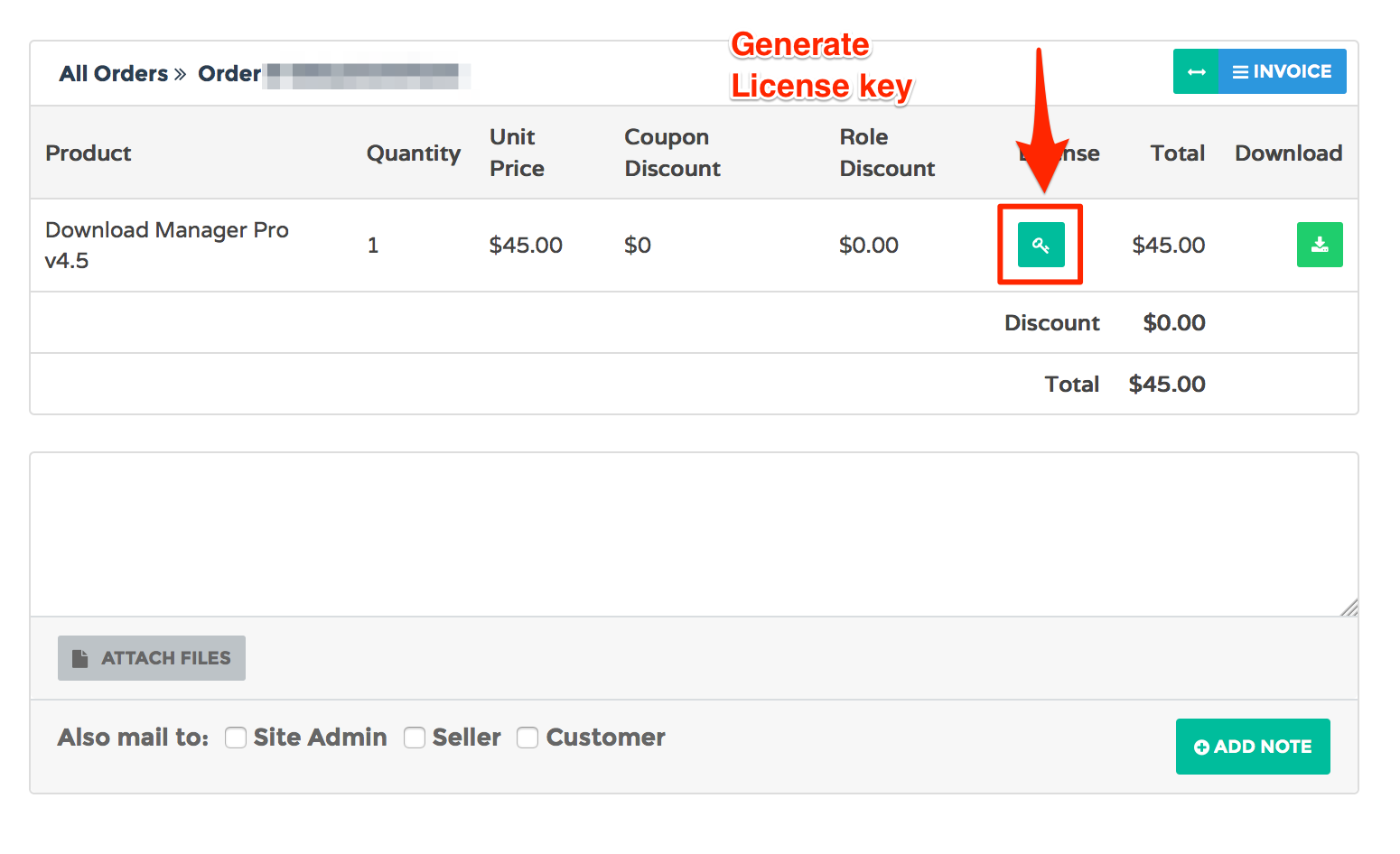
Now you can put this license key in Downloads Settings License tab.
That’s all.
Let me know if any further error occurred.
Thanks.