

Shahjada
Forum Replies Created

copy single.php to single-wpdmpro.php and removed comment form code from single-wpdmpro.php
looks like all files not uploaded properly. please upload all files again ( overwrite current files )
sorry. use this:
[wpdm_category id=enrolments toolbar=0]
new link template with icon added in latest version 3.3.5.rc2.
actually a new add-on coming for that, called “wpdm accordion”, everything there will be in accordion
please send a temporary wp-admin login info to support@wpdownloadmanager.com
if no email arrived then it could something with your server, we used standard wp mail functions to send email. But if you want us to check, please send a temporary wp-admin login info to support@wpdownloadmanager.com
you will need the following add-on for that:
ok, we will check wpdm pro with the plugin. but it can be an issue with that plugin. Nothing to do with wpdm pro
please make the following dir and all files inside it writable:
/wp-content/plugins/download-manager/cache/

if you want to hide toolbar from category short-code use parameter toolbar=false, like::
[wpdm_category id=enrolments toolbar="fasle"]
but from next update there will be option for hiding toolbar globally.
you can select access to categories. Like select user roles from category window, that you want to allow to see and download packages under a certain categories
please check if /uploads/download-manager-files/ dir missing or not writable
please contact live support or send temporary wp-admin login info to support@wpdownloadmanager.com , seems something wrong with setup
1) Download links were not appearing at all as selected page template didn’t have [download_link] tag, i changed it and showing ok now.
2) Create new link template using following code:
<div class="media">
<div class="media-body">
<h4 class="media-heading" style="padding-top: 0px;border:0px;margin: 0px;">[title]</h4>
[download_link] <i style="margin: 2px 0 0 5px;opacity:0.5" class="icon icon-th-large"></i> [file_size] <i style="margin: 2px 0 0 5px;opacity:0.5" class="icon icon-download-alt"></i> [download_count] downloads
</div>
</div>
select the template from edit package window.
please send your license key to support@wpdownloadmanager.com
@monticarlo, please send a temporary wp-admin login info to support@wpdownloadmanager.com . Support team will set it up for you.
@monticarlo, you can skip .htaccess file upload, it will be created automatically
Post Upgrade Steps:
- Please go to Download Manager Settings Page
- Select Page template:
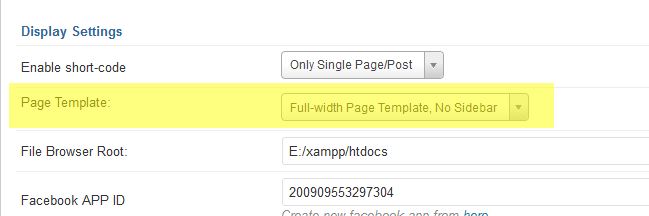
More details about settings - Now, If you want you can adjust other options as your preference
- Save your changes now, Click on “Save Settings” button at the end of page