Ok. I see the File Cart in use on this demo instead: http://demo.wpdownloadmanager.com/addons/membership-plans/
Please explain the difference between https://www.wpdownloadmanager.com/download/wp-pro-membership/ and shortcode [wpdm_user_dashboard].
Is WP Pro Membership a WPDM addon or is it a totally separate WordPress plugin? Confused.
I’d love to work with you to figure out all of the addons we’d need to meet our objectives. Our initial install of WPDM pro is not using the newest addon/functionality to meet our latest needs. Here are our objectives: (What combo of addons would you recommend?)
1 – Download single, by category or by selection to an auto zip file. (Doing this now)
2 – Flexibility to create a desired view of downloads in various layouts. (List (sorted), masonry, title that expands, card etc.)
3 – Get stats based on single download, zip file download (with single files increment).
4 – Collect email prior to download. OR create a login membership.
5 – Backend: Get stats based on email (John downloaded these files historically).
6 – Frontend: Let visitor see which files they already downloaded by searching using their own email.
7 – Store files in the Cloud.
8 – Embed downloads in a post or page. (doing this now)
9 – Style download buttons. (doing this now – would a theme be better? Does that happen sitewide or only for WPDM packages?)
10 – Provide a Title/description per download in text editor (in case we want to add video or other content). (Doing this now)
11 – Password protect a single download (doing this now) Is it possible by group of downloads (by tag or category or other).
12 – Limit the number of downloads per session or IP or email.
13 – Differentiate between a FIle Manager and a DAM relating to your tool. Could we use your tool as a DAM for images to be used on WordPress instead of the Media Library?
14 – Let visitor select files they want no matter what page, package, etc and download the selected files not ALL of the files. Zip the selected files into one for download.
15 – Let the WP ROLE (Admin or editor) select files to suggest to a registered visitor with an email containing links to files.
.
Hello CIALGAR,
Hope you are well. And thanks for writing to us. Are you searching for the User Signup Notification email template as I image attached,

You shall find and customize it from the Downloads > Templates > Email templates section. please check and let me know, if it helps you.
Thank you again and regards
My Downloads are not allowing multiple files anymore?
Has this happened to anyone else? When i drag or copy another file it just replaces the existing one
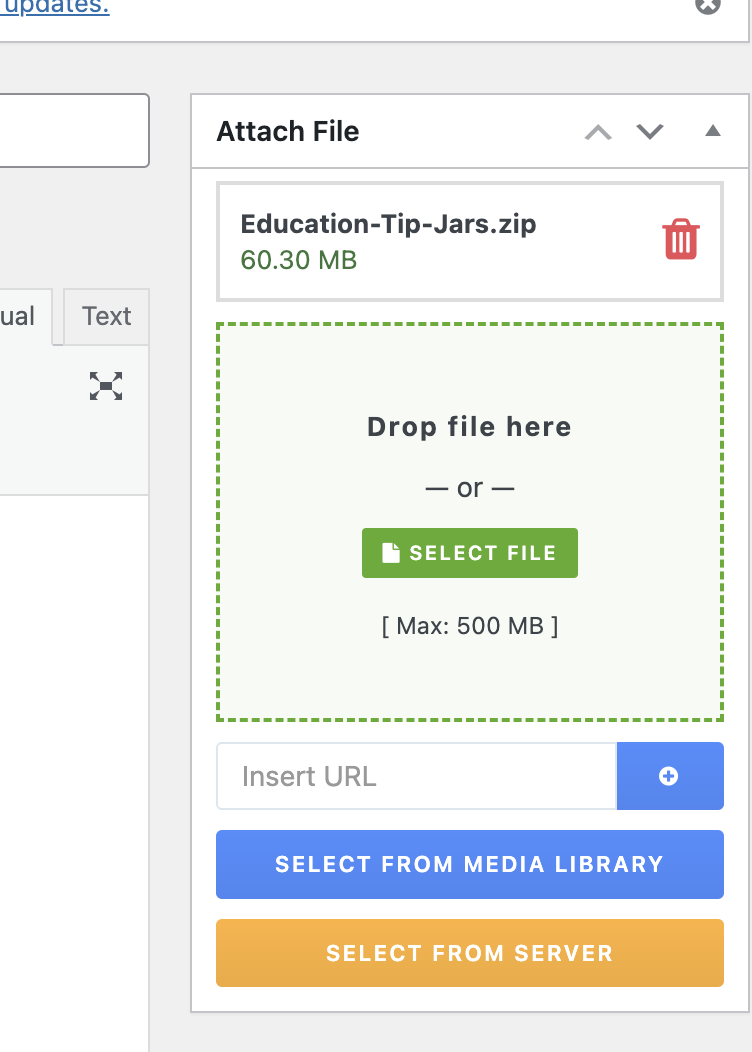
Hello
I’m trying to customize how my installation of wp download manager displays my downloads on a local development website so I can upload them to a published site in production, but following the instructions posted at instructions and I try to change the post meta titles, it doesn’t work.
I would also like to customize, for example, the font size, color, etc. to harmonize the presentation with my Twenty Sixteen WordPress theme installed.
Any suggestions?
Thanks a lot for your supoort.
Hello Tahasin,
thanks for your fast answere! The Article helped me very much to understand the DropZone.
So, may I’ll tell you about my usecase:
We have a Download-Center, where users can acces Downloads that are allowed for their Roles.
We have several pages, where only a special role is allowed to access the Downloads. A user, that is allowed to download from page A is NOT allowed to download from page B and C.
On this pages we would like to implement a DropZone field, that we can simply add downloads via frontend. These downloads may only be visible on the page where they were uploaded via DropZone. They must not be visible on any other page. We need a user role that is allowed to access the uploaded files that es not allowed to access the WordPress backend (like standard WordPres roles like Subscriber or Viewer).
Is this possible via DropZone? Can we have multiple DropZones on a WordPress Site?
Regards
Chris
You can also try this shortcode
Good day, the file renaming feature does not seem to work properly.
Steps taken:
– File on server has name “19.3.4.121.zip”
– In WPDM backend, we rename it to “Driver_Touchpad.zip”
– In Frontend, name “Driver_Touchpad.zip” is shown file listing
However, when actually downloading the file in web browser, it downloads as “19.3.4.121.zip”
Issue:
– physical file is not renamed on harddisk
– filename is not renamed when downloading from frontend
Test URL, use “Driver_Touchpad.zip”:
https://download.schenker-tech.de/package/xmg-p407/
Kindly assist, thank you
Hello, Alfonso Fernandez
I hope you are doing well.
WordPress PDF Stamper Plugin is specially developed for WordPress Download Manager to protect copyrighted PDF files even after a user downloads them. Without WordPress Download Manager you cannot use WordPress PDF Stamper Plugin.
Regards.
My solution I found ended up using WP All Export/Import Pro.
Failed attempts:
1) Exporting from Download Manager, then formatted the CSV per the documentation. Still results in the failed issue.
2) Exporting using Tools > Export, then import in the staging site the import hangs on the downloads import.
Hello Robert Issendorff,
Hope you are well. For updating the WPDM PRO plugin, Please simply click the Save Settings again for the license key option from Downloads > Settings > License, and then please update the plugin from the wp-admin > plugins panel.
For saving settings again for the license key option from Downloads -> Settings -> License, that will regenerate the access token. Thus the plugin will be updated, hope that, it will solve your issue.
If still, the problem exists then you can also manually update the plugin
Thank you and regards
I seem to have persistent errors that started a long time ago and now I’m getting critical errors.
– There is a critical error on the “Add new” page in the Author section
– Also in the download edit / add new pages the description is blank in the backend, but displaying fine in front. And I can’t add featured images.
– I can’t use the “Quick edit” function in the All downloads backend
Is it possible to delete and reinstall a fresh copy of the plugin? Is there any way to save the data that I have so that I can simply upload it after a reinstall?
Thanks in advance!
This reply has been marked as private.
I have WPDM Pro and created a new download selecting 3 files from my server.
When I view the download page on the front end one of the files downloads ok but the other 2 files that were selected are showing as 0kb when downloaded.
I have tried this creating 2 different downloads with 2 different sets of files and the same result.
There are 3 files in each download mp3, pdf, epub – the epub file downloads correctly, the mp3 and pdf download as 0kb files.
I have checked the files uploaded by ftp and they are there ok and when I enter the direct url to the mp3 file on the server it will play directly in my browser.
In Allowed types of files to upload I have put: epub,pdf,mp3
In settings File Browser Root is set to: /home/domain.com/domain/public_html/wp-content/uploads
When I select a file from server I can see the folders and files ok
I have tried different variations in File Browser Root but doesn’t help.
So I don’t understand why the epub files are downloading ok but the mp3 and pdf files are not???
Please Help!!!
Hello wenjay,
I have set the package size to 679 KB. Kindly check.
You can set package size from here, Downloads>All Packages>Package Settings>Package Size
Regards
This reply has been marked as private.
I’ve been using the plugin for around two years and noticed a problem with the download count.
Although the amount correctly increases each time I download the frontend file, the total downloads displayed in each package are exorbitantly higher than the actual amount. I’m the only admin and I’m sure no one has manually changed this amount.
Example: https://www.programacap.org.br/material/resolucao-no-6-de-8-de-maio-de-2020/
This counter shows more than 8 thousand downloads, but there are only a few dozen hits on this page in the last 2 years.
I also noticed that the History and Stats admin page shows an exorbitant number of daily downloads (in my case, more than 5 thousand per day). But the site is rarely visited, I have less than 50 visitors per month!
What can I do to fix this bug? Could this count be a bot/crawler hit?
I imagine the download lock might help, at the same time I can’t use any of Google’s solutions because the site is hosted in Europe and the company’s GDPR prohibits me from using tools outside the EU.
Hi,
We found out that all downloads appear in the default language (EN). However, we translated everything and it used to work.
We use WPML.
You can see it here. The names should be in German but those are the English downloads.
https://www.truma.com/de/service/download-center/
Is there any further setting required to show the correct language?
Thanks. im trying to create a new topic for another question, it doesnt allow me
The below code is pasted on function.php
It allows us to automatically send a notification via email when a visitor downloads a file from WPDM on Website.
I have pasted the below code on function.php, however, I found out that it is only able to display a single character for the field “Company” when it is sent notification email (the field is an extra field created using Advanced Custom Fields.) refer screenshot below.
i have check all the script it was fine. is there anything wrong with the core code? or bugs?
https://pasteboard.co/XBPNft0Nhr3p.png
/** * This code notifies via email when visitor downloaded a file from wpdm. last updated 14Nov2023 */

add_action("wpdm_before_email_download_link", "your_function", 10, 2);
function your_function($post, $package){
    $package_data = get_post( $package['ID'] );
    $headers = 'From: NSW Download Center <example@nxxxxxxx.com>' . "\r\n";
    $headers .= 'Content-type: text/html' . "\r\n";

	//If it's in the trash, you won't be able to download it.
	if( $package['post_status'] == 'trash' ){
        status_header( 403 );
        die;
    }

    // Set the time zone to Asia/Singapore
    date_default_timezone_set('Asia/Singapore');
    $current_date_time = date('Y-m-d h:i:s A');

	$company = $post['custom_form_field']['Company-Name'];// Use Advanced custom field to send out company name.
	$file_type_array = WPDM()->package::fileTypes($package['ID'], false);// Send out file type of the packages downloaded.
	$file_types = implode(', ', $file_type_array);// Send out file type of the packages downloaded.

    $message = '<html><body>';
    $message .= '<strong>Attention Sales Team</strong>: A visitor has downloaded files from the NSW website. <br>This could indicate potential interest in our marketing materials or whitepaper. <br> Please review the information for possible follow-up with potential clients.
';
    $message .= '<strong>Leads/Downloader information:</strong>
';
    $message .= '<table style="border: 1px solid #ccc; background-color: #f5f5f5; border-collapse: collapse;">';
    $message .= '<tr><td style="font-weight: bold; border: 1px solid #ccc;">Name:</td><td style="border: 1px solid #ccc;">' . $post['name'] . '</td></tr>';
	$message .= '<tr><td style="font-weight: bold; border: 1px solid #ccc;">Company:</td><td style="border: 1px solid #ccc;">' . $company['EmailLock/Company'] . '</td></tr>';
    $message .= '<tr><td style="font-weight: bold; border: 1px solid #ccc;">Email:</td><td style="border: 1px solid #ccc;">' . $post['email'] . '</td></tr>';
    $message .= '<tr><td style="font-weight: bold; border: 1px solid #ccc;">Downloaded File:</td><td style="border: 1px solid #ccc;">' . $package_data->post_title . '</td></tr>';
	$message .= '<tr><td style="font-weight: bold; border: 1px solid #ccc;">File Type:</td><td style="border: 1px solid #ccc;">' . $file_types . '</td></tr>';
	$message .= '<tr><td style="font-weight: bold; border: 1px solid #ccc;">IP Address:</td><td style="border: 1px solid #ccc;">' . $_SERVER['REMOTE_ADDR'] . '</td></tr>';
    $message .= '<tr><td style="font-weight: bold; border: 1px solid #ccc;">File downloaded Date/Time:</td><td style="border: 1px solid #ccc;">' . $current_date_time . ' (GMT+8 Malaysia Time)</td></tr>';
    $message .= '</table>';
	$message .= '<br>This email is auto generated by web script when any files on NSW website download center is requested.
<br><br>';
    $message .= '<br></body></html>';

	$recipients = array(
	'Email@email.com',
	'xxxxxxx@gmail.com'
	);

$to = implode(', ', $recipients);

wp_mail($to, "Potential Leads - Visitor downloaded a file from the NSW website.", $message, $headers);

}
not sure if i have created mutiple post to this forum?
it seems doesnt allow me to post new topic here on the support center
The below code is pasted on function.php
It allows us to automatically send a notification via email when a visitor downloads a file from WPDM on Website.
I have pasted the below code on function.php, however, I found out that it is only able to display a single character for the field “Company” when it is sent notification email (the field is an extra field created using Advanced Custom Fields.) refer screenshot below.
i have check all the script it was fine. is there anything wrong with the core code? or bugs?
https://pasteboard.co/XBPNft0Nhr3p.png
/** * This code notifies via email when visitor downloaded a file from wpdm. last updated 14Nov2023 */

add_action("wpdm_before_email_download_link", "your_function", 10, 2);
function your_function($post, $package){
    $package_data = get_post( $package['ID'] );
    $headers = 'From: NSW Download Center <example@nxxxxxxx.com>' . "\r\n";
    $headers .= 'Content-type: text/html' . "\r\n";

	//If it's in the trash, you won't be able to download it.
	if( $package['post_status'] == 'trash' ){
        status_header( 403 );
        die;
    }

    // Set the time zone to Asia/Singapore
    date_default_timezone_set('Asia/Singapore');
    $current_date_time = date('Y-m-d h:i:s A');

	$company = $post['custom_form_field']['Company-Name'];// Use Advanced custom field to send out company name.
	$file_type_array = WPDM()->package::fileTypes($package['ID'], false);// Send out file type of the packages downloaded.
	$file_types = implode(', ', $file_type_array);// Send out file type of the packages downloaded.

    $message = '<html><body>';
    $message .= '<strong>Attention Sales Team</strong>: A visitor has downloaded files from the NSW website. <br>This could indicate potential interest in our marketing materials or whitepaper. <br> Please review the information for possible follow-up with potential clients.
';
    $message .= '<strong>Leads/Downloader information:</strong>
';
    $message .= '<table style="border: 1px solid #ccc; background-color: #f5f5f5; border-collapse: collapse;">';
    $message .= '<tr><td style="font-weight: bold; border: 1px solid #ccc;">Name:</td><td style="border: 1px solid #ccc;">' . $post['name'] . '</td></tr>';
	$message .= '<tr><td style="font-weight: bold; border: 1px solid #ccc;">Company:</td><td style="border: 1px solid #ccc;">' . $company['EmailLock/Company'] . '</td></tr>';
    $message .= '<tr><td style="font-weight: bold; border: 1px solid #ccc;">Email:</td><td style="border: 1px solid #ccc;">' . $post['email'] . '</td></tr>';
    $message .= '<tr><td style="font-weight: bold; border: 1px solid #ccc;">Downloaded File:</td><td style="border: 1px solid #ccc;">' . $package_data->post_title . '</td></tr>';
	$message .= '<tr><td style="font-weight: bold; border: 1px solid #ccc;">File Type:</td><td style="border: 1px solid #ccc;">' . $file_types . '</td></tr>';
	$message .= '<tr><td style="font-weight: bold; border: 1px solid #ccc;">IP Address:</td><td style="border: 1px solid #ccc;">' . $_SERVER['REMOTE_ADDR'] . '</td></tr>';
    $message .= '<tr><td style="font-weight: bold; border: 1px solid #ccc;">File downloaded Date/Time:</td><td style="border: 1px solid #ccc;">' . $current_date_time . ' (GMT+8 Malaysia Time)</td></tr>';
    $message .= '</table>';
	$message .= '<br>This email is auto generated by web script when any files on NSW website download center is requested.
<br><br>';
    $message .= '<br></body></html>';

	$recipients = array(
	'Email@email.com',
	'xxxxxxx@gmail.com'
	);

$to = implode(', ', $recipients);

wp_mail($to, "Potential Leads - Visitor downloaded a file from the NSW website.", $message, $headers);

}
not sure if i have created mutiple post to this forum?
it seems doesnt allow me to post new topic here on the support center
Hi,
So you want to display downloads only when the user clicks on a category. In other words, want to stop loading all packages when the page loads.
It is not possible out of the box but with minor code adjustments, you can implement it. As long as this feature is not added to the add-on you have to make these changes after each update of the addon ( if you update the addon ).
In /plugins/wpdm-archive-page/assets/js/scripts.js file comment the line no 353 as shown in the following screenshot,

Also, add the following CSS to your customizer’s Custom CSS option,
.wpdmap-header-card .card-footer {
    display: none;
}
Use the following shortcode,
[wpdm_archive button_style="primary" template="default" order_by="post_title" order="ASC" items_per_page=12 cols=1]
Best regards.
Download Manager not working. It doesn’t show as option to see files in wordpress media library or on posts.
Then when i go to downloads and show files i upload i cant download them. I get this message: Package you are trying to download is not available!
Also when i go to all files i can see any of my cloud library files.
The reason i brought this plugin was for offload media files, images, and other assets from your WordPress server to pCloud storage.
Hello conceptfbo,
Hope you are well. For updating the WPDM PRO plugin, Please simply click the Save Settings again for the license key option from Downloads > Settings > License, and then please update the plugin from the wp-admin > plugins panel.
For saving settings again for the license key option from Downloads -> Settings -> License, that will regenerate the access token. Thus the plugin will be updated, hope that, it will solve your issue.
If still, the problem exists then you can also manually update the plugin
Thank you and regards
This reply has been marked as private.
Bug: If you click “Tigo Energy” in the categories and then “Leistungsoptimierer”, suddenly all downloads appear instead of just those under Performance optimizer (or tigo energy)



