

WPDM Remote FTP / SFTP Browser
$49.00 — $99.00 Select License Pro For single installation $49.00 Developer Up-to…

WordPress Private Message Plugin allows site members to send private messages (PM) to each other or site admin. Users will have their own inbox and sent box. WordPress Private Message Plugin is a great choice for you if you want to implement a front-end messaging system for your users.
[live_chat] to embed chatbox in a page[live_chat_button] to open chatbox in a popup windowSlack is the AI-powered platform for work bringing all of your conversations, apps, and customers together in one place. Around the world, Slack is helping businesses of all sizes grow and send productivity through the roof. Using the slack integration feature with the Private Message plugin, now, you can handle your customer support directly from slack desktop or mobile app, it will bring your team communication and customer support in same platform and make the process easier for you.
What is ChatGPT?
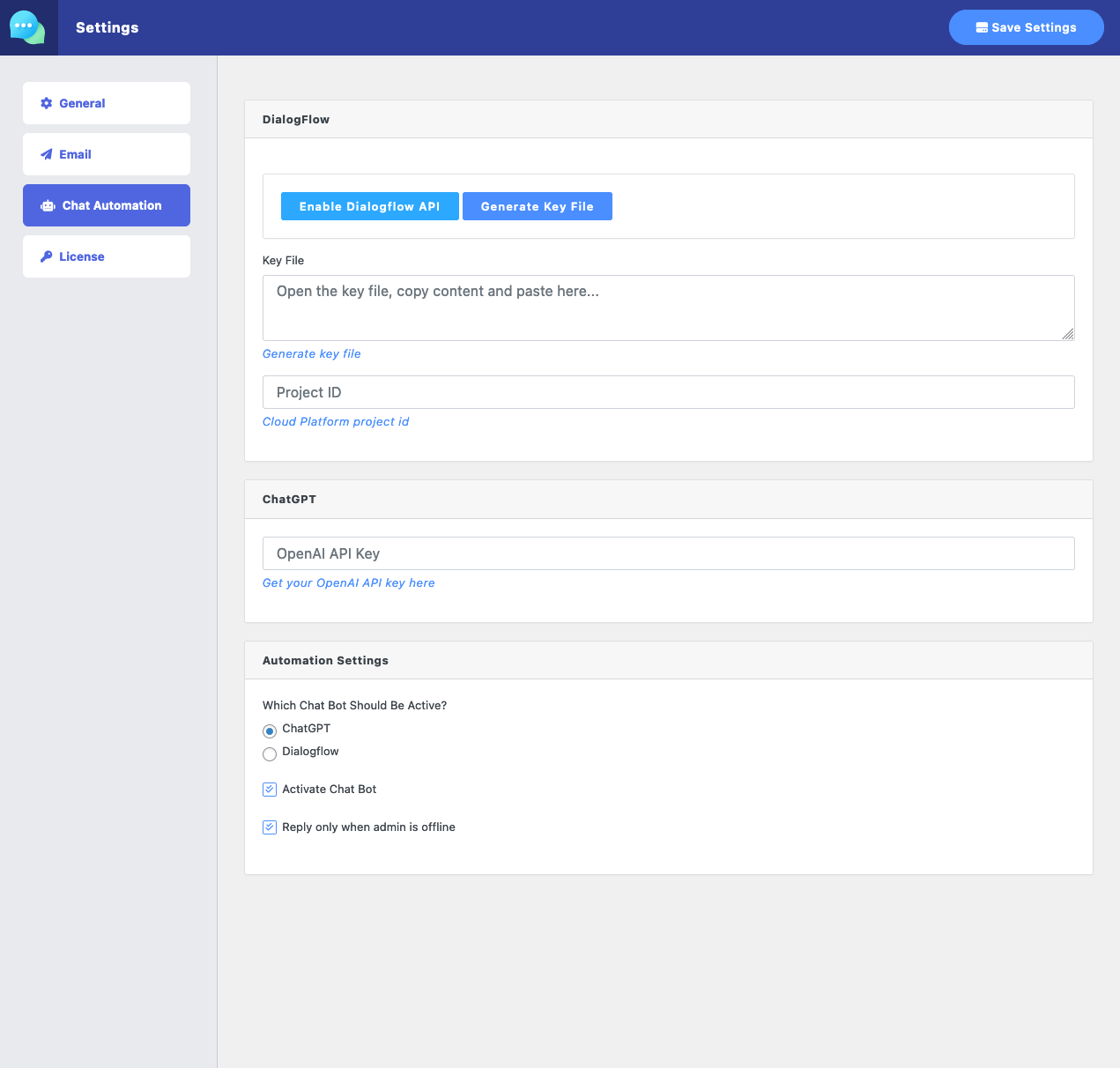
You probably already know it. ChatGPT is a conversational AI model developed by OpenAI, based on the GPT (Generative Pre-trained Transformer) architecture. The "GPT" in ChatGPT stands for "Generative Pre-trained Transformer," while the "Chat" part indicates its primary focus on conversation and natural language understanding. ChatGPT is designed to generate coherent and contextually relevant responses in a conversational setting.
The GPT architecture, from which ChatGPT is derived, is a type of deep learning model that has been pre-trained on a vast amount of text data, enabling it to understand and generate human-like text based on the input it receives. As a result, ChatGPT can perform various natural language processing tasks, including answering questions, providing recommendations, generating content, and more.
OpenAI has released multiple versions of GPT, with each iteration improving upon its predecessor in terms of size, complexity, and capabilities. ChatGPT is an instance of one such version (in this case, based on the GPT-4 architecture), fine-tuned specifically for conversational applications.
What is Dialogflow?
Dialogflow is an Artificial Intelligence software that enables the creation of applications for human-computer interaction. It utilizes natural language in conversations. Application developers are given the tools to enhance their app’s interaction features for their customers through AI-powered text and voice discussions. With Dialogflow’s help, developers can focus their time on other relevant parts of the creative process while the platform handles the standard protocols and functionalities requiring in-depth grammar rules. The applications you develop in the system use natural language processing. Dialogflow also features an in-line editor so that developers can write the code directly from the console.
Enjoy awesome features of Dialogflow:
As well as direct communication with the individual site members, sometimes, you may need to communicate with all visitors. You may need to show a cookie notice or a new offer or any message you want to show your site visitors, you can use this feature. You can create a notice customize colors and styles, add a custom action button, exactly everything you need to attract your site visitor to take the action. We are also using this feature to show offers on our site.
Admin Menu ► Messages ► Settings menu to configure the plugin: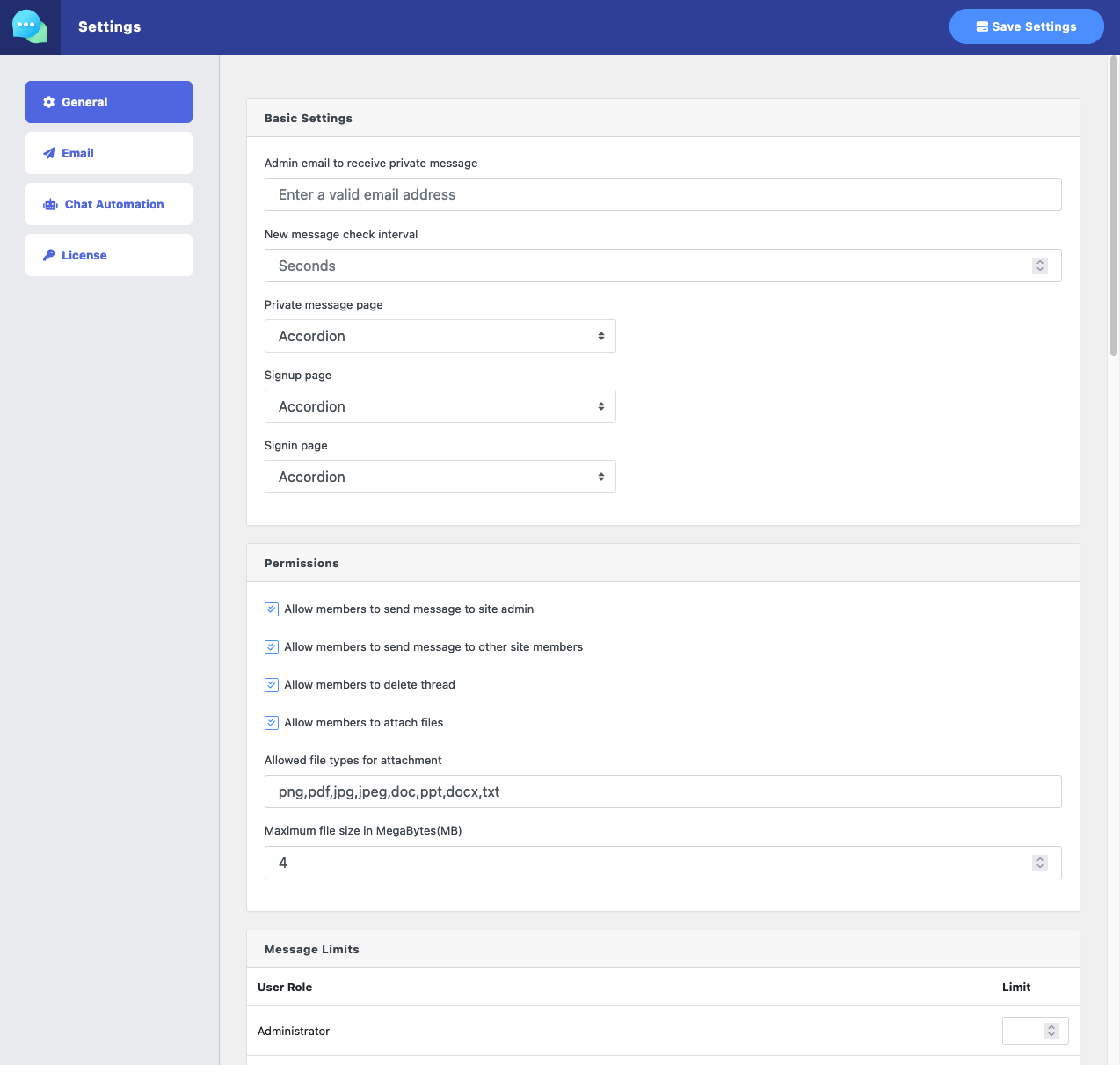
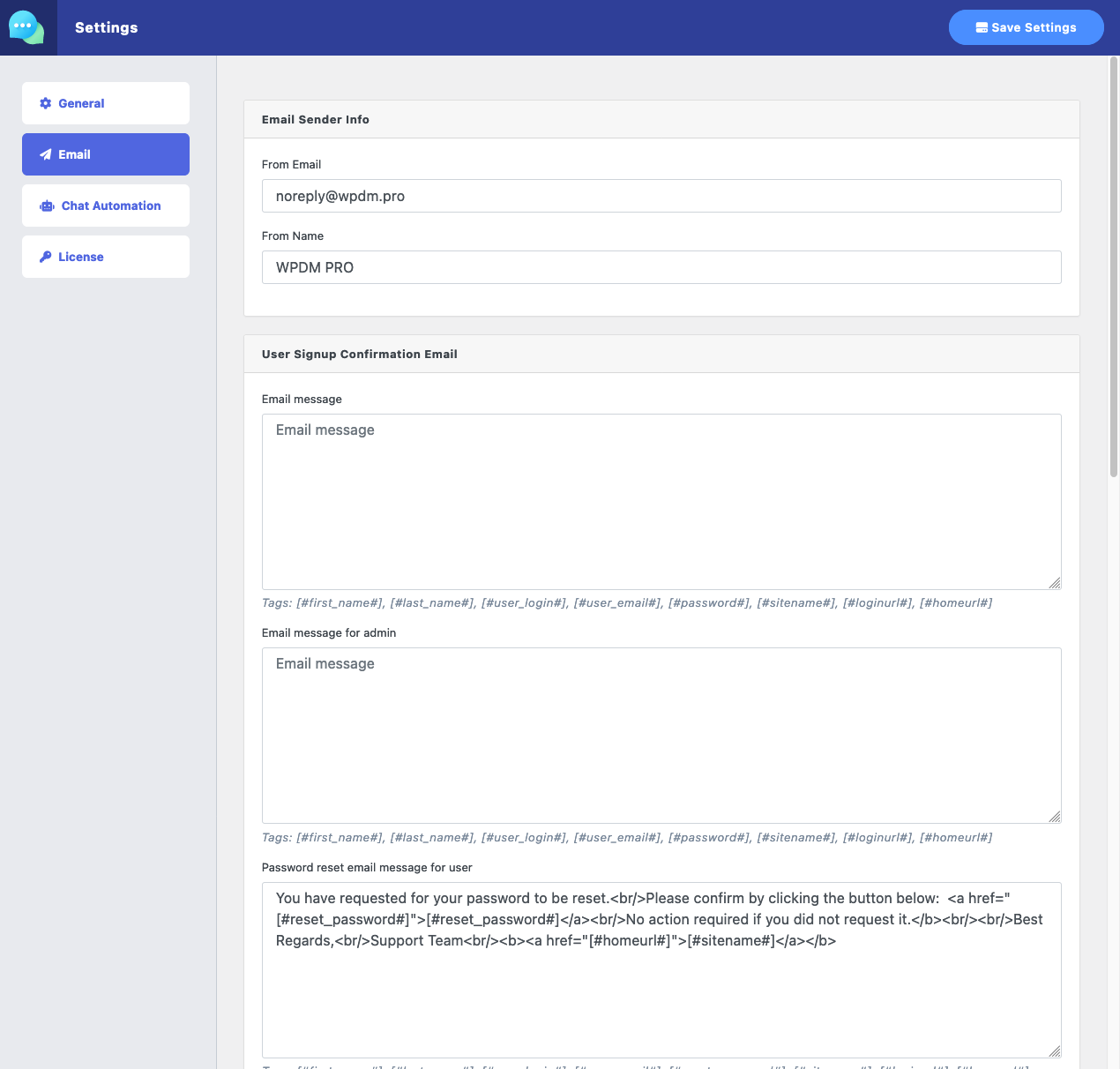
Email Settings:
Chat Automation Settings:
Admin Menu ► Pages ► Add New and use the shortcode [private_message] ( Demo )[unread_msg_count] to show unread message countlive_chat ( Demo ).[live_chat_button] to add the live chat button anywhere and the button will open the live chat window in a popup on click[pm_to_author label="PM to Author" title="Contact Author" color="primary"]
Shortcode to embed the form on the page:
[pm_to_author_embed label="PM to Author" title="Contact Author" color="primary"]
[pm_to_user id=USER_ID label="PM to User" title="Contact User" color="primary"]
Shortcode to embed the form on the page:
[pm_to_user_embed id=USER_ID label="PM to User" title="Contact User" color="primary"]
$49.00 — $99.00 Select License Pro For single installation $49.00 Developer Up-to…

Download Version 4.0.1 Download 82471 File Size 310.17 KB File Count 1…

$49.00 — $99.00 Select License Pro For single installation $49.00 Developer Up-to…

$49.00 — $99.00 Select License Pro For single installation $49.00 Developer Up-to…
205 Comments
Hi,
How can I get the view in the demo? Is there a shortcode not shown or do I require additional plugins to get the view to work?
You can check the demo here: https://try.wpdownloadmanager.com/private-messages/
It doesn’t require any other plugin.
1. Can you please elaborate more about the flow where users can send a private message/direct message to each other?
2. The mailinbox how does it actually work, am I suppose to setup the users email address?
3. In mailbox when I try to compose by sending new inbox how can I find my contacts? As typing to see suggestions is not a user friendly
Hi.
Thanks for your queries.
1. By default user can send message to site admins, but site admin can enable the option to allow user to use messaging option, then users can send a private message/direct message to each other.
2. No separate account setup is needed, also, still users can’t reply directly from their email, they need to click reply link and it will land them to your site message/mailbox.
3. For that, admin need to allow user-user messaging option ( as mentioned in #1 ). Then user will be able to search their contact by name or email. Alternative way is, if go to contact menu and send me message to your any contact from there.
With the latest version of the plugin.
I noticed that it complains about vue.component when running as a shortcode
[private_message]
i was able to find the issue,
on line 300 of plugins/private-message/private-message.php
wp_enqueue_script(“wppmsg-vue”, ‘https://cdn.jsdelivr.net/npm/vue’);
this will load vue 3.4.0
your project seems to be only vue2,
this breaks in production.
if you change it to wp_enqueue_script(“wppmsg-vue”, ‘https://unpkg.com/vue@2.6.14/dist/vue.js’);
it will work.
Additionally.
in the Class Function __Template for the function locate.
i think you could make some changes,
the second argument is $tpldir
it should be stripping
the line
$template_dirs[] = get_template_directory().’/private-message/’.$tpldir.’/’;
would result in an unobtainable path.
because this is your theme directory + _DIR_ from when this locate function was called.
Please check
plugins/private-message/src/Message/MessageController.php line 79 for refrence of _DIR_ being used in the second paremeter.
Why does this matter?
when pulling in the templates to your stylesheet directory.
I have to put everything in the private-messages/*.php. directory
when it should be
private-messages/**/*.php
for the example on line 79, i would expect it to find the php from theme-dir/private-messages/views/pm-front.php
however it does not, and finds it at theme-dir/private-messages/pm-front.php
Happy to communicate directly with you on working on these fixes together.
Hi,
Thanks for your detailed explanation. But seems like you are using an old version, as in the latest version 3.7.1, we are not using vue js from CDN.
However, trimming
$tpldirwas a good suggestion, we have done that for the next update.But
private-messages/**/*.phpin side the child theme is not necessary, as you can keep the template files directly insideprivate-messages/dir in your child theme.Hello,
I’m having trouble with the [private_message] shortcode.
When a user clicks on an individual message that was sent to their Inbox, nothing shows up. Once an individual message is clicked, I can see a div with id=”viewmessage” with added class=”active show” in dev tools, but nothing in that tab is visible or interactable on the frontend.
A solution would be much appreciated!
Looks like a minor cs conflict, please post in forum https://www.wpdownloadmanager.com/support/forum/download-manager-pro/ for tech support. Add temporary wp-admin login info in a private reply.
Hi again,
how can I disable auto renew?
Please send an order note from order details page.
Hi there, prospective purchaser here.
Quick Question – is there a way of restricting user account types to user account types. I am currently building a football coach to player b2b platform and would like only players to talk to coaches and vice versa, not player to player or coach to coach?
You can restrict chat for specific role, but restrict chat within users with same role is not possible yet, but it seems like a good idea, and noted for implementation with the next update.
Hi,
how can I implement my own E-Mail Template. Or can I just edit one of yours?
Thanks
Hi,
Yes, you can edit exiting email template or you may design your own template following current template tags. You need to create dirs inside your active theme dir:
/private-message/email-templates/and place your email template there.Hi,
are there any docs for this Plugin? Maybe hooks for WordPress?
Thanks.
Hi,
Usages are explained on the page above. And we are still working on dev doc. In the mean time, please let me know your specific query, I shall explain it to you.
I use the formidable forms plugin. I already implemented the chat in the entries page, where the submitted forms from a specific user are displayed. I took the username from the corresponding url to find the user id and used it so I can message this specific user.
Now when the admin in the dashboard clicks on a chat with a user he needs to see the entries from this specific user. Did you create any hooks I can use to place these entries below and get the user id?
Thanks
Yes, I also created an example code snippet form you:
https://gist.github.com/codename065/8ab7c5a8faa7f431cae8375aacef7eed
BTW, update private message plugin too.
Your need to select language file location from loco translate settings, however, please post in forum https://www.wpdownloadmanager.com/support/forum/download-manager-pro/ forum detailed explanation.
Hi,
I translated plugin strings with loco translate, but it won’t show. I then tried to move the translation file to the languages folder from wordpress and it translates the plugin in the dashboard but breaks the front end site where I placed one of your shortcodes.
We may, if those are useful for our users, we are actively working on this. So, no worry 🙂
Hi,
do you plan to add more shortcodes like showing messages from a specific user or chat?
I need to know if I can use this plugin in the future for other projects. That’s why I’m asking those questions.
Thanks!
Excellent, that is correct. And to get sender’s ID use:
$message->sender->IDGot it myself with $message->receiver->ID .
Sorry to bother you again, but is there any way to get the current user id in my php snippet?
Thank you very much for your effort! 🙂
Hello, I have 2 questions.
1. Is there a way to prevent the users to send a new message x minutes after their last message?
2. Is there a way to prevent the users to reply to their own message.
In my project, private messaging is ONLY for allowing users to contact the admin.
The admin doesn’t want to get plenty of daily messages. He wants to allow users to send one daily message and that’s all.
If the time delay is not possible, at least users shouldn’t be able to send a new message UNLESS it’d be a reply from an admin’s message.
Thanks.
Hi,
Here are the answers to your query:
#1. No such option yet, but noted for the future implementation
#2. No, also, noted for implementation.
Hello,
How do we remove the social links from the default email template?
Thank you,
Shall adjust it with the next update
If the admin is offline, can the plugin send a email if a member send a message.
Yes, it does.
Does this have the option to restrict messaging between user roles?
The is an option to control the message limit for user roles, if you want to disable a role, you can set `Message Limits` = -1 for that role.
Hi presales questions,
I have been setting up a real estate user listing site atm. It has contact form 7 integrated on it but I am not using it as it has only user email contact feature. So my concern is, is it fully compatible to integrate with it so that wp logged in user can send message via single property page ? The theme has a built in dashboard and can it be add message tab on it? Thanks
Yes, possible
“can it be add message tab on it? ” <-- it seems like a custom design and may require to change some code in your theme.
Hi, Loving the what this plugin offers. Does the ability to send an email notification exist when there is a message reply? We are looking at customising the plugin to enable this ability.
Hi,
Regarding this shortcode
[pm_to_user_embed id=USER_ID label=”PM to User” title=”Contact User” color=”primary”]
Is there a way to redirect to another page on submission of the form? for example i would like it to redirect to a page that displays all private messages for the user
Not yet, but noted for implementation.
Hi – Great product. We are using the PM portion on our site and it is working nicely. Few questions:
1. How can we disable email notifications when private messages come through?
2. How can we allow non-admins to delete messages from their inbox? Currently, this only works for admins – not subscribers.
Thanks
Glad to hear that.
1. Disable email notification option is not available yet. But noted for implementation.
2. We are checking the message delete issue from front-end for subscriber, if there are anything to fix we shall adjust it with the next update.
Hi Shahjada,
We wish to purchase this plugin. However, there is a question that need to be confirmed.
The question is: we wish to add a form to our users to fill in and then send the private message for the admin only. This means we wish to add some columns such as ‘Name’/’Date’/’Gender’ etc. Rather than ‘to’ or ‘subject’.
Is it possible to fulfill this feature?
Thank you so much for your help.
Yours Sincerely,
Leo
That option is not available yet, but we can implement for trough some code customization. However, it is noted for future implementation. If you need it urgently, please contact https://www.wpdownloadmanager.com/download/custom-upgrade-service/
hello please help me how to member of website chat with each other using this plugin i install plugin but can not see the option to chat mmber on frontend
User-to-user chat is not possible yet. But, they can communicate with PM. However, we shall enable chat room and user-to-user chat soon.
if not possible yet why you add in above this feature “👍 An authorized user can send messages to any user ( or admin ) on your site using their username”
i purchase plugin and install that for this purpose for online chat with member but you display wrong information and this is not good kindly tell me the procedure to get back the payment
Yes, that’s what I’m saying, a user can send private messages to another user. But, chat is only for a site user to admin, however, we are enabling u2u chat soon.
You need to enable it from settings:
Allow members to send message to other site membershow to send private messages to users to each other tell me i check your plugin user send message only admin not user
Can we set limit like 2 messages to admin per month?
WordPress Private Message has a user role-specific message limit option.
Hi there,
I searching for a plugin, that allows users to send messages to each other. But instead of having an email like interface (like you message interface), I would like to have a chat type of interface. Something like this: https://i.imgur.com/1A2B2XL.png
So one user can only have one conversation with another user (and not multiple) and the messages are just like chat messages.
This interface should be located on one specific site and not like a chat button on every page. I hope it is understandable what I need. Can I archive this with this plugin? So something like a hybrid between the message and the chat function of your plugin. Thanks!
We have that option ( https://demo.wpdownloadmanager.com/wpdmpro/live-chat/ ), but at this moment it is only available to communicate with site admin, however, we shall enable the user to user chat soon.
Would you consider to to add a reply rating feature in the future so that user knows how fast they can except to get a response from user they sent a messaged/chat to?
Thanks
May you please post a little more details on your idea here https://www.wpdownloadmanager.com/support/forum/download-manager-pro-feature-request/, so that we can push it to the dev queue.
Will this plugin work with geo directory so that users be able to contact the listing owner/author?
Hi,
This plugin will word with any standard WordPress setup, no dependency on WordPress Download Manager.
Ok. What about the user info on the right side of the message? Where is this information being called from.
Is it possible to link the authors name to their public wordpress author profile?
We shall add some extended options for this with the next update, there also will be an option to hide the sidebar as well as linking the author to the profile page.
Those features will require some code customization and we have a dedicated customization team in case of your need ( https://www.wpdownloadmanager.com/download/custom-upgrade-service/ ).
OK great.
Another few questions:
1. Is it possible to add custom fields to the send message form?
2. Is it possible to add more info to the sidebar which shows the detail about the message author/user? I need to be able to show links to the authors posts. Do you think that’s possible?
Thanks
Hello, is there the ability to accept payment or tips inside the messenger plugin?
Not with the native option yet, but you may take payment using the integrated FB messenger option. However, we shall integrate the payment option using WPDM and WooCommerce from the PM/Chat window soon.
Hello, I bought the Plugin Private Message and have a problem with the translation into German language. I translated it using Loco Translate. It always works very well. But unfortunately I don’t see any translations. Everything is still in English. Do you have any tips for me? Do I have to rename the file or set something else? The name of the translation file is private-message-de_DE.po and is in the same directory as the plugin
Sure, please post in the forum https://www.wpdownloadmanager.com/support/forum/download-manager-pro/, add temporary wp-admin login info to check it in detail, and set it up there for you.
Thank you for your quick response. I have another question. See the User always the menu items Profiles, Affiliates, Downloads, etc. in the dashboard or can I hide these menu items so that the logged in users only see the messages? And does the message plugin also work with the current WordPress version?
Private Message also has a dashboard separated from wpdm and no dependency on WPM.
Demo: https://demo.wpdownloadmanager.com/wpdmpro/private-messages/
Hello, i want buy your message plugin. Can I use a shortcode to send a message to a specific user? With a link or button. If so, can you please write me this shortcode. Or its only possible to send a message to post author?
Hello Sebastian, You can send a message to a specific user using the following shortcode:
[pm_to_user id=USER_ID label=”Button Label” title=”Send Private Message to Author” color=”primary”]I did , thanks
hi
I tried to use this but not working
[pm_to_author label=”Button Label” title=”Send Private Message to Author” color=”primary”]
I want the costumer send message to admin ?? how ?
That will send a message to the post author. Please post in the forum ( https://www.wpdownloadmanager.com/support/forum/download-manager-pro/ ) to help you with the setup.
sorry I cannot understand you , can you explain to more
Please post in the forum ( https://www.wpdownloadmanager.com/support/forum/download-manager-pro/ ) for tech support.
Hello,
I’m looking for a messaging (chat) plugin, but I need it to have some particularities :
– Only one user (user 1) role can create a new conversation
– User 1 will receive an anonymous form from the other user (user 2), he than needs to be able to create a conversation with user 2 without seeing his name. I have access to user 2’s ID, but user 1 won’t be able to see his name.
– On my website, if user 2 no longer wants to be anonymous, he has to click on a button to display his name.
Do you think it would be possible to hide user 2’s name and when he clicks on the button, his name is revealed when chatting on the conversation with user 1 ?
I know this is a special case, but I really need these features for my solution to run well. If you think it’s possible and, even better, if you know how to do this, I will buy your plugin immediately!
Thanks in advance for your answer!
Quentin
This will require custom development, you may contact https://www.wpdownloadmanager.com/download/custom-upgrade-service/
Thank you for your answer, I will think about it!
Have nice day!
Quentin
Hi Shahjada,
I really like your plugin, however, I have noticed that your plugin is causing my server to load intensively (CPU and RAM) and I needed to disable the plugin until we resolve this. My hosting provider confirmed that too, please see the screenshots > http://share.dreamweb.rs/ljm/20210331-sGGswcg9zQ.png
I hope you can help me to resolve this issue.
Thank you.
Best regards,
Brando
Hi, We are using perfectly in our several high traffic sites without any trouble. Probably your server configuration is too low to handle the requests sent by the plugin to check new messages. But, you can reduce the requests by increasing message check interval from PM settings:
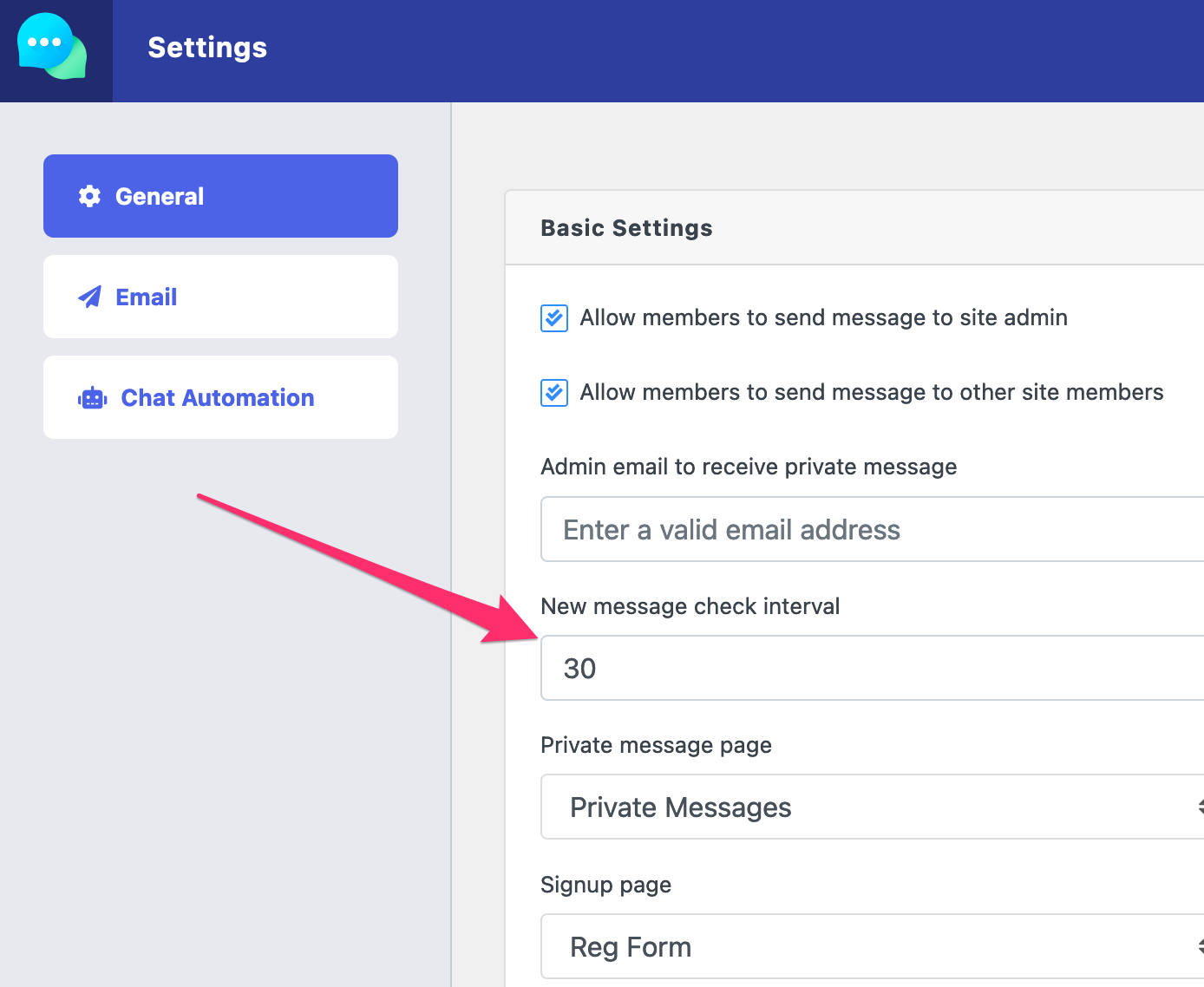
Also, we are preparing an update with firebase support, then you can use firebase to store PM data instead of your server.
Hi there,
Before I buy the plugin, I have some questions:
1. When did you start developing this plugin and where can I find the full changelog?
2. Is it fully compatible with WP Bakery?
3. Can you please provide me with a function and a shortcode that counts the unread messages? I would like to use this is menu that shows a number of unread messages to users, similar to something you see on Facebook or any similar social network.
4. When I as admin send a message to all users or group of users, will they also get an email that they got a new message or not?
5. When will you release the next version and what improvements can we expect?
Thank you in advance.
Best,
Brando
Hi,
Thanks for your interest, here are the answers to your questions:
#1. Initial release date Oct 19, 2019, we shall add changelog soon.
#2. So far we didn’t find any conflict report, but, Our plugin is guaranteed to function on a clean installation of WordPress. We do not guarantee it will function with all 3rd party plugins or with all web browsers. ( https://www.wpdownloadmanager.com/terms-and-conditions/ )
#3. You can use the code
<= PrivateMessage()->message->countUnread(); ?>to show unread message count#4. Yes, they will get an email.
#5. We are actively developing this plugin, soon, we shall move it to a separate site of its own, and we are working on WooCommerce integration and improvements on pm automation.
Hi Shahjada,
Thank you for your reply and info provided. The only thing I’m concerned is question number 3. For this purpose, I will need a function AKA shortcode that I can implement wherever I want on any page or in the menu. If this is possible and you could provide me with this, I would gladly purchase the plugin.
And new question, 6 – Does the “members” also come with this plugin, this one > https://demo.wpdownloadmanager.com/wpdmpro/all-members/
If yes, I will need a way to present users/clients only with certain roles, not all site users…is that possible and will you also add a search and maybe some filter options?
Thank you in advance.
Best regards,
Branislav
Okay, we shall add a shortcode for that.
Yes, members list is with this plugin using shortcode [wppmsg_members cols=4], we shall add additional filters with the next update, so you will be able to do that.
Yes,, use shortcode [unread_msg_count]
Have you added filters in new version?
It is already added for the next update :), however, we are also working on some other improvements, next update is coming real soon.
Hi Shahjada,
Awesome, tnx! Can I expect this shortcode (question 3) in the next release or you will provide me with the function and shortcode after I purchase the plugin?
Thank you in advance.
Best,
Branislav
HI, there’s a way to get the number of unread messages programmatically way? (or similia ?)
You can use the following code:
<?php //$USER_ID <--- replace it with the user's ID you want count the number of unread messages $key = "__msg_status_{$USER_ID}"; $unread_message_count = (int)$wpdb->get_var("select count(*) from {$wpdb->prefix}postmeta where meta_key='{$key}' and meta_value='new'"); ?>Please I can’t find the settings for the plugin to Show global site announcement and notices
Here it is:
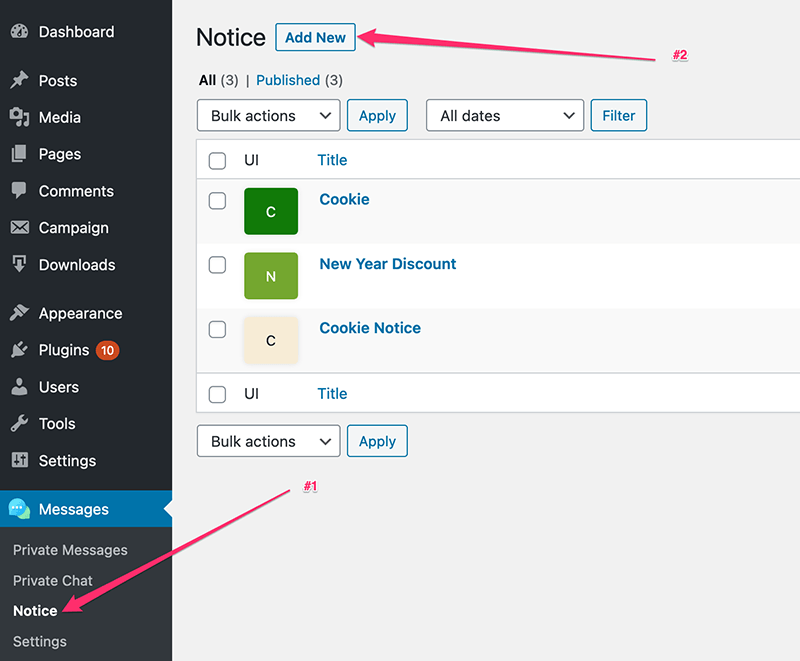
My own position is far more different from your own. you can see screenshot here >>> https://snipboard.io/hqnZJu.jpg. I have not seen where “Notice” is located
It looks like you are using an old version, please update your copy. Get the latest version from here https://www.wpdownloadmanager.com/user-dashboard/?udb_page=purchases
Latest version:
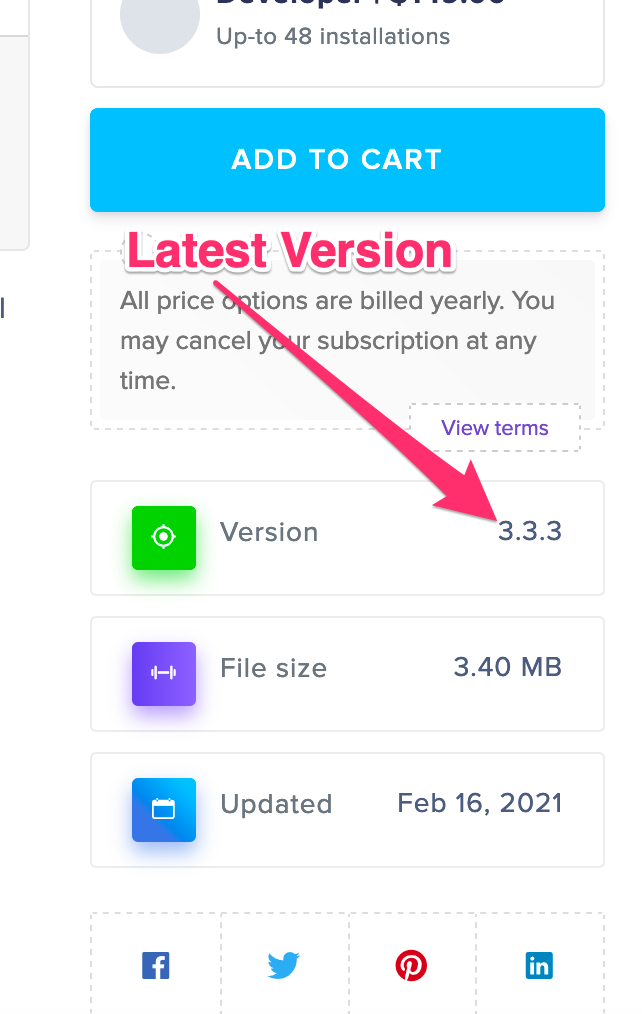
Please what is the latest version of the Private Message plugin? (e.g 1.0.0)
Hi, I have a few presale questions.
– Is it correct that I can use this plugin as a standalone plugin on my wordpress site? I want users to be able to chat with each other but I will not be using the wordpress download manager. I want to know if I can still use it then.
– If my customers log in using a default wordpress login page, will they automatically be registered as a user in this plugin as well? Or do they have to log in through another portal? Are the users from my wordpress site automatically integrated/copied as users in this messaging plugin?
– Can I show the message dashboard/private messages in the frontend Woocommerce dashboard so users can check their messages in their Woocommerce dashboard instead of your WordPress Download Manager dashboard? As I mentioned before, I will not be using your WordPress Download Manager. If so, how? Do I need to use a shortcode?
I hope everything I asked above is possible, then I will be happy to buy this plugin!
Kind regards
Hi,
Thanks for your interest. Here are the answers to your questions:
— Yes, it is a standalone plugin, no need to use download manager
— Yes, default login and signup is okay, need to go through a separate process
— Yes, you can integrate it with the woocommerce account page using any woocommerce account tab manager plugin or also can use the shortcode on a separate page. The shortcode is `[private_message]`. There are a few other shortcodes, explained in `How to use:` section above on this page.
Hi, trying to translate to Spanish, downloaded the .po file from /private-message/languages/ and renamed it -es.po. Uploaded the po file BUT I cannot see any of the front end words (Compose, Sent, Inbox, Contacts, Message, Subject, and so on…), I guess I’m missing something here, any idea what I did wrong?
Thanks
Simone
The language file name should be `private-message-es_ES.po`, however, I’ve checked, those strings. They are in the language file. Please post in the forum to check your issue in details:
https://www.wpdownloadmanager.com/support/forum/download-manager-pro/
Se la inserisci, lo compro, grazie
I buy it too
Noted for implementation.
Se la realizzi, lo compro, grazie
Salve, l’amministratore ha la possibilità di approvare i messaggi prima che arrivino al destinatario?
grazie
No such option, messages are sent immediately.
is there the possibility to realize this option?
Noted, let’s see any other users need this option.
I think it is very useful!
Buongiorno,
posso integrare questo plug-in in un sito di linsting, dove gli utenti inviano messaggi privati a pagine personali di venditori?
grazie
Yes, you can, use shortcode `[pm_to_athor label=”Button Label” title=”Send Private Message to Author” color=”primary”]`.
Is there a joomla compatible plugin available?
Please advice,
regards,
Patrick
Is the above comment possible?
Is there a way to make it where all the members or roles can message all other roles like the admin? I have a group of volunteers who were using another plugin, that had that capability – but the plugin is no longer working (hasn’t been updated in some time). This group of volunteers work at gift shop in a hospital. They get their schedule monthly. At which time, some may need to trade schedules with someone else due to a conflict. They use this plugin feature to send out a message to all other volunteers, to see if someone is willing to trade a shift. So I would need the functionality of them being able to choose all volunteers role (which I created in user profile). Is this possible?
Yes, you can, but only from the admin side, add
define("PM_ADMIN_CAP", 'edit_posts');in wp-config.php. However, if you need to do that from the front-end, it will require some customization, you may contact https://www.wpdownloadmanager.com/download/custom-upgrade-service/ for that.So can you send message to entire group? For example – have users labeled volunteer. Can I send message to all volunteers (without having to tick all 109 volunteer profiles)?
Yes, but only the admin can do that.
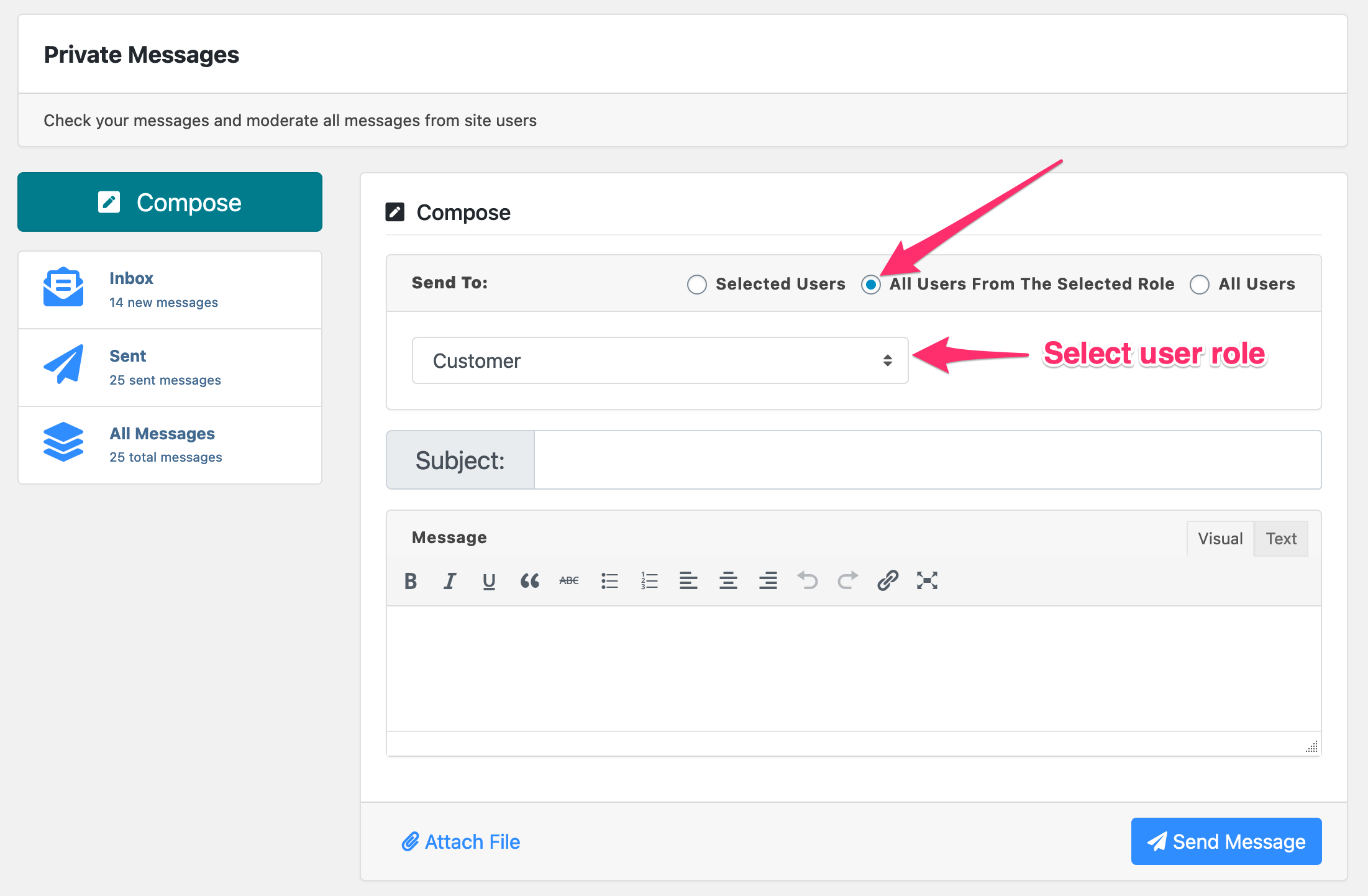
Here it is:
Hi, I installed but I can’t see private message in user dashboard, can you help me please
Please check the following option to add it with wpdm user dashboard:
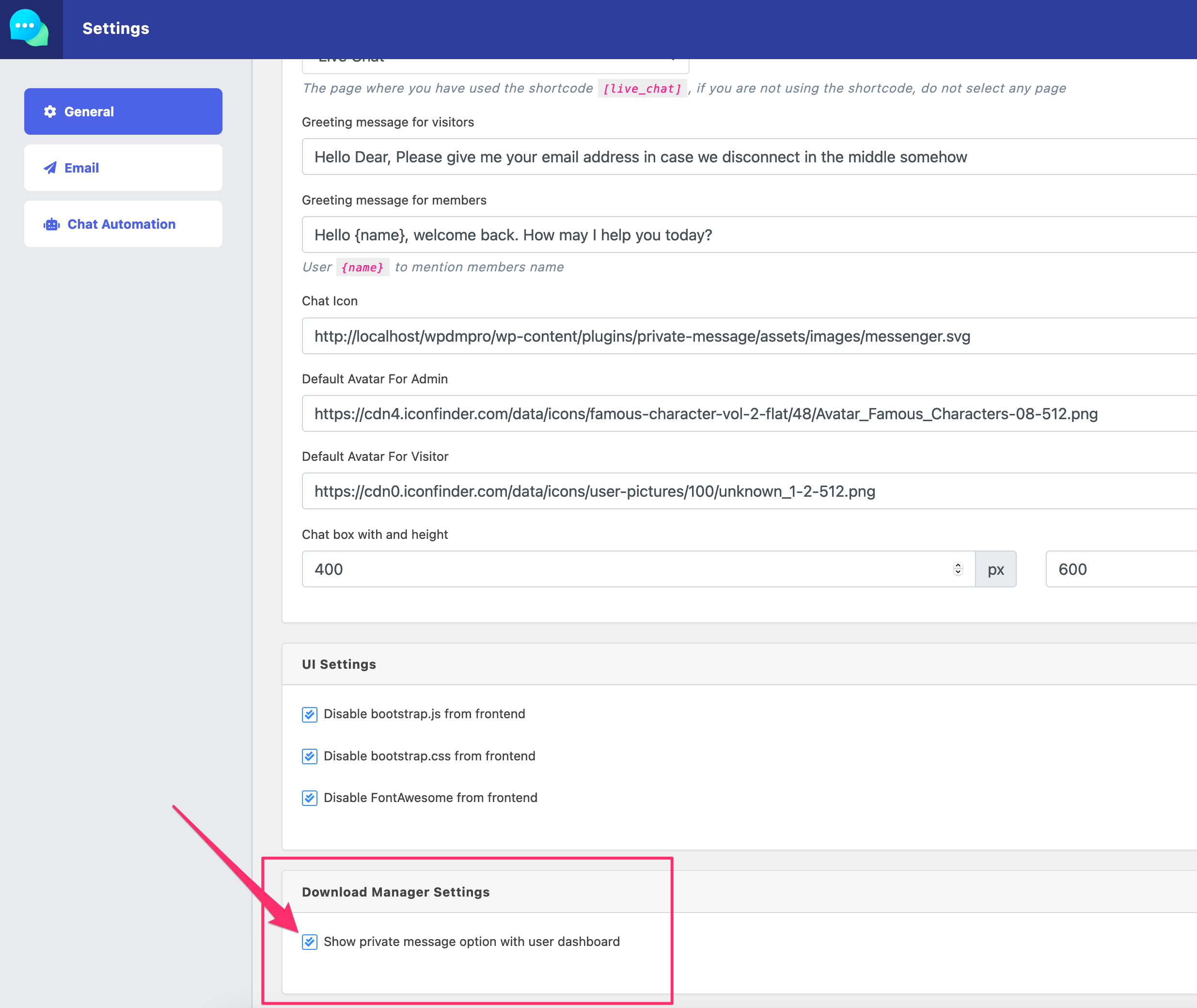
Hello,
I am trying to translate the plugin to dutch with the LOCO translate plugin but it wont translate anything..
It creates all the right files but it wont change it in the front end of the website… any reason why i cant translate the plugin?
I just tested with LOCO translate plugin, the private message is plugin fine:
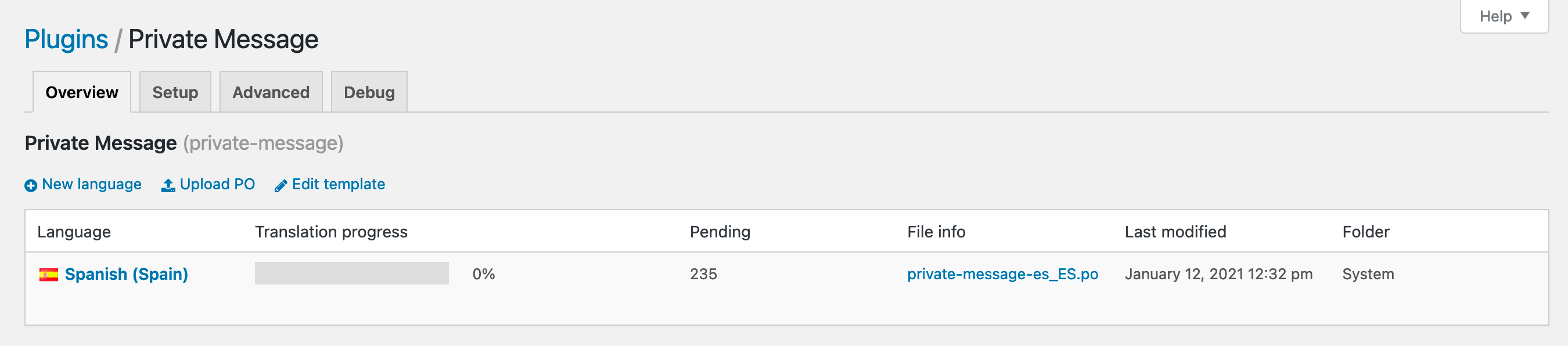
Please post here https://www.wpdownloadmanager.com/support/forum/download-manager-pro/ to check your setup.
Is it maybe because i only use the private message plugin? and not the download manager plugin..
i only need the private messages… not the download manager
There is no dependency on the download manager plugin.
Sure, Checking and updating SOON :).
Found the problem, can’t translate because the .POT file doesn’t have the words that are on the front-end of the plugin… only some words that are found in the backend.
words like ” Whitelisted Contacts” “Compose” and “Welcome” that are in the frond end aren’t there… so that’s why it doesn’t change in the front end because the strings don’t match.
Can you please update your plugin with the ‘GetText‘ formula…. the plugin is great but this should be a native feature in every plugin in this day and age..
Hi, do you know the approximate date of the new plugin update?
Within this month, also there will be a new feature coming with this release, named “Announcement”. Using this option site admin will be able to add notices/announcements at the front-end for the site users with action buttons.
hey can you create short code for each elements in menue
like for
compose message
for inbox
for sent
Thanks
good morning, how can I link a form in gravity forms to send a message to an author?
The [wpdm_authors] shortcode is with wpdm pro, no with the private message plugin, but, we shall add it with the private message plugin too, soon.
Hi, I’m not sure if this is the same problem. I would like to get the user to send a message to the author from a post from a button in the post! Is there an option to do this?
Thanks
Hi,
You can put the following shortcode on a post or on a sidebar widget to show a button to allow users to contact the author:
Hi,
It will require some code customization. However, here are the parameters to send a PM:
Endpoint URL:
rest_url('/wpdmpm/v1/send-message')POST DATA:
send_to => USER_ID
subject => “Subject”
message => “Message”
HEADER:
X-WP-Nonce =>
wp_create_nonce('wp_rest')I need to show the users (members directory) on a page. What is the shortcode do I need to use to achieve that?
The shortcode is
[wpdm_authors].Hello. Any help? Can you explain the process how users can communicate between each other? Can we show all the user profiles on a page and any member can message to another?
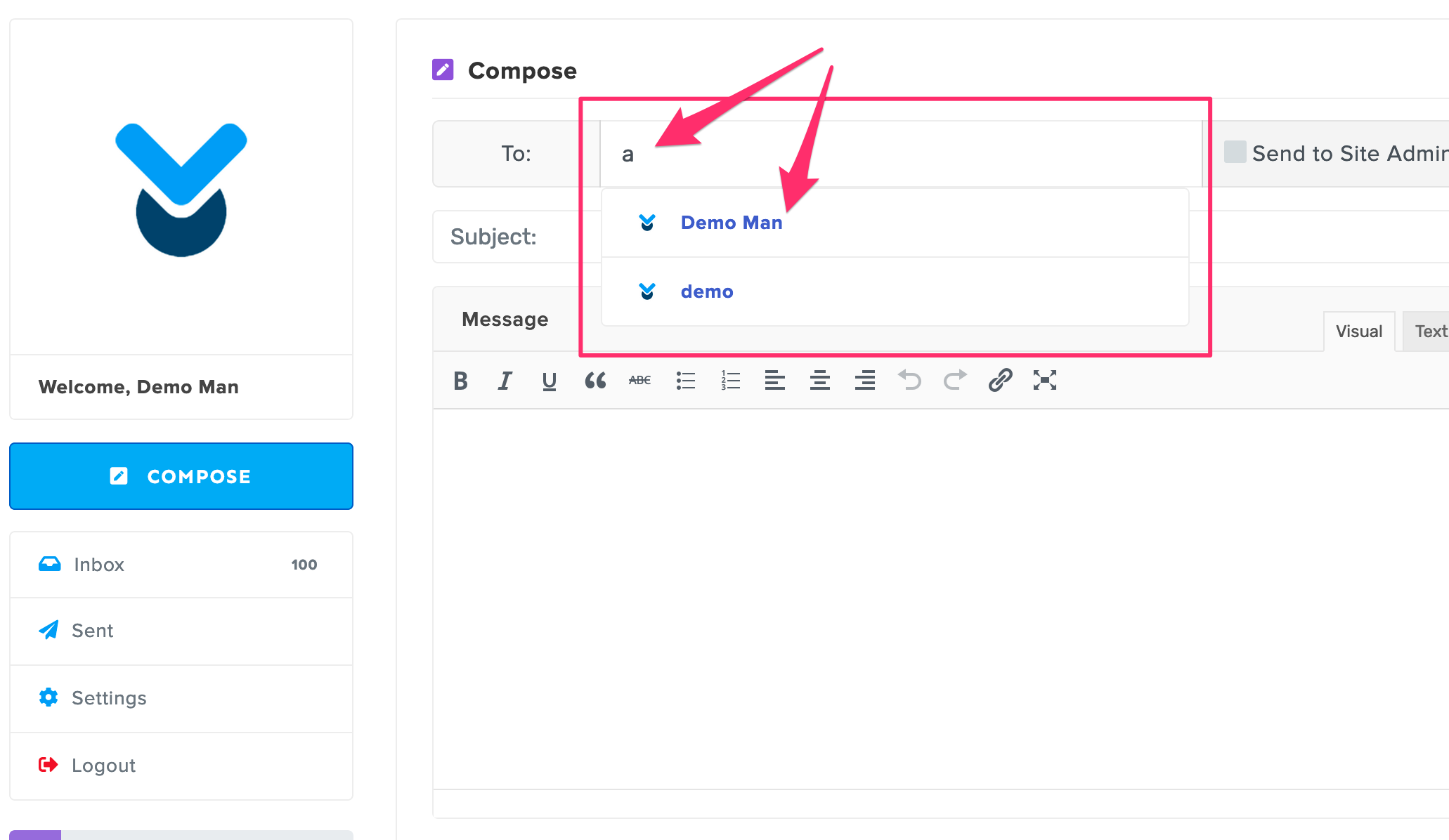
You ( admin ) need to check the following option for that:
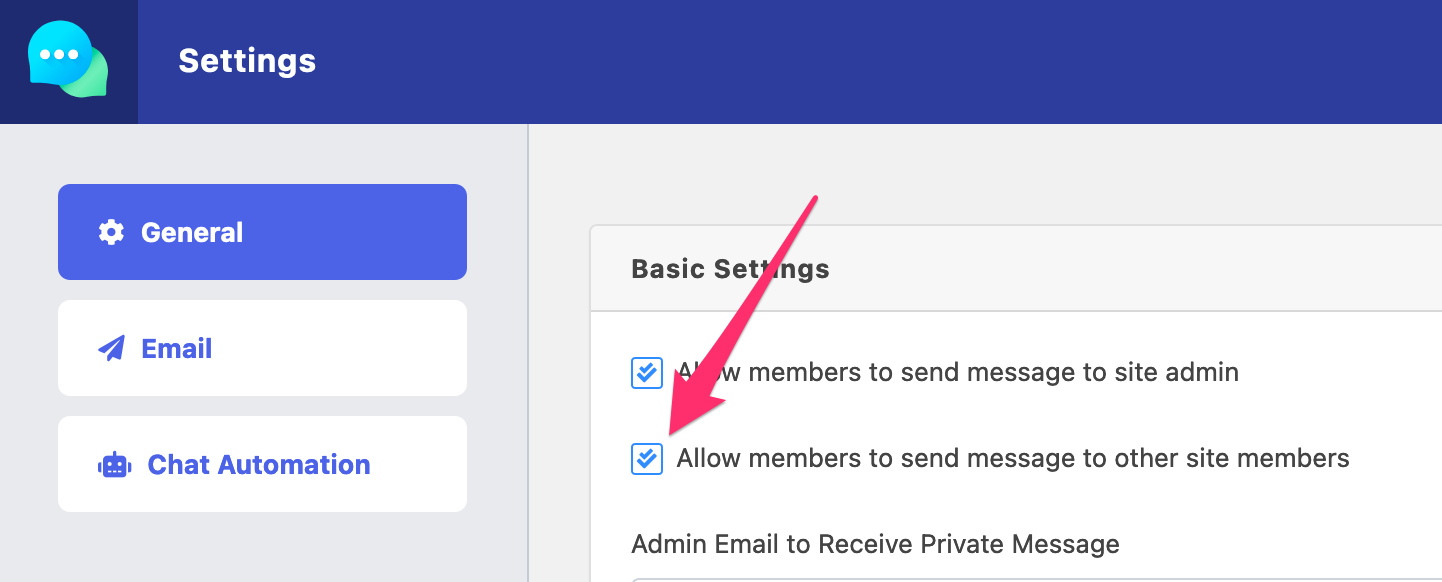
Then, a user will be able to search other users from the message compose form and send a message to the selected user:
When I add the shortcode it just displays the shortcode. Not sure why. It doesn’t display the chat interface. Please help
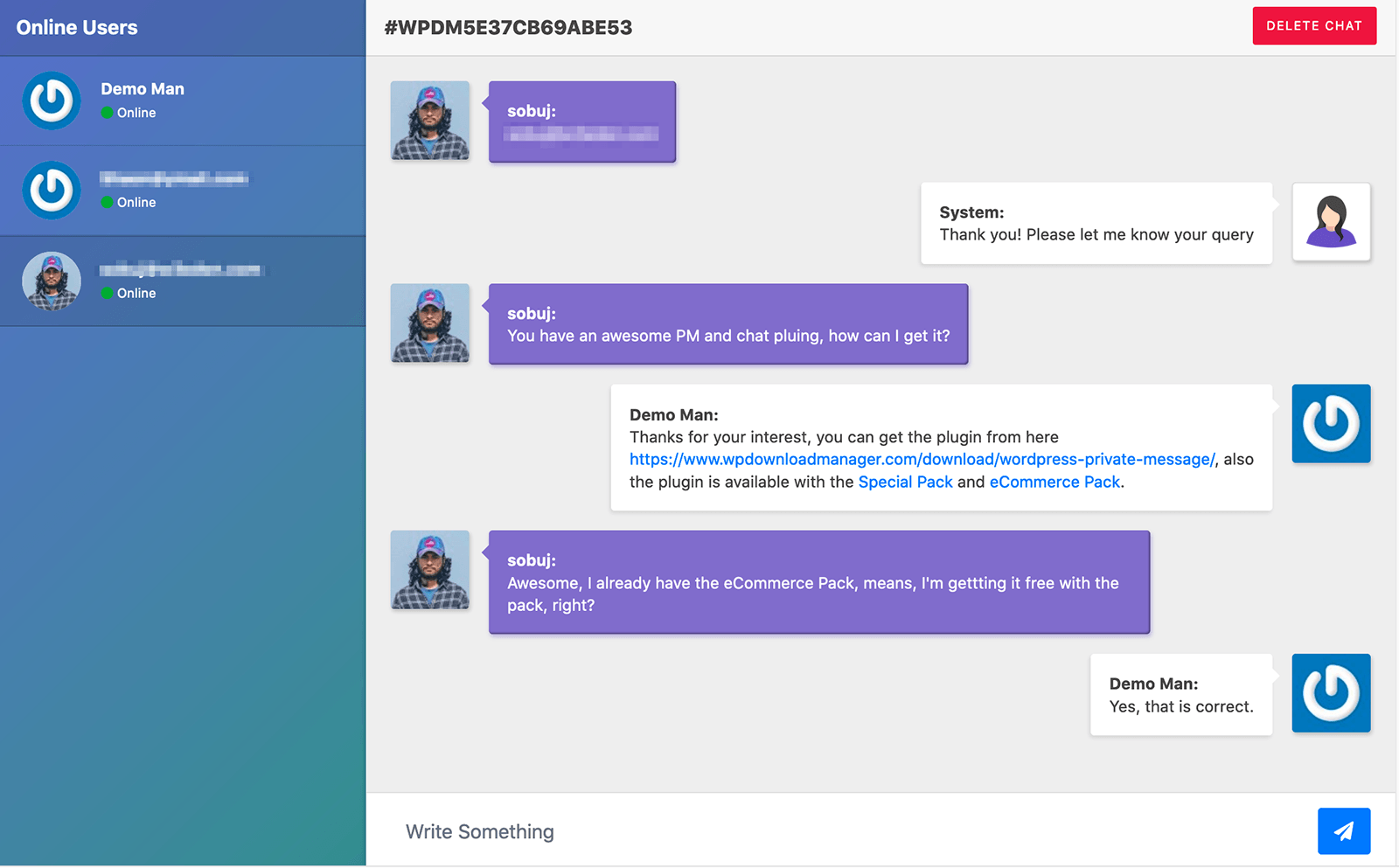
Thing that I want to achieve is message broadcasting for registered users. Like this: https://cdn.wpdownloadmanager.com/wp-content/uploads/2019/10/WordPress-Private-Chat-Session-Manager.png
But why I am not able to use the authors shortcode to display all registered users?
That interface is accessible from Admin Menu => Messages => Private Chat menu:
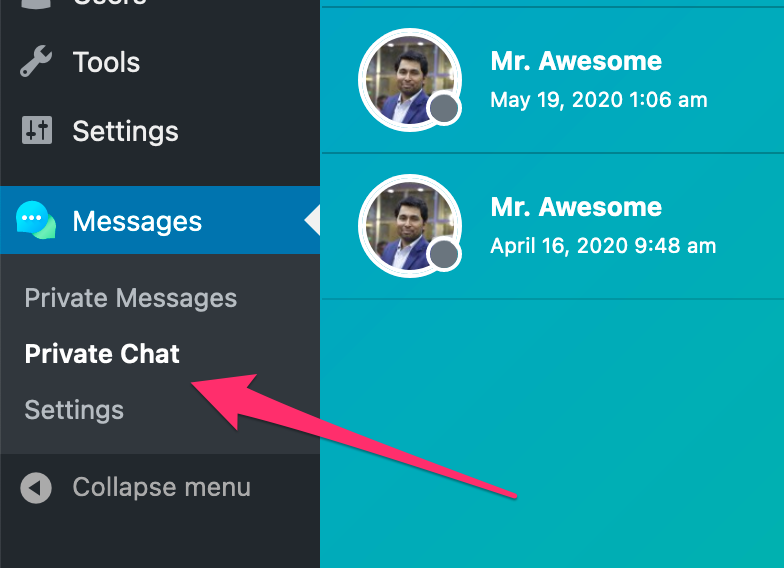
Thanks for your answers. How can I translate all the texts into Spanish?
You can get the translation file template `private-message.pot` from `/private-message/languages/` and create your Spanish language file `private-message-es_ES.po`.
How can I implement the notification bell of the messages received in the menu bar?
At this moment we are adding an admin menu drop-down to preview inbox messages and a notification bubble to show unread messages count.
Do you know when the option to chat between users can be activated?
Still working on it, will be available with the next update, user to user chat, contact management, and global site notice feature.
@Shahjada
Hi,
1. I’m also intested with the function sending message to the post author via shortcode. Is the option available now?
2. does [live_chat] works between non-admin user?
#1. Please use shortcode:
in page/post content to add “PM to Author” button.
#2. We are adding that option soon, for now, site visitors only can chat with site admins.
Is it possible to inject custom fields into the email notifications? i.e. I need to inject a person’s job title / image when the system notifies a user that they have an email.
Looks like that is not possible yet, but may you please explain me a little more, so that we can add it with the next update of the plugin.
I’d like to list ACF fields next to each user. So, rather than use a gravatar image, for example, I have a custom field with an image, instead.
We are working on an admin chat view like this:
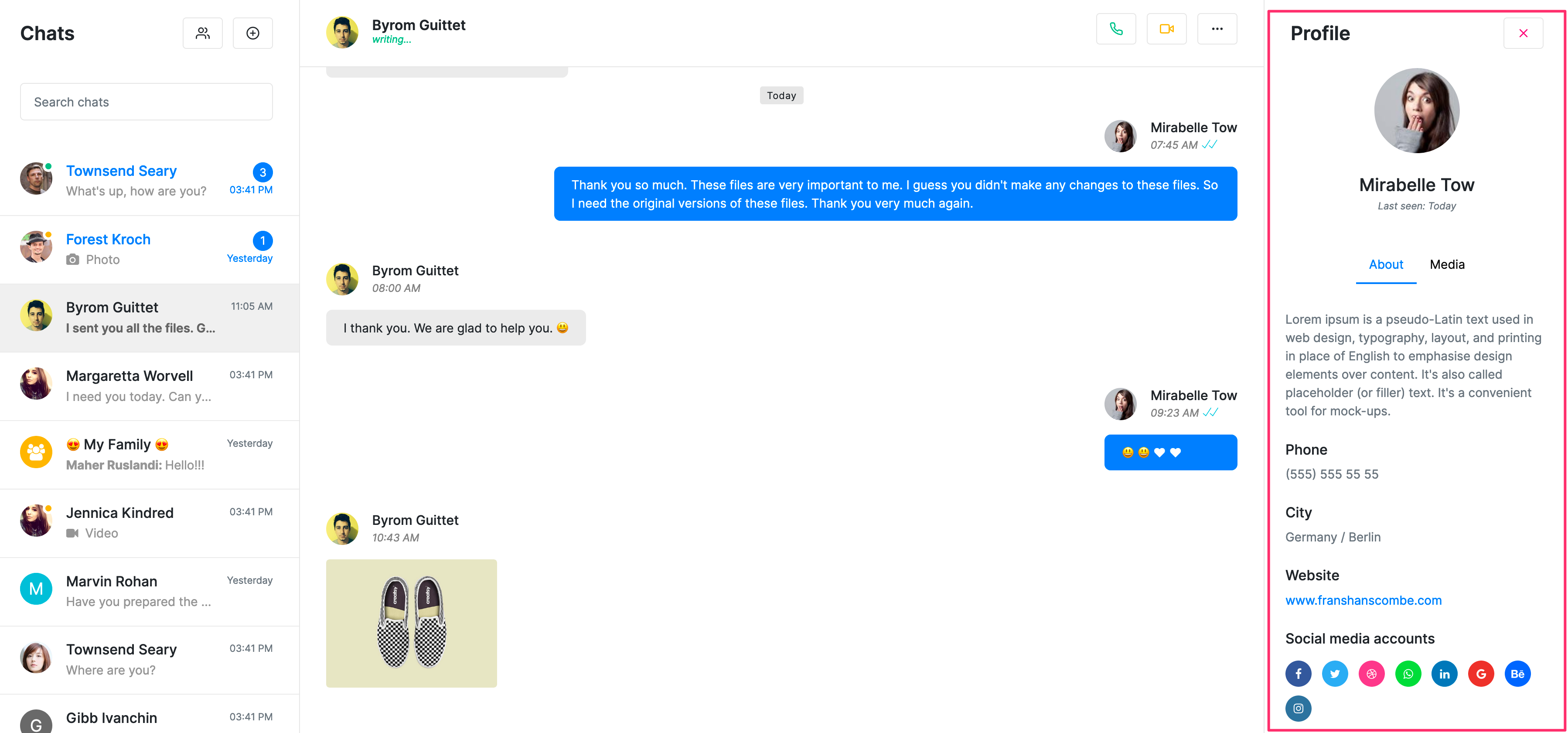
On the right column, admin will be able to see the user profile.
Hi,
When this will be available ? any ETA ?
It looks nice 🙂
Hello,
It is possible to send a private message to a user via contact form 7 ?
Thanks
No, wppm has its own shortcode, however, if you want our customization team ( https://www.wpdownloadmanager.com/user-dashboard/?udb_page=upgrade ) can implement it for you.
Hello there. Is there a demo version of this, and can messages be sent to groups/multiple recipients?
Thanks!
The Demo link is given at the top of the right column on this page.
However, here it is again:
https://demo.wpdownloadmanager.com/wpdmpro/user-dashboard/?udb_page=messages
You can send a message to a single user for now. But we shall add the support for multiple recipients with the next update of the plugin.
Sorry, I mean demo as in to see how it looks in any other theme? And do you have an estimated date for the update?
hi
is it possible to receive privet massage from client to admin 1 and admin 2 or editor, other roll at the same time ?
Hi!
I’m just trying this plugin out and from the above it seems private chat between users would be possible in the front-end, but I can only see the regular messaging and the live chat which is with an admin. Is there no instant messaging between users like the screenshots above suggest?
For that, you need to enable live chat from the settings page.
Hi!
I have a few questions about the features. Firstly – is there a feature that allows you to ban certain words and symbols from being used? Secondly – Is there feature that lets the admin confirm messages before they are sent out? And lastly – can you limit to which people messages can be sent?
Regards,
Mikus
# Ban word option is not available yet, but it is in our to-do list.
# ” Is there feature that lets the admin confirm messages before they are sent out?” — No such option, if we see some other request for this feature, we shall add it in our to-do list
# Option is not available yet, you only can enable or disable user-to-user communication.
how I can enable the “TO” for only the admin, I don’t want to wait for the users to start the communication ? there is some senarios when the Admin want to send email to a specific user or a group of users ( this option is a must ! )
Also want to know how I can use the plugin as a stand alone, not as a wpdownloadmanager addon !
Thanks
The option is available now. We shall release stand alone version soon.
is it available on spanish languague? i need it in case you don´t have it.
Regards,
I am not able to reply throught private live tab, not came properly please help me
For tech support, please post in forum.
where I received live chat messages? I cant see live_chat message anywhere.
Admin can see the online chat users and chat with them from Admin Menu ► Downloads ► Private Chat ( https://demo.wpdownloadmanager.com/wpdmpro/wp-admin/edit.php?post_type=wpdmpro&page=wpdmchat )
can it automatically reply to the guest user’s query?
Not yet, but we shall soon, integrate it with https://dialogflow.com/, then the plugin will be able to do that using AI api
Hi, do you have any trial demo for this plugin?
I really wanted to try in my website before buying!
Regards
No such trail option is available, but we have full open demo, you may check every feature from here.
Hi, I would like to show only a message box (text area) without Subject and “To” (all messages only to admin if possible) areas. I want to give feedback to their answers through private messages. I want to use it as a short answer form in my LMS education website. As my students are very little I need only the message box to insert inside posts by shortcode. If it is possible as I described I can buy it. Best Regards
Hi,
If you disable member-to-member message and keep only member-to-admin message active from private message settings, it will hide the “To:” field. However, no option to hide the “Subject” line yet. However, your idea seems good and noted for implementation.
I need a message system that is Admin to user only. 1 on 1 messages in real time. Can this handle multiple conversations at one time 1 on 1, Admin Client?
The live chat option with this plugin does that. But, user/visitor need to initiate the communication.
Thank you.
I installed this plugin, but it is not showing up in my Dashboard. Is there a prerequisite for the plugin?
If you need any assistance with the setup, please post in support forum https://www.wpdownloadmanager.com/support/forum/download-manager-pro/
Yes, please install download manager ( free or pro ) too https://www.wpdownloadmanager.com/pricing/. All add-ons here requires download manager ( free or pro ).
Hi,
is it possible to contact users within a post ?
Best
Chris
Do you mean, sending a message to the post author? We shall a shortcode for that with the next update of the plugin.
Can this interface with real email?
User receives email notification for each private message.
Hi Shahjada,
Does your company customize this plugin for client.
We’d like to use it, but there are some features we’d like added.
Thanks
Hello Mimi,
Yes, we do, you may send your custom requirements from here:
https://www.wpdownloadmanager.com/user-dashboard/?udb_page=upgrade
Then, our customization team will review and give you a quote.
Hi, when can we expect the update with private chat ?
Also is there a possibility to add attachment to the message and chats ?
Nilesh
The update is available now.
It will be available within the next few days, as you can see in demo demo.wpdownloadmanager.com/wpdmpro/, we are already done, just doing some extended test.
Yes, we are also working on attachment, link preview, and message button feature.
Hi,
when compose, I did not find the “to” column.
there are only subjects and messages.
Please provide information for use?
For
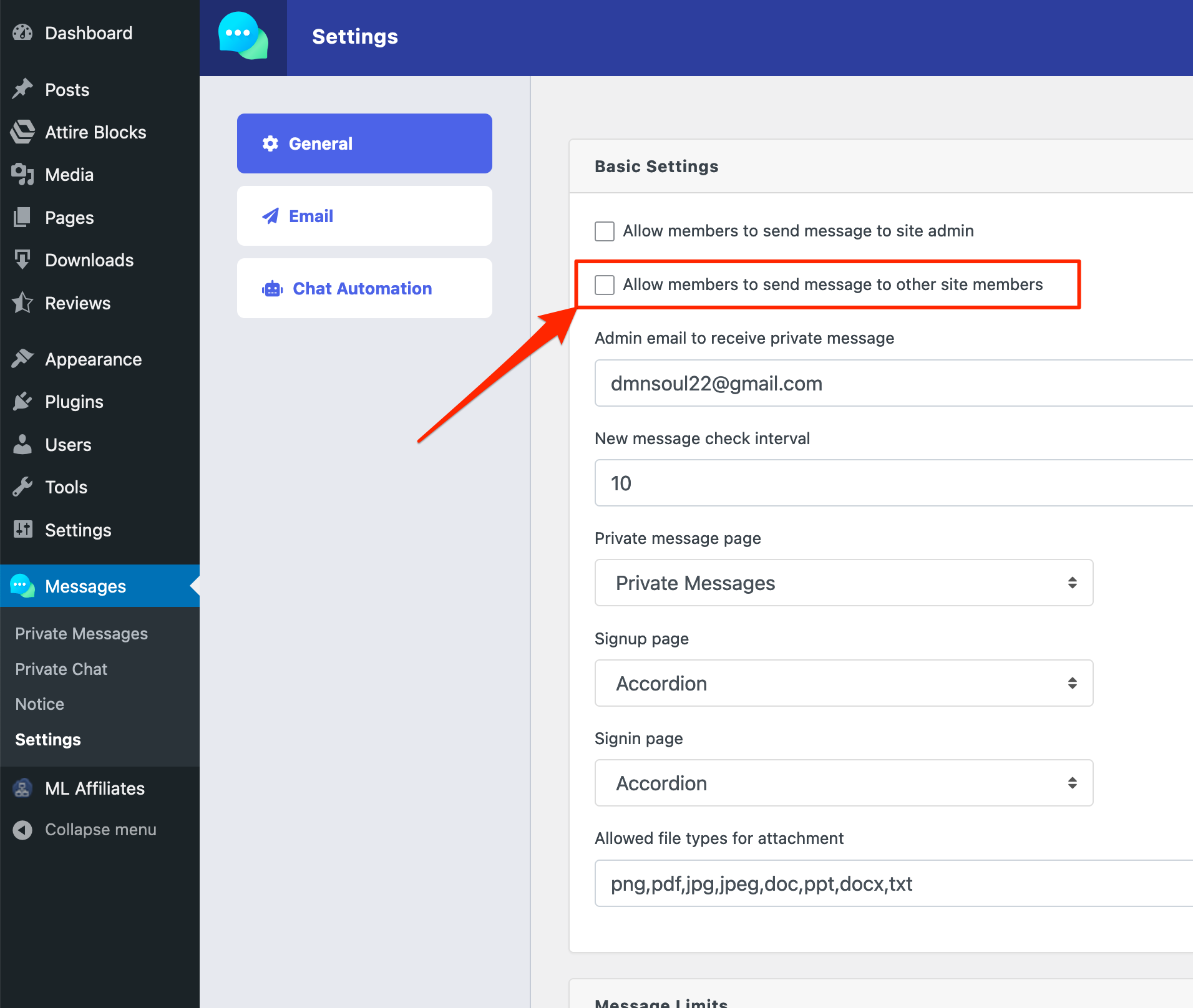
Tooption, please check ” Allow members to send message to other site members ” from pm settings:Hello, does this add-on come with membership subscription? Also, can the admin make a broadcast message to all members at once? Do you have a demo product to see how this works?
For the demo link, please check the first button on the right column.
The broadcast feature is not available yet, but coming soon. Also, the private chat option will be available from the next update.
Thanks
Not all strings are translatable by WordPress plugins (for example wpml or loco translate) because not all string are translatable ready.
Compose
Thanks
ComposeThanks for pointing that, we are releasing a new update soon with the adjustments
Are there shortcodes in this addon?
Thanks
Yes, it is [wpdm_private_message], also, please check the step #5 and #6 in the description above.
Hello Shahjada, can I use a shortcode to write a specific user? With a link or button. If yes, can you please write me this shortcode.
Thank you so much! Never seen before.
Yes, added after your comment 🙂