
Forum Replies Created

It is not possible yet to use a link tag in the submit message. But noted for implementation.
Currently, You can use the link directly Thank you for requesting the file. If the download fails, please try this URL https://pocketprograms.com/erp-scale_alt_server
Hi,
Add the following code to your theme’s functions.php file to include child category posts too. This code uses the wpdm_embed_category_query_params filter which allows you to modify any query parameter.
function wpdm_embed_category_query_params( $params ){

    $tax_query  = $params['tax_query'];
    $taxonomy   = $tax_query[0]['taxonomy'];
    $terms      = $tax_query[0]['terms'];
    $operator   = $tax_query[0]['operator'];

    $params['tax_query'] = array(array(
        'taxonomy' ► $taxonomy,
        'field' ► 'slug',
        'terms' ► $terms,
        'include_children' ► true,
        'operator' ► $operator
    ));

    return $params;
}
add_filter('wpdm_embed_category_query_params', 'wpdm_embed_category_query_params');
Best regards.
Hi,
Please remove the key from the old site. Go to your order details page from purchases tab and click the ‘Key’ icon. A modal with license key and linked sites will appear. Remove the key from the old site. Then copy the key and save it on your new site.
Thanks.
Hi,
You can set up user-based downloads using Download Manager Pro + Advanced Access Control ( https://www.wpdownloadmanager.com/download/advanced-access-control/ ) add-on.
You can purchase the Special Pack which includes both plugins and some other useful add-ons https://www.wpdownloadmanager.com/download/wordpress-download-manager-special-pack/
Thanks.
@asiastonevn, Check if you have the Extended Shortcode add-on installed. Please create a new support ticket if the add-on is activated and tree shortcode still not working.
We have the plan to implement this feature in Download Notifications add-on https://www.wpdownloadmanager.com/download/download-notifications/ Currently the add-on sends notification to admin when someone downloads a package.
Please send temporary wp-admin login info in private reply to check the issue.
Please check now. I have installed the latest version of WPDM Pro there. Login worked for me here https://ferraricontabil.com.br/acesso/
By the way, activate your license key to enable the auto-update feature. Get your license key from the Purchases page https://www.wpdownloadmanager.com/user-dashboard/?udb_page=purchases
You can copy the direct download link from All Files page.
https://www.evernote.com/l/AUf2-W5cym1B57dfc2sMHwVJUsOuscP4dsMB/image.png
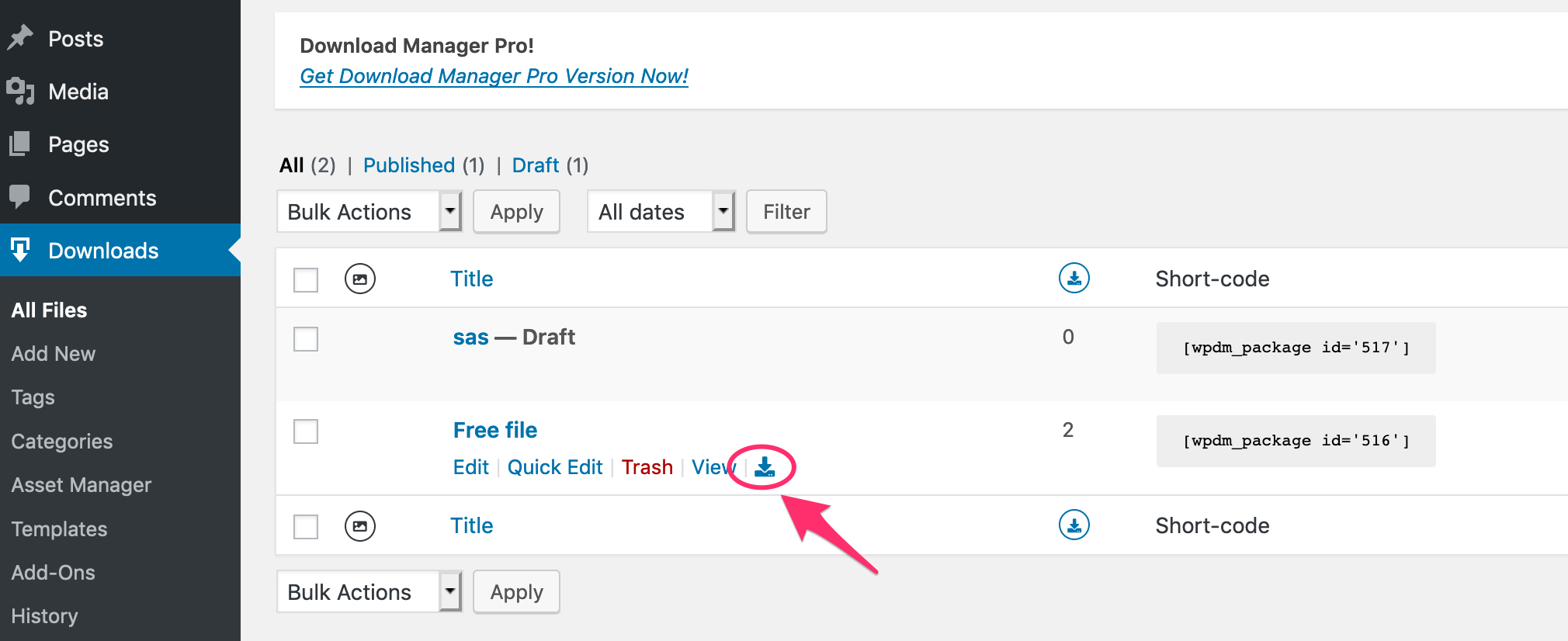
Are you using Google Drive add-on to attach file?
Hi,
Please search for “Premium Packages – Sell Digital Products Securely” in the plugins page. It is the “WPDM – Premium Packages” add-on.
Thanks.
Masterkey bypasses all locks to provide the direct download link.
Please send your page URL. Maybe adding some custom CSS will do the trick.
It is not possible from the server-side. There is a Javascript work-around. You can replace the [download_link] template tag in your link/page template with the following code. This will initiate the download and then redirect to the REDIRECT_URL Replace the REDIRECT_URL with your external URL.
<a class="wpdm-download-link btn btn-primary" href="#" onclick="window.open('[download_url]', '_blank');location.href='REDIRECT_URL'; return false;">Download</a>
Hi,
There are many options available to you. I will explain those and you can decide which one is best for you.
There are two bulk import options available. CSV and Directory import.
1 ) In the case of CSV, you have to create the CSV file with all necessary package info. Each row will create a package.
2 ) Directory import is easier. You select a dir and import all files. One package will be created for each file.
If you want you can attach the whole directory in a package too. The has some drawbacks too because there won’t be file-based stats and all files will be under the same access rules.
Let me know which option fits the best for your use case. I will suggest the next steps based on that.
Thanks.
You have to use a custom link template to modify the link in the package title. Currently, it is using the [page_link], to open the file directly replace that with <a href="[download_url]">[title]</a>
You can clone the link template from the Downloads > Templates page. Send temporary wp-admin login info in private reply if you need help with that.
Have you installed the Extended Shortcodes add-on ( https://www.wpdownloadmanager.com/download/wpdm-extended-short-codes/ )?
Yes, you can attach a URL with the package. The user will be sent to that URL in this case. Use the URL tab from Attach File meta box to add URL.
You can use a custom template tag to render the “Preview” button conditionally. Shown this preview button only when attached file in a PDF file. wdm_before_fetch_template hook is used to create a new template tag. The code should be something like the following example. You have to add this to your theme’s functions.php file. Adjust the link <a class='btn btn-success' href=''>Preview</a> to match your style.