

Shahriar
Forum Replies Created

Please use following code snoppet to get cart item count and total,
<?php echo count(wpdmpp_get_cart_items()); ?> item(s) ( <?php echo wpdmpp_currency_sign().wpdmpp_get_cart_total(); ?> )
1. Term Lock only works on details page now and link templates. In next update, we will add the support for the all package shortcode too.
2. There is no global option for that. Each package has its own terms and condition option. But we will add support for terms lock in Default Value in next update. This addon allows you to set default values for new packages, so your terms will automatically be repeated in new packages.
Added the fix in your installation and the update is coming today.
There is an example in that doc page, you can use it as the reference.
Your code doesn’t look like anything related to creating custom tags. Not sure what you are doing there.
Re-generating master key will disable the direct download. You can regenerate master key for a package from package settings. Just check the option and update the package.
Looks like this is a permission issue. Does your user have the full admin capabilities?
Are there any role manager plugin installed?
Try creating a new administrator account and login using that account. If none of these works send a temporary wp-admin login info in private reply. temporary user’s role should administrator.
Hi,
Looks like this screenshot does not have any Download Manager related content.
To get started with Download Manager please check this doc https://www.wpdownloadmanager.com/doc/add-new-package/ It shows how to add a download.
Then use this add-on to insert shortcode easily https://www.wpdownloadmanager.com/download/advanced-tinymce-button/
Let us know if need further help with any issue.
Thanks.
Each Payment Gateway option has a return URL field. That is the URL where users are redirected to after payment. So, you just have to set your thank you page URL there.
https://www.evernote.com/l/AUeJqBQ6LhtGMZ_zsTTfJZpElpLK2zX7CWgB/image.png
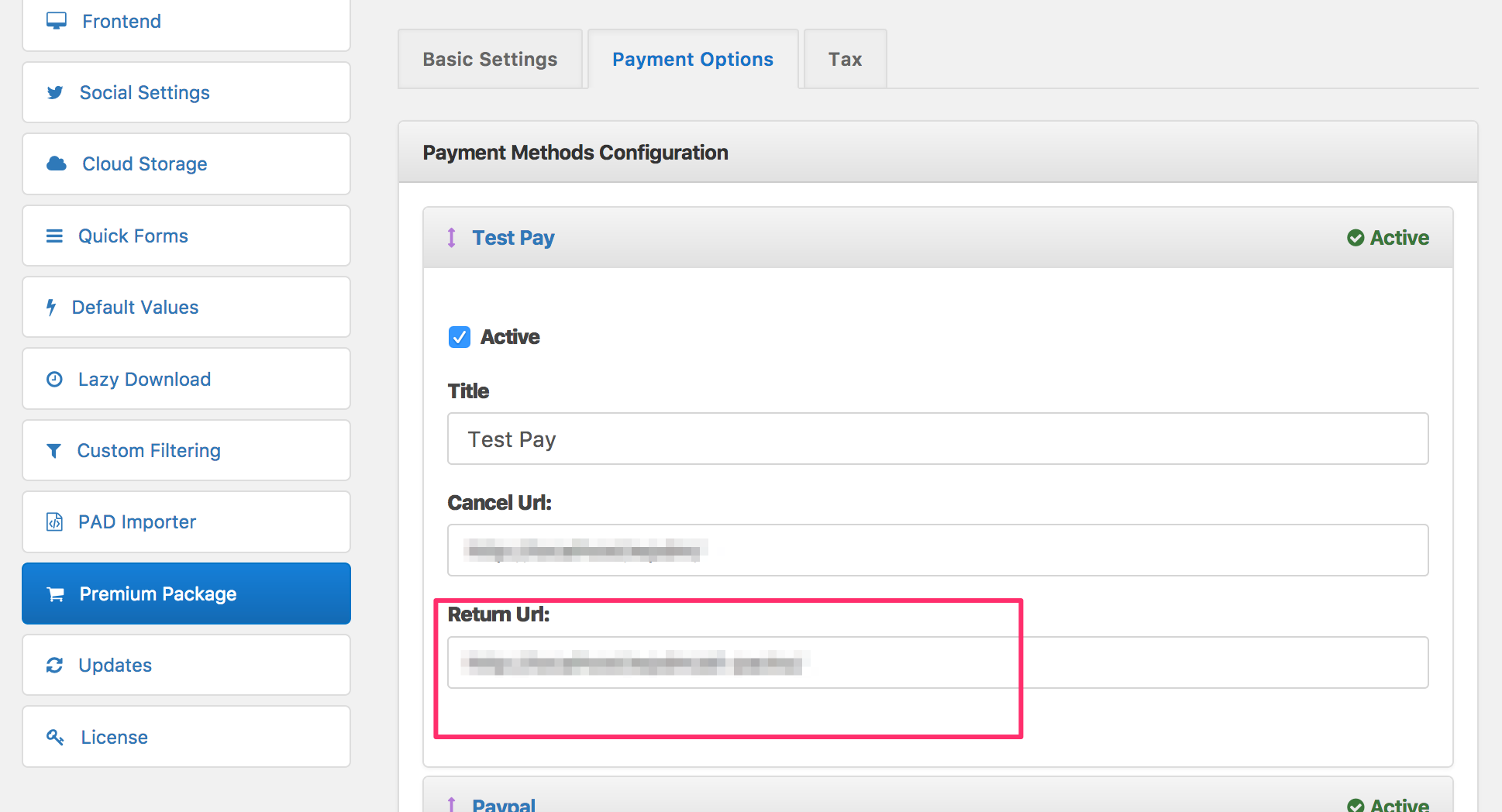
Please ask your server support to add the following to your .htaccess file. That should fix the saving issue. Send me an url where you see the warning.
<IfModule mod_security.c>
SecFilterRemove 001868
</IfModule>
Clone Link Template Panel 1/3 ( From Downloads Templates admin page ) and then set parent div class to col-md-6. Use this custom link template when inserting archive shortcode. Your packages will show in 2 columns now.
You can upload those icons somewhere else. Then add the icon URL in package settings. Your URL will still be there after plugin update.
Yes, you can remove the details page link. Use a different link template than what you are using now.
Following link templates doesn’t have the link,
1. Default Template
2. Default Template Extended
3. Default Template with download count
use TinyMCE addon to insert shortcode, you will have the option to select link template.
There are two ways of showing a download/package.
1. Link template ( using shortcode ) – There are multiple link templates available. Each one has its own layout. Use TinyMCE addon to insert shortcode, you will find the option there to select the link template.
2. Page Template – This is the details page for the package/download. You see this page when previewing the package. You can set this details page url in your link template. Clicking on the title ( in link template ) brings the user to the details page.
Hi,
Download Manager requires php version >=5.4
Please ask your server support to update your php version to fix this issue.
Thanks.
Use [create_date] and [update_date] template tags to show package dates ( In custom template, requires pro version ).
In the free version, default page template shows the create date in the pcakge details page.
Sorry, no bulk option available for that.
You can try this one https://wordpress.org/plugins/really-simple-ssl/
@thepigfarmer, Please send the key ( the one you are using here http://www.burlescombprimary.co.uk) in private reply.
Your server is rejecting ajax request with “400 Bad Request” response. Please ask your server support to allow the ajax request. That will fix this issue.
Login info not working. Please check the info again.
Please send temporary wp-admin login info in private reply. Maybe you are using an older version of WPDM.
No option yet to configure stats access based on role.
I have created a test package and featured image loaded without any issue in my test. Also, fixed the Select dropdown in Theme options. You can select slider category now.