
Forum Replies Created

Okay, for that, you may use the [file_list_extended] template tag in your related page template, for more template tags, you may visit this doc, https://www.wpdownloadmanager.com/doc/templates/template-tags/
Which translation plugin you are using here? please let me know, if possible, please, give your temporary wp-admin login details in a private reply for checking the issue.
Thanks
please check now, is it okay or not, https://broker.1111realty.ca/download/westvale-at-lackner-ridge-building-3/
thanks
I think you are trying to implement advanced custom fields in contact form 7, but it is not possible yet, please let me know if you have other queries
thanks
Please, give your temporary wp-admin login details in a private reply for checking the issue.
Thanks
Hi,
You shall find the tracking user downloads option from the Downloads > Stats > Download History section, please check and I hope it may help you
thanks
Sorry somehow missing,
Do you have followed category access procedure,
Category access for roles and packages follow these steps as I describe below,
before giving access to a certain category for a particular role you have to set from the edit category option,
then you have to make empty for Allow Access option or giving a particular role on it like as I image attached or as usual for select member option too,

because Package Access = Package Access + All Category Access = All Visitors + Subscribers = All Visitors
and Package Access = Package Access empty + Category Access(Subscribers) = Subscribers
or Package Access = Package Access(subscriber) + Category Access(Subscribers) = Subscribers
Thanks
Okay, checking anything alternative solution or fixes
thanks
Can you please change the filter function name if somehow help, and the dt_portfolio post type is not related to WPDM
thanks
It is already in doc there, https://www.wpdownloadmanager.com/download/wpdm-extended-short-codes/, please check
and wpdm_tree with file size and date it may require some customization you please knock here with your requirements, https://www.wpdownloadmanager.com/user-dashboard/?udb_page=upgrade
thanks
For direct download link use the additional parameter download_link=1 in [wpdm_tree] shortcode. i hope it will work then
thanks
Are you using this add-on, https://www.wpdownloadmanager.com/download/wpdm-extended-short-codes/, [wpdm_tree] shortcode feature? please let me know
thanks
Hello @sudron,
If you get some free moments and if you like our plugin as well as support, please give us a 5* here. It will inspire us a lot.
Thanks.
Please, give your temporary wp-admin login details in a private reply for checking the issue.
Thanks
Yes, you can provide the screenshots here in a private reply, it will be more easier for me recognizing those issues
thanks
I think somewhere within your scripts conflicting, i have added this code in your theme functions.php, thus it resolves the issue,
// WPDM CUSTOM CSS
add_action('admin_head', 'custom_css_wpdm');
function custom_css_wpdm() {
  echo '<style>
.w3eden .input-group { display:table !important; }
  </style>';
}
thanks
Hello Arun,
Is the CSV file you have attached or shared the same structure till now, let me know
thanks
Sorry for your little inconveniences, please use [file_size] instead of [package_size], it will work fine then for your custom template
thanks
If you are claiming All Downloads Table of Gutenberg block issues, there are working fine from my side, can you please elaborate more on your issue, if possible, please, give your temporary wp-admin login details in a private reply for checking the issue.
Thanks
Sorry for the inconvenience, please, give your temporary wp-admin login details in a private reply for checking the issue.
Thanks
please try from now creating a package from the default template, I tried it again and it was working fine. and I hope it will also work in the other template too
thanks
Please check here, it is working fine here, https://wp-test.durham.gov.uk/dscp/download/test-3-3/
thanks
Hi,
For Invalid File Type updating ( 3.1.17 or 5.3.7 ), you may face the following 2 issues:
- Upload is not working
- Showing “Invalid File Type” error when trying to download
Here is the reason and solution:
From WPDM Free 3.1.20 and WPDM Pro 5.3.7, we have changed the file type validation process during file upload and download. Now, you have to white file types to allow them to upload or download. You will find the option at Admin Menu ► Downloads ► Settings ► Basic Settings Tab ► Upload Settings section.
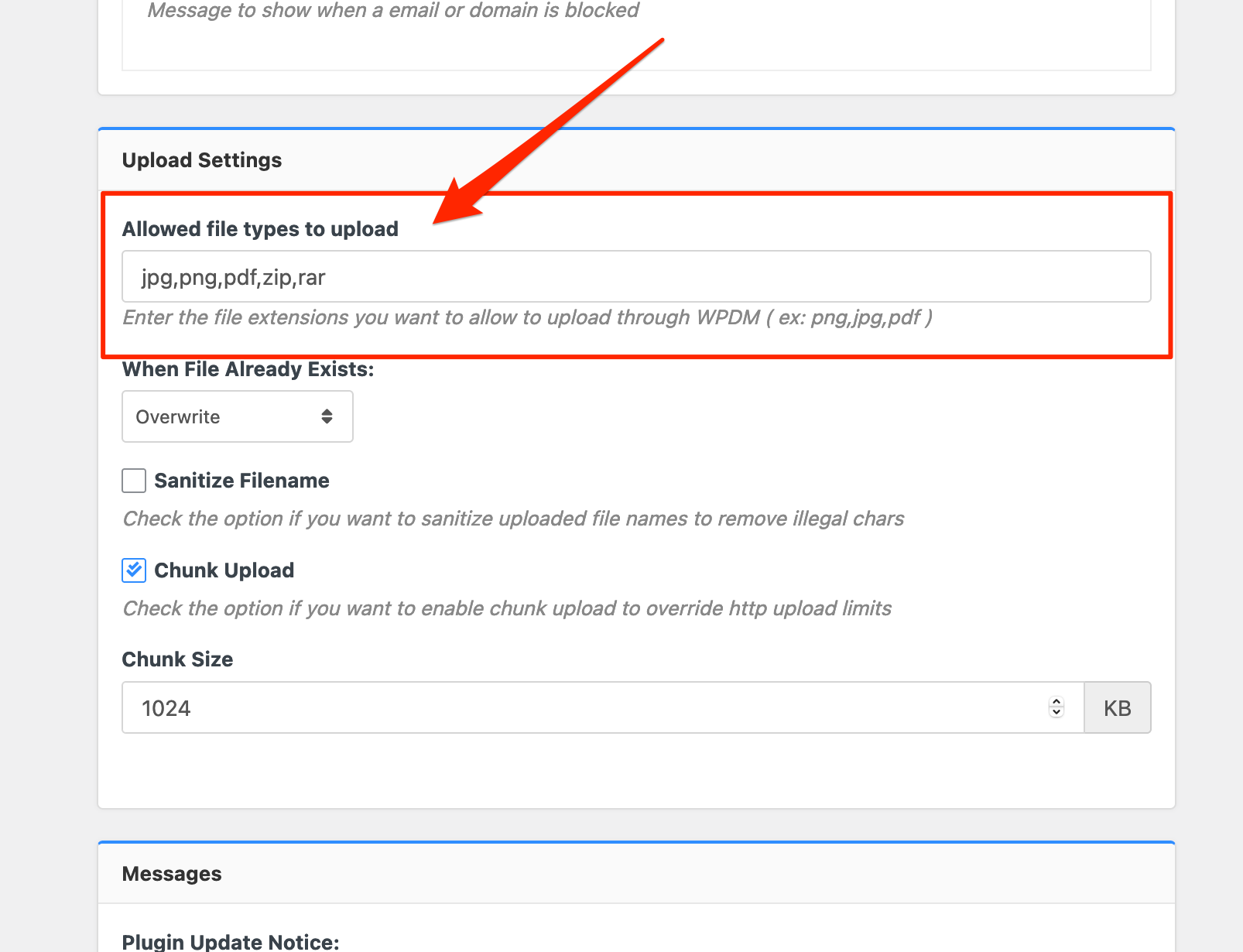
Please add file types ( texts, multiple texts separated by a comma ) as shown on the marked image. And then save settings. The shall resolve the issue.
or, Just Keep it Empty for WordPress default use as I image attached

thus it may resolve the issue
thanks
please try the followed procedure as I have described it will work fine from your side too
thanks
Can you please share your related URL, if possible, please, give your temporary wp-admin login details in a private reply for checking the issue
Thanks