
-
Search Results
-
Topic: Invalid File Type (*.zip)!
Hello,
I have a download package—if there is one file in it, I can download it. When I add two files to the package and then try to download it via the link, I get the following message:
Invalid File Type (*.zip)!
What am I doing wrong?
Thank you
Hi
After plugins update a lot of stuff has broken but I have been able to work around here and there. This one is tricky though.
So before the update I had all the tags (Advanced Custom Fields) set and worked well, but it is not showing the data from any[wpdm_all_packages thumb="" login=1 items_per_page="10" jstable=1 order_by="date" order="DESC" cols="acf_datos_propietario|acf_datos_finca|title|acf_datos_vencimiento|download_link" colheads="Usuari|Titular|Document|Vencimient|Descàrrega"]
Front end image https://www.dropbox.com/scl/fi/z4fi0uazl6wmft29vvd8z/Screenshot-2026-02-04-at-8.11.55-AM.png?rlkey=1zoesf96jrbd13ova1jbfupcs&dl=0
This is not working anymore even though if I call the php it works
if (is_user_logged_in()) {
$test_post_id = 19365;
$acf_propietario = get_post_meta($test_post_id, ‘__wpdm_acf_datos_propietario’, true);
$acf_vencimiento = get_post_meta($test_post_id, ‘__wpdm_acf_datos_vencimiento’, true);
custom_logger(“ACF Test – Propietario: ” . $acf_propietario . ” | Vencimiento: ” . $acf_vencimiento);2026-02-04 12:48:17 – ACF Test – Propietario: ENSCAT | Vencimiento: 2026-04-04
Setup
Downloader Manager Pro Versión 7.2.1
WPDM – Advanced Custom Fields Versión 3.0.0
WPDM – Extended Short-codes Versión 4.0.0Wordpress 6.9
I want to prevent URLs from being shared.
Set the download link validity period to 30 minutes.
Have the URL change each time.
Be able to tell if it has been downloaded.We recently updated our WPDM plugin to version 7.2.1, and this has caused the content of the version column to disappear.
The column header is still visible though, and the table still sorts correctly based on version data.We are using the following shortcode:
[wpdm_all_packages login=0 thumb=1 items_per_page="5" categories="ams" jstable=0 order_by="version" order="DESC" cols="page_link|version|publish_date|package_size|download_link" colheads="Title::25|Version::15|Publish Date::15|Size::15|Download::30"]Image:
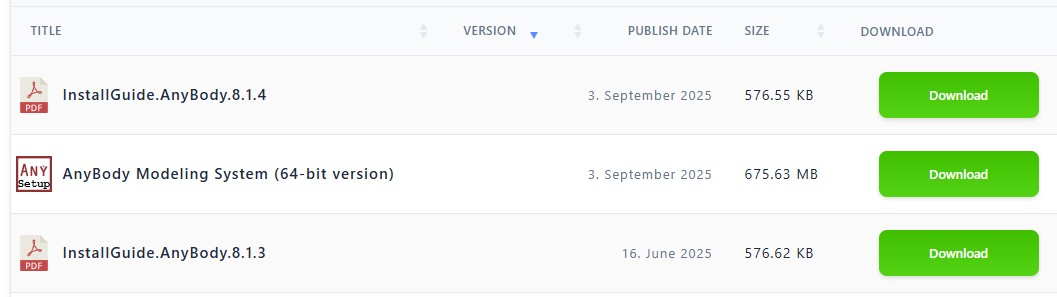
Is this a bug, or intended behavior?
If intended, what shortcode should be used to make it show the version data again?Hello,
When using the file cart add-on, I can add a file to my cart from an externally linked URL, but when I download the ZIP file, the externally linked URLS do not download. Is there a fix to this, or do the files need to be hosted on the same server? Thank you
Topic: Filter by Category
I have a page that uses wpdm_all_packages
[wpdm_all_packages login=0 items_per_page="20" jstable=1 order_by="title" order="ASC" cols="title,file_count,download_count|categories|update_date|download_link" colheads="Title|Categories|Update Date|Download::125px"]
this would load all packages. I use to be able to pass a value for wpdmc within my url https://www.mydomain.com/?wpdmc=case-studies to narrow the results by category but sorting by category doesnt seem to work anymore?
Also clicking a category within the results table doesnt seem to narrow the search down either. URL looks like https://www.mydomain.com/?tax%5Bwpdmcategory%5D=case-studies
Please advise how to filter all packages by specific category by passing vars within urls
The website im working on really requires shortcodes that can be used with the ID of files in packages and not just the overall package ID that lists all files. we need to be able to keep things neat and have one package that contains, say, 5 files and use a shortcode to create a link template for each individual file. Currently your shortcode for providing link template is only for the entire package forcing users to download ALL files in a package.
Many of your customers have petitioned me to continue to push this basic need for your plugin and I’m urging your developers to make this simple fix. We need to be allowed to use package ID or File IDs (already created when uploading files to a package) in templates and shortcodes!
Hope you understand and thank you for reading.
Hi, after recent update our download packages which have attached dirs connected to them doesnt allow to download individual files, file icons show as links but nothing happens when clicking.
Even with “Single File Download” enabled it does not work. Anything else we can try?
My link template works fine with WPDM 6.8.9. After updating to 7.0.2 my template styling breaks (wrong colors). Here’s my code:
<div class=”card” style=”border-radius: 1px; margin: 5px;”>
<div class=”card-body”>
<div class=”media”>
<p class=”mr-3 img-48″ href=”[page_url]”>[thumb_96x96]</p>
<div class=”media-body”>
<h3 style=”font-size: 16px; font-weight: 400;”>[title]</h3>
<div class=”meta text-white-50 text-small mt-1″><i class=”fas fa-hdd text-white-50″></i> [file_size] <i class=”ml-2 far fa-arrow-alt-circle-down text-white-50″></i> [download_count] [txt=Downloads]</div>
</div>
</div>
</div>
<div class=”card-footer”>
<div class=”row”>
<div style=”line-height: 15px; font-size: 12px;” class=”col-6″><i class=”far fa-calendar”></i> [create_date]<br><span class=”[hide_empty:version]”><i class=”fas fa-code-branch”></i> [version]</span></div><div class=”col-6 text-right align-right”>[download_link_popup]</div><div style=”clear: both”></div></div></div>
</div>Have you changed template handling? What is your suggestion?


