Search Results for 'download link'

Viewing 25 results - 10,926 through 10,950 (of 11,356 total)
  • Author
    Search Results

  • ThomasCrown
    Member

    Thanks for your response Shaon,

    I saw this and tried to create a new link template, but your short code doesn’t seem to work. I tried clicking on the download link button, but no code is unveiled or inserted into the new link template to the left. I am on a Mac, could this be the problem? Pretty frustrating. All I want to do is creating a very simple download link that will link to the document without creating any of these package detail download pages. Can you help please?

    #6890

    jalema
    Member

    Anyone???
    Please….

    #6882

    In reply to: Change Package Owner


    toddgeist
    Member

    Hello,

    Before I installed your plugin the authors on my site created blog posts and we just put download links in the body of the post. Here is the site
    http://www.modularfilemaker.org/category/module/

    Now that I have your plugin I want to make each of these posts into a DownLoad Package. I can copy and paste the content, but I want to make sure that the New Download Packages are still “Owned” by the authors who wrote the original post. So they can continue to manage them.

    Another way to say it is that I need to turn my old blog posts Packages

    Does the help to clarify it?

    Thanks

    Todd


    Shahjada
    Keymaster

    Everything explained here http://www.wpdownloadmanager.com/docs/integrated-templates/.
    Here is again:
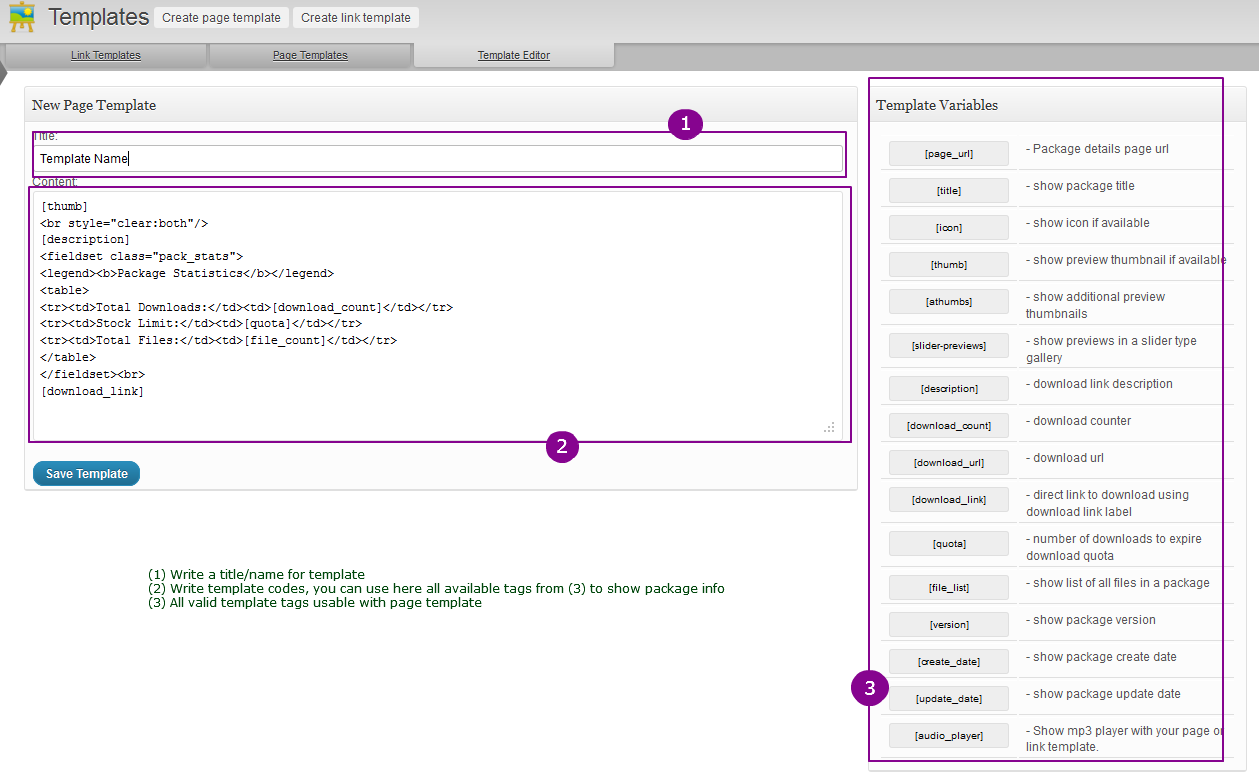
    You need to create a link template. as you seeing on the following image:

    right sidebar ( #3 ) has bunch of short-code. You can use those short-code along with other html tag to generate your link template.

    The tag [page_link] outputs package title linked with details page , so you simply need to skip this tag if you don;t want to link with details page . but if you still want to show the package title , you can use [title] tag , which will simply outputs the package title without any link

    [download_link] tag outputs the download link of your pacakge. and you can use or skip other tags depending on which info you want to show or not.

    #6872

    Shahjada
    Keymaster

    ok, send wp-admin login info to support@wpdownloadmanager.com with forum post link, and make functions.php writable.


    jalema
    Member

    Please help me with this…
    We cannot download the files.

    1 thing you need to login into our system with Teamviewer etc. because we run the site on a local webserver its a Intranet so not reachable from the outside.

    Please let me know or email me @ Kay [at] kayvanaarssen.com

    Thanks


    middystyle
    Member

    Is it possible, with the default link template to disable the title link that goes to the download page?


    pmasseycpa
    Member

    Can you tell me why the popup box is coming up in a non-accessible window? It’s behind the screen almost faded out in black. Please take a look at the link below and click on download to see what I mean.

    http://www.acctapps.com/download/case-study-fred/


    ThomasCrown
    Member

    Hi there,

    I am having trouble finding any useful information on how to create a simple link to download a file instead of an entire download page.

    We are a financial services firm trying to supply some publications, some of which should be free and accessible via direct download by anybody (guest) and some of which should require registration (simply entering an email address is not going to be sufficient).

    I understand that there are ways to make downloads dependent on likes on Facebook, Google + etc., but there is no information on how to make users register/create an account before being able to download an account.

    Can you please help. Otherwise, your plugin will be completely useless to us. Many thanks.

    #6843

    In reply to: Link to file type


    webleyson
    Member

    And the number of downloadable files in each package…. y’know??

    #6842

    In reply to: Link to file type


    webleyson
    Member

    Thanks! Found it!
    Now.. Another question.. Is there a shortcode for the number of downloads in each category?

    Thanks again!

    #6821

    sphipps
    Member

    JtGD28—> Is there a way to create a simple, plain links template without the file download button to the right similar to the way the [file_list] gets displayed?

    Try this in your style.css:

    .wpdm-thumb, .wpdm-download-link img.wpdm-thumb{
    display:none;

    }

    #6790

    buerosmart
    Member

    I figured that the files uploaded are stored in a subfolder of wp-content/uploads

    As I wanted to avoid that anyone reading the E-Mail with the download-link is able to just click on the link and download the file, I tried to set up password-protection with .htaccess for that subfolder. However, clicking on the link still simply downloads the file so I wondered whether the download-link provided in E-Mail is pointing to another folder. Is it like that?

    Is there any way to protect the download via password request or is it absolutely necessary to buy the Pro-Version of the Plugin to get this done?

    #6788

    Semjon
    Member

    I don’t get the idea of the whole page thing.
    Can someone please explain it to me?

    I successfully created a package.
    The download link works just fine.

    But my file name and the pdf-icon link to a page called wpdmpro. Why?
    You can take a look at it here: http://www.ruinedheart.de/about-the-film/the-slam-poetry-treatment/
    The wpdmpro-page is here: http://www.ruinedheart.de/wpdmpro/wpdmpro/

    Help is highly appreciated.

    #6781

    gabstero
    Member

    Hi Gang!

    Looks like a really nice download management plugin, I like the administration so far!

    So, I created a download package containing 4 pdf files. I copied the short link and pasted it into a page. The download icon shows up just fine but when I am saving the file to-be-saved looks like “download-manager-files.txt”.
    Not sure if I should have received a zip file containing the 4 pdfs in the package I created?

    A little confused. Any tips will be appreciated!

    thanks,
    g

    #6770

    Shahjada
    Keymaster

    In fact we don’t have any due support ticket from 17th, if your issue still not checked/resolved, then we didn’t receive your email and email didn’t have all required info. for example, you need to mention the issue or forum post link with login info.

    #6757

    Shahjada
    Keymaster

    yes, its totally depends on link template http://www.wpdownloadmanager.com/docs/integrated-templates/

    #6737

    albuor
    Member

    Hi, I’m using a Custom Post Type with a php template to show products, and in the bottom I add the link of the package to download from WpdmPro.

    Example:

    Is there a way to use these link with the email lock without opening the package page. For example the same behaviour as it happens with the category shortcode.

    So when i click on the link and a modal window appears prompting for email.

    It’s possible to code that to a php template?

    I hope I explain correctly,
    thanks in advance.

    #6734

    ghforum
    Member

    Hello Shaon,

    We managed to correct the icon and json issues.

    However, the problems with the display of the little down-facing arrows on the archive page is really bothering us quite a bit. Our organisation’s policy prevents me from giving out access to our back-end. Anyway, the issue might be linked to the CSS and doesn’t require such access.

    We expect a quick answer to this simple question because we invested the money for a developer license and all the add-ons. How do you propose to resolve this issue?

    Best regards,

    Evren from the GHF Team

    #6723

    Shahjada
    Keymaster

    please send a temporary wp-admin login info to support@wpdownloadmanager.com or contact live support

    #6722

    In reply to: link expired


    Shahjada
    Keymaster

    @simonwiffen, please send a temporary wp-admin login info to support@wpdownloadmanager.com

    #6712

    In reply to: link expired


    simonwiffen
    Member

    Hi ptwong – I’m having the same issue (getting a link expired message) when trying to download a link. I notice yours is now working, may I ask how you fixed the problem?


    leopold
    Member

    Hi,

    I just purchased the plugin pro version today. I encountered two problems:

    1. When I tried to download something from the front-end, I got a link expired txt file. The free version worked fine.

    2. The top navigation became grey after I activated the plugin. (It used to be black.)

    Link is: http://shu-wu.com/books/html-and-css-design-and-build-websites/

    Thank you

    #6683

    In reply to: Update to 3.3.7


    ttyasi
    Member

    Perfect! But my download links do not go to the corresponding pages anymore, they go to wpdmpro page only for any one you click.

    Test here: http://asiwearables.com/categories-test/

    Also note the error at the top.

    Check email for user and pass.

    #6670

    Shahjada
    Keymaster

    if you don’t want to set a limit, use 0 , but regular limit also may expire for public download links because of bots. in that case you can use a open password.

Viewing 25 results - 10,926 through 10,950 (of 11,356 total)