Please guide me to update 5.0.3 and help the download link work.
Currently I have an error of the image of the file icon. And at the interface additional download packages are faulty. You can see in the attached image!


Hello !
Because my account has to login through Google account.
I cannot add Login to the update server.
You guide me to delete the Plugin, then download the new version and reinstall, you tell me that it will work, and I will not lose data.
But after I deleted 5.0.2 and installed 5.0.3, all Download buttons did not work.
I have reinstalled 5.0.2 and it works normally. But there were error images representing the file type.
Please guide me how to solve it!
Thank you !
Hi!
Is it possible to have the WPDM Categories widget linking directly to a download links page, instead of first going via a list of downloads that in turn links to a download page for the selected download?
In short: I wish to arrive directly from the WPDM Categories to the corresponding category’s list with download links. At the moment I’m stuck with manually creating a new download page for each category, using the [wpdm_category id="Category_Name"....] short code. Although this is easy for a single website, I’m creating several different sites and would like the process to be more dynamic and use the widgets.
I noticed that my pagination is not as smooth as in your demo. In your demo, when you click between pages 1 and 2 the packages load all at the same time and do not shift around the page (https://demo.wpdownloadmanager.com/wpdmpro/archive-page-default/). However, on my site, the rows and packages temporarily jump out of order when switching between pages (some rows temporarily have only one package displayed for a second). Once the page loads, it looks fine, but doesn’t look good prior to fully loading. I will include the link to my page in a private message.
The problem is that for multilingual downloads (using WPML) the direct link does not automatically forward the user to the content in the currently chosen language
hi,
You need to use a link template in your shortcode. Its default link-template was a problem with your theme so I am making you a new link template. Your shortcode is working when you add this template tag link_template="5ddfbe241755d"
This link will get the template’s ID Downloads->Tempalates-> links Templates
http://prntscr.com/q3bq28
thanks
This reply has been marked as private.
This reply has been marked as private.
Hi,
You are using a custom template of list-packages-panel.php on that page. The default one doesn’t have the category filter. But this page should be used only by users who can create/edit packages.
For normal users, create a page with all packages shortcode, this one has built-in category filter.
[wpdm_all_packages items_per_page="10" jstable=0 cols="page_link,file_count,download_count|categories|publish_date|download_link" colheads="Title|Categories|Publish Date|Download::155px"]
Thanks.
This reply has been marked as private.
Hello everyone,
maybe you can help me: recently the font size of my download links is far too large, how can I reduce the font size?
Screenshot of Downloads
We always insert the files via shortcode and I guess the standard template is used.
Thank you very much for your help
Felix
Hi,
no man the template tag don’t work… I need a direct link not a link that open browser to package download page…
You can try yourself:
https://www.scsconsulting.it/download/il-governo-dei-rischi-per-la-continuita-del-business/
I need an email link that START download!
Hi to all,
which is shortcode that add direct download link in e-mail lock template?
I’ve tried with:
[#download_link#]
[download_link]
[#package_link#]
[package_link]
but i can’t get direct link package url when i receive e-mail..
Can you help me?
Thanks,
Icons are already uploaded and setting up.
For the rest, sorry I don’t understand.
For example, I’m using this short code :
[wpdm_all_packages items_per_page="20" categories="windows" jstable=1 order_by="field_name" order="ASC/DESC" cols="title,file_count,download_count|categories|update_date|download_link" colheads="Title|Categories|Update Date|Download::155px"]
the result is this one :
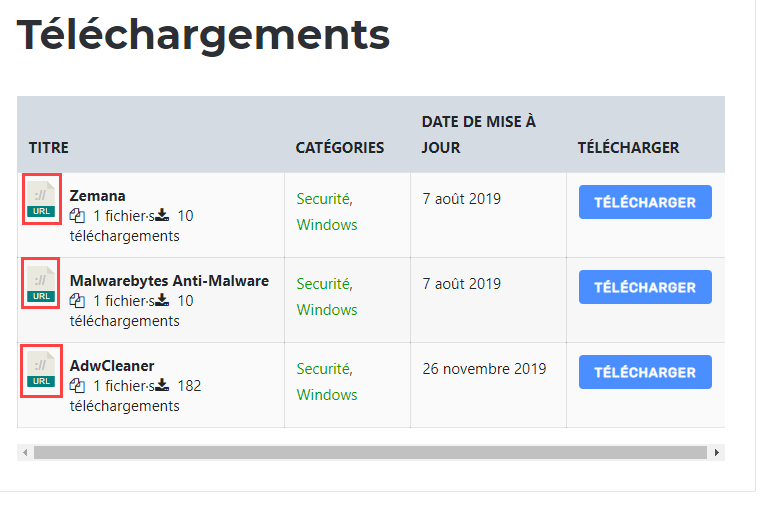
What shortcode use to see my icon instead of basic icon ?
Thanks !
You can unlink the domain from your order details page https://www.wpdownloadmanager.com/user-dashboard/?udb_page=purchases But no need apply the key in dev domain if it is temporary. Do you encounter the same issue in dev domain?
Ok. Thank you.
1) To support the custom tag, is it just a matter of doing a search and replace in that PHP file? If so, what do I need to search for and what do I need to replace it with?
2) I did a test using a regular tag and the similar downloads are now being displayed. How do I change the link template that is used for [similar_downloads]? Is there somewhere where I can configure the settings?
Thanks.
1 ) In your package settings meta box set “Click here to download PDF” as “Link Label”. This “Link Label” defines the download button text which is “Download” by default.
2 ) Each package has its own details page, but it is not strictly necessary to use the details page. You can use a package shortcode to insert the download anywhere you want. Copy the package shortcode from the “All packages” admin page or use the TinyMCE Button add-on to insert shortcode visually. This add-on adds a Download icon in Gutenberg classic editor, use that to insert package in a page or post.
The result of the shortcode is controlled by the link template. You can use any of the built-in templates or create your own using Template editor from Downloads > Templates page.
3 ) If the download button isn’t visible to you then it means you user role doesn’t have access to the package. Set “All Visitors” in the “Allow access” option of package settings meta box to fix that.
1 ) Create a page with WPDM Login Shortcode [wpdm_login_form redirect="redirect_url"] and set it as Login page in Downloads > Settings > Frontend Access page.
2 ) Add the following code to your theme’s functions.php file,
add_action( 'template_redirect', 'wpdm_login_redirect' );
function wpdm_login_redirect(){
    if( ! is_user_logged_in() && get_the_ID() != get_option('__wpdm_login_url') ):
        wp_redirect( get_permalink( get_option('__wpdm_login_url') ) );
        exit();
    endif;
}
Please try activating Bootstrap 3 from Downloads > Settings > User Interface Tab. That should fix the issue. Bootstrap 4 version lacks a template that handles the emailed download link.
Hi,
Have you enabled the archive page from Downloads > Settings > Basic > URL Structure panel? If this option is active but still nothing in archive URL then please send temporary wp-admin login info in private reply.
You can use this addon WPDM Directory Add-on to get more advanced features like ajax search, filter, link template support etc.
Thanks
Hi,
Since updating WPDM week, this page, amist.com.au/join-amist-super/, is giving off this error:
Notice: Undefined index: eid in /home/…/public_html/wp-content/plugins/download-manager/libs/class.ShortCodes.php on line 521
Notice: Undefined index: eid in /home/…/public_html/wp-content/plugins/download-manager/libs/class.ShortCodes.php on line 522
Notice: Undefined index: eid in /home/…/public_html/wp-content/plugins/download-manager/libs/class.ShortCodes.php on line 521
Notice: Undefined index: eid in /home/…/public_html/wp-content/plugins/download-manager/libs/class.ShortCodes.php on line 522
The page and its links appear to be functioning OK, but I may be missing something. I’ve switched off errors for now.
Other pages with download links don’t appear to have errors.
Thanks.
Hello
Seems like you can do a lot with this plugin but I’m a bit confused.
I would like a simple “Click here to download PDF” and when clicked, prompts the user to enter in an email address. Once entered the download starts immediately.
I’ve set up the test PDF with email locking and what not, but this is saved a separate Post page? I don’t want this to be a separate page or post. When I preview it I get a red box saying I can’t download, when I show it to a friend they don’t get the red box but there’s no button for them to download.
Since I purchased a pro version of this plugin, I would rather not just get a link to another forum post or FAQ. Can I receive step by step support on how to do this? Thanks!
Hi,
The format of the link that is sent to visitors via the Email Lock has changed from v4 to v5, and the new format URLs all return 404.
old format was like this: /?wpdmdl=(packageID)
new format is like this: /wpdm-download/(hash)
The old format still works and is generated by the direct ‘download’ button, the new format returns 404 from any client / browser / etc.
Can you advise on what we need to do to troubleshoot and fix this?
Thank you



