Search Results for 'all+downloads'

Viewing 25 results - 2,276 through 2,300 (of 5,456 total)
  • Author
    Search Results
  • #130686

    In reply to: Membership issues


    Bobby Hayes
    Participant
    This reply has been marked as private.
    #130683

    mark wright
    Participant
    This reply has been marked as private.
    #130613

    Nayeem Riddhi
    Moderator

    Hi,
    Can you please check those,
    1. check your download manager category access to the subscriber role Downloads > Categories > Your category
    2. check Downloads> Settings > Basic > Access Settings > When a user is not allowed to download: Hide Everything
    3. You can also set option from Your package > Package Settings> Allow access

    • This reply was modified 6 years, 4 months ago by Nayeem Riddhi.
    #130584

    Web Guy
    Participant
    This reply has been marked as private.
    #130550

    In reply to: SLOW ADMIN SECTION


    mark wright
    Participant
    This reply has been marked as private.
    #130488

    Michael P
    Participant

    Hi Nayeem

    It looks like I’ve been able to fix this by going into the plugin Settings and saving the settings again, which I guess cleared a transient or flushed something out, so the stats are tracking again.

    There’s another strange thing happening, which is on the stats page (/wp-admin/edit.php?post_type=wpdmpro&page=wpdm-stats), the total downloads for “Today” doesn’t correspond to the graph or the “Export History” log, so it appears the “Today” stat is showing more like over 48 hours’ worth of data (i.e. a higher figure). I’m not sure if that’s something you can recreate on your own demo, or whether it’s just occurring on my website?

    There’s a few other issues I’ve had too (e.g. PayPal payments are all listed as “Stripe”) but I’ll open another support ticket another day about these.

    Thanks

    Mike


    Nayeem Riddhi
    Moderator

    Hi,

    You shall find it from Downloads Templates Import like as I image attached,

    img

    Thanks.

    #130461

    lloyd thomas
    Participant

    Recently updated download manager and all the passwords linked to each download have been lost. Is there a way I can bulk add the same password to all the downloads?


    Paul Phillips
    Participant

    The order_by parameter has recently stopped responding to any kind of input and has thrown all my lists of downloads into the wrong orders. Is this is a bug in a recent release? Is there a fix for this ?

    #130315

    YogurF
    Member

    Hi. I have your plugin on a website in four languages. Some downloads have a password. But I can’t translate the popup text that says “Enter Correct Password to Download”. In all languages it appears in Spanish (main language of the web).

    With the “Loco Translate” plugin I see that this does appear translated, for example into French.

    How can I change this text in each language? Does any shortcode work?

    Best regards.

    #130295

    Bobby Hayes
    Participant

    My client purchased membership pro and I’m having having a few issues with connecting it to the free version of the download manager.

    1. I added a test download and changed the access settings to one of the membership levels. Next to the subscribe button (instead of download), it says you have to purchase the level I selected along and Free plan. I only have one selected and it won’t change. It continues to add the free plan even though I don’t have that selected.

    2. Only when I do a page cache that the items on the download page will show up correctly. For instance, I added another test download to double check the above issues, it wouldn’t show up until I did a page cache. Why are these not updating without having to do a clear chach which I added the plugin after it wouldn’t update properly.

    3. When someone clicks on the subscribe button to download, the button goes to the membership plans page I set up but I only want it to that specific plan only. Users will get confused when going to the page with all 3 membership levels. Is there a way for the subscribe button to only go to the that specific membership plan IF I add each of the membership plans on separate pages? Or a way to disable the other ones? I will need them available for other downloads so I can’t check off “disable new registrations”.

    4. After someone subscribes to a plan, it takes them back to their user dashboard and not back to the downloads page to download their product. If I put in the login shortcode to redirect after login to the download page, then when someone log in like normal, they are redirected to that. Is there a way to have the subscription to go back to the download they need purchased AND have the regular login page redirect to the dashboard if they didn’t subscribe to anything? Right now if someone logs in, it is taking them back to the login that says you are already logged in as this must be the default.

    5. In the confirmation emails, it is adding /wp-login.php for the login page instead of the /login page I set up. In the subscription email, it says Log in to your membership account here: /membership-plans/ instead of /login page. I DO NOT want them to go to the /wp-login.php page but the /login. The other one is adding the wrong content. Also, the confirmation email shows Hello #first name#, but nothing is showing up because they didn’t put in their first name when they signed up via the subscription.

    6. When they sign up via the subscription, there is no where to add their first name and last name like the registration page. I would also like to add other items such as their address and phone. Is there a way to add these items to the subscription?

    7. The site needs to be set up so that all files will need a subscription plan. Right now, I have it set up to be Free, Members Only and Paid. Therefore, I need to have their basic information (name, address, etc.) when they checkout to pay for their subscription whether it be free or paid. Nothing will be purchased directly such as a buy now so I won’t be setting this up with the products having an amount. Everything will have to go through the subscription plans. How can I get this all set up so it is like as if they are checking out as if they paid for something directly? This includes all the information when checking out, redirects to /purchases page, etc.?


    Ali Khansari
    Participant

    We’re almost there, I need to know how we can “reset” the limit when they pay again. Let’s say they pay $25 (10 files plan) and they use it (they download 10 files). They want to try to buy the same plan, but they are already locked in to the plan. For a better UX, I’d like to let them know that their limit is passed and they are no longer in 10 file plan (we don’t have a time limitation but we have # of file limitation)

    Is there anyway to cancel the membership “Automatically or programmatically” once a user hit the limit of downloads (10 files in this case) ?
    Or even further, sending an email for a renewal. So they know that they have to purchase the plan again?


    Nayeem Riddhi
    Moderator

    For the download option, you can check this doc https://www.wpdownloadmanager.com/doc/shortcodes/ for WP Pro Membership, here is a shortcode called, [wppm_downloadarea] for your downloads files

    And for the limit option, it has to know whether you are trying to restrict some page for the WPDM download packages.

    and for upgradation your plans, you have to cancel your already subscribed plan and have to subscribe to a new one.

    Thanks.


    Ali Khansari
    Participant

    Thank you for your response.
    After user hits the limit, it should give them a message to purchase more packages. Can you explain about the customized plugin pleasE?

    Also, when after downloading a PDF, how can user download the PDF again? Is there a way to download a file again or is there a way to show a message “you have already purchased the file, go to X to download/view the file?
    Obviously, we don’t want to count those again.
    Another thing, I know that you can upgrade your plans. This way the number of downloads should add up. How does this plugin work to handle this?

    Overall, you’re saying to create 8 plans (8 roles) to get started with this. Right?

    #130222

    In reply to: Plugin won’t update


    Nayeem Riddhi
    Moderator

    Hi,

    please follow these steps for updating the plugin,

    1 ) Deactivate and delete the old version. You won’t lose any data.
    2 ) Download latest version from here https://www.wpdownloadmanager.com/user-dashboard/?udb_page=purchases
    3 ) Install the latest version and activate the license key.

    To enable the auto-update, login to your WPDM account from the Downloads > Settings > License tab. If login is successful and you have an active subscription then you can update the future releases right from your plugins page.

    Thanks.

    #130213

    Michelle Knight
    Participant

    I have a client that purchased your membership pro and I’m having having a few issues with connecting it to the free version of the download manager.

    1. I added a test download and changed the access settings to one of the membership levels. Next to the subscribe button (instead of download), it says you have to purchase the level I selected along and Free plan. I only have one selected and it won’t change. It continues to add the free plan even though I don’t have that selected.

    2. Only when I do a page cache that the items on the download page will show up correctly. For instance, I added another test download to double check the above issues, it wouldn’t show up until I did a page cache. Why are these not updating without having to do a clear chach which I added the plugin after it wouldn’t update properly.

    3. When someone clicks on the subscribe button to download, the button goes to the membership plans page I set up but I only want it to that specific plan only. Users will get confused when going to the page with all 3 membership levels. Is there a way for the subscribe button to only go to the that specific membership plan IF I add each of the membership plans on separate pages? Or a way to disable the other ones? I will need them available for other downloads so I can’t check off “disable new registrations”.

    4. After someone subscribes to a plan, it takes them back to their user dashboard and not back to the downloads page to download their product. If I put in the login shortcode to redirect after login to the download page, then when someone log in like normal, they are redirected to that. Is there a way to have the subscription to go back to the download they need purchased AND have the regular login page redirect to the dashboard if they didn’t subscribe to anything? Right now if someone logs in, it is taking them back to the login that says you are already logged in as this must be the default.

    5. In the confirmation emails, it is adding /wp-login.php for the login page instead of the /login page I set up. In the subscription email, it says Log in to your membership account here: /membership-plans/ instead of /login page. I DO NOT want them to go to the /wp-login.php page but the /login. The other one is adding the wrong content. Also, the confirmation email shows Hello #first name#, but nothing is showing up because they didn’t put in their first name when they signed up via the subscription.

    6. When they sign up via the subscription, there is no where to add their first name and last name like the registration page. I would also like to add other items such as their address and phone. Is there a way to add these items to the subscription?

    7. The site needs to be set up so that all files will need a subscription plan. Right now, I have it set up to be Free, Members Only and Paid. Therefore, I need to have their basic information (name, address, etc.) when they checkout to pay for their subscription whether it be free or paid. Nothing will be purchased directly such as a buy now so I won’t be setting this up with the products having an amount. Everything will have to go through the subscription plans. How can I get this all set up so it is like as if they are checking out as if they paid for something directly? This includes all the information when checking out, redirects to /purchases page, etc.?


    Robert Pechey
    Participant

    Hello,

    I have added the email lock and all of my downloads are no longer downloadable? Just gives me the following message now: Download was expired on June 9, 2020 01:37 PM

    what is the fix for this please?


    Nayeem Riddhi
    Moderator

    Which PHP version you are using? if you are using an old version of PHP, please upgrade it. please follow these steps for updating the plugin,

    1 ) Deactivate and delete the old version. You won’t lose any data.
    2 ) Download latest version from here https://www.wpdownloadmanager.com/user-dashboard/?udb_page=purchases
    3 ) Install the latest version and activate the license key.

    To enable the auto-update, login to your WPDM account from the Downloads > Settings > License tab. If login is successful and you have an active subscription then you can update the future releases right from your plugins page.

    Thanks.

    #130102

    Jaewon Kim
    Participant
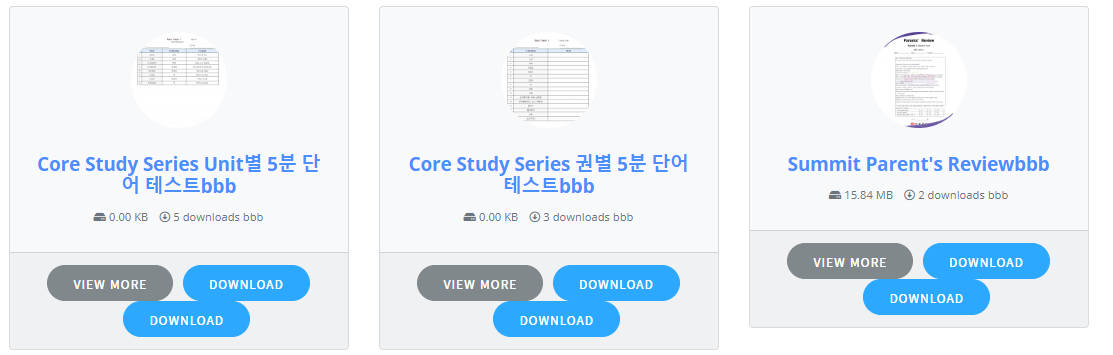
    <div class="card bg-light c2a4 mt-2 mb-2">
        <div class="card-body text-center pb-4">
            <div class="text-center wicon">
                [thumb_128x128]
            </div>
            <h3 class="p-0 m-0 mb-2"><a style="font-weight: 700" href="[page_url]">[title][ifbutton]</a></h3>
            <div class="text-muted text-small"><i class="fas fa-hdd"></i> [file_size] <i class="far fa-arrow-alt-circle-down ml-2"></i> [download_count] downloads [ifbutton]</div>
        </div>
        <div class="card-footer text-center">
                <a href="[page_url]" class="btn btn-secondary">View More</a>
                <div class="d-button d-inline-block">[download_link]</div>
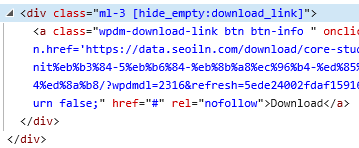
                <div class="ml-3 [hide_empty:download_link]">[download_link]</div>
        </div>
    </div>
    <style>
        .w3eden .c2a4 .wpdm_icon{ height: 64px !important; width: auto; }  .well.c2a4 .media-body{ font-size: 11pt; }
        .w3eden .c2a4 .wicon img{ border-radius: 500px; max-width: 96px;margin: 5px auto 25px; }
        .w3eden .c2a4 .btn{ border-radius: 50px; font-weight: 500; margin: 0 3px; padding: 0 25px; height: 36px; line-height: 36px; font-size: 12px; }
    </style>


    I made it with the code above, but it doesn’t seem to work properly.
    How can I use this tag properly?

    • This reply was modified 6 years, 4 months ago by Jaewon Kim.
    #130078

    Alex Carr
    Participant

    Hi,
    We are currently adding additional functionality to a clients website.

    We are experiencing Admin AJAX blockage issues.

    We have tried following steps here: https://docs.easydigitaldownloads.com/article/201-admin-ajax-blocked

    We even tried using a fresh install of WordPress on the same server. Still experienced the issue.

    Our thought is that if you whitelisted our IP it would resolve the issue.

    #130027

    Michael
    Participant

    Hi Nayeem, thanks for your response..

    Unfortunately, this will query all downloads, where all I would like to have is a page showing the categories to allow users to click and see the downloads for those categories. I could probably build a page and add images and have them linked to the categories, but wondered if there was a shortchode just to list the category names (preferably with the thumbnail for that category).

    I see what you’re suggesting, which would give a kind of tabbed approach but it will query all the downloads which will slow things down for a root page.

    #130025

    Nayeem Riddhi
    Moderator

    Michael
    Participant

    Am using breadcrumbs, and would like a page that would act as a root for all downloads, so it would be a page with just a list of all categories and thumbnails for the categories. Can’t seem to find a shortcode that will do it, is there one ?


    Nayeem Riddhi
    Moderator

    Sorry for the inconvenience, have you made the custom templates manually like creating PHP file, example custom-template-file.php from the scratch or made them from the Downloads > Templates > Create New Template section. let me know.

    Thanks.

    #129987

    In reply to: How to

    Hi Greg Harte,
    We are sorry for the inconvenience caused to you. Thank you for your patience. [wpdm_all_packages] doesn’t have the options to change download link from the shortcode as there are different kinds of packages.
    But we’ve come with a solution to your problem – SHOWING ADD TO CART BUTTON IN [wpdm_all_packages] Responsive Table.

    please follow the steps.
    1. download the file (wpdm-all-downloads.php) from here https://drive.google.com/file/d/1H-Prpy0CUaWP5PiDCD1H2teH6z3Kqh2u/view?usp=sharing
    2. put the file into the following directory of your WordPress wp-content/themes/{YOUR ACTIVATED THEME}/download-manager/
    (if the download-manager folder not available in your ACTIVATED THEME then please create it)
    that’s it. you should now see theAdd To Cart button in the table rows.

    Thanks.

Viewing 25 results - 2,276 through 2,300 (of 5,456 total)