-
Search Results
-
Is it normal that in the Download History page I have “Unknown” listed for almost all IPs, Browsers, OS package downloads?
I am using the short-code [wpdm-all-packages] to display downloads available to registered users. It works perfectly except for one problem.
Our audience is “Over 50’s” with many people coming to look for material well into their ’70s and ’80s. Sadly for many of us, getting older brings with it failing eyesight. Our problem is that the fonts used in this short code are VERY small, especially the second (post_content) line. We are already getting complaints from people about how hard this is to read.
I have tried other short codes but this one sorts properly at startup and allows me to display all the information needed by our members to decide which material they want.
Is there any way I can increase the font (several options would be brilliant) for this short-code or is there some way that the short-code can be modified to add a font size option
My code is as follows;
[wpdm-all-packages items_per_page="30" categories="computers" jstable=1 order_by="title" order="asc" cols="title,post_content|publish_date|download_link,package_size,view_count,download_count" colheads="Title|Published Date|Download"]and it is displayed at this url https://seniornet.co.nz/teaching-manuals-downloads/computers/
Thanks in advance
PeterAll given downloads don’t work since I downloaded the given WordPress Download Manager (the old download plugin couldn’t be updated anymore). If I click on the download-button, there’s just a download of a “download-not-available.txt” – all previous linked documents aren’t linked anymore. And I neither know where to find them in the backend, nor do I know how to re-attach them to the respective link. (https://hans-josef-fell.de/dokumente/)
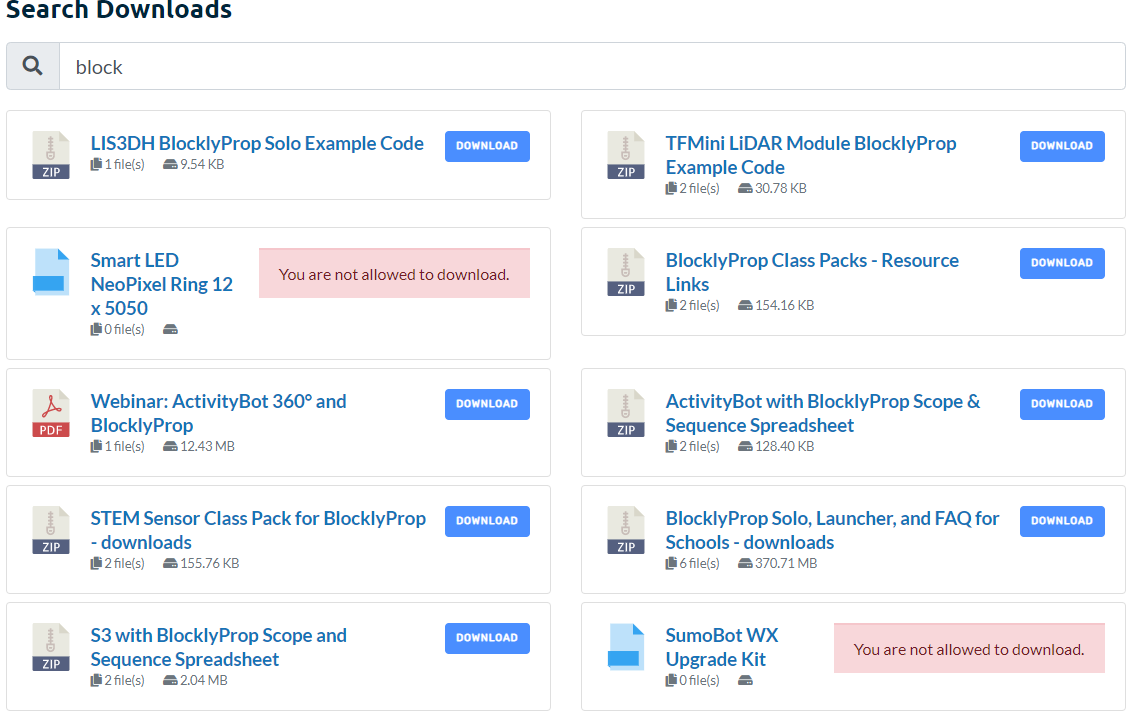
I am using this plugin on a development site, and my woocommerce products are showing up as downloads? I dont know why.
I am using this Shortcode: [wpdm_search_result init=1 template="link-template-default" cols=2]
Here is a picture: https://i.gyazo.com/229178c8ed7394dda146b57923f2ad0b.png
The “You are not allowed to download” warnings are all WooCommerce products. I do not know why they are being pulled in. The SLUGs of the WooCommerce have /products/ in the URL and the downloads have /package/ in the URL.
I can share more details in a private response.
Hi,
the free version worked like a charm. After upgrading from free to pro version all my downloads are broken and i get this error:
<br /><b>Notice</b>: A non well formed numeric value encountered in <b>/var/www/clients/client15/web13/web/labw/wp-content/plugins/download-manager/admin/tpls/metaboxes/file-info.php</b> on line <b>18</b><br /><br /><b>Notice</b>: Uninitialized string offset: 1600115352 in <b>/var/www/clients/client15/web13/web/labw/wp-content/plugins/download-manager/admin/tpls/metaboxes/file-info.php</b> on line <b>18</b><br /><br /><b>Warning</b>: Illegal string offset 'title' in <b>/var/www/clients/client15/web13/web/labw/wp-content/plugins/download-manager/admin/tpls/metaboxes/file-info.php</b> on line <b>18</b><br /><br /><b>Notice</b>: Uninitialized string offset: 0 in <b>/var/www/clients/client15/web13/web/labw/wp-content/plugins/download-manager/admin/tpls/metaboxes/file-info.php</b> on line <b>18</b><br />
Screenshot
Any help?The only reason i switched from free to pro is that i had to make a small change in the default link template. Can i copy the default link template to my child theme and do the changes? if so i would go back to free and ditch the pro version.
Matt
Hi,
using directory add-on I have added a shortcode on my webpage which has a “category” attribute set (which is ONE of my parent categories). However, the initial state of the webpage shows all downloads overall (it should show all downloads UNDER DEFINED PARENT CATEGORY).
I would like to:
1. show only “all downloads which belong under defined parent category and it’s subcats”
2. if I want to, I’d like to show no downloads under “home” until user select a subcategory
3. Remove the “breadcrumbs” line “Home Parent cat Subcat” and just add a parent category on top of subcategory list (could be named “Home” actually)How do I achieve all this?
Thanks
Bostjan
Topic: Invalid download link
I’ve installed download pro – and it works….
However, there are more than 50 downloads on a customers site ( paye.net/paye-projects ) and when you first select a download – you get the invalid download link…
Then you clear your cache and you get the correct link.
However, the end-user isn’t going to do this – they will simple go somewhere else.
Can you help?
thanks
David
Hi,
I updated today to the newest version of WPDM and my (custom) template shows all downloads wrong. I want them to be in a row and not one under the other, like it was before updating the plugin. Dear Support, can you send me a solution for that.
The popup box appears behind the save dialogue on all downloads even those with a set start and end dates specified. it says: Download was expired on October 14, 2020 11:27 AM but the download actualy comences?
I have updated it to the latest Plugin Version 5.2.4 and does the same thing. I tried adding dates to some of the items in case not having any dates was the issue but it displays the same if I add valid dates or leave them blank?
no idea what the issue is or how to find the problem?