

Download Speed Control
$49.00 — $99.00 Select License Pro For single installation $49.00 Developer Up-to…

WordPress PDF Viewer is the easiest way to embed PDF files on your WordPress site and let visitors read, search, and zoom through documents directly in the browser — no download required. Powered by Mozilla's PDF.js engine, it works in every modern browser and on mobile devices, and integrates tightly with WordPress Download Manager Pro so even password-protected and members-only PDFs can be previewed safely.
Unlike Google Doc Viewer (the default fallback in WPDM Pro), this add-on renders PDFs locally in the visitor's browser, so private files never leave your server. When a package has multiple PDFs attached, you can show all of them in a switchable preview gallery using the [pdf_gallery] template tag.
[doc_preview] template tag[pdf_gallery].doc, .docx, .ppt, .pptx, .xls, .xlsx files via the Microsoft Office Online viewer[doc_preview] in your page template to render a single PDF preview[pdf_gallery] when a package has multiple PDFs attachedTry Demo – View and Download Try Demo – View Only – Password Protected
tabindexwpdm_download_expired_message for customizing the download expired message $49.00 — $99.00 Select License Pro For single installation $49.00 Developer Up-to…

$49.00 — $99.00 Select License Pro For single installation $49.00 Developer Up-to…

$59.00 — $99.00 Select License Pro For single installation $59.00 Developer Up-to…

$39.00 — $99.00 Select License Pro For single installation $39.00 Developer Up-to…
53 Comments
I need help with the PDF Viewer plugin.
Please post in forum: https://www.wpdownloadmanager.com/support/forum/download-manager-pro/
hello! I would like to know if I install this add-on, when I click on download, it will preview the document instead of downloading.
Using this add-on you can preview the PDF directly on page, however, to open PDF rather than download, you don’t need this add-on, you need to select the option “Open in browser” option with wpdm pro settings.
Hi.
I need to translate “view” on button / Add-ons “PDF Viewer”, how to do ?
i tryed to found translate file with no success and tryed with loco-translate but doesnt work …
For now, you have to translate it by editing the plugin file. If you want that do it from here `/plugins/wpdm-pdf-viewer/wpdm-pdf-viewer.php` line 95
Hi Developer Team,
I have a couple of questions about customization of PDF Viewer Add-on.
1 – In the [file_list] template is there any possibility to customize the shortcode? I would like, i.e., to show the icon, the buttons “View” and “Download” but not the file name on the side (“example.pdf”) in the front-end. In some contexts, it is not necessary and creates distraction to the user.
2 – Is there any chance to customize the button colors and background box? So far, I achieved the desired colors through CSS inspector of classes and adding custom style sheet code, but it is very time consuming. Maybe to insert a customization color panel in the back-end would help a lot.
3 – Finally: is there a method to customize the button text “View”? At the time I am writing using WPML this text is incorrectly translated into other languages of the site (FR, DE, IT, ES, PT, and so on). Maybe having the possibility to insert a custom text to the buttons or fix the localization would be particularly useful.
Thanks for considering these requests.
The query is too detailed to to explain in comments, please post in forum https://www.wpdownloadmanager.com/support/forum/download-manager-pro/
There doesn’t appear to be a private reply function in this comments section.
When I use the [doc_preview] shortcode it pulls in .docx and .pptx files fine, but when I try to show multiple using the [pdf_gallery] shortcode it does not display correctly. Is this a known issue? Is there a fix coming?
I’ve tested again now, there is no issue with the [pdf_gallery] tag, it should functional for your too. If you need tech assistance, please post in support forum https://www.wpdownloadmanager.com/support/forum/download-manager-pro/. Please add admin access in a private reply for faster resolution.
Hi Shahjada, I’m still not having luck viewing multiple PDFs or PPTs using the [pdf_gallery] shortcode. Will provide my example and access in next comment.
There doesn’t appear to be a private reply function in this comments section.
is this support with lazy download plugin?
Hi! I want to know more about this
is this work with the lazy download?
as mentioned “Added support for remote pdf url preview” is there file size limitation? like 20 MB 100 MB
Hi, the demo doesn’t work.
404 – PAGE NOT FOUND!
When I can see it? 😉
Demo links are active now 🙂
Hi, is possible to have the view button usable like the [download_link] tag for the link template?
Hi, I Just bought this plugin. but I need a view button like you have in the demo page.
It will show automatically with `[file_list]` tag.
Hello, the file does not appear in the PDF when you upload the file. Instead, there is a message: PDF.js v1.9.426 (build: 2558a58d)
Message: Invalid PDF structure
What with this? How to fix it? Thank you.
Hi,
Please post your issue here https://www.wpdownloadmanager.com/support/forum/download-manager-pro/ with URL and temporary wp-admin in a private reply.
Hi, Am i able to upload pdfs for specific users to see only e.g. individual project files for different users with just this plug in?
Am I able to use a URL from a Dropbox PDF with this add-on? The file won’t be uploaded through WP Media Library.
Yes, you can.
Hello, I have the problem. I have not learned from any instructions on how to make the appearance of individual items look as you state on this page https://demo.wpdownloadmanager.com/wpdmpro/download/pdf-viewer/. I.e. File name, right button of the PDF View and then Download button. I have been trying in vain to set it up for several hours. I thought the preview button could be easily added to the list
Hi,
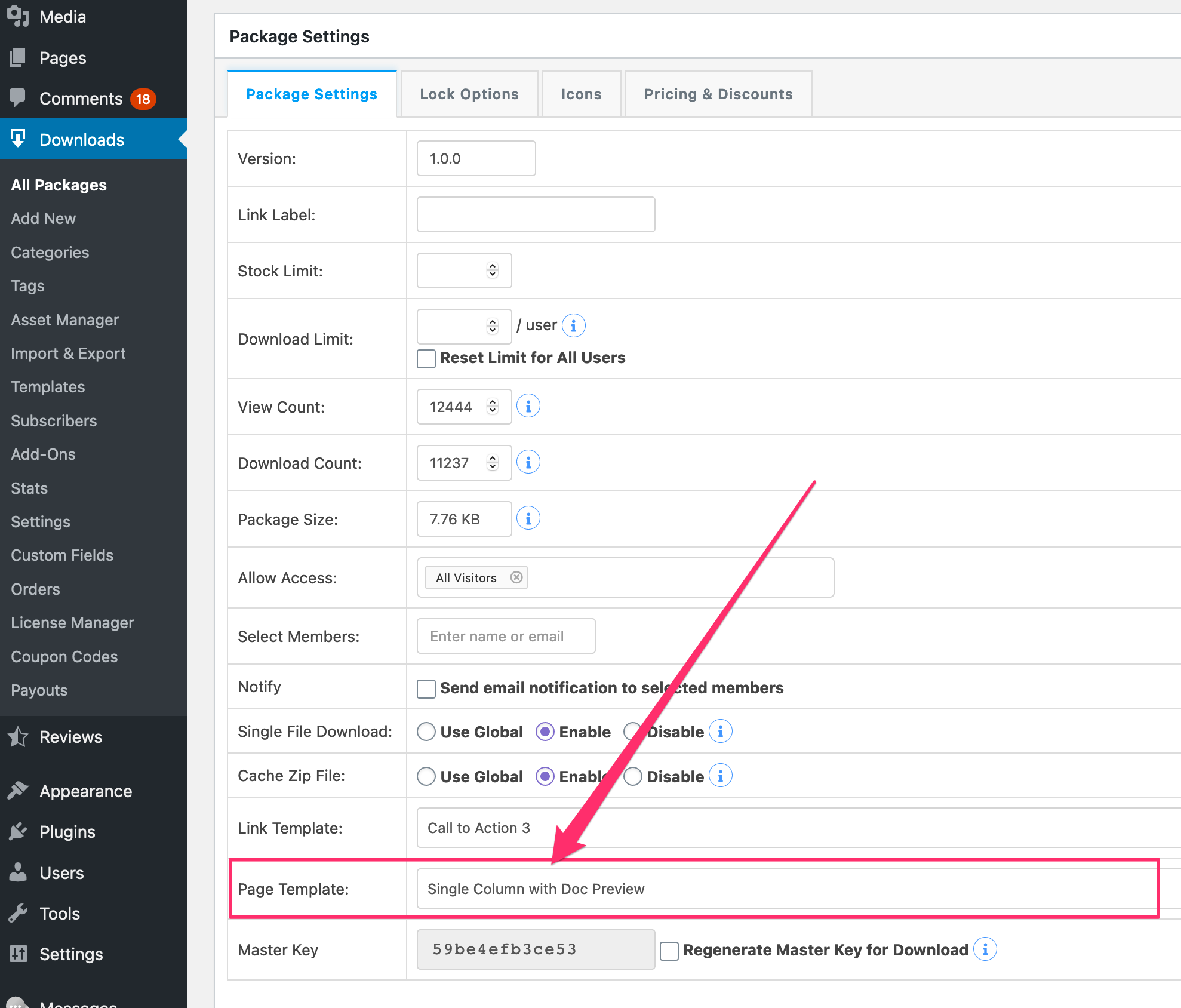
There is a ready to use page template for that view:
Is it possible to have this appear as a link that opens in a modal? Rather than an inline preview?
The feature will be available with the v1.5.0
We would like to have the PDF open in a modal and triggered by a “View” button. Per the example here:
https://try.wpdownloadmanager.com/download/pdf-viewer/
We are using using v3.0
Please advise on how to accomplish this.
Nevermind, I had the incorrect version installed. Once I got 3.05 added, everything works as it should. Great Add-on!
We are looking at purchasing for a client so we can set up a members’ only site but occasionally we would like to allow non-members to access a document. Could we password protect a file but allow members/subscribers to see the file without having to enter a password? Perhaps there’s a better solution? Thanks!
Hi,
Yes, you can do that.
is it work on a big pdf file size. 100 mb
Yes, it works.
Is it possible to edit the viewer so that I can hide the Presentation View? When a user clicks “Presentation View” they can easily print the full-size document. I only want to show them a preview.
Hi, for our site – Downloads files are restricted by password. Will this pdf viewer plugin work with these restrictions. i.e. will non – users not be able to preview pdfs while users will be able to preview pdfs?
Hello,
I just got your plugin, and I’m enjoying a lot so far. One tiny hitch though : the pdf viewer plugin only loads the base wpdm stylesheets… Which means that styling the buttons is impossible. I have found a work around – I mess with the viewer template file and add a line to load my theme stylesheet, chich has the mods I want, but I haven’t been able to create a custom viewer template in my child theme folder, it only works if I mess with the original files… which is something I’d rather not do.
Is there any way we could have the option to load our custom stylesheets ? Or to create viewer template files ?
Thanks !
Hi, for our site – Downloads of files are restricted by password. Will this pdf viewer plugin work with these restrictions. i.e. will non – users not be able to preview pdfs while users will be able to preview pdfs?
You said above ‘may use this viewer to show protect/members-only documents too’. Does this mean it would need some customisation after purchase? I only use protected documents.
I do not have the option “Templates” in my admin panel, how should I create such a new template and use the pdf viewer?
Please post in forum https://www.wpdownloadmanager.com/support/forum/download-manager-pro/ and add temporary wp-admin login info in a private reply, we can help you there to set it up.
Do I have to have the Pro version to use the plugin?
No, it will work fine with the free version too.
It does not work with a pdf, which is protected by terms and conditions. The file will still be downloaded and not displayed.
It actually should work, please post in the forum to check it in your installation.
I added the usage section in the item description above
Is there a tutorial how to use the plugin?
To Preview the PDF, do I need to create & Upload sample PDF separately ? or this addon will create automatically ?
For Example, the PDF has 100 Pages. I would like to show first 10 pages as preview.
01. do I need to create first 10 pages of the PDF and upload as separate file ?
or Automatically, This addon will show first 10 pages of the PDF ?
Please confirm.
Thanks in advance
When I use this with a package with multiple files .. it only shows the first PDF. is there a way to preview other pdf’s in the package?
We shall add multiple file preview option soon.
Hi
I remember i was looking for a plugin https://wordpress.org/support/topic/secured-pdf-plugin/
Can this add-on do this?
Only point 6 i would replace with support Download Manager secure folder.
This addon only can preview a pdf document attached with WPDM Pro package.