

ActiveCampaign Subscription
Version 3.1.1 Download 58 File Size 17.40 KB File Count 1 Create…

WordPress File Hosting & Sharing Plugin for WordPress Download Manager Pro will help you to build a file hosting site like DropBox or Box.com just with few clicks. With this add-on, you can allow your website users to host files from the front-end, get share links or embed code easily.
Separate Shortcode | User Dashboard
Login: demo/demo
[panel title="Version 1.5.1 | Released on May 27, 2022" class="panel-default panel-logs" open="1"]
[/panel]
[panel title="Version 1.5.0 | Released on Aug 21, 2021" class="panel-default panel-logs" open="1"]
[/panel]
[panel title="Version 1.4.0 | Released on May 21, 2020" class="panel-default panel-logs" open="1"]
[/panel]
[panel title="Version 1.3.9 | Released on Apr 05, 2020" class="panel-default panel-logs" open="1"]
[/panel][panel title="Version 1.3.7 | Released on Sep 24, 2019" class="panel-default panel-logs" open="1"]
[/panel][panel title="Version 1.3.6 | Released on May 17, 2019" class="panel-default panel-logs" open="1"]
[/panel][panel title="Version 1.3.5 | Released on Nov 26, 2018" class="panel-default panel-logs" open="1"]
[/panel][panel title="Version 1.3.4 | Released on Sep 21, 2018" class="panel-default panel-logs" open="1"]
[/panel][panel title="Version 1.3.1 | Released on Mar 20, 2018" class="panel-default panel-logs" ]
[/panel][panel title="Version 1.3.0 | Released on Oct 06, 2017" class="panel-default panel-logs"]
[/panel][panel title="Version 1.2.2 | Released on Feb 21, 2017" class="panel-default panel-logs" ]
[/panel][panel title="Version 1.2.0 | Released on Oct 02, 2015" class="panel-default panel-logs"]
[/panel]
Version 3.1.1 Download 58 File Size 17.40 KB File Count 1 Create…

Automatically push email lock leads from WordPress Download Manager to HubSpot CRM.…

Download Version 1.4.0 Download 38606 File Size 7.32 KB File Count 1…

$49.00 — $99.00 Select License Pro For single installation $49.00 Developer Up-to…
25 Comments
The demos do not work. Can they be fixed so I can test it out.
Demo links are active now.
need short code
The shortcode is [wpdm-file-browser], which is also mentioned in the “Usage” section of the product description :).
Hi, I installed the addon but the shortcode prints the following error: “Operation failed!”
Is it because I installed it on a free version of WP Download Manager? I need to upgrade to PRO?
Thanks
Hi,
Yes, it requires WordPress Download Manager Pro or the special pack ( https://www.wpdownloadmanager.com/download/wordpress-download-manager-special-pack/ )
Is there a way to auto protect new uploads? Presently, if a user uploads files, all links and access are public until I restrict access.
I want users to upload files, but then they’re only available for that user, or for admin to access. Will another add-on help with this? I purchased the all add-on pack
Even when I try to manually restrict access to this category to ‘Author’ and ‘admin’, then I purge all my website caches, access site through private browser, and I can still access these files.
Hi,
For now, File Hosting & Sharing Add-on set access to “All Visitors” for packages by default, however, we are adding default value add-on compatibility with the next update of the add-on, then, you will be able to set initial value using the default value add-on. The update is coming within the next week.
Few questions.
-Can we restrict uploads to a specific file type/size?
-Is this compatible with your cloud add-ons, for example, users uploads go to google drive?
Hi,
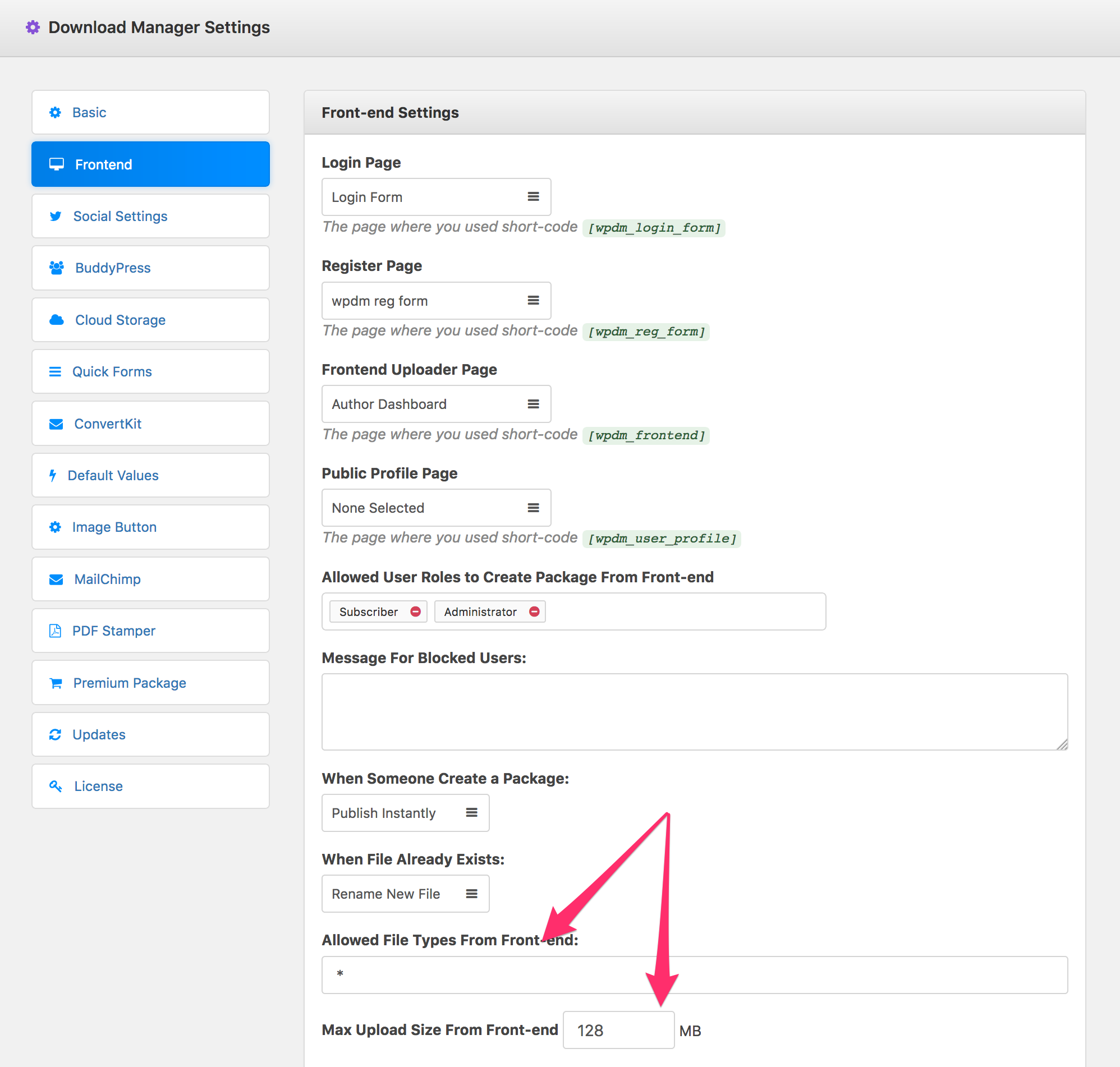
— Yes, you can restrict file type/size from wpdm settings:
— Sorry, not yet.
Hi, I have a client who needs to give his clients access to documents. Each client will have a folder with their data, for example company xx, from that folder there will be more subfolders, year, quarters, etc.
If there was a client there would be no problems, the problem comes when there are more than 300 and I want it to be managed well, without having to put the information file by file, but upload to the server and place the documents as they are on the computer and that the only thing that has to be closed is the access to the first category / folder so that nobody can see the content except the client owner of those documents.
Is it possible with this plugin?
Thank you
Actually, you don’t even need this addon, but you will need advanced access control addon ( http://www.wpdownloadmanager.com/download/advanced-access-control/ ) and wpdm pro to do that. You simply need to follow the steps:
1. Create a dir inside `/download-manager-files/` with your client name.
2. Create package and attach the dir
3. Assign the package to that client ( https://youtu.be/Vnincz-xlVs )
4. At share the package with your client, after login, only the client will be able to access to that package ( https://www.youtube.com/watch?v=UWIOIbN8IOo )
I purchased this to try with the wp download manager free but the short code is just giving me a red error. Do I need to purchase the Pro version to use this?
Yes.
I purchased this. It is only previewing 10 of my 50 downloads on the frontend. How do I change this??/
Sorry for the issue, update with the fix is coming within next 48 hours.
I purchased this add-on. When I click “New Package” or “New Folder” I get a darkened screen and I am not able to upload anything. Please help ASAP.
Nevermind. Theme issue. Resolved.
Hi is there the ability to keep this private just for editors? I want to use this more as an easier way for the web editor to click on categories and upload or delete files in that category.
Yes, you can control access from Download Manager Settings >> Frontend tab
Oh and is folders the same as categories. Is this linked to the general Documents Downloads List?
Yes, Folders are same as categories and they are linked to downloads list. Each user will have his own category base.
Thank you for this add-on. I need a little more information on how to show files using the [wpdm-file-browser] shortcode. I have a multisite and want to host common files on one of the sites and then pull the tree for them on a sidebar on other sites. How would I go about doing this using your shortcodes?
Sorry, that is not possible, you can share single package, not a complete tree, anyhow we have noted it for future implementation.