

Linked Products
Version Download 4 File Size 42.11 KB File Count 1 Create Date…

Advanced CSV Importer add-on for WordPress Download Manager will give you the easy way to import CSV files with a field mapping option.
Usage Steps:


[panel title="Version 2.6.0 | Released on Apr 9, 2017" class="panel-default panel-logs" open="1"]
[/panel]
Version Download 4 File Size 42.11 KB File Count 1 Create Date…

Version 1.1.0 Download 6 File Size 175.87 KB File Count 1 Create…

Version wp.org Download 36228 File Size 31.63 KB File Count 1 Create…

Version 1.0.0 Download 6 File Size 159.51 KB File Count 1 Create…
14 Comments
Hi
This plugin is not importing tags
Hi!,
I am trying to upload a csv formatted the same way as the sample.csv file. For the file path, I am trying to to put an external link but when I upload the csv file it doesn’t work properly. The url gets changed to a set of random character.
Hi
I am interested in this plugin to want to clear 1 point. Can this plugin upload files via CSV file?
hi
Is It possible to bulk update current packages with this add-on?
You can use the Default Values add-on to bulk update package settings
When I import the does the featured image, package file and tags also imported?
Yes, if you use those fields, they will be imported too.
Will it works with custom field?
I have added some custom fields to your download CPT, and is looking for a CSV solution…
Yes, it will work with custom fields.
@shaon
I am getting the following error:
Fatal error: Allowed memory size of 268435456 bytes exhausted (tried to allocate 79 bytes) in /mnt/data/vhosts/casite-668856.cloudaccess.net/httpdocs/wp-content/plugins/wpdm-csv-importer/templates/process-file.php on line 242
My CSV is 4.4MB
1. Please check Memory Limit in your server’s PHP setting and increase it. Or use smaller csv file.
2. Also make sure non of your plugin forcing memory limit using `ini_set(‘memory_limit’, ‘256M’)`
3. You can increase memory limit from wp-config.php file too. Check this link for more info http://codex.wordpress.org/Editing_wp-config.php#Increasing_memory_allocated_to_PHP
sample csv file can be downloaded from Bulk Import menu:
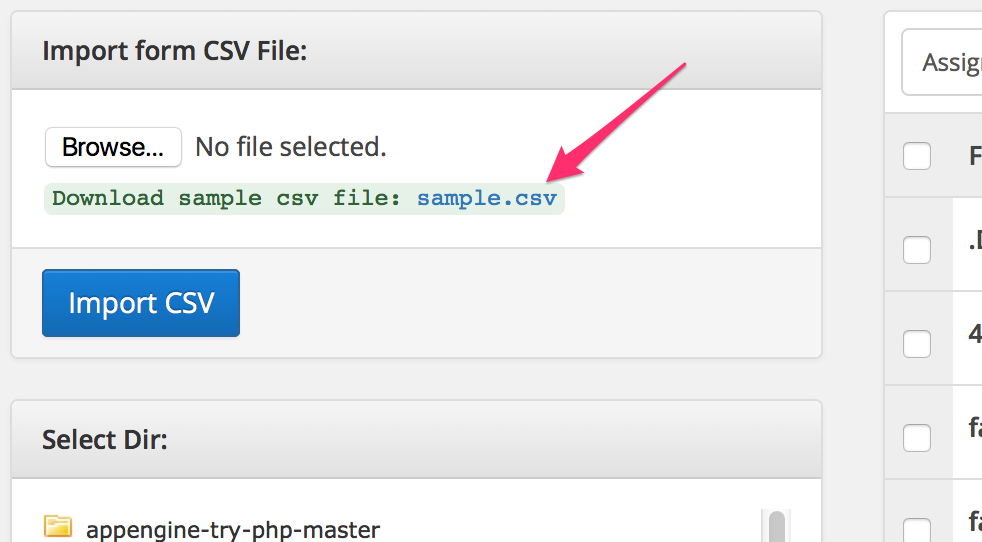
Where can I find the Sample CSV file?
Will this add-on allow me to assign access to individual users? (I am using the Advanced Access add-on, btw.)