

Advisors Excel
Forum Replies Created

Hey Nayeem, I’m not asking if it works as expected on your site…I’m wondering if you were able to replicate the issue we are experiencing while you were logged into our site. Confirmation that you saw what we see would be helpful.
Turning off plugins is going to be difficult for us to do. I can try to find an opportunity to do this, but if there’s a chance you know what plugins or types of plugins I should maybe be focusing on, that would help. Every plugin on our site is essential, so if this is a conflict of some kind, I’m interested to know what the process is moving forward…can we be refunded for the inability to use your add-on, or will you work to provide a fix for it?
This issue has persisted for a very long time and our thread alone has been going on for weeks with very little movement toward a solution. Is there anyone else on your team like a team authority that we can loop in here to ensure we aren’t missing anything? We’d really love a second opinion on this issue.
I’m not sure what I’m looking at exactly with the link you provided. But were you able to replicate the counting error on our site? Because our site is live and I don’t have a staging environment to test with, turning off plugins/themes is going to be difficult to accomplish. I’ll have to find time after hours to do this testing. It would be nice to know if you saw the error yourself on our site at least though.
Okay, so I deactivated the plugin and turned your test package to draft because it is during business hours and I don’t want users getting download limit errors. When I am finished testing, I have to deactivate the plugin because users are getting limits even when their role doesn’t have any limits set. The test package was showing up in our recently added packages. We get thousands of page views a day so I don’t want to confuse users with packages that aren’t real.
I’m not able to turn on that column in the users panel unless the add-on is activated, but I turned it off.
I think it may be tied to the fact that you only have one role assigned as an administrator. Our users have to have multiple roles for the way that we do business. When a user with more than one role downloads, it counts as multiple.
So far this does appear to be fixed. Thank you so so much, Shahjada!
Hey Nayeem,
I’m afraid maybe we aren’t talking about the same issue. This is in regards to the Download Limits plugin, not downloads on the package itself. Are you activating that plugin for your testing? Currently it is deactivated as it isn’t working correctly at all, so I have to test with it outside of business hours. Please if you haven’t clicked through these examples, check them out as they are extremely helpful in understanding what is happening:
Nothing with your login credentials has changed. I tested them and they are working fine. Please make sure you are using the provided backdoor URL.
No, I checked and it is still not working. I didn’t take the time to document what is happening because it is the same as what I’ve already spent time documenting. If you haven’t taken the time to click through these, they would be very helpful in understanding the issue.
- https://proofs.advisorsexcel.com/2024/weekly-dbr/i/download-limits-09.05.2024.pdf
- https://proofs.advisorsexcel.com/2024/weekly-dbr/i/download-limits-09.05.2024_unique-only.pdf
There’s no need to create new test packages as this is occurring sitewide on all packages. The issue is actually multiplied when switching between packages. That’s when it seems to count multiple times. Once downloading the same pacakage back-to-back, those seem to count as one download, but moving between packages will count anywhere from 2-4 downloads.
We will test and confirm. Thanks, Shahjada.
I am only online from 8am-5pm CST, so I didn’t see your message. You have permission to look into this outside of the 6am-8pm CST timeframe.
Yes, views are counting towards downloads. And the downloads aren’t counting properly. As you’ll see in the provided examples, sometimes a view or download will register as 3 downloads.
- https://proofs.advisorsexcel.com/2024/weekly-dbr/i/download-limits-09.05.2024.pdf
- https://proofs.advisorsexcel.com/2024/weekly-dbr/i/download-limits-09.05.2024_unique-only.pdf
We are using multiple roles on our site and most users have more than one of these roles applied. I don’t know if somehow that is contributing to the triple counting, but I haven’t been able to test and get any kind of consistent experience yet, but it does count wrong every time even if it doesn’t do it the same way consistently.
Yes please. Thanks for jumping in Tahasin. Let me know what you need from me. There’s a lot of history here to catch up on, but I am happy to provide any screenshots you may need.
Revisiting this topic as it has not been resolved. I closed your access to our site awhile back in order to keep it secure. I don’t want to open another topic as I’ve already opened two an I think the history here of the issue is relevant. However, if I don’t get a response, I guess I’ll start this process over. I first reached out about this issue a year and a half ago and it has not been fixed nor has anyone been engaged in communication about the issue which is extremely frustrating.
Thanks! I got it!
Hi Nayeem, it is a longstanding issue that you assisted with in the past. We just have too many site views which creates some issues with PDF Viewer working. I’m just looking for a solution on our most visited packages that will allow us to reduce the number of fetch requests and using an iframe seems to work for what we are looking for. Is there a way to build a shortcode of my own that works like the [file_list] one? I realize it is meant for multiple files, but we aren’t going to be using it that way, so if I could strip out the code that removes it from my URL string, that would be awesome.
We tried making our own with some php and it places into the template perfectly on its own, but when I add it to the src url of an iframe, it doesn’t read the shortcode at all:
<iframe src="[wpdm_url_ae]" style="width: 100%; height: 400px; border: none;"></iframe>
#document (https://resources.advisorsexcel.com/resource/test-package/[wpdm_url_ae])Thanks, Shahjada. We may pursue this add-on. No one has told us about this option.
Looks to be working now! Thanks, Nayeem!
Hi Nayeem! So I’ve implemented this code and it is working, but once I select that choice in my filter it reverts to the original name. Any idea why that might be?
So, it is changing everywhere on the admin side, but on the frontend where I am trying to call that post type in my filters, it still auto-displays that post type name as “Downloads” instead of “Resources.” You can see in this screenshot: https://dbr2.flywheelsites.com/wp-content/uploads/2024/07/downloads-filter.png
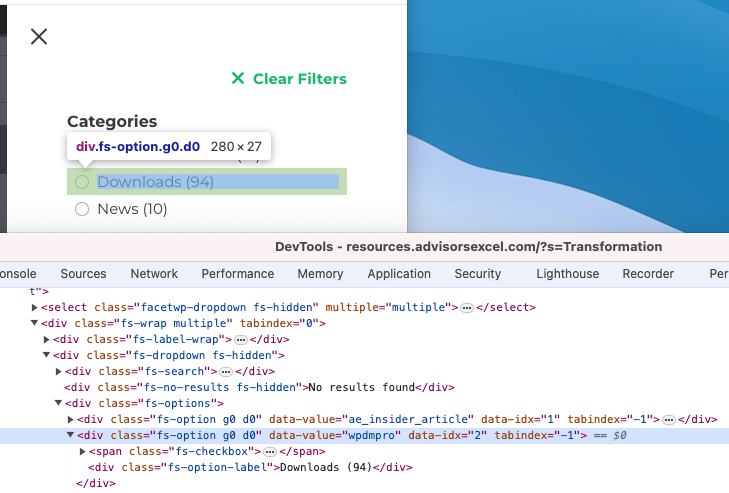
I did the same method to turn the “Posts” post type to “News” and that worked, as you can see.
Thanks for the update. My concern is that we get a lot of site traffic. Is there potential that the number of hits are causing issues that your other customers are not experiencing because they don’t have the same volume of traffic?
With the increase to our database, we are running optimally now, but we would love to not have to increase that for the WPDM plugin to function correctly under strain.