
Forum Replies Created

Thank you so much, Nayeem. Can you tell me why the search bar doesn’t work? If I search for “paw” as in the first package, it will return “no packages found” results. Thank you.
Yes. If I change items_per_page to the number 9, the code seemed to work and all pages of the category shortcode functioned. If I use anything other than 9 there are several pages that return a 404 error.
Yes, that is the page. Password was given in a hidden comment.
The current, custome theme I am using right now does not give the error. I switched to 2022 theme to test, as per your instructions above, and when I get to page 3 on the pagination for the category ID shortcode, the front end switches from my blog to a whole screen WordPress error that “the website has encountered a fatal error” on the front end.
If I change the shortcode to only display a maximum of 9 items, all pages funtion. I have over 19 pages so it would be nice to be able to increase this number.
Upon further troubleshooting, it appears that 9 items per page are the maximum number for the shortcode to function correctly. Any idea why this is? With over 19 pages this way it makes for so much scrolling. It would be lovely if that number could double. Ideally 21 or 24 items per page.
Hi Nayeem, I have disabled all plugins and the problem still exists. I switched themes and received the error “this website has encountered a critical error” message for pages 3-5 of the category shortcode section.
I have narrowed it down to the [download_link] shortcode. If I update that shortcode in my template to [download_link_extended] the form works and downloads correctly, however, I do not want that extended information always showing. I also don’t know how to troubleshoot the [download_link] shortcode.
I tested other templates (yours not custom) and all the ones with [download_link] cause the problem for me.
I see that it is working for you but it is not working for me nor any of my readers. These are the comments just from about 5 minutes’ worth of time. Something is still not working. I have had friends try also and they get the same error and I have seen this same error several times in the forum. I have updated browsers, templates, themes, plugins. I have cleared caches, deactivated all plugins, changed themes, everything, and nothing is working.
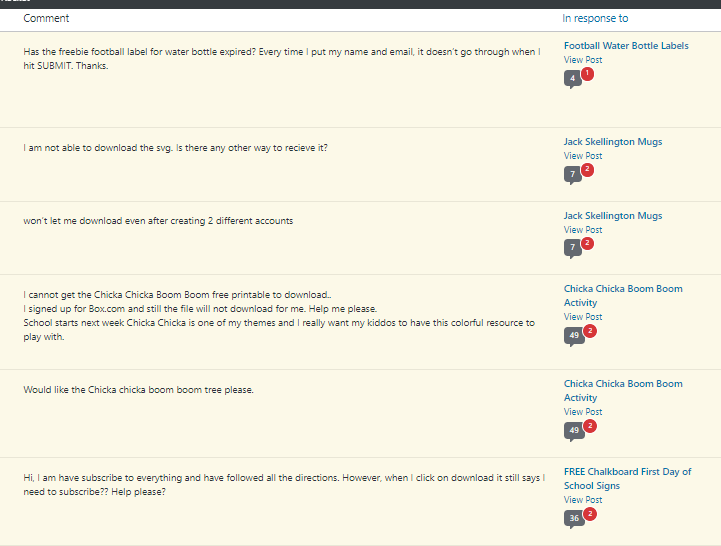
It doesn’t work on Edge or Safari either!!! My inbox is full of angry readers and I have no idea how to help them. Can someone else please look at this? I am updated to 6.0.7. I am so frustrated.
Hi Humayon,
Here is what I have tried:
1. Updated to the current version of WPDM = no success
2. Updated Chrome browser (also Firefox) = no success on either
3. Deactivated all my plugins leaving only WPDM active = no success
4. Changed my template from my custom to Call to Action 4 = no success
5. Cleared all caches multiple times = no success
6. Changed my theme = no success
Please see this screencast for both Chrome and Firefox.
Hi Humayon,
I saw your screencast however it still is not working for me. I have cleared my browser’s cache as well as my site’s cache. I have even disabled my cache plugin and still no luck. I have tried Chrome and Firefox and the form still does not move forward it just cycles back to itself. I have so many angry readers, I am really hoping you can help.
Hi Humayon,
All of my add-ons were updated before I opened this ticket.
I am having this problem on all of my packages but here is a URL for reference: https://www.thatswhatchesaid.net/free-rainbow-svg-files/
Also, my categories are not pulling up either as this page is supposed to pull a category and display and you can see it is blank: https://www.thatswhatchesaid.net/printable-downloads/
I will send login information as well as password for the password-protected page so you can see what I am talking about in the next comment.
Thanks
I am using WordPress Version 5.7.2 but the issues did not start until I did the most recent update to WordPress Download Manager. Thanks!
Yes, NEW insertions are working perfectly. The issue was all my existing packages that were inserted using the WPDM Package Gutenberg block. All of those blocks were broken after the latest update.
Packages inserted with shortcode were fine but on the packages that used the WPDM package block, those were all broken. I have spent the day going back and updating them all to the shortcode. It was a huge mess and pain.
If I insert the packages as shortcode, they work. The Errors are all when I used the WPDM Gutenberg blocks to place the package download links. I attached an image from the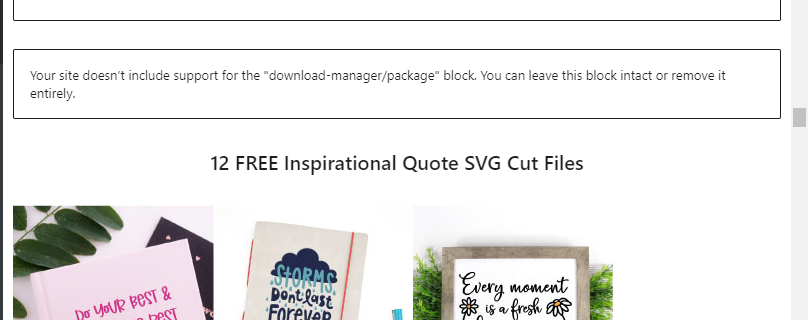 back end with the error. Everything is up to date.
Any update on the missing download blocks?
In my post, I am getting a “Your site doesn’t include support for the “download-manager/package” block. You can leave this block intact or remove it entirely”
I am updated to the newest version and have the Gutenberg block add-in installed and updated. Manually updating all my posts with packages is going to be a huge pain and I have angry readers.