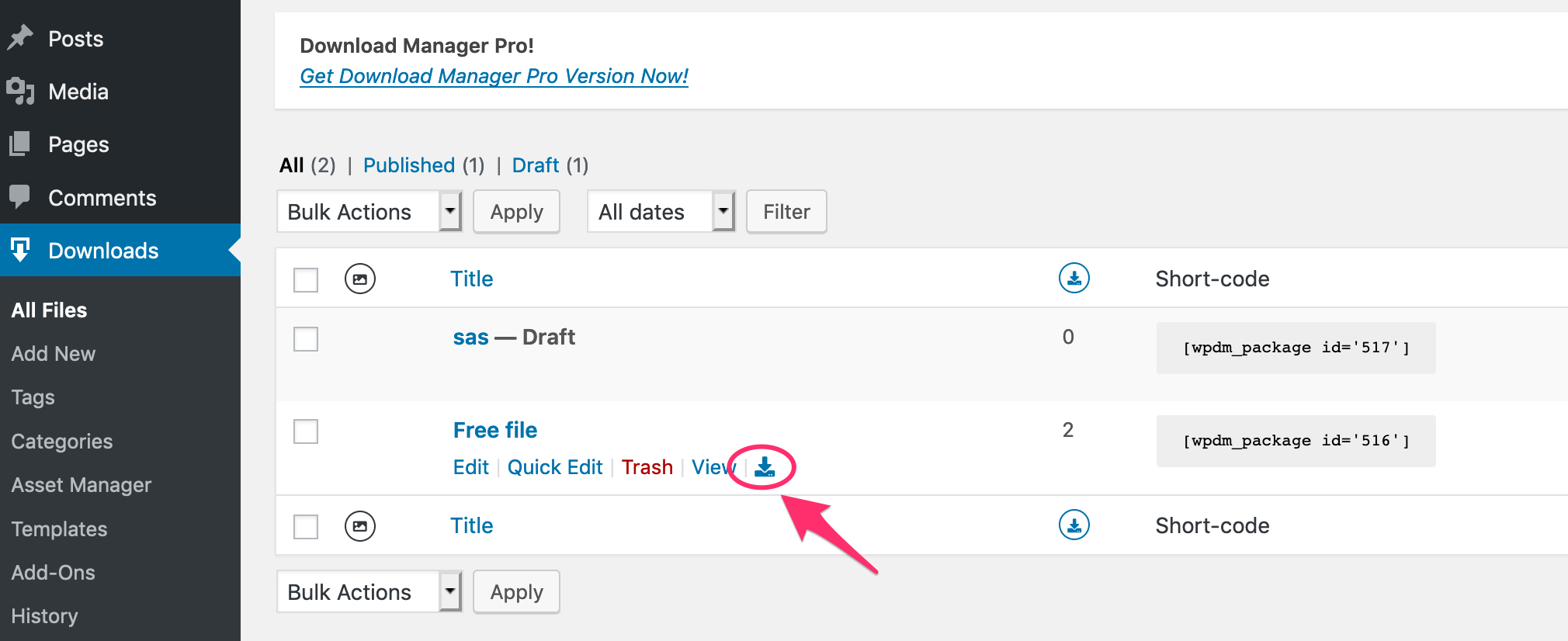
It is not possible yet to use a link tag in the submit message. But noted for implementation.
Currently, You can use the link directly Thank you for requesting the file. If the download fails, please try this URL https://pocketprograms.com/erp-scale_alt_server
Hi,
I set up a download using a URL to Amazon S3.
Two things bother me:
1) I still must make the file on Amazon S3 public accessible, which I do not prefer.
2) Once I click the download button it opens the PDF in the browser displaying the full URL to S3.
How do I prevent this?
See my test page: https://financienvoorondernemers.nl/testpage/
Hi,
Please remove the key from the old site. Go to your order details page from purchases tab and click the ‘Key’ icon. A modal with license key and linked sites will appear. Remove the key from the old site. Then copy the key and save it on your new site.
Thanks.
hello!
howto creat template, when click to link download will open new tab?
This reply has been marked as private.
Masterkey bypasses all locks to provide the direct download link.
I added the Constant Contact credentials and can see the list of our contact lists, and selected the one I wanted to connect to the Email Lock but I don’t see the dropdown menu in the Email Lock section where I can select the list I want to link to. None of the email addresses that input into the ‘subscribe to download” field on the page are being transferred over to our Constant Contact list. Any ideas?
It is not possible from the server-side. There is a Javascript work-around. You can replace the [download_link] template tag in your link/page template with the following code. This will initiate the download and then redirect to the REDIRECT_URL Replace the REDIRECT_URL with your external URL.
<a class="wpdm-download-link btn btn-primary" href="#" onclick="window.open('[download_url]', '_blank');location.href='REDIRECT_URL'; return false;">Download</a>
You have to use a custom link template to modify the link in the package title. Currently, it is using the [page_link], to open the file directly replace that with <a href="[download_url]">[title]</a>
You can clone the link template from the Downloads > Templates page. Send temporary wp-admin login info in private reply if you need help with that.
We will review the implementation of a hook to change the page template on the fly. In the meantime, I have a suggestion for your membership area implementation. Instead of linking to the details page, use a shortcode with link-template which will provide instant download without visiting the package details page. This will make things easier for your members.
Is it possible to include links in the text of the submit message of the email lock?
e.g. Thank you for requesting the file. If the download fails, please try our alternative download server
Hi,
this is the short code:
[wpdm_category id="erp-scale-pse" tags="web" cols="1" order_by="name" toolbar=1 desc=1 item_per_page=10 template="link-template-calltoaction3.php"]
For your information: Each time we create a new version of our software, we create a new category which is version specific. e.g. erp-scale-pse-v4-0-2-b19233. We then make the parent of the new category (erp-scale-pse-v4-0-2-b19233) the category erp-scale-pse. This automatically displays the latest release on our main download page. When the next version is released, we change the parent of category erp-scale-pse-v4-0-2-b19233 to the the category old-releases. Using this we can quickly move versions between the current release page and old releases pages.
Note: On the old releases page we currently add each previous release individually in a separate block with a separate short code. It would be great if we could get a similar layout by just adding the “old-release” category and the child categories are automatically listed as a separate block with the category title as header and the files listed within the block.
Thanks for your help
Ian
I would like allow logged in users to be able to click the package link and be taken directly to the pdf/doc file, instead of them going to the intermediary page where they then click download. Is there a way to do this?
Hi – we are on 4.9.7. Can you give me a link to download 4.9.8? We are not able to commit time to testing to update to 5 yet but need to get the single file download link working again.
Thanks,
Julia
Is it possible to create a link to download a pdf that I have in WPDM? Basically, for my use situation, none of the templates work. I would like to have a direct link to download the file and have the download count in the stats.
Is this possible? The “Only Link/Button” gives me a button, not a link.
The use situation is having the link in show notes for a podcast feed. (to be clear, I’m talking about getting a download link for a PDF, not for the podcast audio)
Hello, I am using WP Download Manager Pro with the PDF Viewer Add-On. I have created a custom link template which allows a user to download a file or click on a custom link which opens a Modal window displaying the PDF of the document. The PDF view is managed using a custom page template assigned to each PDF. This works great. The issue I am running into is that my client would like to have a mix of PDFs and non-PDF documents in the same category. As I can only use the one Link Template when using the category shortcode, all downloads including those that are not PDFs have the Preview button. I am going to create a “Sorry no Preview Available” page template and assign it to the non-PDF downloads as a short term solution. Ideally I would like to not display the Preview link if the download is not a PDF. Does the WPDM template builder allow for custom PHP code? If so, within a template is there a way to look up a download’s file name extension?
Thank you for your time!
Please update the “Button Template Clone” with the following code. Adjust the image src to set your own image.
<a class="wpdm-download-link" href="[download_url]"><img src="https://img.icons8.com/nolan/50/000000/download.png"></a>
Hi,
I set up Download manager to activate in wordpress from my website, it runs https secured, so whe I create a new file and upload the file.zip very light an I make to link my page, so far it’s good but when I test to download my file.zip in my computer it works for downloading but in at the end it says it can’t open the file.zip because it says “it is rarely downloaded” and it might contain virus from modification or other. I don’t understand what is wrong ? Please help me, how to fix that problem? What i am missing for setting ?
I use last Firefox, windows 10 and last wordpress.
I used the download code that you suggested me:
<a class="wpdm-download-link btn btn-info" href="[wpdm_package id='8396']">Donwload</a>
In the previous message was not readable as code.
Thanks
Hello.
I downloaded DM to trial it out and linked it to my website store. I no longer want to use it, for now, and when I uninstalled it, an error keeps appearing telling me that I need to have it installed for WPDM – Premium Packages plugin to work. But I don’t want either, and I can’t find WPDM – Premium Packages plugin on my list of plugins.
Can someone help me? This plugin is sending customers an email after purchasing the one file I trialled with, and I want to make sure it is not interfering with the rest of my store. Thanks for your help,
Jami
This reply has been marked as private.
This is my code:
[wpdm_all_packages items_per_page="5" order_by="publish_date" order="DESC" cols="title,package_size|download_count|publish_date|download_link" colheads="Dokument|Broj preuzetih dokumenata|Datum|Preuzeti"]
how to change color of text inside rows to be diferent with one in header?
One of your plugin is breaking the download URL when using [download_link] tag.
http://prntscr.com/pe1v0m
I have cloned Button template to create a new template with the following code. And that fixed the issue.
<a class="wpdm-download-link btn btn-info" href="[download_url]">Donwload</a>
Updated the pacakge with the new Link Template “Button Template Clone”. Try the download link in this page https://www.prounione.it/en/ecumenism/wpcu/2020-week-prayer-christian-unity/
Hi,
Use the first link without the master key,
http://www.fensor.com/download/mbw-t12/?wpdmdl=4125
Thanks.