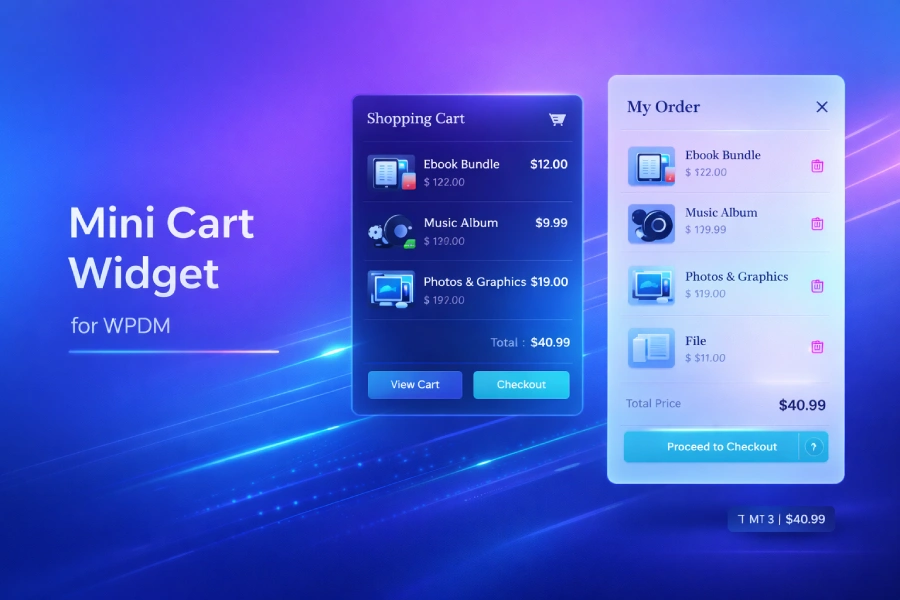
We’re excited to announce Premium Packages 6.2.0, a major update that brings powerful new features to enhance your WordPress digital store. This release introduces the highly-requested Mini Cart Widget and a convenient Customer Export feature, making it easier than ever to sell digital products and manage your customers.
What’s New in Premium Packages 6.2.0
Whether you’re selling software, ebooks, music, themes, plugins, or any other digital goods, these new features will significantly improve your customers’ shopping experience and streamline your workflow.
Mini Cart Widget: A Modern Shopping Experience
The star of this release is the brand new Mini Cart Widget. This modern, responsive shopping cart component gives your customers instant access to their cart from anywhere on your site – no more navigating away to check what’s in their basket.
Three Flexible Display Styles
The Mini Cart comes with three display options to match your site’s design:
- Dropdown: A compact dropdown that appears when customers hover or click the cart icon – perfect for header integration
- Slide Panel: A sleek side panel that slides in from the edge of the screen, offering more space for cart details
- Floating Button: A fixed-position cart button that stays visible as customers browse, with a badge showing the item count
Easy Integration Options
We’ve made it incredibly easy to add the Mini Cart to your WordPress site. Choose the method that works best for you:
1. Auto-Inject (Easiest)
Simply enable the “Auto Inject” option in settings, and the Mini Cart will automatically appear on your site. No coding required!
2. Shortcode
Use the shortcode to place the Mini Cart anywhere in your pages, posts, or widgets:
[*wpdmpp_mini_cart]You can also customize it with attributes:
[*wpdmpp_mini_cart style="floating" position="bottom-right"]3. Navigation Menu Integration
This is perfect for theme compatibility! Add the Mini Cart to any WordPress navigation menu without editing any code:
- Go to Appearance → Menus in your WordPress admin
- Add a Custom Link to your menu (URL: #, Link Text: Cart)
- Enable “CSS Classes” in Screen Options if not visible
- Add the CSS class
wpdmpp-minicartto the menu item - Save your menu
That’s it! The menu item will automatically transform into a fully functional Mini Cart with icon, item count, and total price.
Real-Time Cart Updates
The Mini Cart uses a modern REST API to provide instant updates. When customers add or remove items, the cart updates immediately without page reloads. This creates a smooth, app-like shopping experience that customers expect from modern eCommerce sites.
Mobile-Optimized Design
We’ve paid special attention to mobile users. On smaller screens, the Mini Cart automatically switches to a full-screen mode that slides up from the bottom, making it easy to view cart contents and proceed to checkout on any device.
Fully Customizable
Match the Mini Cart to your brand with customizable options:
- Primary color for buttons and accents
- Badge color for the item count
- Position options (top-right, top-left, bottom-right, bottom-left)
- Toggle item count and subtotal display
- Show/hide product thumbnails
- Auto-open behavior when items are added
- Configurable auto-close delay
Customer Export: Manage Your Buyers Efficiently
The second major feature in this release is the Customer Export option, now available directly on the product/package edit page.
With a single click, you can export a complete list of customers who have purchased a specific product. The CSV export includes order details, making it perfect for:
- Email marketing: Import customers into your email marketing platform for targeted campaigns
- Customer support: Quickly identify and reach out to buyers of specific products
- Analytics: Analyze purchasing patterns and customer demographics
- Product updates: Notify customers about new versions or related products
- License management: Track who has purchased licenses for your software
Configure Your Mini Cart
After updating, configure your new Mini Cart:
- Go to Downloads → Settings → Premium Packages
- Find the Mini Cart settings panel
- Enable the Mini Cart and choose your preferred display style
- Customize colors and behavior options
- Save your settings
Complete Changelog for 6.2.0
- NEW: Mini Cart Widget with three display styles (dropdown, slide panel, floating)
- Added Mini Cart shortcode
- Added Mini Cart nav menu integration using CSS class
wpdmpp-minicart - Added Mini Cart REST API endpoints for real-time cart updates
- Added comprehensive Mini Cart settings panel with color customization
- Added mobile-optimized full-screen cart mode
- Added customer export option on product edit page – export customer list with order details as CSV
- Improved overall shopping experience with instant cart feedback
What’s Next?
We’re constantly working to improve Premium Packages and make it the best WordPress eCommerce solution for selling digital products. Stay tuned for more updates, and don’t hesitate to reach out to our support team if you have any questions or feature requests.
Thank you for choosing WordPress Download Manager and Premium Packages for your digital store!