Advanced Access Control
Price: $[price] $49.00 — $99.00 Select License Pro For single installation $49.00…

Let your visitors handpick exactly what they need. File Cart transforms your download site into a personalized experience where users can browse multiple packages, select individual files, and download them all together as a single custom bundle.
[ file_list] tag in your page templateNote: File Cart works with unlocked, publicly accessible packages. For gated content, users must first unlock the package before adding files to their cart.
Shortcode: [wpdm_file_cart] — Display the cart on any page outside the user dashboard.
Price: $[price] $49.00 — $99.00 Select License Pro For single installation $49.00…

$59.00 — $149.00 Select License Pro For single installation $59.00 Business For…

$59.00 — $149.00 Select License Pro For single installation $59.00 Developer Up-to…

$39.00 — $99.00 Select License Pro For single installation $39.00 Developer Up-to…
39 Comments
Hello,
is it possible to place the File Cart button with the file counter on the right side of the page in the menu?
May you please show me in a screenshot or a mockup.
Hello Shahjada,
Unfortunately i do not have the option to add a screenshot in the comment section.
Basically i would like to place the file cart button on the right side of the page in the navigation menu.
Would that be possible? Is there a widget or a shortcode for that?
I have created a mock up with Adobe XD, you can view the example here: https://xd.adobe.com/view/a7705da9-8733-4649-b45d-cfc7122669d1-f223/
That will require some customization. You may contact our customization team https://www.wpdownloadmanager.com/download/custom-upgrade-service/
Is it possible to make the File Cart A Widget? So that it can be added to the header to show the count of files instead of the floating “cart” on the side?
We shall add a widget option with the next update.
hi,
How can I turn off the button of “email this cart” ??
Hey,
so this request was initially from 2019 and now 2022 still no option to disable floating bar?
I would like to see the possibility to enable this floating bar only for logged in users (maybe even select user roles for which it should be enabled).
We don’t make use of a user dashboard page so the floating bar would be an good option if those conditions would be met.
thanks!
it is available now.
Hi! How can I remove the fixed sidebar button from file cart in a page? (the one that drives the user to the file cart page at the top right corner of the page?)
No option yet to deactivate the floating buttons. You can remove it manually from
wpdm-file-cart.phpfile line 76. We will add an option in the next release to show/hide this panel.do you mean line 76 ? fcinit(); ? or line 78?
No, remove the `w3eden` div above it. http://prntscr.com/ph90lc
Hey there! Any option yet to deactivate floating buttons?
In the file cart instead of [SUNSET.JPG] etc I want to show the title set for that download, e.g.
[SUNSET IMAGE]
Is this variable available to output in the cart? If so what is it called?
many thanks!
Sorry I’ve fixed this now, what I want to extract is the text added for the download in the rich text editor under the title…
I’m using a link template with the checkboxes for each item to ‘add to cart’ – how on earth do I output/display the ‘download all’ button that downloads all of the items checked/selected?
Thanks
You can access to cart page in 2 ways,
#1, you can use short-code
[wpdm_file_cart], if you want to keep that page public#2, otherwise, logged in users can access to that page from
User Dashboard >> File CartThanks for the prompt reply, that works great.
I’ve added the shortcode underneath the items on the same page. Is there an option to auto-show the cart once a user has added something to it? At present I need to fully reload the page to view the cart and it’s contents.
Many thanks
Auto-show is not possible for now.
Will this work with the Form Lock add-on. I mean will the users be able to select the files they want within the form that needs to be validated before the custom download starts? Thanks
sorry, not yet, but added the feature in our to do list.
What exactly do you mean by “File Cart will not work for locked/private packages.” Are you referring to locked files or files posted to a members only area (using BuddyPress)?
You can lock downloads using one of WPDM’s lock options ( EMail,Password, Social etc ). Here locked packages term are refereed to those packages that used one of WPDM lock.
Is there a possibility to add the [file_list] to a custom Page template? I’d like to be able to add an entire package to the file cart.
I found the solution that I was looking for but now I have another question that I hope will be answered soon.
Currently I have my page list the items they can add to the cart, is there a way to have the cart auto load the selected items instead of requiring a refresh for the items to show up in the cart? Possibly through AJAX
User have to go to the file cart page to download the product, so page reload happening anyway.
If user opens cart page and then adds more file, those files are also added to package , even he does not refresh the page before download.
However, showing added files in second case would be a nice feature, so noted for implementation.
Will this plugin’s functionality integrate with the email sharing in the File Hosting and Sharing Plugin? I need the ability to have people add downloads to their cart and then email them to a third party.
Sorry, no, but noted for implementation.
Hi, is there already any progress on that item?
Will be available with the next update of the add-on.
Hi!
Is it possible to have the + or Add to Cart button aapear when I’m using the [wpdm-all-packages] shortcode on a regular WP page? My client wants the sortable/searchebale files list.
[wpdm-all-packages jstable="1"]
Thanks!
Sorry, that is not possible as the short-code doesn’t show individual files from a packages.
What is the shortcode for the ‘Add to Cart’ button???
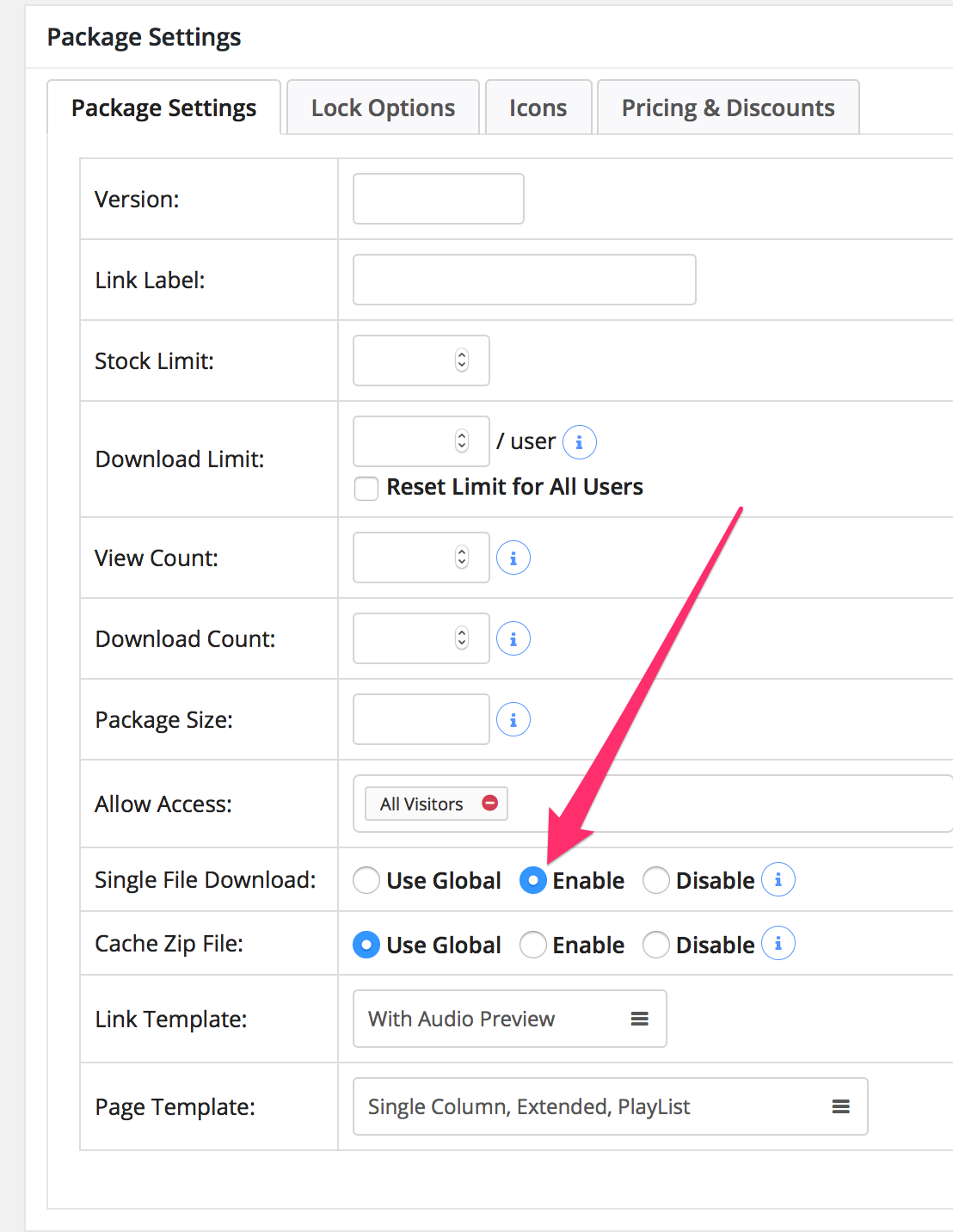
Please enable individual file download and keep [file_list] tag in your page template. No other separate short-code/tag is needed there.
“Now other separate”…? “No other separate”? No other separate what? 🙁 I tried adding [file_list] to both my link/page template. It didn’t help. It just added the file list in each case *laughs*.
Does this addon require the latest version of the plugin to be installed? (4.5.3) I’m currently on (4.5.0).
Actually, no, I was on 4.4.0. But we’ll try upgrading now.
Sorry, I meant “No other separate short-code/tag”, it will work file with 4.5.0, please post in forum http://www.wpdownloadmanager.com/support/forum/download-manager-pro/ , we shall help you there with the setup. However, please check if “Single File Download:” is disabled, the option should be enabled.