
Checking your download statistics shouldn’t require logging into WordPress every day. What if your site could send you a beautifully formatted report showing exactly what’s happening with your downloads — automatically?
That’s exactly what the new Activity Reports feature does. Available in Download Manager Pro 7.2.0, you can now receive comprehensive download analytics directly in your inbox, on your schedule.
Why Email Reports Matter for Digital Asset Management
If you’re managing file downloads on WordPress, staying on top of your metrics is crucial. Whether you’re tracking:
- Which documents get downloaded most
- How your download numbers compare week over week
- Who your most active users are
- Which categories drive the most engagement
…doing this manually takes time. Time you could spend creating content, serving customers, or growing your business.
Activity Reports automate this entire process. Set it once, and get actionable insights delivered to you — without lifting a finger.
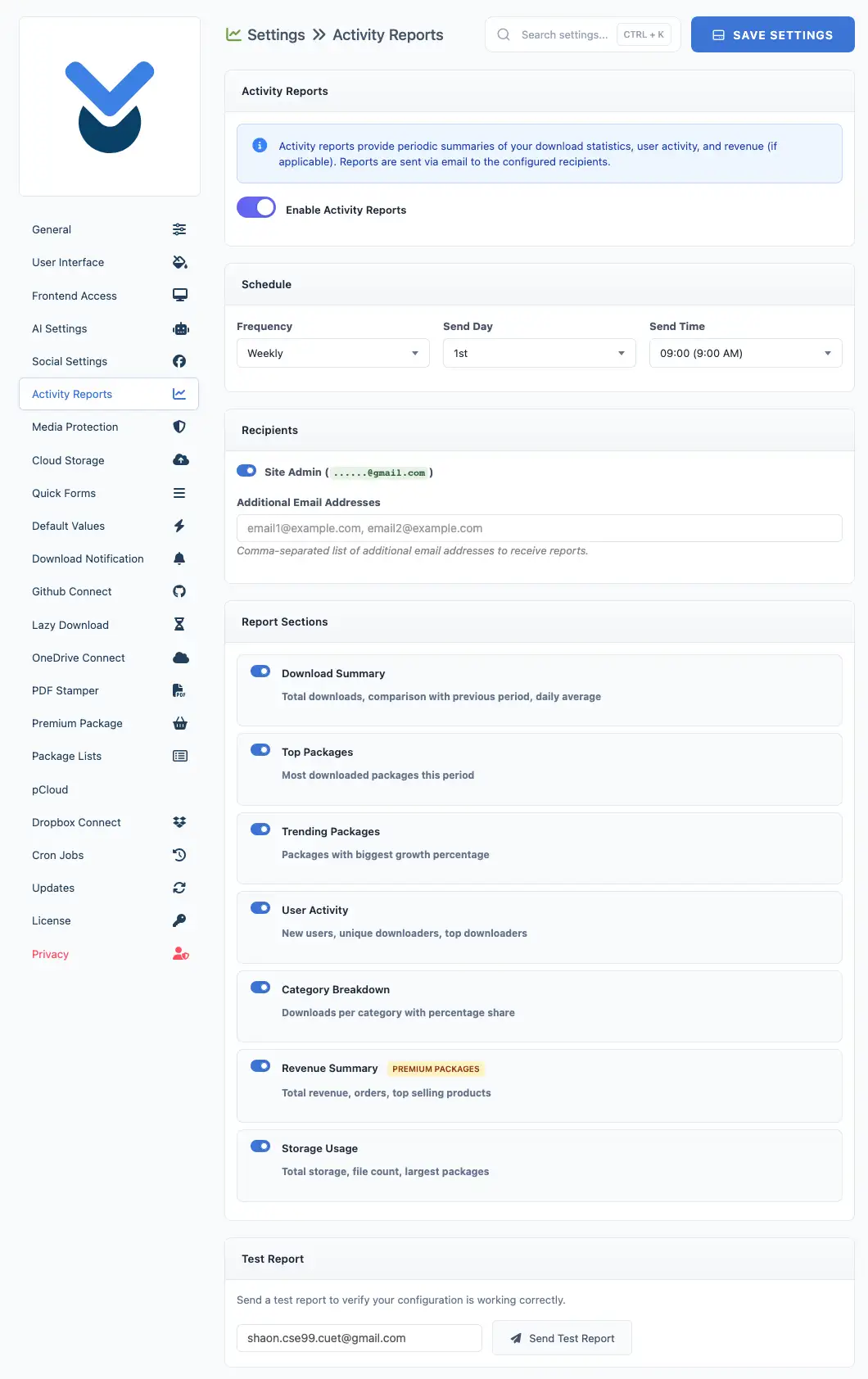
What’s Inside Each Activity Report?
Every report is packed with the metrics that matter most. You choose which sections to include:
📊 Download Summary
See your total downloads at a glance, plus how they compare to the previous period. The report highlights your daily average and identifies your peak download day — so you know when your audience is most active.
🏆 Top Packages
Discover your most popular downloads with a ranked list showing download counts and visual progress bars. Instantly identify your best-performing content.
📈 Trending Packages
Sometimes a file suddenly takes off. The trending section shows packages with the biggest growth percentage, helping you spot viral content or successful promotions early.
👥 User Activity
Understand who’s downloading your files. See new user registrations, unique downloaders (both registered and guests), and a leaderboard of your top downloaders.
📁 Category Breakdown
If you organize downloads into categories, this section shows downloads per category with percentage share. Quickly see which content types resonate most with your audience.
💰 Revenue Summary
Selling digital products? When Premium Packages is active, your report automatically includes revenue data: total earnings, order count, average order value, and your top-selling products.
💾 Storage Usage
Keep an eye on your hosting resources. See total storage used, file counts, new packages added, and your largest files.
Flexible Scheduling: Weekly or Monthly
Not everyone needs the same reporting frequency. Activity Reports let you choose:
- Weekly reports — Perfect for active sites. Pick any day of the week (Monday through Sunday)
- Monthly reports — Ideal for overview and planning. Choose any day from the 1st to the 28th
You also select the delivery hour, so reports arrive when you’re ready to review them — whether that’s with your morning coffee or during your weekly planning session.
Multiple Recipients
Running a team? Activity Reports can be sent to multiple email addresses:
- Site administrator (included by default)
- Additional team members, stakeholders, or clients
Just add comma-separated email addresses, and everyone stays informed.
How to Set Up Activity Reports
Getting started takes less than a minute:
- Navigate to Downloads → Settings → Activity Reports
- Toggle Enable Activity Reports to on
- Choose your frequency (weekly or monthly)
- Select the day and time for delivery
- Add any additional email recipients
- Check the report sections you want included
- Click Save Settings
Want to preview before committing? Use the Send Test Report button to see exactly what you’ll receive.
Beautiful, Mobile-Friendly Emails
Activity Reports aren’t just data dumps. Each email is professionally designed with:
- Clean, modern layout that looks great on any device
- Color-coded change indicators (green for growth, red for decline)
- Visual progress bars for quick scanning
- Clickable links to jump directly to packages in your dashboard
It’s the kind of report you’ll actually want to read.
Privacy-First Analytics
Unlike external analytics services, Activity Reports use data already in your WordPress database. No third-party tracking. No data leaving your server. Your download statistics stay exactly where they belong — with you.
Get Started Today
Activity Reports are available now in Download Manager Pro 7.2.0. Update your plugin and head to Settings → Activity Reports to configure your first automated report.
Stop logging in to check stats. Let your stats come to you.