
Forum Replies Created

You are using the free version there which doesn’t have the bulk import feature. Please install the Pro version. You can download it here https://www.wpdownloadmanager.com/user-dashboard/?udb_page=purchases
Deactivate and delete free version before installing Pro.
Are you trying to serve downloads from another server?
Please check the category permissions. Maybe users are getting access from there. Make sure to uncheck all options there.
https://www.evernote.com/l/AUeNQ2vN-1ZK0qsT4VpXgtusGOnCQDFmV4YB/image.png

Please send temporary wp-admin login info in private reply to check the issue. Are you using archive page ( Directory ) add-on for searching downloads?
Yes, you can hide the form using a custom template for /wpdm-premium-packages/templates/partials/guest-order-details.php
1 ) Copy the file and place it in /your-active-theme/download-manager/partials/ dir.
2 ) Add the following CSS at the bottom of the file.
#goform{ display: none; }
https://www.evernote.com/l/AUdivrQZ4kZLUrfsmZ68b5dZ9eldowuq4X8B/image.png

Could you please send me the screenshot of the page. I am not sure which location you are referring to. The word Quantity used in multiple locations.
You need to disabled the following plugin:
https://www.evernote.com/l/AV0o0-63-OtCa6hioqVI4OlSaSKDvcOZY10B/image.png
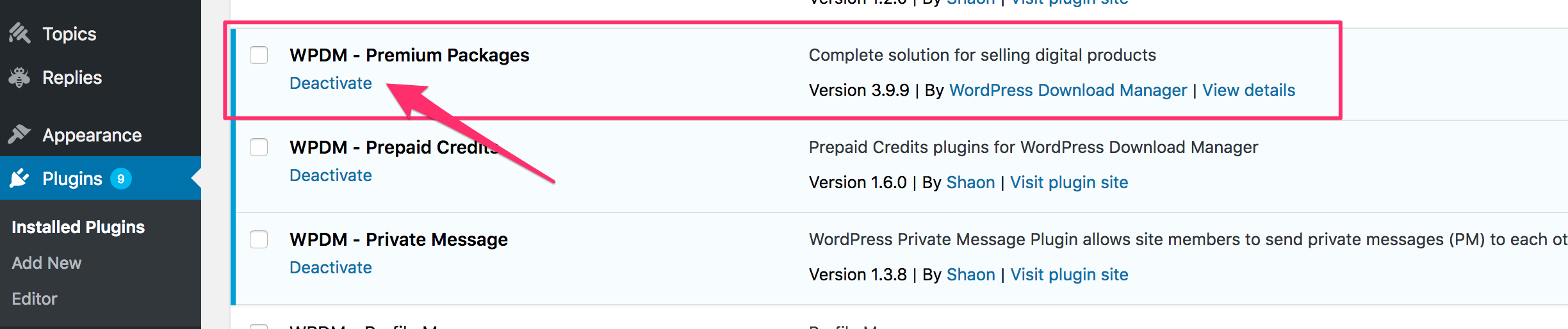
Maybe a CSS issue. If your theme is using its own Bootstrap you can disable the WPDM bootstrap from the basic settings page.
However, please send temporary wp-admin login info in private reply so I can check this on your site. Attached images exceeded allowed size.
In all packages table, File icon is generated dynamically based on attached file type. But if you want to show the icon set in package setting you have to add the following code after line no 254 in /download-manager/tpls/wpdm-all-downloads.php file,
$ext = $data['icon'];
To make this change unaffected by plugin update, use a template file instead of customizing core plugin file.
1 ) Copy this file /download-manager/tpls/wpdm-all-downloads.php and place it in /your-active-theme/download-manager/ directory.
2 ) Now make changes in this new template file
Yes, you can add the package details link in the title. Actually, it is done by default when using the following shortcode,
[wpdm-all-packages jstable=0 items_per_page=10]
Hi,
Please mail to support@wpdownloadmanager.com about the order cancellation issue. It will be better if you replace the order with another add-on.
Thanks.
You can use only one template with a single shortcode.
I guess you want to show the star in some packages only. If you want to add the star conditionally then you need a custom template tag. The above approach won’t work.
Here is the related doc https://www.wpdownloadmanager.com/doc/filter-reference/wdm_before_fetch_template/
Hi,
I think the Archive Page sidebar view is the right solution for you. It shows all categories in the left sidebar and shows packages on the right. When you click a category that has child categories, all those child categories will be shown on the right. And you can select one to filter downloads from it.
I think you should check the demo here https://demo.wpdownloadmanager.com/wpdmpro/archive-page-sidebar/ to get a clear understanding of how it works.
Let me know if you have any further query.
Thanks.
Please add the following code in your theme’s functions.php file to add a consent checkbox in WPDM registration form,
function wpdm_register_form_custom_input(){
?>
It is not possible yet to remove countries. You can manually remove countries from /wpdm-premium-packages/assets/js/data/countries.json file to make the list smaller.
Will add a translation file in next release.
Thanks.
Looking like there is a compatibility issue with the latest version of Premium Package. Releasing an update within 24 hours.
Hi,
Please add the following code on line no 600 in this file /wp-content/plugins/download-manager/libs/class.Apply.php
if( ! is_array( $package ) ) return;
Adding this code should fix the warning issue. We will add this on our side too in next release.
Thanks.
Yes, users can download all packages using the main download button from package details page. Did you check the download details page? Actually, all page templates have that button.
Please let me know if you have any confusion. Or send temporary wp-admin login info in private reply. I will set up a sample package for you.
https://www.evernote.com/l/AUe7YQm6ygBCXZ7nEssCwgXN2MZyiaQmu_AB/image.png

You can use the category shortcode with panel link template. Please check the doc here https://www.wpdownloadmanager.com/doc/short-codes/wpdm_category-query-all-downloads-from-one-or-more-categories/
Install the TinyMCE add-on to insert shortcode using a GUI.
With that, If you need filter and search option Archive Page add-on is the best solution https://demo.wpdownloadmanager.com/wpdmpro/archive-page-default/
You were using the frontend uploader page ( [wpdm_frontend] ) which is not the correct shortcode for showing all downloads. The right shortcode is [wpdm-all-packages jstable=0 items_per_page=10] I have updated the shortcode.
Now download page is here- https://www.toi-suisse.com/media-download/
If a user is not logged in a login button will be shown instead of the download link. After login, the user will be redirected to the download page.
https://www.evernote.com/l/AUfUaQoZxutPlrplXEjkugU5zGvcEOUVnkkB/image.png

When creating the package you will set the access for the package from package setting meta box.
Did you try switching theme ( only for testing purpose )? Please send temporary wp-admin login info in private reply if you want me to take a look there.
The issue usually happens when some other plugin or theme inserts some data when building the zip file.
There is no option yet for that. But you can apply the rule by adding the following code at the beginning of check_download_lock function in /wpdm-form-lock.php file,
if ( is_user_logged_in() ) return '';
https://www.evernote.com/l/AUfvJ0uowKVN47dKQ9Ph5DlHf5Zbyx_BKbgB/image.png

Working now. Added the following CSS in Customizer Additional CSS,
.wpdm_icon{ width: 40px; }
Please send temporary wp-admin login info in private reply to check the issue.
Moving old cache files fix the issue? However, WPDM should be able to create new files in cache directory when you create new packages. Otherwise, preview won’t be available in new packages. If WPDM can’t create the cache file that definitely means there is an issue with dir permission. If you face the issue in future, please ask server support to check the permissions in cache dir.
Tree view and Archive Page Sidebar view both shows the child categories. If you need help with the setup please send temporary wp-admin login info, I will set it up for you.
let me know which one you want to set up,
Sidebar Demo – https://demo.wpdownloadmanager.com/wpdmpro/archive-page-sidebar/
Tree View Demo – https://demo.wpdownloadmanager.com/wpdmpro/tree-view/