
Forum Replies Created

How long is it going to take? I really needed to download some plugins i paid for.
Has it been fixed?
All of them! The entire pack and all 50+ addons are unable to be downloaded from my account dashboard!
what did your team do to fix this?
Thank you! Very thorough response and it really helped.
Can confirm the file size doesnt update either even if a size is put in manually for [file-list]. Everything has been 0 KB so far. And you’re welcome ~

–
Please look at the red and green arrows in the image below:
https://i.postimg.cc/BnJ6MD0Q/Screenshot-2026-05-08-102227.png
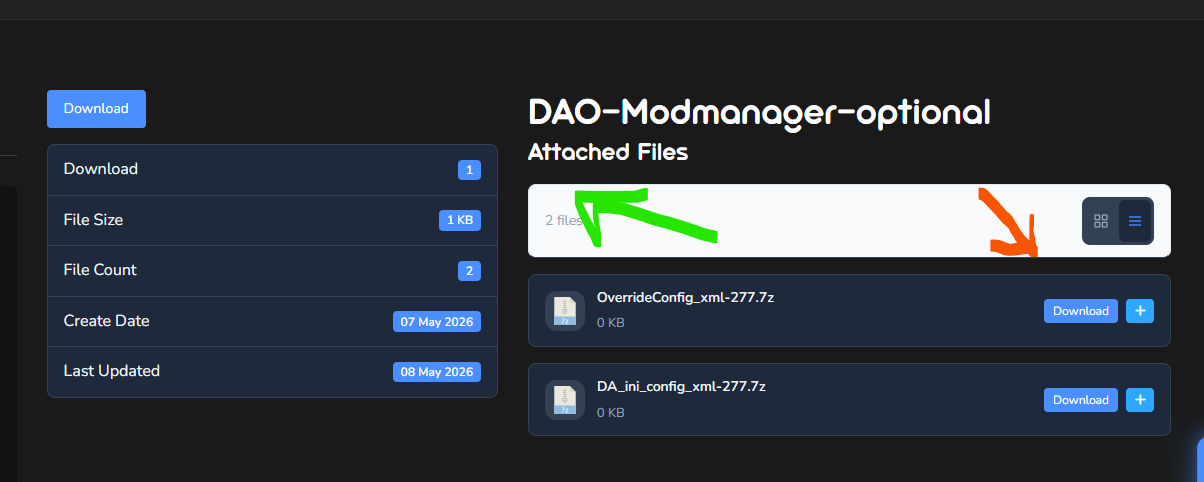
I found out the problem. It is with the [file-list] and maybe other shortcodes. The Green arrow points at the download button and file size that are working correctly. The Terms of Use modal pops up perfectly if I click that download button and notice the file size is accurate. However if I press the download buttons at the bottom the terms of service popup doesnt work and file size doesnt work. So it is a bug in your [file-size] code.
Here is another example. Look at the green circles and red circles in the image:
https://i.postimg.cc/dVJ14dYq/Screenshot-2026-05-08-101131.png
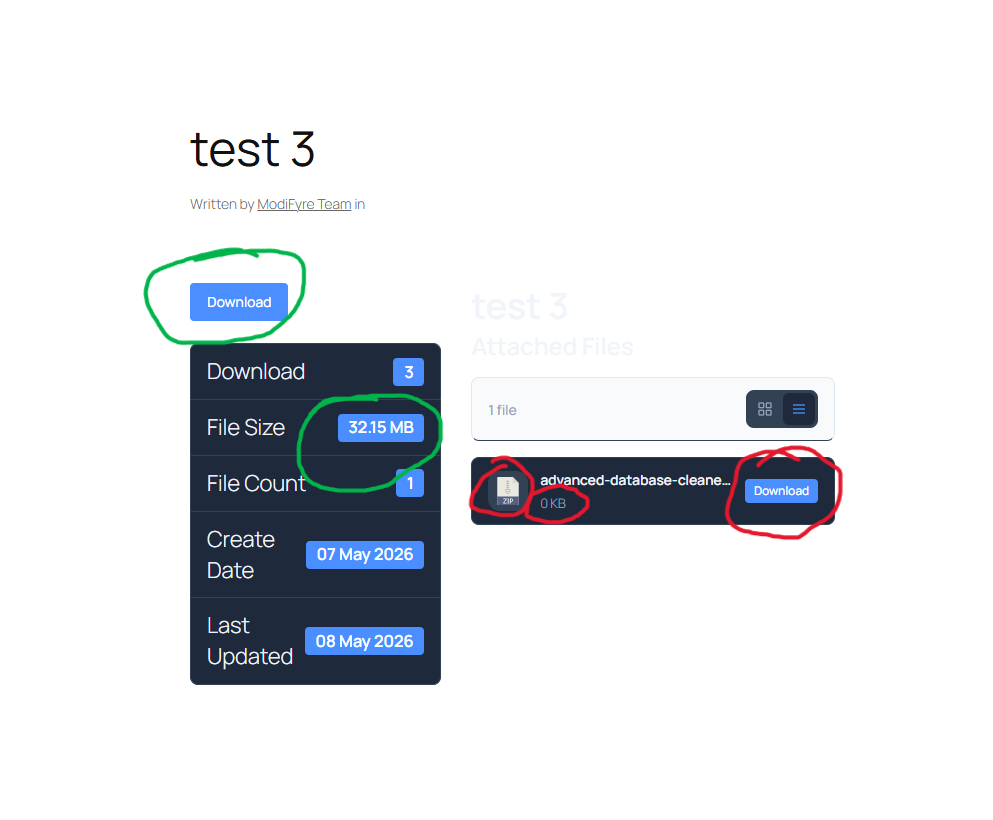
The Terms of Service popup works fine with the download button circled in green but not the button circled in red. Also notice the red circles around file size and file image. they dont update with the settings in the backend. File Size always shows 0 on the bottom and the image isnt updating with the image chosen in the backend.
———————————————
I have tested with this no other plugins except yours and the default wordpress theme and mine. It is the same. So it isnt a plugin interfering or a theme. [file-list] just needs to be fixed properly.
Please see the attached image:
I would like the package description underneath the title or version and file size. A row of its own
thank you. my final question is, how does the following feature work:
“Keep files of each package in a separate folder” I added a file to a package and it auto-uploaded to the bucket but it didnt go into a separate folder with the packages name. It just went into the main bucket folder selected in settings.
Just want to make sure im not doing something wrong.
Thanks again!
I guess it just took time for the changes to propogate on their servers..or maybe it was a cache thing.
another question (since you’re so amazing) can you add tell the team to add a feature to choose which files to auto-sync or upload to the cloud? You have a setting where we can turn on auto-upload to cloud bucket but can we get an additional feature that filters what to upload based on extension? For example…not everyone wants their photos uploaded to the cloud everytime they add something to the media library…or even files like fonts for example. Maybe we only want zip files or large video files offloaded. Having the option to offload selectively and choose which extensions to upload would be so useful!
Also- another popular feature other cloud plugins have is the ability to delete local files after they have been uploaded to save space. please add that to your teams list as well. it would be beneficial to not have duplicate copies of a file locally and in the cloud if the purpose is to save space right? So an optio to automatically delete local copies after it has been offloaded to the cloud would be very nice!
Nvm. it seems to be working now! How did you fix it? I changed back from your credentials to mine and its working still?!
How is yours working and mine isnt? what could be the problem? Im just putting in my credentials like you are. what is your cors info set to? Did you turn on any other settings in Cloudflare’s bucket settings?