
Forum Replies Created

Can you elaborate on the big download button to download all , you can provide a screenshot or related URL too
thanks
Have you enabled the Imagickextension from your server-side? Imagickis the PHP extension of the ImageMagick. please enable it and let me know then
thanks
Hi,
Category access for roles and packages follow these steps as I describe below,
before giving access to a certain category for a particular role you have to set from the edit category option,
then you have to make empty for Allow Access option or giving a particular role on it like as I image attached or as usual for select member option too,

because Package Access = Package Access + All Category Access = All Visitors + Subscribers = All Visitors
and Package Access = Package Access empty + Category Access(Subscribers) = Subscribers
or Package Access = Package Access(subscriber) + Category Access(Subscribers) = Subscribers
Thanks
The topic has been marked as resolved, please let me know, has the problem been resolved on your side?
thanks
Please, give your temporary wp-admin login details in a private reply for checking the issue.
Thanks
Has the problem been resolved on your side? please let me know
thanks
Has the problem been resolved on your side, please let me know
thanks
please check now, shortcode is working fine now, https://mpcstag.wpengine.com/shortcode-test/, please clear the cache or press CTRL + F5 if you are using windows to see the effect, I have adjusted with some code in style.css in your child theme CSS
thanks
I have checked that, you have used this shortocode,
[wpdm_archive_compact template="link-template-default" category="arbeits-und-personalwirtschaft" include_children=1 cols=2 colspad=1 colsphone=1 items_per_page="12" orderby="date" order="desc" login=1]
you can easily change the link-template from here this parameter, template="link-template-default", can you please elaborate more on your issue, please
thanks
Please check now, everything should work fine from now
thanks
I think it is conflicting somewhere, can you please enable/disable other plugins for checking, you may also switch theme to another for checking, please let me know then
thanks
For invalid File, https://www.thatswhatchesaid.net/coffee-svg/, it is working fine here now, please check
thanks
Please, give your temporary wp-admin login details in a private reply for checking the issue.
Thanks
Have you tried the wp_postmeta table from your database, it may reside there. please let me know, how can more I help you
thanks
Hi,
For Invalid File Type updating ( 3.1.17 or 5.3.7 ), you may face the following 2 issues:
- Upload is not working
- Showing “Invalid File Type” error when trying to download
Here is the reason and solution:
From WPDM Free 3.1.20 and WPDM Pro 5.3.7, we have changed the file type validation process during file upload and download. Now, you have to white file types to allow them to upload or download. You will find the option at Admin Menu ► Downloads ► Settings ► Basic Settings Tab ► Upload Settings section.
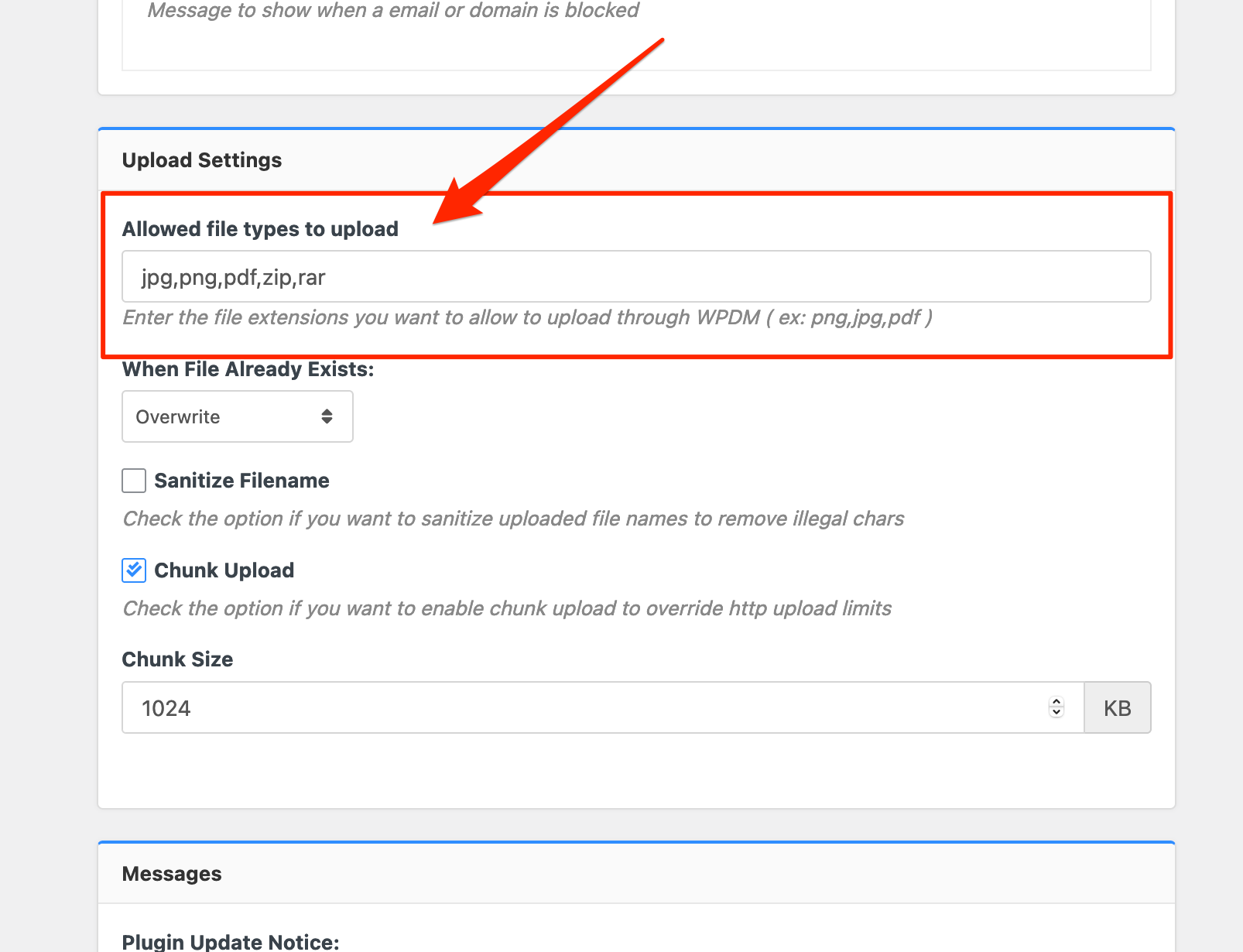
Please add file types ( texts, multiple texts separated by a comma ) as shown on the marked image. And then save settings. The shall resolve the issue.
or, Just Keep it Empty for WordPress default use as I image attached

thus it may resolve the issue
thanks
Please let me know if you have applied the last step already if the problem resolved on your side
thanks
Does it working with other normal roles, I think you are using the custom role to access the packages, please let me know
thanks
You may use this plugin, https://wordpress.org/plugins/wp-smushit/ or you may check this plugin too, https://wordpress.org/plugins/tiny-compress-images/
thanks
Please check your latest topic reply
thanks
Hello,
Have you open a recent topic yet, please let me know
thanks
The topic has been marked as resolved, has the problem been resolved on your side? please let me know
thanks
Hello,
I have tested that, it is working fine here, https://canalsolar.com.br/download/wpdm-test
thanks
Can you please reinstall the plugin again please and it could be your server issue too, maybe blocking the WPDM services, for that you may contact with your server administrator
thanks