
Forum Replies Created

please try to continue. it’s can be a typo. we are adjusting in the next upgrade version
thanks
please download the latest version from here, https://www.wpdownloadmanager.com/user-dashboard/?udb_page=purchases
thanks
Are you talking about the featured image and additional previews images, it depends on the proportional size of the screen overview and what’s image size you are looking for your theme and also for the site visitors
thanks
Hi,
For Invalid File Type updating ( 3.1.17 or 5.3.7 ), you may face the following 2 issues:
- Upload is not working
- Showing “Invalid File Type” error when trying to download
Here is the reason and solution:
<hr/>
From WPDM Free 3.1.20 and WPDM Pro 5.3.7, we have changed the file type validation process during file upload and download. Now, you have to white file types to allow them to upload or download. You will find the option at Admin Menu ► Downloads ► Settings ► Basic Settings Tab ► Upload Settings section.
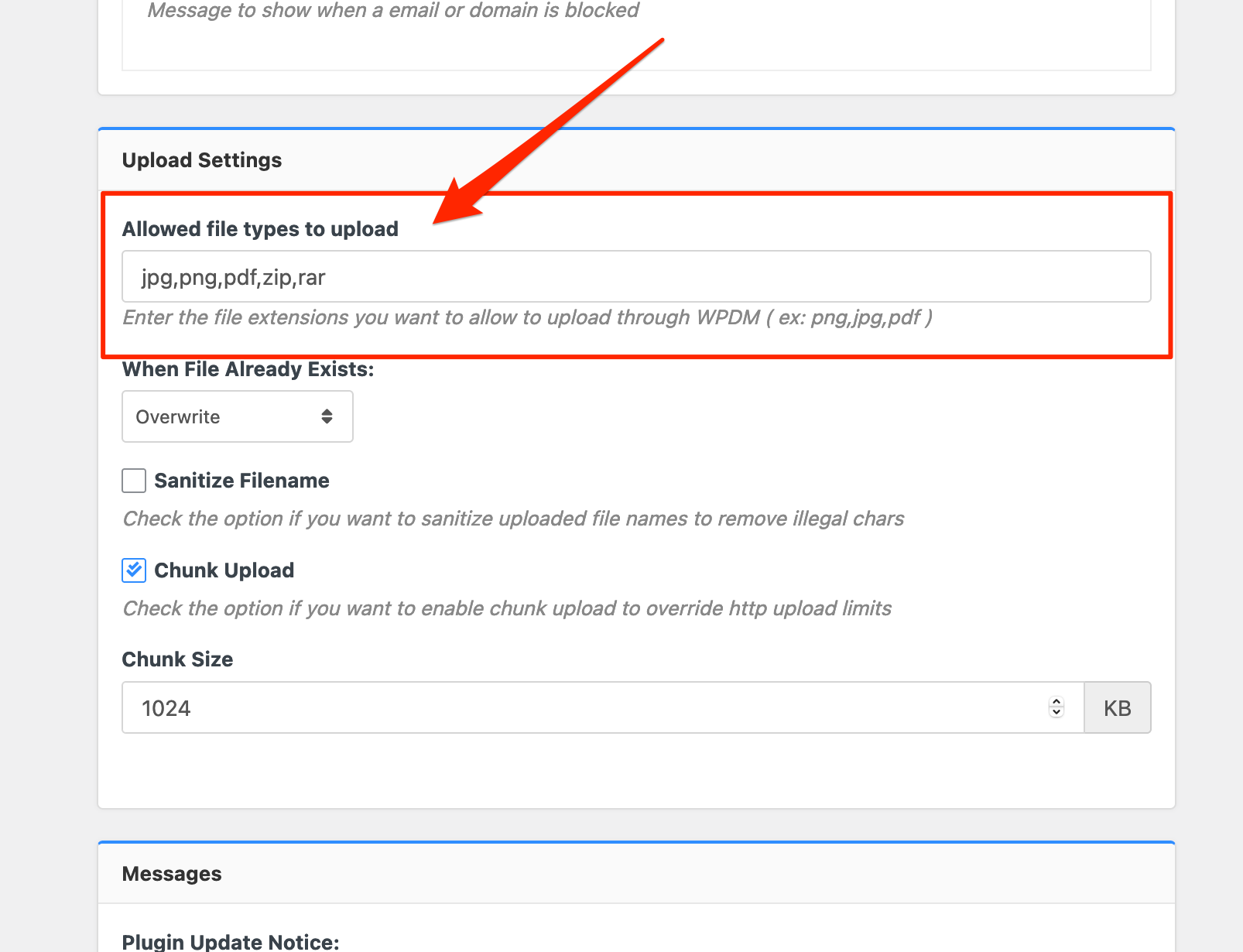
Please add file types ( texts, multiple texts separated by a comma ) as shown on the marked image. And then save settings. The shall resolve the issue.
or, Just Keep it Empty for WordPress default use as I image attached

thus it may resolve the issue
thanks
Hi,
please just removed this message from the Downloads > Settings > Basic
Download Limit Message:
<code><i class=”fa fa-exclamation-triangle”></i> Download Limit Exceeded!</code>
I hope this will work fine then
thanks
The contact form 7 with form lock is working fine from our side, https://wpdmpro.w3eden.com/download/wpdm-form-lock/, I have checked there are many plugins installed on your side, can you please enable/disable other plugins for checking, you may also switch theme to another for checking, please let me know then
thanks
please share your related URL, if possible, please, give your temporary wp-admin login details in a private reply for checking the issue
Thanks
For now premium-package-wordpress-digital-store-solution add-on is required for membership add-on, we shall soon look over this and try to make an update
thanks
Please, give your temporary wp-admin login details in a private reply for checking the issue.
Thanks
please check, the profile image has been adjusted. I have adjusted it from your theme style.css
thanks
please mail support@wpdownloadmanager.com, I hope you should get the help
thanks
Hi,
Please activate this add-on https://www.wpdownloadmanager.com/download/premium-package-wordpress-digital-store-solution/, for the pricing setting, thus the error will disappear
thanks
For add-on for now,
1 ) Download the latest version from here https://www.wpdownloadmanager.com/user-dashboard/?udb_page=purchases
2 ) Install the latest version
thanks
please adjust the download button size option as I image attached from Downloads > Settings > User Interface

I hope you should get the help
thanks
It can be an issue too for margin, padding among the images, please try to inspect the element from the browser. I hope you should get the resolution
thanks
please use [thumb_gallery_WxH] template tag instead of [gallery_WxH], it will returns all attached additional image thumbnails with specified width ( W ) and height (H) if available, every thumbnail is linked with original image
thanks
This message is showing while try to login as I image attached

please check
thanks
Does this problem only occur in the non-english language? please let me know
thanks
please your site login URL too
thanks
Are you trying to open a new tab, for this shortcode download package,
[wpdm_all_packages items_per_page=15 jstable=1 thumb=1 categories="dump-files" order_by="publish_date" order="DESC" cols="title,download_count,package_size|publish_date|download_link" colheads="File Name|Update Date|Download::155px"]
please let me know
thanks
please share your related URL, if possible, please, give your temporary wp-admin login details in a private reply for checking the issue.
Thanks
Sorry for that little confusion, we are adjusting it next upgrade
thanks
When you have set the Allow Access role to All Vistors, then it is giving User role to Guest as a download user, please let me know, how can I more help you
thanks
please share your related URL, if possible, please, give your temporary wp-admin login details in a private reply for checking the issue
Thanks