
- This topic has 92 replies, 27 voices, and was last updated 4 years, 4 months ago by
Humayon.

After this update ( 3.1.17 or 5.3.7 ), you may face the following 2 issues:
- Upload is not working
- Showing “Invalid File Type” error when trying to download
Here is the reason and solution:
From WPDM Free 3.1.20 and WPDM Pro 5.3.7, we have changed the file type validation process during file upload and download. Now, you have to white file types to allow them to upload or download. You will find the option at Admin Menu ► Downloads ► Settings ► Basic Settings Tab ► Upload Settings section.
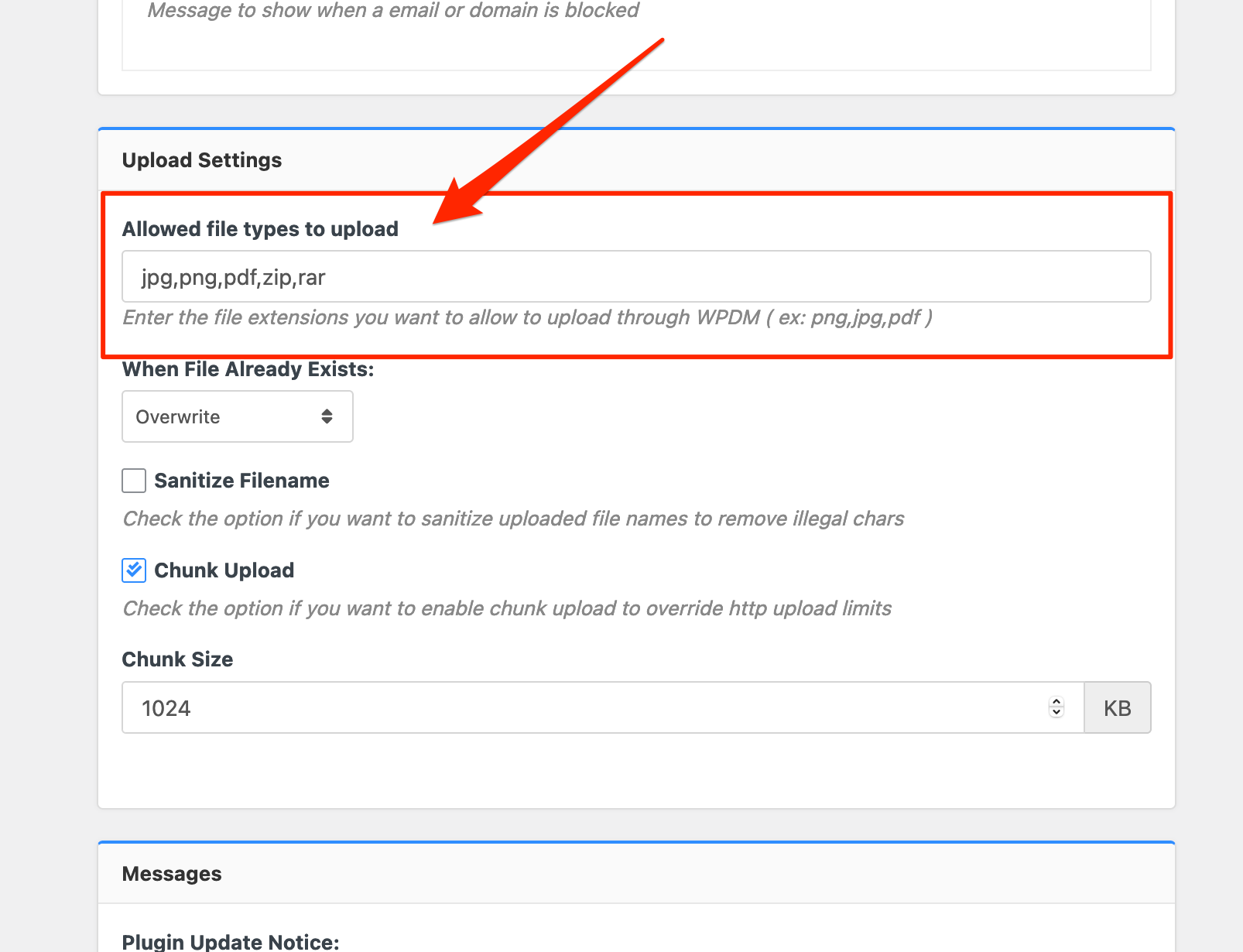
Please add file types ( texts, multiple texts separated by a comma ) as shown on the marked image. And then save settings. The shall resolve the issue.
If you have further questions, please create a separate post. Thanks for staying with us and using WordPress Download Manager.

This solution fixed the issue for me:
I have just removed this message from the Downloads > Settings > Basic
Download Limit Message:
<i class=”fa fa-exclamation-triangle”></i> Download Limit Exceeded!
****
Remove the above and the saving and pdf file downloads work properly.

I am getting this error but when I try to make and then save the changes mentioned above the gear icon spins next to “Save Settings” but it never saves the changes. I have tried disabling all plugins besides Download Manager and reverted the theme to default Twenty Twenty One but it still won’t save.

Thanks Shahjada – can you please share a list of acceptable file types in the correct format?


Hello!
SOLVED
In the filetype settings all file types where there from previous versions of WPDM and WordPress.
After careful investigation I found that it was a space after each comma. When this space was removed in the settings it is working again.
/Erik
Hi Erik,
Glad to hear that the issue has been resolved.
There should be no spaces among the file type declaration example(apk,ppt,docx) etc.
However, If you found my support helpful, could you leave your valuable review here https://wordpress.org/support/plugin/download-manager/reviews/?rate=5#new-post
Your rating keeps us inspired ❤️
Cheers!

Is there a way to allow down/upload of files without a file extension?
This used to work with wildcard (*) before the update.
I tried something like this but it did not work:
foo,bar,, <- two commas after each other
Any solution for that?
Thanks a million!

I’ve followed Shahjada’s instructions – but no results. The upload still does not work.
I want to add akp files.
The problem appeared on an earlier update as well. When I added apk as an allowed file type back then it worked fine. Unfortunately not trhis time.
Any suggestions to solve this quickly?
It still does not work. I’ve tried all the things you suggested before. Not result.
A couple of updates earlier I faced the same issue – back then the workaround you forwarded now did work fine. Not this time… 🙁
Hi Christoph K.,
Will you please share the related page/file URL with us?
If possible, please, provide us with your temporary wp-admin login details in a private reply for checking the issue.
Thanks

Files with “.” in the name, and not only as seperator between name and filetype, are in this version not allowed. This is an unacceptable restriction.
See file class.Packages.php, from line 89. The array $_exts will in this case have 2 or more elements. Not all of them will match elements of the allowed filetypes. So the test in line 92 will fail.
Please release a corrected version.
H Ron,
Thank you for letting us know about it. I am going to forward your request to our core development team. Hopefully, we will adjust it in the next release.
Regards
After updating to Version 3.1.26 today NONE of my downloads is working any longer!
With the old version at least all the files that had been uploaded previously could be downloaded. – With the new Version 3.1.26 NONE of my apk-files can be downloaded!
Hello Ron,
We have adjusted your issue in the latest version. Please update your copy of the WPDM plugnin and then let us know if your above-mentioned issue has been solved or not.
Thanks
Hi Christoph,
We have released an update(V 3.1.27) which will solve your issue. Please update and then let us know about it.
Thanks
THANK YOU!
Version 3.1.27 works fine for me! Upload and download are fully functional again!
Hi Christoph K.,
Glad to hear that your issue has been resolved.
If you found my support helpful, could you leave your valuable review here https://wordpress.org/support/plugin/download-manager/reviews/?rate=5#new-post
Your rating keeps us inspired ❤️
Cheers!

I have the same issue as Jonas K. — I was using a wildcard (“*”) to allow all types and now that doesn’t work. Can this functionality be restored?
The solution suggested in #152013 is not sufficient as I want to allow extensions outside of the default WP allowed extensions.
Thank you.

Hi, I am having the issue with new uploads (existing files are okay after I made the field Allowed file types to upload = empty). However, new uploads do not work, I tried jopg, pdf etc and for all I get ‘No file is attached with this package!’. I have also updated to the latest release.
Hi Shawn,
We have found the issue and we will adjust the wildcard(*) issue in the next release.
Wildcard(*) will allow all file types in the next release.
Right now Wildcard(*) is allowing to upload all default WordPress allowed file type.
All default accepted file type list can be found here.
Thanks
The topic "Upload and download is not working" is closed to new replies.