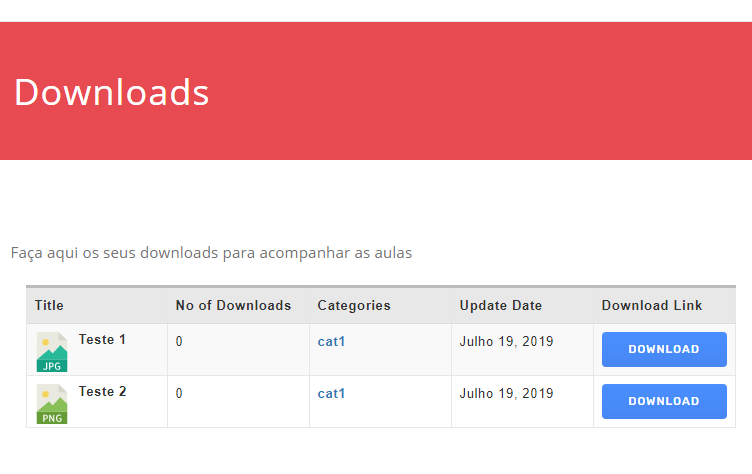
My issues appear to have went away after you accessed my admin. I assumed that you fixed something while you were in there. My downloads are working but I don’t know why because you didn’t say if you fixed anything. Did you fix or do anything? If so, what?
I had made a staging copy of my site last week and it was still having the issues as of this morning. I went into the Cloud Storage settings where my Amazon S3 account credentials are set and I just re-saved the settings by clicking the Save Settings button. Right after doing that, the downloads started working again on my staging site too. Ron, I’d recommend that you try re-saving your settings to see if it gets your S3 downloads working again. Perhaps support re-saved my settings while they were in there.
Shahriar, you couldn’t access my own package downloads because I have my downloads protected by another membership plugin so that only certain membership roles can access the downloads. For future reference, I’ve found that you can still access one of my protected package downloads by going to the edit screen for one of my packages and then clicking Preview Changes. This will open up the page for the package and allow testing of the Download buttons even though the package is protected.
Thanks. Would it be possible for this to be a feature that is added in a future update? I imagine many of the users of your plugin have different categories with different settings for different products and would not always want to do a bulk update that impacts ALL of their downloads. Please consider this as a future feature. Thanks
PS can it be optional in the package whether the mp3 can be downloaded? Or will it prevent all mp3 downloads? If there is no option I prefer that they can’t download the mp3 but it would be better if I have an option to allow or not. Thanks.
We will fix this issue in next release. For now, you can replace this code \WPDM\Package::userCanAccess($data['ID']) with just 1 in /tpls/wpdm-all-downloads.php file to get the old feature back.
If you are changing the domain, unlock the key from the old domain. You can do that from your WPDM dashboard or just send me the order id. I will unlock the key.
If you are getting the error without moving the license to another domain, Please install the latest version to fix the issue. Follow these steps to update the plugin,
1 ) Deactivate and delete the old version. You won’t lose any data.
Actually – found the fix – realised it was because the upload had certain characters in it – the filenames contained () and ”
Removing those solved the issue and the downloads work as expected
I just updated to WPDM Amazon S3 2.7.6. Since doing do, my downloads have all stopped working. When I click on any Download button, I get a page saying, “The site is experiencing technical difficulties.” I have tested with all other plugins disabled except for Download Manager and WPDM Amazon S3 and the issue still occurs. Please help ASAP. Thank you.
We have our site hosted on WPEngine and are experiencing timeout issues due to this plugin’s download time taking too long. Trying to download files natively through WP works fine. I reached out to support and was told this:
“It’s all the bells and whistles! They may have a solution if you let them know that it’s running php and getting killed by our apache timeout and you need an alternative. Otherwise a more compressed or smaller zip would be needed, or just use and old-school direct link to the file.”
She said the fact this plugin is queuing php to download is what’s causing the network errors. If there’s a way to download without queuing the php scripts, the downloads won’t take so long and time out.
Hello,
I want to modify the pages I get when clicking on a category.
I’ve already set it to use my custom link template which works fine, but it is automatically adding the title of the download above my template. I also want to disable pagination and change the css a bit to make the downloads show up in 2 columns.
I know you can set columns when using the shortcode on a manually created page but I couldn’t find any more settings for category pages.
I am sorry that I must reactivate this discussion:
Now the error described above:
No downloads available and the message (translated): “The website has technical problems”.
is a permanent error.
Try gps.rother.de // EDIT: Because I must find a workaround to give our customers the possibility to download the files, you find the original site with it’s problem here: https://gps.rother.de/gps-downloads-rother-tourenfuehrer-not-working-original-site/ The problem occurs only, if you choose (with category “gps”) all packages. If the table contains only a part of the packages (like “wanderfuehrer”), downloads are available.
Perhaps the current version 4.9.3 is not compatible with WordPress 5.2.2? Or is there a limit in download packages? This is a slight catastrophe for us and we need help as soon as possible.
If you need a login again, plese tell (I already deleted the old one).
Shortcode of the table:
[wpdm_all_packages items_per_page="20" template="5c52b37b15298,5c52b454a10c1" categories="gps" jstable=1 order_by="title" order="ASC" cols="page_link,file_count|categories" colheads="Title|Categories"]
What is interesting is that the tables of the other languages are working properly.
See https://gps.rother.de/english/
Only difference is the additional download button – but that we had to delete on the start site some tiome before because it caused problems. And of course, that the table contains not so many packages.
I’m experimenting with importing a few files using csv and manual methods before I go ahead with importing a few thousand.
Most of my downloads must have an audio preview. However, the main file to be downloaded in the package is not an audio file (it will be midi or a proprietary audio format that can not be played in a browser).
There will be over 100,000 files eventually so it is not practical to edit each package and I will have to find a way to automate this well using csv or bulk import, so these trials are important to me.
At the moment I have made example packages with an mp3 file (to be played as a preview) and a midi file (to be downloaded). So I have two files in the package and I would prefer if the user was not able to download the audio preview, only the midi. Is this possible? The audio file just needs to be a type of attachment to the post instead of a download. Or, part of the package but not downloadable.
{edited to add – the .mp3 and the .mid have the same file names, except for the extensions. I’ve created them that way deliberately so that the same ‘name’ can be used. The .mid is the primary file. Other packages will have different proprietary file extensions but ‘allied’ files will have the same names, different extensions.}
Can you think of a good way to implement this? It needs to be a method that can be automated in the csv once I have made a few to practise.
Also please note for your file type icons – midi files usually have the extension .mid so I have copied the .midi icons in the wp-content/plugins/download-manager/assets/file-type-icons folder and renamed them to .mid and that works well.
I have a website I am managing using WPDM, I have a page that was created using Visual composer and implemented shortcodes on the page to display downloads.
The shortcodes used are
[wpdm_search_result cols=1 template="5b255c0a0640f"]
and
[wpdm_packages link_template="link-template-semi-ext.php" order_by="post_title" order="asc" paging="1" items_per_page="10" title="" desc="" cols=1 colsphone=1 colspad=1]
Everything was working 100% and now all of a sudden the page is not accessible to the public – it displays a box with two fields asking for username or Email and Password
ANy ideas on why this might be happening and how to fix it please – I need to know urgently as this is the download center for the whole iste that the public can now no longer view.
When logged in as administrator the page views as it did before
The demo page is using category shortcode with a custom link template. I see you have already implemented the shortcode on your site using a different link template.
No downloads available and the message (translated): “The website has technical problems”.
I deactivated caching (toggled checkbox) and all was working again.
I only can guess that the error occured not immediately but after some action of the cache plugin. Or that you didn’t try the homepage, only the details page (?).
But if you don’t know a solution or a (for download manager) working cache plugin, you can close this discussion and we will try to find and test other cache plugins.
Hello,
I upgraded to 2.7.6 of the Amazon S3 Plugin and have been unable to use the S3 feature at all.
When in the wordpress admin Downloads –> Amazon S3, I get this error in the console: /admin-ajax.php?action=awsBuckets:1 Failed to load resource: the server responded with a status of 500 (Internal Server Error)
The S3 Buckets never show.
I’ve tried disabling + deleting + re-installing the plugin without any success.
I’ve also verified that plugin permissions are 755
Thank you for any guidance on resolving this issue.
It is pretty simple, What you are trying to do. Just allow the role frontend uploader access from Downloads > Settings > Frontend Access The user from the allowed role will be able to add/edit their own file from the frontend. Create the frontend page using [wpdm_frontend flaturl=0] shortcode.
Hi,
Installed version 4.9.3 Single downloads are working now.
I see the Fastest Cache is active there. But there is no issue with the download. So, it seems both plugins are working fine together.
Thanks.
Author
Search Results
Viewing 25 results - 2,826 through 2,850 (of 5,456 total)