Okay I have manually changed the publish date so that I can manipulate the order. But when I change one of my downloads to have a publish date of 2024 (so that it forces it to the end of the list) it does not update and when I click into the download it still says the original date.
Is there a way to make your plugin realise the updated publish date for any downloads?
I use the wpdm_archive button_style code to show the buttons and the search bar without going to any specific catagory so it shows ”
Home All Downloads” but it doesn’t show anything. Just the text “Select category or search… “. If I click Home in the breacrumbs, then it shows me all the available downloads.
This leads me to the next issue where the Search function only searches everything AFTER I click the Home button to load everything. It also doesn’t search outside of its category if I have a category selected with a button.
How can we get it to show all downloads first and how to have the search bar work so it searches all the downloads regardless of the category that might be selected? Several of my users and testers found this very confusing.
I have created a package for each user of the website. When I create a package in the “Access” option I remove “All visitors” and I select only the specific user I need. This way noone else can download the files uploaded for that user.
The issue is that his download page URL is still visible and public and you can see the list of all his files names.
Even if a visitor can’t download any file, it is a privacy issue to show the names of the downloads.
So far I have solved the issue by creating this snippet that hides the subpages of the download page from logged out users,
add_action('init', 'restrict_download_subpages_to_logged_in_users');

function restrict_download_subpages_to_logged_in_users() {
    // Get the current path
    $request_uri = $_SERVER['REQUEST_URI'];

    // Check if the URL starts with /download/ and is not exactly /download/
    if (preg_match('#^/download/.+#', $request_uri)) {
        // If user is not logged in, redirect to login
        if (!is_user_logged_in()) {
           wp_redirect(home_url());
            exit;
        }
    }
}
HOWEVER I need a solution in order to show the entirety of the package url only to the user I have attributed the Access to.
To enable the auto-update, login to your WPDM account from the Downloads > Settings > License tab. If login is successful and you have an active subscription then you can update the future releases right from your plugins page.
– For your first requirement, you can use our Advanced Custom Fields, by using this you can add custom fields in the registration form. When a users submits a register form you can check all details from Users > All Users > view users details section.
– You can find the stats here Downloads > Stats section and also download/export the data as a CSV file.
– For user data extraction, you can easily export them from users section or any third party plugin like Import and Export user data
Download Manager Directory Add-on will help WordPress Download Manager users to show all categories and downloads on a single page with different styles.
You can deactivate the gutenberg editor from here Downloads > settings > General. Here is a screenshot for your assistance.
First of all, make sure that you have selected the login and register page from the settings.screenshot
When a user logs in, they are redirected to the dashboard page like this. If you want to create a separate page to display all your files, you can use our shortcodes.
Good morning, I would like to know why your plugin appears in this way and not with a normal editor, I think it activates guttemberg?
I am also trying to configure your plugin, I do not understand how after login have a page that displays all available downloads. I have to create a landing page but how? Currently I have created those indicated in the manual i.e.:
Login Page
Register page
User Dashboard
Autor Dashboard
I do not understand the logic well, I imagine that after a login page it should display the catalog of downloadable gfiles right? and how do I create this self-generating page? (then I will filter the visibility to users with the Membership plugin), the important thing is to understand with which page to display the products. I wanted to see how you had done in your demo area but user and password do not work.
This shortcodes doesnt work with the search bar. I need to configure the categories in 1 column, 20 downloads per view and with the search bar, but when i activate tool bar the system says “EMPTY” when is not empty the category. please try and solve, in need this operative.
Here you can use the parameter order_by and order to show in order. Also you will be able to show top downloads by using parameter download_count. Please kindly check.
What are downloads great for? Product manuals. Location maps. Destination details. LOADS of documentation assets that NEED to be associated with _relevant content_.
MANY webmasters _already use_ the native WordPress “Post Tags” for their content, (I use the example of products that need user manuals associated). Several clients I work with sell products and use POST Tags to associate all sorts of related content to their product, such as the (downloadable) user manual, as well as user reviews or testimonials, etc. ALL OF THE Webmasters in my Groups tell me they do the SAME thing – associate all sorts of related content using Post Tags.
NOTE: I’ll reiterate, since you’re slow to understand – THEY USE NATIVE POST TAGS TO ASSOCIATE RELATED CONTENT.
Your plugin adds a custom taxonomy, but REMOVES the support for Post Tags – that makes NO SENSE AT ALL. It’s fine if you want to ADD custom Tags (but not “force” it on users) but removing support for native Post Tags is simply DUMB.
They would LOVE to use a plugin like yours to be able to easily track downloads as well as take advantage of some of the other nice features your plugin includes, but THEY WON’T USE IT BECAUSE IT LACKS SUPPORT FOR POST TAGS!
I am NOT asking for a “individual setting based on user preferences” – I am asking for a VERY BASIC FEATURE that I could see being left out of a free plugin but not a PREMIUM plugin!!
If you don’t WANT valuable feedback like this from real users and developers, THEN WHY BOTHER WITH A FEATURE REQUEST FORUM?!?!
I’m done. Add it or don’t. I’m NOT GOING TO EFFING PAY YOU TO DO SOMETHING YOU SHOULD DO FOR THE BENEFIT OF YOUR USERS!
I’m also done promoting your plugin to others. I’m done giving it good reviews. I’m going to search for a competitor product and promote that instead.
I hope you’re doing well, and thank you for reaching out.
The responsive table derives from the all_packages shortcode, listing all packages/downloads. To display specific categories, utilize the categories variable. For issues regarding questions 2, 3, and 4, kindly share your wp-login credentials in a private message so we can investigate further.
Your drozone and layout issue maybe resolved now. For dropzone I have adjusted Downloads > Settings > Frontend Access> Author Dashboard Allowed User Roles to Create Package From Front-end & Front-end Administrator Rolesand for layout issue I have added some CSS on Customizer > Additional CSS section. Now for exporting packages issue it is giving critical error while exporting, can you share the PHP error log details or can adjust settings here https://dtctuning.com/wp-admin/index.phpPHP Error log thus I can check which error is coming. Please kindly check.
Hello,
we update our downloads 1ce a month and gibe the user access to it to specific dates. works well so far.
My problem is that in former times see here picture one there was no download button when here is no download at the moment avialable. Than there was a message when the download is wvailable.
Now (2nd picture and 3rd of the document) all downloads will have imidiately a download button even if the download is not available now. Than the message will appear on the next page.
We want the old desgin (picture 1) again. How can we change this?
Hope you are well. Thanks for writing to us. Form email lock subscriber you can get subscriber list from Downloads > Subscribers, then you can create manually the user account from WP System. Please kindly check and let me know.
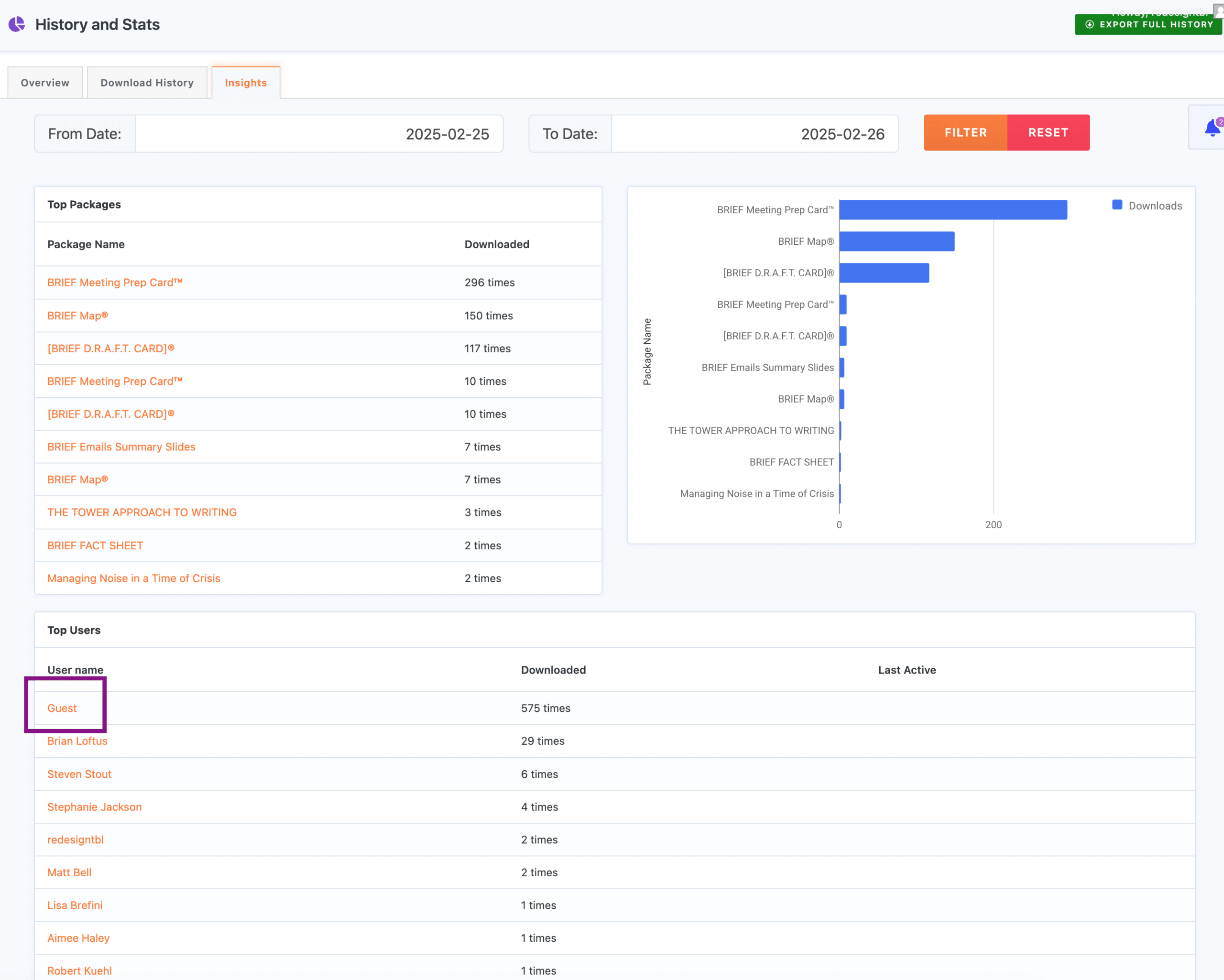
I’m trying to figure out why the download count for “Guest” download count is so high. All my download packages are locked to only people with an account. So I don’t understand why guests are able to download items on my site and why is so high compared to real users that show on the history report.
Here is a screenshot of the stats of the last 24 hours. The download count for “Guest” shows 575 downloads.
OK so thats the pagination. But we want to show all downloads at once, one page, no pagination. Is this also the Bridge Core Plugin or is it the Download Manager. I am talking about the limitation of 50 items.
Thank you so far for looking into it.
PS: Found the pagination setting, our customer is happy with it. Case closed 🙂 Thank you
Author
Search Results
Viewing 25 results - 251 through 275 (of 4,518 total)