For #1, can you please let me know where the issue is appeaing, you can share the related URL.
For #2, We have not built in shortcode for share button, but you can create this with HTML and use this on your package editor or custom template.
For #3, It has been added with separate add-on now.
For #4, Are you trying to disable this with individual packages?
For #5, I have back with information from our team that, It’s normal for the cart to maintain the original price of a product if a user clicks the “add to cart” button before a price change, as it is designed to not update the price once added.
For #8, Please kindly share the related URL.
For #9, I have seen that, the search icon is already in header menu on your theme.
Please kindly check and let me know.
Thank you and kind regards
Hello Ibrahim Ahmed,
Hope you are well.
For #1, Can you please elaborate more? please kindly share the related URL. If possible please give your temporary wp-admin login details in a private reply to check the issue?
For #2, If you are using Download PRO, you can customize the template and add share links or buttons
For #3, please kindly check this add-on for your requirement, https://www.wpdownloadmanager.com/download/wpdm-default-values/
For #4, Please kindly check this article, https://www.wpdownloadmanager.com/how-to-disable-comments-in-wordpress/
For #5, For this issue we are checking, I am going forward it to our related team authority.
For #6, Please from this directory wpdm-premium-packages\templates\checkout-cart\cart-form.php remove the Quantity column, also backup the file following this article, https://www.wpdownloadmanager.com/doc/template-files/
For #7, You can use the v2 version now, if it works properly from your site.
For #8, Can you please elaborate more? please kindly share the related URL.
For #9, You can check this shortcode, https://www.wpdownloadmanager.com/doc/short-codes/wpdm_search_result-shows-search-form/.
Please kindly check and let me know.
Thank you and regards
So filling the form once only works per package, not per form? When we tested the demo, entering an email address once allowed us to download multiple files. It looked like the Form Lock worked the same way. It is an absolute necessity that users only need to fill out the form once. It would be really irritating for them to have to fill them out each time. We also need a way to link to each of the files individually. It looked like the easiest way to do that was to set each up as its own package. Please let us know how we can configure things so that users only have to fill out the form once and so that we can have URLs for downloading each individual document.
Please add support for Elementor Dynamic Tags in the Download Manager plugin to enable dynamic display of file details, download URLs/buttons, and metadata within Elementor widgets for custom templating. This feature would enhance flexibility, reduce reliance on custom code in PHP, and expand use cases for personalized and dynamic downloads, expanding the plugin with more flexible use cases.
Simply create a page using this short code: [wpdm_user_dashboard recommended="recent" signup=1 flaturl=0 fav=1] and add the page in your main menu.
Please check and let me know if this works for you.
This reply has been marked as private.
I have to do it this way. The file is generated daily by a different system and placed into the WP system daily. I know that I can have the file served by php easily and mask the URL. I just don’t know how to add the captcha which is why i needed your plugin.
I’ve tried 2x to get your custom team to make this work and no response. I shouldn’t have to pay extra though as this is the WHOLE point of your plugin. If the system doesn’t hide the url, than anyone can see it and continue downloading it outside of my system. Why would they continue to pay or how can I track download counts.
This seems like a bug that needs to be fixed.
Hello Joseph Waddingham,
Hope you are well. And sorry for the inconvenience. Please share the related URLs. if possible, please, give your temporary wp-admin login details in a private reply to check the issue.
Thank you and regards
I added the link you said, and made a payment, it did not change anything. This is the link the customer was given after payment completed:
Purchases
If I check this link and I am logged in as an Admin, I can see the order and download page, and everything looks fine.
If I am not logged in, it asks me to login: https://tinyurl.com/2xu2uno7
Why is that happening if I have selected check out as guest? I can see 100% that the problem here is the Guest checkout options are not working.
Yes.

You can check the code yourself here: https://itsnamewasmormo.com/thank-you-transaction-result/
Please confirm 3 things in your reply.
1. Double check the shortcode is fine by opening the link above. You can see the page.
2. Check the settings in my previous screenshots are fine.
If both 1 and 2 is ok.
3. Provide me with code to override the settings
Please address 1, 2, 3 in your reply
Can you please add a new option to the dropdown when a user is not allowed to download:
1. Redirect to URL
2. Choose a Page/Post to display
3. Ability to set a custom ‘only block download’ message

One of the files in the list of WPDM files is not “uploaded”, it’s been added as a link to a file on the server.
When user clicks on front end to download it gets this page displayed:
<!DOCTYPE html>
<html style=”background: transparent”>
<head>
<title>Download </title>
<script>
var wpdm_url = {“home”:”https:\/\/www.neolink.si\/”,”site”:”https:\/\/www.neolink.si\/”,”ajax”:”https:\/\/www.neolink.si\/wp-admin\/admin-ajax.php”};
</script>
<link rel=”stylesheet” href=”https://www.neolink.si/wp-content/plugins/download-manager/assets/bootstrap/css/bootstrap.css” />
<link rel=”stylesheet” href=”https://www.neolink.si/wp-content/plugins/download-manager/assets/css/front.css” />
<link rel=”stylesheet” href=”https://www.neolink.si/wp-content/plugins/download-manager/assets/fontawesome/css/fontawesome.min.css” />
<link href=”https://fonts.googleapis.com/css?family=Overpass:400,700″ rel=”stylesheet”>
<!–
<script src=”https://www.neolink.si/wp-includes//js/jquery/jquery.js”></script>
<script src=”https://www.neolink.si/wp-includes//js/jquery/jquery.form.min.js”></script>
<script src=”https://www.neolink.si/wp-content/plugins/download-manager/assets/bootstrap/js/bootstrap.min.js”></script>
<script src=”https://www.neolink.si/wp-content/plugins/download-manager/assets/js/front.js”></script>
–>
<style>
:root {
–color-primary: #4a8eff;
–color-primary-rgb: 74, 142, 255;
–color-primary-hover: #4a8eff;
–color-primary-active: #4a8eff;
–color-secondary: #6c757d;
–color-secondary-rgb: 108, 117, 125;
–color-secondary-hover: #6c757d;
–color-secondary-active: #6c757d;
–color-success: #18ce0f;
–color-success-rgb: 24, 206, 15;
–color-success-hover: #18ce0f;
–color-success-active: #18ce0f;
–color-info: #2CA8FF;
–color-info-rgb: 44, 168, 255;
–color-info-hover: #2CA8FF;
–color-info-active: #2CA8FF;
–color-warning: #FFB236;
–color-warning-rgb: 255, 178, 54;
–color-warning-hover: #FFB236;
–color-warning-active: #FFB236;
–color-danger: #ff5062;
–color-danger-rgb: 255, 80, 98;
–color-danger-hover: #ff5062;
–color-danger-active: #ff5062;
–color-green: #30b570;
–color-blue: #0073ff;
–color-purple: #8557D3;
–color-red: #ff5062;
–color-muted: rgba(69, 89, 122, 0.6);
–wpdm-font: “Rubik”, -apple-system, BlinkMacSystemFont, “Segoe UI”, Roboto, Helvetica, Arial, sans-serif, “Apple Color Emoji”, “Segoe UI Emoji”, “Segoe UI Symbol”;
}
.wpdm-download-link.btn.btn-primary.btn-sm {
border-radius: 4px;
}
</style>
<style>
body{
font-family: Overpass, sans-serif;
font-weight: 400;
font-size: 14px;
}
.w3eden .alert:before{
text-transform: uppercase !important;
}
.w3eden .alert{
letter-spacing: 0.5px !important;
}
.w3eden .card .card-header{
font-size: 13pt;
}
.w3eden .card .card-body{
font-size: 13pt;
}
</style>
</head>
<body class=”w3eden”>
<div style=’display: table;vertical-align: middle;height: 90%;position: absolute;width: 90%;margin-left: 5%;’>
<div style=’text-align: center;height: 100%;display: table-cell;vertical-align: middle’>
<div style=’max-width: 70% !important;display: inline-block;font-size: 13pt’>
No file is attached with this package! </div></div></div>
</body>
</html>
Same page is shown if in backend I use button “Select from server”. What is this?
Bostjan
This reply has been marked as private.
This reply has been marked as private.
Here is the page template code:
<div class="row">
    <div class="col-md-12">
        <div class="card mb-3 p-3 hide_empty [hide_empty:featured_image]">[featured_image]</div>
    </div>
    <div class="col-md-5">
        <div class="wpdm-button-area mb-3">
            [download_link]
        </div>
        <ul class="list-group ml-0 mb-2">
            <li class="list-group-item d-flex justify-content-between align-items-center [hide_empty:version]">
                [txt=Version]
                <span class="badge">[version]</span>
            </li>
            <li class="list-group-item d-flex justify-content-between align-items-center [hide_empty:download_count]">
                [txt=Download]
                <span class="badge">[download_count]</span>
            </li>
            <li class="list-group-item d-flex justify-content-between align-items-center [hide_empty:file_size]">
                [txt=File Size]
                <span class="badge">[file_size]</span>
            </li>
            <li class="list-group-item d-flex justify-content-between align-items-center [hide_empty:file_count]">
                [txt=File Count]
                <span class="badge">[file_count]</span>
            </li>
            <li class="list-group-item d-flex justify-content-between align-items-center [hide_empty:create_date]">
                [txt=Create Date]
                <span class="badge">[create_date]</span>
            </li>
            <li class="list-group-item  d-flex justify-content-between align-items-center [hide_empty:update_date]">
                [txt=Last Updated]
                <span class="badge">[update_date]</span>
            </li>
<!--            <li class="list-group-item  d-flex justify-content-between align-items-center [hide_empty:company_name]">-->
<!--                [txt=Company Name]-->
<!--                <span class="badge">--><?php //echo wpdm_acf([268],'AuthorReview/company_name'); ?><!--</span>-->
<!--            </li>-->

        </ul>
    </div>

    <div class="col-md-7">
        <h1 class="mt-0">[title]</h1>
        [description]
        <h3>Attached Files</h3>
        [file_list]
        <div class="wel">
            [tags]
           [add_to_list]
        </div>

    </div>

</div>
for link template:
<div class="card bg-light c2a4 mt-2 mb-2">
    <div class="card-body text-center pb-4">
        <div class="text-center wicon">
            [thumb_128x128]
        </div>
        <h3 class="p-0 m-0 mb-2"><a style="font-weight: 700" href="[page_url]">[title]</a></h3>
        <div class="text-muted text-small"><i class="fas fa-hdd"></i> [file_size] <i class="far fa-arrow-alt-circle-down ml-2"></i> [download_count] [txt=downloads]</div>
    </div>
    <div class="card-footer text-center">
            <a href="[page_url]" class="btn btn-secondary">[txt=View More]</a>
            <a href="[download_url]" class="btn btn-secondary">[txt=Download]</a>

[addto_file_cart]
    </div>
</div>
<style>
    .w3eden .c2a4 .wpdm_icon{ height: 64px !important; width: auto; }  .well.c2a4 .media-body{ font-size: 11pt; }
    .w3eden .c2a4 .wicon img{ border-radius: 500px; max-width: 96px;margin: 5px auto 25px; }
    .w3eden .c2a4 .btn{ border-radius: 50px; font-weight: 500; margin: 0 3px; padding: 0 25px; height: 36px; line-height: 36px; font-size: 12px; }
</style>
Thanks for this. I’ve now the redirect URL. However, the problem of the Registration form not actually adding a new user is the real problem. Again. Please try this on our site and you’ll know what I mean.
I have chosen the “no template” template… How can I make a button appear in that template? Now it only allows me to put a hyperlink but not for it to appear as a button.
Additionally, I am trying to ensure that when I add the download link variable it displays a very long url (it looks terrible visually). Can I make a text appear but when you click it direct you to the link of the variable without the entire url appearing? The variable is: {{download_url}}
Hi
I was wondering if we can use wpdm to count external clicks, so intead of uploading a file. We just redirect a user to another url and that counds as a ‘download’. Would that work if we just use the Insert URL option? https://i.imgur.com/VZCvbYi.png
Also is there an addon or a way with more reports/stats? We would need to get the number of downloads per quarter or per month and which ones were downloaded and how many times.
Despite installing the WPDM ONE DRIVE add-on and completing the preparatory tasks, the section of the plugin for cloud settings is not displayed. Even when directly entering the URL for the CLOUD SETTINGS tab, the settings are not shown, but an error appears. https://www.example.com/wp-admin/edit.php?post_type=wpdmpro&page=settings&tab=cloud-storage How can this problem be resolved? The need is to use ONE DRIVE as external storage for the documents uploaded to the site.
I have identified the problem: The OceanWP theme is blocking the URL from functioning properly. When you switch the theme, you can access the frontend URL upload option. Additionally, I have noticed that an update is available for the OceanWP theme. Please update the theme, as this may resolve the issue.
Kindly check
This reply has been marked as private.
Not adding to URL also working,
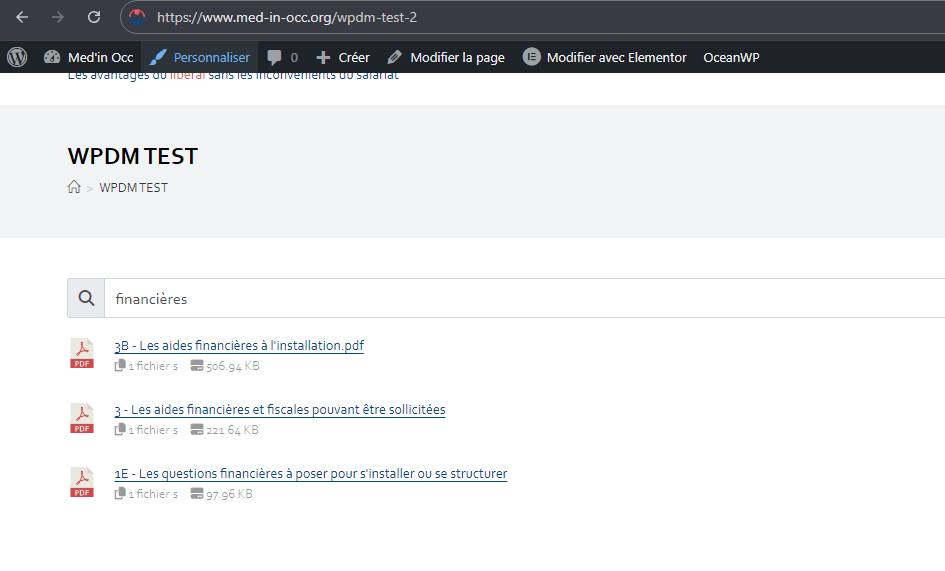
Please kindly check.
Thank you
by adding ?search=financière at the end of the url of the page ok. but not using the search field and i won’t ask the visitors to write queries in the url field of their browser…
The last URL also showing 404 error screenshot
To view the plugin’s log, please follow these steps:
– Access the error logs via the cPanel Error Log file.
– Enable debugging mode in your config.php file by adding the following code: define( ‘WP_DEBUG’, true );
– Alternatively, you can install an error log plugin, such as Error Log Monitor.
Hi Nayeem, it is a longstanding issue that you assisted with in the past. We just have too many site views which creates some issues with PDF Viewer working. I’m just looking for a solution on our most visited packages that will allow us to reduce the number of fetch requests and using an iframe seems to work for what we are looking for. Is there a way to build a shortcode of my own that works like the [file_list] one? I realize it is meant for multiple files, but we aren’t going to be using it that way, so if I could strip out the code that removes it from my URL string, that would be awesome.
We tried making our own with some php and it places into the template perfectly on its own, but when I add it to the src url of an iframe, it doesn’t read the shortcode at all:
<iframe src="[wpdm_url_ae]" style="width: 100%; height: 400px; border: none;"></iframe>
  #document (https://resources.advisorsexcel.com/resource/test-package/[wpdm_url_ae])


