

iContact Subscription
$39.00 LicenseSingle SiteDeveloper+ $60.00 Add To Cart Version 1.0.0 Download 9 File…

Advanced Custom Fields Add-on for WordPress Download Manager
Capture more data, customize your download forms, and display rich package information — all without writing a single line of code.
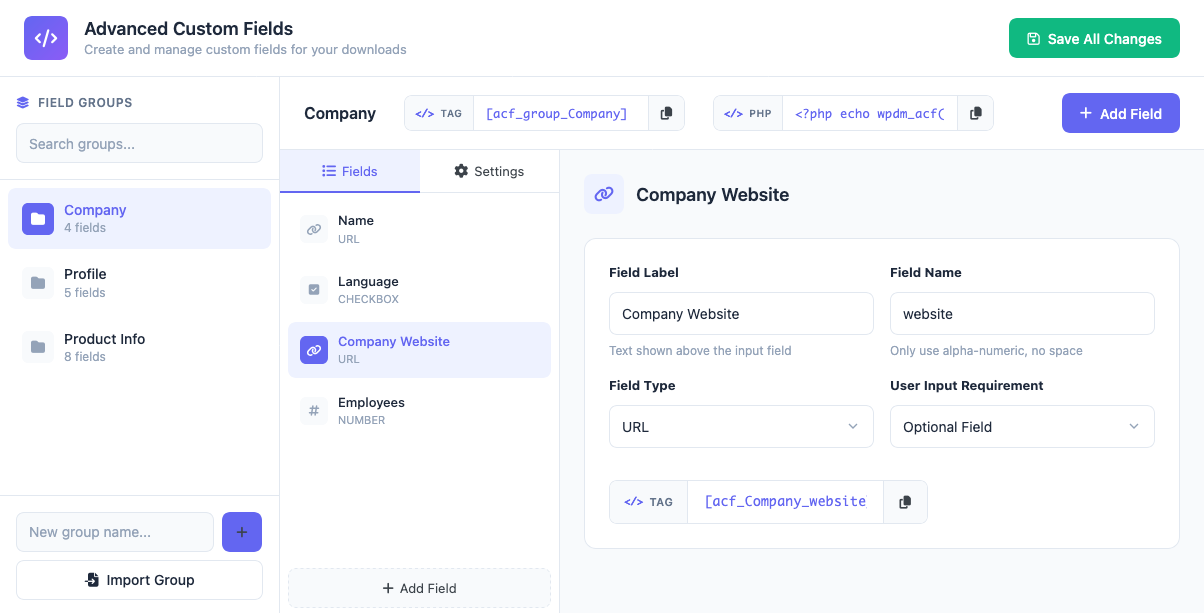
The Advanced Custom Fields add-on extends WordPress Download Manager with powerful form-building capabilities. Create custom field groups tailored to different downloads, collect visitor information through email lock forms, and present package details exactly the way you want.
Whether you're distributing software, documents, or digital products, standard download pages often fall short. This add-on lets you add product specifications, version details, system requirements, or any custom data your audience needs — displayed beautifully on the front end.
Software vendors, theme/plugin developers, digital marketplaces, educational resource sites, and anyone who needs structured download metadata or wants to qualify leads before granting file access.
[panel class="panel-default panel-logs" title="Version 3.0.0 | Released on Dec 10, 2025" open=1]
[/panel][panel class="panel-default panel-logs" title="Version 2.4.2 | Released on May 01, 2025" open=1]
[/panel][panel class="panel-default panel-logs" title="Version 2.4.1 | Released on Mar 20, 2025" open=1]
[/panel][panel class="panel-default panel-logs" title="Version 2.4.0 | Released on Feb 19, 2025" open=1]
[/panel][panel class="panel-default panel-logs" title="Version 2.3.3 | Released on Aug 02, 2024" open=1]
[/panel][panel class="panel-default panel-logs" title="Version 2.3.2 | Released on Jul 04, 2024" open=1]
[/panel][panel class="panel-default panel-logs" title="Version 2.3.1 | Released on Jul 01, 2024" open=1]
[/panel][panel class="panel-default panel-logs" title="Version 2.3.0 | Released on Oct 29, 2023" open=1]
[/panel][panel class="panel-default panel-logs" title="Version 2.2.8 | Released on Nov 15, 2022" open=1]
[/panel][panel class="panel-default panel-logs" title="Version 2.2.7 | Released on Oct 15, 2022" open=1]
[/panel][panel class="panel-default panel-logs" title="Version 2.2.6 | Released on Jul 12, 2021" open=1]
[/panel][panel class="panel-default panel-logs" title="Version 2.2.5 | Released on Jul 04, 2021" open=1]
[/panel][panel class="panel-default panel-logs" title="Version 2.2.4 | Released on May 25, 2021" open=1]
[/panel][panel class="panel-default panel-logs" title="Version 2.2.0 | Released on Nov 05, 2020" open=1]
[/panel][panel class="panel-default panel-logs" title="Version 2.1.0 | Released on Sep 25, 2020" open=1]
[/panel][panel class="panel-default panel-logs" title="Version 2.0.0 | Released on May 19, 2020" open=1]
[/panel][panel class="panel-default panel-logs" title="Version 1.9.6 | Released on Dec 20, 2019" open=1]
[/panel][panel class="panel-default panel-logs" title="Version 1.9.5 | Released on Nov 22, 2019" open=1]
[/panel][panel class="panel-default panel-logs" title="Version 1.9.4 | Released on Sep 07, 2019" open=1]
[/panel][panel class="panel-default panel-logs" title="Version 1.9.2 | Released on May 16, 2019" open=1]
[/panel][panel class="panel-default panel-logs" title="Version 1.9.1 | Released on Apr 04, 2019" open=1]
| , like option_value|Option Label[/panel][panel class="panel-default panel-logs" title="Version 1.9.0 | Released on Jan 24, 2019" open=1]
[/panel][panel class="panel-default panel-logs" title="Version 1.8.0 | Released on Nov 22, 2018" open=1]
[/panel][panel class="panel-default panel-logs" title="Version 1.7.4 | Released on Feb 02, 2018"]
[/panel][panel class="panel-default panel-logs" title="Version 1.7.3 | Released on Jul 20, 2017" ]
[/panel][panel class="panel-default panel-logs" title="Version 1.7.2 | Released on Jul 06, 2017" ]
[/panel][panel class="panel-default panel-logs" title="Version 1.6.1 | Released on Feb 09, 2017"]
[/panel][panel class="panel-default panel-logs" title="Version 1.6.1 | Released on Jul 23, 2016"]
[/panel][panel class="panel-default panel-logs" title="Version 1.5.3 | Released on Feb 25, 2016"]
[/panel][panel class="panel-default panel-logs" title="Version 1.5.2 | Released on Feb 13, 2016"]
[/panel][panel class="panel-default panel-logs" title="Version 1.5.1 | Released on Feb 12, 2016"]
[/panel][panel class="panel-default panel-logs" title="Version 1.5.0 | Released on Feb 11, 2016"]
[/panel][panel class="panel-default panel-logs" title="Version 1.4.1 | Released on Sep 04, 2015"]
[/panel][panel class="panel-default panel-logs" title="Version 1.4.0 | Released on Jun 24, 2015"]
[/panel]
$39.00 LicenseSingle SiteDeveloper+ $60.00 Add To Cart Version 1.0.0 Download 9 File…

Price: $[price] $499.00 Select License Pro For single installation $499.00 Add To…

$49.00 — $99.00 Select License Pro For single installation $49.00 Developer Up-to…

$49.00 — $99.00 Select License Pro For single installation $49.00 Developer Up-to…
50 Comments
Hi, we have the Advanced Custom Fields and would like to add more fields to the registration form. But when we create a Custom Field and then insert the ShortCode into the page, only the ShortCode is displayed as text. What are we doing wrong?
Please post the issue in forum https://www.wpdownloadmanager.com/support/forum/download-manager-pro/. Support team will assist you with the setup.
Is there documentation on how to add a field to the front-end file upload?
The options are simple and self-explanatory. Go to Admin Menu => Downloads => Custom Fields, that area will give your options to create fields / field groups with the front-end upload form.
Hi, how can we select the default value while adding a radio button list?
Add default one at the top ( as the first item ).
Can we use custom fields with the archive filter?
May you please explain a little more.
I am using wpdm directory add on which allows you to filter package based on category, I was wondering if it is possible to add custom fields an additional filter parameter.
But i guess it is not possible. Though it would be a nice feature where one can customize wpdm directory addon options with help of the filter(wp) of function.
Could this be used to add a field to a shared package that would show which user shared the file?
How do I add one of these fields to the email that is sent through the Download Notifications add-on. We need to show the Customer Number on the email that is sent to our Admins after a customer downloads a file that needs a password.
Thanks,
Steve
Use email template tag
[#REQUEST_custom_form_field/FIELD_NAME#]replace
FIELD_NAMEwith proper field name from custom field settings.I understand how that would work inside an email template, however, there is no email template for the email that gets sent to the admin when a user downloads a file.
Right now I have edited the php in the plugin to add the text that I need. Is it possible to add a custom field to the php?
Thanks,
Steve
Please update the download notification add-on, then you will have the email template to edit. Before this update, please delete the old version first. As, in this update, we have changed the plugin folder name
Please post here https://www.wpdownloadmanager.com/support/forum/download-manager-pro/ and give me your package URL and temporary wp-admin login info to check and set this up there for you.
I have done that and I have seen the new template for the download notifications. I also added the code above however this is what is contained in the email:
September 21, 2020
Someone just downloaded an item from your site.
User and package info:
Downloader’s IP: 142.162.5.249
Downloader’s Email: steve.lewis@dpsi.com
Package: PMC 8.1 Setup (x86) – Office 365
[#REQUEST_custom_form_field/cust_no#]
Hi,
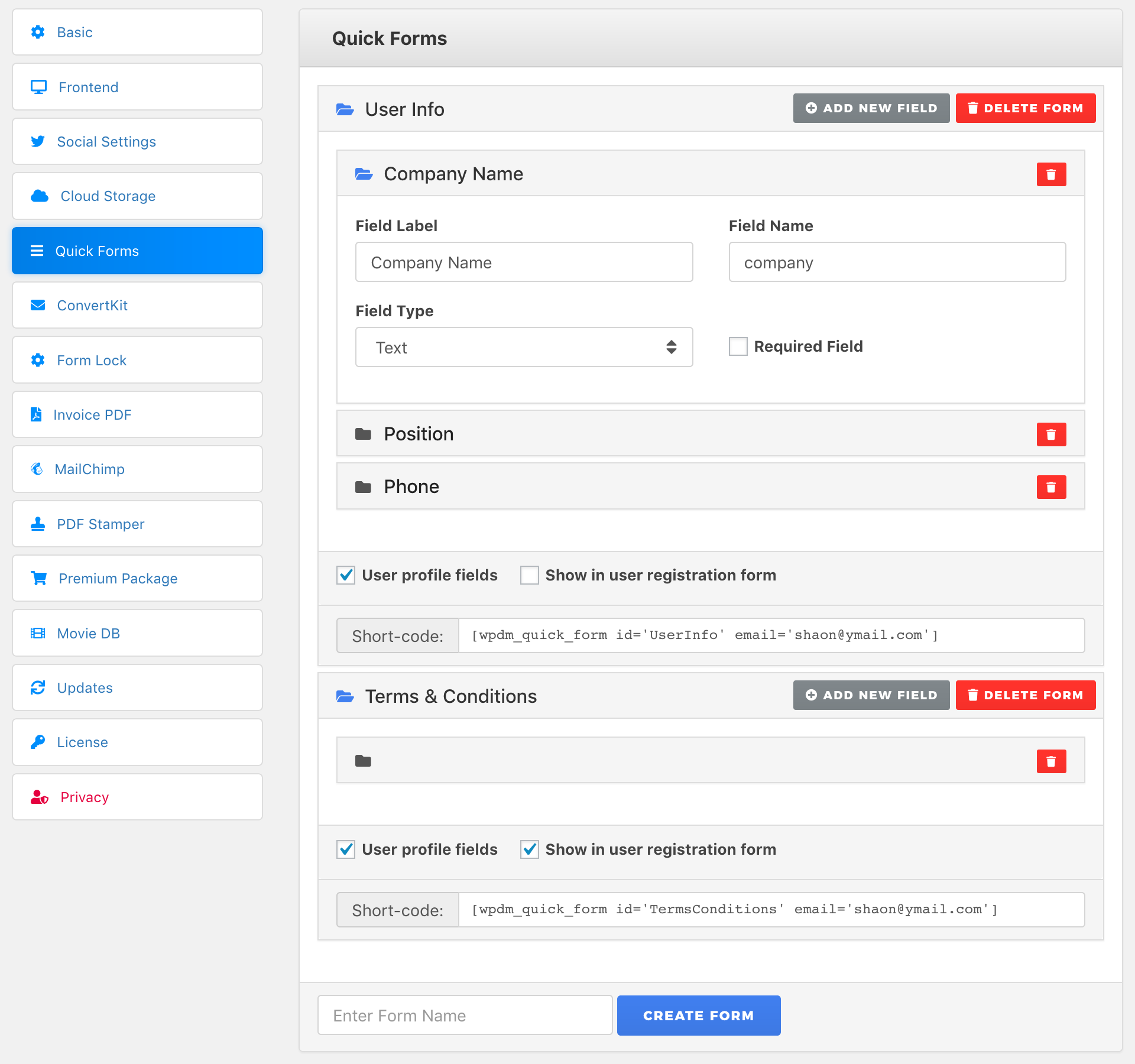
Once i created a “Quick form” in settings and selected it in “Additional Fields” in the Email lock protection, where do I found the informations users filled in frontend ? And why can’t I see those fields in the stats export ?
Thank you
Hi,
You can see and export those data from
Admin Menu ► Downloads ► Subscribers.Hi,
Thanks for the reply !
How can I make this entry (Downloads > Subscribers) visible by editors ?
Hi, I bought the complement for custom fields to be able to add fields in the registration form and I don’t know how to do it so that I can add all the fields that I want. I hope help thanks
Hi,
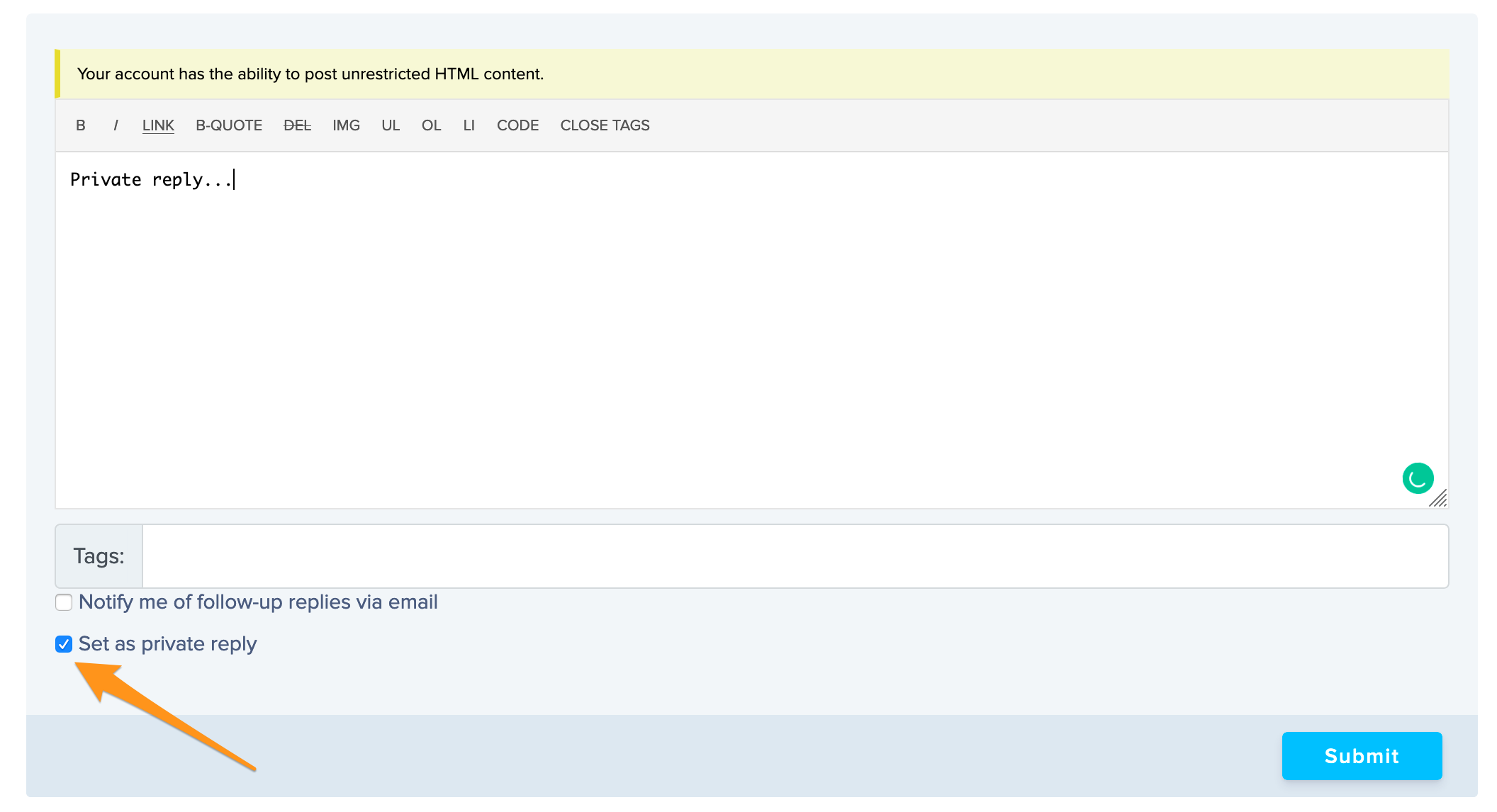
For tech support, please post your issue here https://www.wpdownloadmanager.com/support/forum/download-manager-pro/, also add temporary wp-admin login info in a private reply for speedy resolution.
How a private message is made I don’t know how to do it forgive
After creating a post in pro forum, you can add a reply as private:
I really need some help with the Email templates. Every time I make a change to the template it changes everything to unrendered HTML. For example instead of something showing as bold it now shows text.
I have had this issue several time and they have fixed up my site for me, which is much appreciated.
However, each time they reset the templates I go to make another change and it reverts back to the HTML showing.
Is it possible to get this fixed so that I can edit the templates as designed without these issues.
Thanks,
I currently have 2 add-ons activated on my site. Download notifications and Advanced custom fields.
I have a custom field called cust_no which stores the customer number.
First question: How do I get that new field to show up on the registration form?
Second question: How do I show the customer number in the email that the administrator gets once a file has been downloaded?
Thanks,
I have a test site where I want to use this addon first to make sure I can get it configured properly before adding it to our live company site. If I activate it on the test site and then deactivate it can I then activate it on our company site?
Thanks,
Yes, you can do that.
Does this addon allow me to add on extra fields to the registration form ?
No, it doesn’t, but we have plan to add the feature soon.
Has the feature been added? I need this feature urgently, but I do not want to puchase this addon if it doesn’t do what I need.
Yes, added, please review the description for all features.
Hello,
we need to add custom fields in email lock request form and we need these fields to show in “Subscribers” page.
Is it possible with this add-on??
Thanks in advance
Yes, possible.
How to do that? I create a Custom Field Group, but it is now showing on Email Lock settings.
To create field group for email lock, you need to create it from quick form menu in wpdm setings. Then select the group when enabling email lock on edit package window.
How to show custom Field only visitor, and do not show all Group Member
Hi,
The option is not available yet, but noted for implementation.
Hi Simon,
is this an specific WPDM Add-On to handle integrate the ACF PlugIn in a proper way, or is this the normal ACF PlugIn purcased by you?
This add-on is not the ACF plugin from wordpress.org This is a separate plugin to add custom fields in Download Manager packages.
Also, how can you add logic in page template to check if custom field has value?
the “nbsp” tag.
Hey, when I put a TextArea it removes some HTML formatting.
I’m using those fields into my page template to display blocks of HTML data in a certain way, but it removes the tag and some other probably too.
Any workaround?
I want to be able to hide most of the package settings from showing on the Package settings page and the package page.
That is i want to be able to HIDE the following.
Version:
Link Label:
Download
Stock Limit:
Download Limit:
/ user
Reset Limit for All Users
View Count:
Download Count:
Package Size:
Allow Access:
Individual File:
Don’t Allow Inidividual File Download Allow Inidividual File Download
Link Template:
Reset Key
I don’t want want users to see most of these because it confuses most of them. I just want users to have a straight forward upload process without complicated stuff. And i dont want it also show on the front page/Package Page.
Can i achieve this with this addon? If not, which addon can i use to achieve this?
In a template, can you hide custom fields that are empty?
I added a custom field to a link template used in the directory/search add-on. For items that do not have data in this custom field, the custom field’s shortcode displays in search results.
Yes, possible now, please update your copy.
In your example, where will the product appears ? in the widget ?
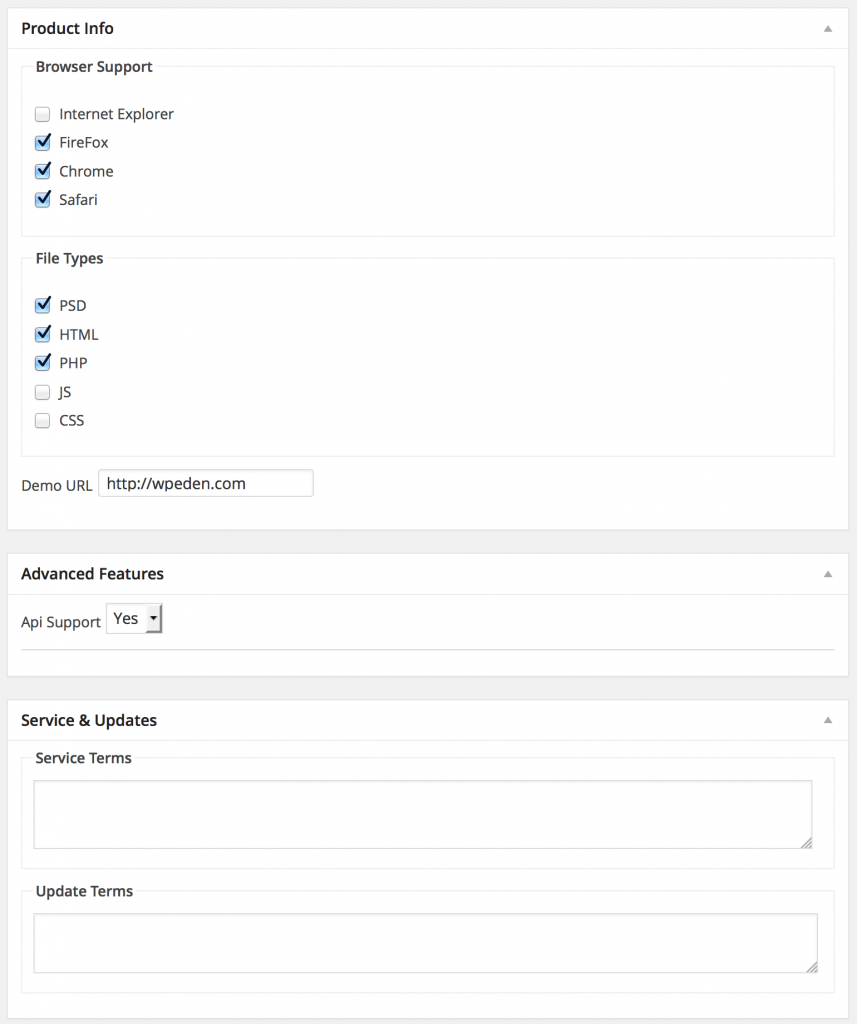
You can show Product Info data in link/page template using template tag [wpdm_acf-ProductInfo] ( the tag mentioned under the box ) or you also can show that putting the php code mentioned there in your theme template.
*product info
We want to be able to display JUST the values of the the custom fields. No CSS, or goofy tables and styling.
On a previous post, you indicate there is shortcode that will meet our needs: http://www.wpdownloadmanager.com/custom-field-support-for-wpdm-pro-file-management-plugin/
Specifically, you write: “you can show any specific custom field using short-code [wpdm_cf custom field name], for example if you just want to show the value for “File Types”, simply use [wpdm_cf File Types] , which will show the value “HTP, JavaScript, HTML, CSS, PNG”.
When we use this shortcode per your instructions, it does not work: [wpdm_cf CityName]
We also tried this shortcode and it does not work: [wpdm_cf City Name]
When we use this shortcode: [wpdm_acf-CityName] we see a formatted table THAT WE DO NOT WANT.
Please download the add-on again to get the updated version 1.1.0 , there we have added new template tag
[wpdm_acf-GroupName-FieldName]for showing specific field value