

WPDM for iOS
Download Version 4.3.0 Download 6916 File Size 0.00 KB File Count 1…

Connect your Microsoft OneDrive to WordPress Download Manager
Distribute files directly from your OneDrive cloud storage. No more downloading and re-uploading - just browse, select, and attach.
Your files live in OneDrive. Your downloads live in WordPress. Keeping them in sync is a hassle:
Your cloud storage should work with your website, not against it.
WPDM OneDrive Integration connects your Microsoft OneDrive directly to WordPress Download Manager. Browse your cloud files without leaving WordPress, attach them with one click, and serve downloads straight from OneDrive.
Link your Microsoft account once. Access your entire OneDrive - personal or business - from your WordPress dashboard.
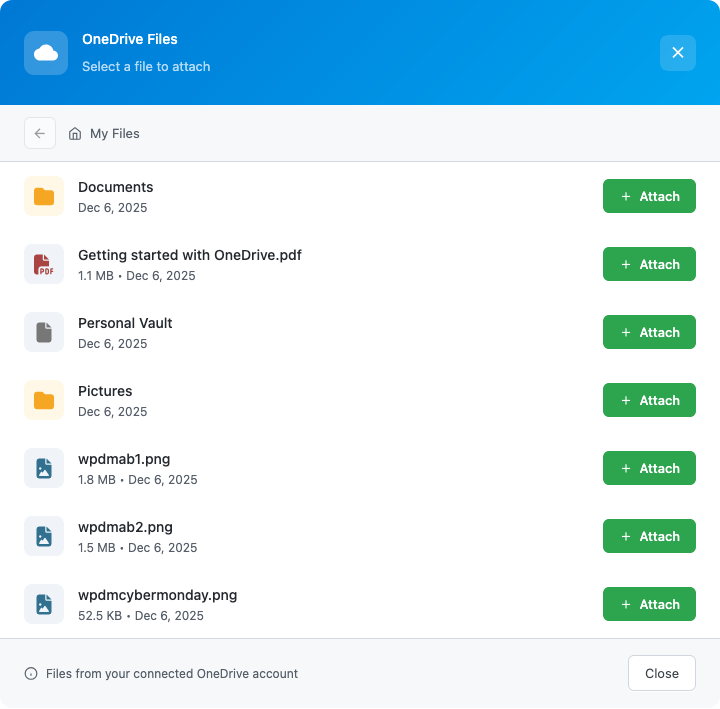
A sleek, modern interface to navigate your OneDrive folders. Find files fast, preview details, and attach in seconds.
Files are served directly from OneDrive. Update a file in OneDrive, and your downloads automatically reflect the changes.
Secure OAuth 2.0 authentication with Microsoft. No API keys to manage. Just click "Connect" and authorize.
Downloads are served directly from OneDrive's CDN. Fast, reliable, and no bandwidth on your server.
Works with personal Microsoft accounts and Microsoft 365 business accounts. Access your organization's files securely.
OAuth tokens refresh automatically. Connect once, stay connected forever.
Designed to match WPDM's look and feel. If you've used the Dropbox or Google Drive add-ons, you'll feel right at home.
Document Distribution Share PDFs, Word documents, spreadsheets, and presentations stored in OneDrive with your WordPress audience.
Media Libraries Distribute images, videos, and audio files from your OneDrive media collection.
Team Collaboration Multiple team members can upload to OneDrive. You attach to WordPress. Everyone stays productive.
Enterprise Users Already using Microsoft 365? Leverage your existing cloud storage investment for content distribution.
Backup & Redundancy Keep your master files in OneDrive's reliable cloud while serving downloads through WordPress.
No coding required. No complex configuration.
Does it work with OneDrive for Business?
Yes! Connect with any Microsoft account - personal OneDrive or Microsoft 365 business accounts.
Are files copied to my server?
No. Files remain in OneDrive and are served directly from Microsoft's servers. This saves your hosting bandwidth and storage.
What happens if I disconnect OneDrive?
Previously attached files will show an error. Reconnect your account to restore access.
Can multiple users connect their OneDrive?
Each WordPress admin can connect their own Microsoft account. Files they attach are served using their connection.
Is my data secure?
Absolutely. We use Microsoft's official OAuth 2.0 flow. Your credentials are never stored - only secure access tokens that can be revoked anytime.
What file types are supported?
Any file in your OneDrive can be attached - documents, images, videos, archives, and more.
Stop the download-upload dance. Connect your OneDrive to WordPress Download Manager and serve files directly from Microsoft's cloud.
WPDM OneDrive Integration - Your cloud. Your downloads. Connected.
Part of the WordPress Download Manager ecosystem - trusted by 100,000+ websites worldwide.
Download Version 4.3.0 Download 6916 File Size 0.00 KB File Count 1…

Version 1.1.0 Download 21 File Size 2.26 KB File Count 1 Create…

$299.00 — $799.00 Select License Pro For single installation $299.00 Business For…

Download Version 3.1 Download 221054 File Size 1.21 MB File Count 1…
14 Comments
OneDrive add-on has been updated and fully functional now.
Also cannot find the “Cloud Storage” settings in the WPDM settings after installing plugin. Instructions are outdated for registering the application with Microsoft Azure. Seems that this add-on no longer works or is not supported now.
Hello, I can´t find any settings for it in the backend. Is it still working? Best, Tom.
where i get the redirect uri?
We are updating instructions soon.
Hi, can this plugin be used to show all files from one Onedrive-Folder, or is every single file added separately?
If it’s possible to show all files from one folder, are files added automatically, when new files are uploaded to this folder, or is it required to update the downloads manually?
That is not possible with one drive, but you can do that using the Dropbox add-on https://www.wpdownloadmanager.com/download/dropbox-explorer/
does this still works
Hi, Do you need to have WPDM Pro for OneDrive integration to work?
It will work with the free version in the same way as the pro version.
The platform screen is different than your instructions. For the redirect url field, you can only enter a url that begins with “https://” vs. “http://” as used in your example. I am having difficulty using your addon as my site does not begin with “https://”. Any suggestions?
The platform screen also has a “Logout URL” field to complete as well. The “Target Domain” field in your example is no longer there.
Now they require https. You can get a free SSL cert from here https://zerossl.com/free-ssl/#crt
I think these instructions are now out of date. The add platform dialog box looks very different for me on onedrive.
Doc still valid, please follow the steps exactly.