
Forum Replies Created

Same with the old version. Definitely a server related issue. But as you have no log I have to debug the code and check file permissions to pinpoint the issue. It is only possible if I FTP access. Please let me know if you can manage it somehow.
If you can’t locate where I add the code, you should ask where did I add the code. That’s more professional than saying you lied.
Here is the code I added to reset download without initiating a new download. This is triggered when you visit the dashboard. And reset happens when 24 hours passed after the first download initiated by the user,
https://www.evernote.com/l/AUdt9ZW98ppFFoOlE74UscgxDe8PMAXrv4AB/image.png

Download limit has been reset for my user maxve Notice that there is not new download. The count is still 0.
https://www.evernote.com/l/AUcW6GcE0YdG9Zu5Lfd1YtbX3noSUuDdGKoB/image.png

You can use the following shortcode for Archive Page compact view. This shortcode has category drop-down.
[wpdm-archive button_style="inverse" link_template="link-template-panel-1-3" order_by="post_title" order="asc" items_per_page="10" cat_view="compact"]
You can also check out the sidebar view https://demo.wpdownloadmanager.com/wpdmpro/archive-page-sidebar/
[wpdm-archive button_style="default" order_by="post_title" order="asc" items_per_page="10" cat_view="sidebar"]
WPDM packages can have more than one file types in a single package. So, there is no way to create a dropdown by file type because you can manage this kind of things using category and subcategory.
Please check now. Everything looks perfect. I have installed Image Button add-on to beautify the download buttons. You can change the button styles from settings.
Advanced Search Left Shortcode
[wpdm-search-page cols="1" items_per_page="10" link_template="panel" position="left"]
Advanced Search Shortcode
[wpdm-search-page cols="1" items_per_page="10" link_template="panel"]
Archive Page Compact Shortcode
[wpdm-archive button_style="inverse" link_template="link-template-panel-1-3" order_by="post_title" order="asc" items_per_page="10" cat_view="compact"]
Please install the Advanced TinyMCE add-on. This add-on provides an easy to use a graphical user interface to insert various shortcodes including the ones you need.
The update is coming within next week. Maybe at the begging of the next week.
How did you create your custom link templates? If you have put those files inside the Download Manager plugin dir files will be gone after deleting the plugin. If you have put those in theme dir I can safely delete the plugin to test old version.
I added the code on your site. So, no action required from your side.
Please add the following code before line no 159 in /download-manager/wpdm-start-download.php file,
$filepath = str_replace('\\','/', $filepath );
That should fix the naming issue. We have added the fix in our side for the next update. I guess you are using Windows server, it happens due to the use of Backslashes in the path.
Hi,
It is not a fixed approach. Depending on user behavior and IP address Google makes the process easy or hard! ( multiple images ) Nothing can be done from our side.
Thanks.
Currently, Archive Page add-on search adds those downloads even when the option is set to hide everything. This add-on more efficient for this kind of stuff.
However, soon we will extend the Default Search result shortcode to include the downloads whose access comes from category settings.
Here is the CSS for the pagination bg color,
#wpdm-all-packages .paginate_button.active a { background: #c1c1c1 !important; border-color: #c1c1c1; }
Do you want something like this https://demo.wpdownloadmanager.com/wpdmpro/archive-page-compact/ ? You can implement it using Directory Add-on.
Added new code. Now the limit should reset without initiating a new download.
Please send temporary wp-admin login info in private reply to check the issue.
Can’t delete the plugin. Asking for FTP info.
https://www.evernote.com/l/AUfIbWgl7atFrIHgxiPW9DdFIk-pGhZ7td4B/image.png

Please try now. Unlock the key associated with your order #5b7530eaef655
Please check your email inbox. Replied to your email.
Sorry for the delayed reply. Yes, you can leave the section 1 empty if you are using the role-based limit. Thanks.
Hi,
You can use the Default Values add-on ( https://www.wpdownloadmanager.com/download/wpdm-default-values/ ) to set default terms and conditions.
Thanks.
Hi,
Sorry for the delayed reply.
Which shortcode are you using in your member page?
The Custom Access Level add-on has a shortcode [wpdm_my_downloads] to list user downloads. The user must log in to access this page and can only see the packages assigned to them using AAC add-on.
PS. You have access to the Pro forum ( https://www.wpdownloadmanager.com/support/forum/download-manager-pro/ ) Please post your future query there for a faster support response.
Thanks.
Maybe a date format issue. Please try the marked format or the one below it.
https://www.evernote.com/l/AUfrF4Jngi9B1ZSyN03QlDsi-oo2UPCLOrwB/image.png
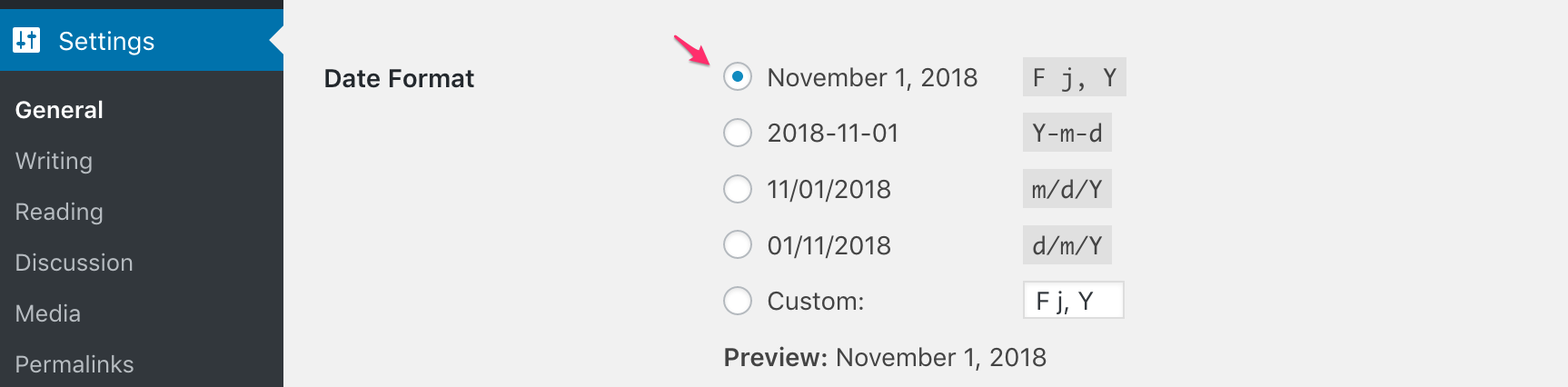
Hi,
Sorry for the delayed reply.
If you are hosting on Siteground add following rule in your .htaccess file to fix the saving issue,
<IfModule mod_security.c>
SecFilterRemove 001868
</IfModule>
Otherwise please send temporary wp-admin login info in private reply.
Thanks.
Please install the updated version of Dropbox add-on. We have fixed the issue.