
- This topic has 12 replies, 6 voices, and was last updated 7 years, 4 months ago by
Shafayet.

I tried to edit some settings within the plugin today, and hit some interesting issues. I made changes to my Login Required message, as well as my Captcha settings, and when I try to click “Save Settings”, the icon switches to a loading icon, but the page never saves. Nothing happens. No scripts run, no page refresh, nothing. It simply will not save any settings.
My next attempt was to uninstall and reinstall the plugin. When I did this, I found all of my existing settings and files where still intact. So I uninstalled again, and manually deleted the files via the “wp-content” folder. After yet another reinstall, all the same files and settings where still there.
Any idea on how to do a complete clean installation? Or how to actually save my settings?

Please give me temporary wp-admin login info in a private reply to check your issue.
Still having these issues, would love to find a resolution. If not, I’ll find another app that works.
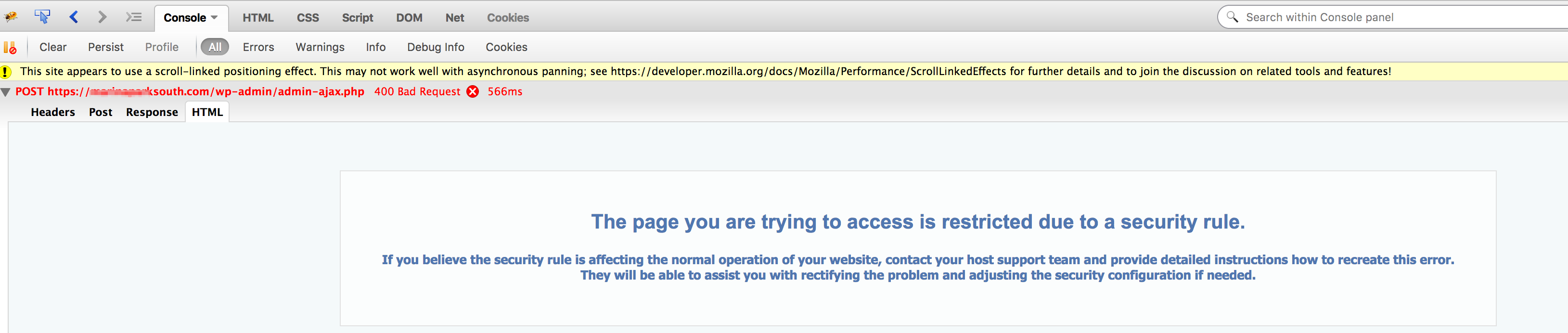
The request was blocked by your server rules:
https://www.evernote.com/l/AV0WKpNmG6ZI1ZXXzKswJKPfIEvnFBoOOAwB/image.png
Please contact hosting support to fix this or if you want to solve it by yourself, please add the following rules to your site’s .htaccess file to get it to work:
<IfModule mod_security.c>
SecFilterRemove 001868
</IfModule>
That fixed the issue, thanks. Never encountered this kind of issue before on a web server.

I have the same issue…
I need help.
Please admin reply to my email

Hi Nduka,
Please send temporary wp-admin login info in private reply to check the issue. You can create your own support ticket here https://www.wpdownloadmanager.com/support/forum/download-manager-pro/ ( Form is at the bottom of the page )
Thanks.

Hi there – I am experiencing the same issue.
Can you publish what the solution that resolved this is?
Thanks!

Please check #post-60409 for solution. It is hosting related issue, you also may ask the hosting support for help.
The topic "Settings won't save – Can't Uninstall Completely" is closed to new replies.