
- This topic has 15 replies, 7 voices, and was last updated 7 years, 5 months ago by
trieu bap.

Hi !
I’ can’t access to the files located in the Media Library from a “new file” page in Download Manager. There is no file tree.
I’ve developped a web site on a test sub-domain (test.mysite.com) and then transfered it to another subdomain (new.mysite.com). I tried to migrate with Duplicator, but had issues to install the database, while the FTP files seem to have been correctelly transfered (?). So, I kept the test database and give the new web site the old database connection informations in wp-config.php (db name, user, pw) and modified the content of the old database with the new sub-domain informations.
The new web site works well, but I have one problem: the block with the manager (file tree ?) to access to the files located in the Media Library is a blank block (see attached). jqueryFileTree.js is correctelly located in wp-content/plugins/download-manager/assets/js/…
I’ve searched the database to see if there is any link to the “old” sub-domain left. I’ve deactivated Download Manager and reactivated it. I’ve uninstalled it and reinstalled it from the WP extensions backend (btw, the old files created before were still there after that). I’ve reinstalled a brand new Download Manager (downloaded from the official WPDM site) via FTP. I’ve checked that jqueryFileTree.js is correctelly located in wp-content/plugins/download-manager/assets/js/. My AdBlocker is deactivated on this site.
I still have no access to the Media Library.
Any idea where that can come from ? and how to solve it ?
A great great thanks in advance if you can help me…
Warm regards
Yan
Lausanne – Switzerland
Any idea ?

Hi,
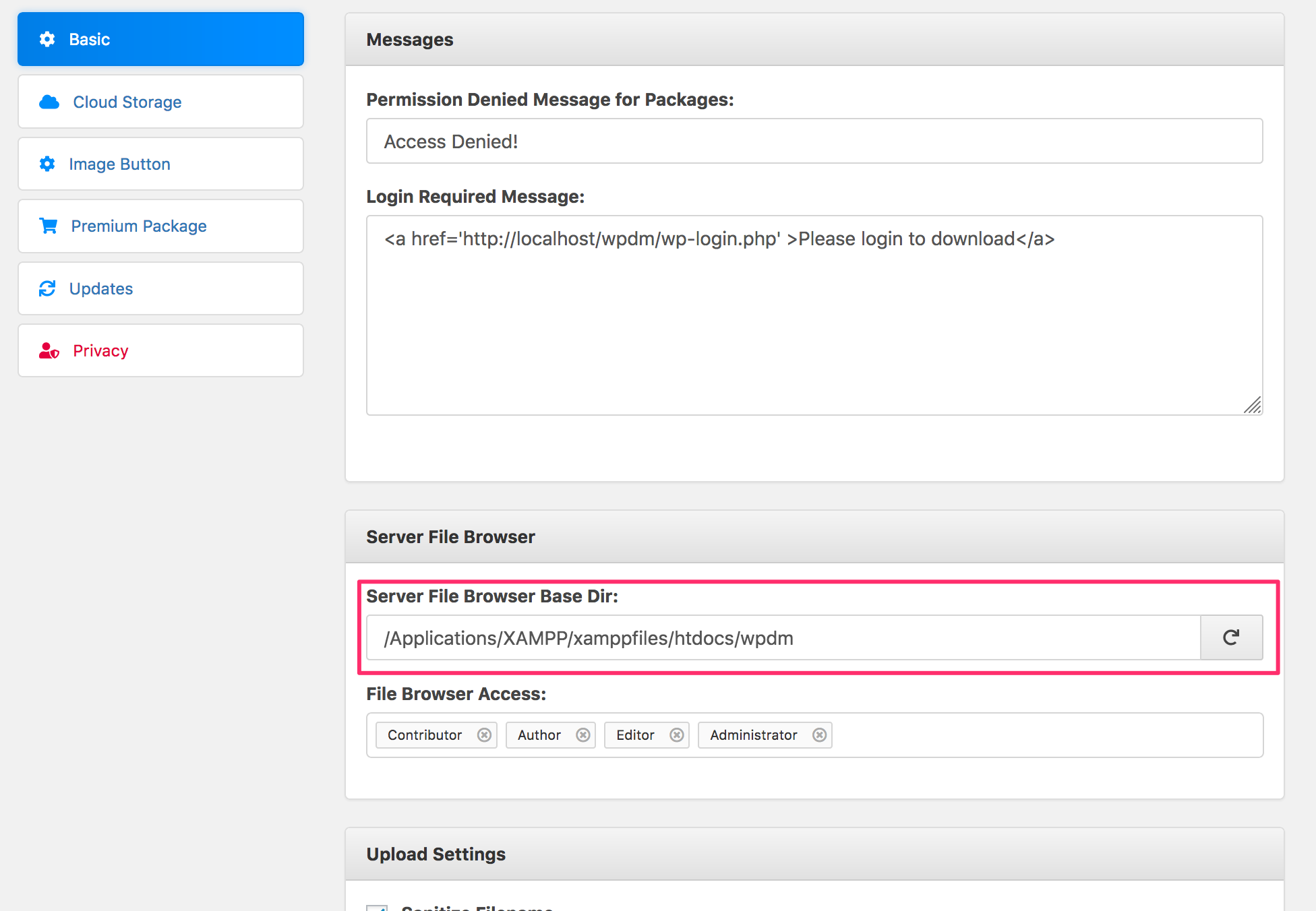
Sorry for the delayed reply, It looks like an issue with “File Browser Base Dir” option, you need to set a proper path for that option.
https://www.evernote.com/l/AV0tsYVIdxdJ7Zg6fDKLyxACMPG4qWHz-YcB/image.png

Hi,
I have the same problem, but only for non admins.
Admins see the file system, Editors don’t, they just get a blank block if they are added to file-browser access.
So it cant be a problem with the file browser base dir.
Is this a bug?
kind regards
Constantin

Have you added the Editor role in File Browser access option as shown in the screenshot above? Please send login info in private reply if that doesn’t solve the issue.
What is the “Server File Browser Base Dir” path supposed to point to ? I don’t have a root folder named “wpdm”, as in your example.

The private message here in the forum is secure, only you and moderators will be able to see them. “Server File Browser Base Dir” should point to the dir from where you want to start browsing to attach files with wpdm package.
Ok, thanks.
So I should write the whole path from root to the wp-content/uploads folder ?
From your settings, I see that only administrator role can access the file browser. Are you trying with the admin role? We need temporary admin access to further investigate this issue.
Yes, I have admin role. Sure.
Can you give me your email address, so I can create you a temporary profile ?


The topic "Blank block instead of files manager" is closed to new replies.