Please kindly check now, https://spacel.it/?page_id=2690, you have to remove thumb=1 parameter from shortcode for showing icon as per documentation, https://www.wpdownloadmanager.com/doc/short-codes/wpdm_all_packages-list-all-downloads-in-tabular-format-in-a-page/. Please kindly check and let me know.
Thank you and kind regards
Hello HappyHelper,
Hope you are well. We have generally used bootstrap skeleton, you can check the doc here https://getbootstrap.com/docs/5.3/getting-started/introduction/ for bootstrap. For more interactive design templates, please check Downloads > Templates > Import Template as I image attached,
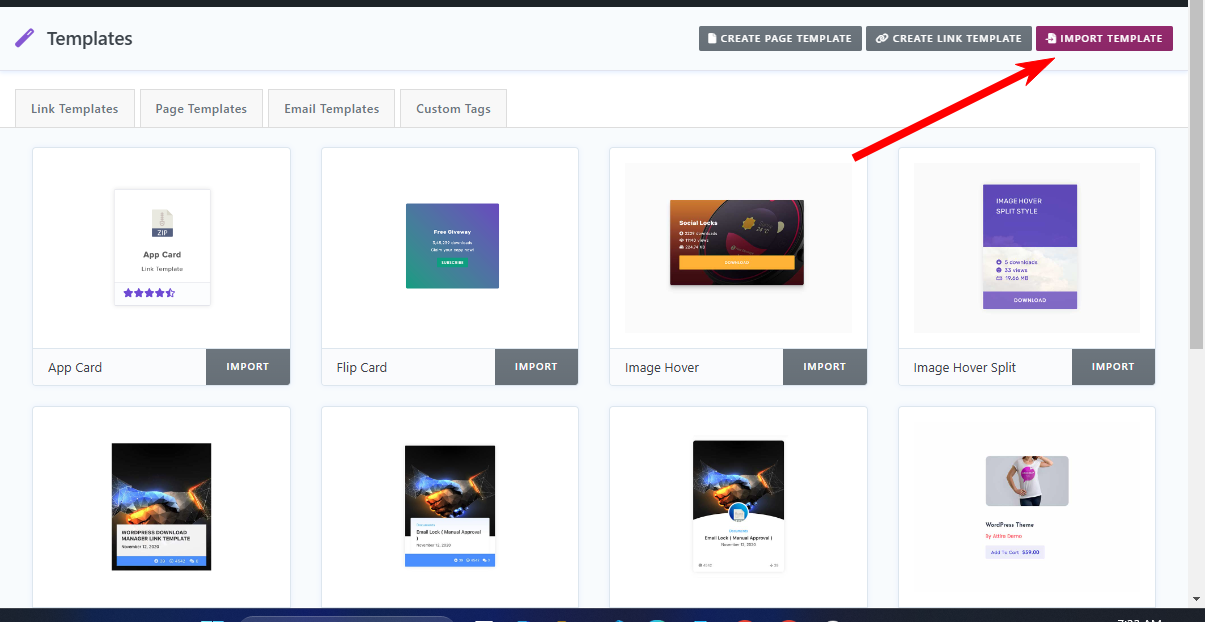
Please kindly check and let me know.
Thank you and kind regards
It is OK, don’t worry. It should be an option to be able to change the page title of the Archive Page. Again, the page title “Downloads” is coming automatically.
Thank you,
Hi Tahasin,
This is a WP Download Manager system generated Archive page, how do I change its name? Again, if you look at the 2nd image, the link shows .products in the link, but the page is called “Downloads.” This is also on the Demo page on this website.
Hello,
I hope this message finds you well and thanks for reaching out.
Could you please clarify which downloads you’re referring to? A screenshot would be really helpful.
Thank you!
Hi. My found out that there are no files in wp-content folder. I recovered the files by restoring an old backup. Thanks. I did reinstall wordpress two weeks ago. Files were moved by exporting downloads and importing to the new install. It worked fine until now but I guess that’s where the problem came from. As long as I got my files back I am cool lesson learnt I will back up files in the cloud.
This reply has been marked as private.
In Download Manager Pro you can easily download single files, using the single Download option.
To display all downloads on a single page, you can use our wpdm_all_packages shortcode. For more details about the all_packages shortcode, please visit this page.
Regards
I tested this in your demo. Before I buy and use the plug-in for a customer, I have to make sure that it works without any problems. I sent you a screenshot of the test environment.
Here is the link: Demo Post
Kind regards
Michael
P.S. I have one more question: Is it possible to display all downloads listed on one page? Practically like a blog archive.
Hello Tahasin,
Thank you for the quick reply. I have now tried to download a file individually in the demo (pink arrow). Unfortunately, that doesn’t work. I am not offered the option to download the other PDF files, but I think that the buttons are covered by the “Top Downloads” field. However, I can download the entire package at the top left (red arrow).
Regards, Michael

uff so i bought it when i don t need it then if specially to specify to a user , i want my downloads to show to all registered users and admins that s it.
ok bought but when i set as admin and subscribers to allow show my downloads and files it will not show unless i add each user email manually, that s it?
sure there is another option to auto load list of users to show my downloads
Is it possible to achieve the following use-case with the Email Lock feature and user registration?
When a user visits the site and wants to download a file, can WPDM allow a “User Registration” form in a modal format instead of just their name and email address? The goal here is to allow the user to ‘register’ with a username/password, name, email, etc… the very first time they want to download a file, instead of just name and email address. Then, if the user returns to the site weeks/months later to download a file again and they are no longer ‘logged in’, a modal window would pop up asking them to register and/or login.
Hope my scenario makes sense. Here’s a simpler breakdown to help clarify.
User clicks on Download button. Modal pops up asking user to register and/or login. If they register, they fill out name, email, username, password. Once they register or login, the file automatically downloads. If they want to download another file, it would automatically download. If their session expires when they try to download another file in the future, a modal window will pop up asking to register or login.
Thanks for your support.
Hello HappyHelper,
Hope you are well. Thanks for writing to us. You shall able to find your active link/page templates from the Downloads > Templates section. And please use [download_link] template tag in your used template, thus I hope the appearance settings that has been set by you, will be effected from Downloads > Settings > User Interface > Color/Download Button. Please kindly check.
Thank you and kind regards
This reply has been marked as private.
Oh, ok. It would make more sense that all downloads (bundle or single) are treated the same way regarding the lock. From my point of view there is now advantage to have no lock on the file list of the bundle, while the bundle is locked. Either I lock all or none.
Hello Carina,
Hope you are well. Can you please elaborate more on your issue? Do you want to restrict downloads with the Allow Access option with a certain role? And do you want to register the user manually by admin from the WP-Admin > Users > Add New section? Please kindly check and let me know.
Thank you and regards
Hello Chris,
Hope you are well. Thanks for writing to us.
For updating the WPDM PRO plugin, Please simply click the Save Settings again for the license key option from Downloads > Settings > License, and then please update the plugin from the wp-admin > plugins panel.
For saving settings again for the license key option from Downloads -> Settings -> License, that will regenerate the access token. Thus the plugin will be updated,
For updating WPDM add-ons, please download your plugin from here, https://www.wpdownloadmanager.com/user-dashboard/?udb_page=purchases,
And update manually from the wp-admin dashboard Plugins > Add New option. I hope, thus it will resolve your issue. For the Download > Settings > Updates option will may not work properly for some server settings. please check and let me know, if you have any queries.
Thank you and regards
Hi there,
when I try an update (in this case 6.5.8 to 6.6.0) this error happens:
Aktualisierung fehlgeschlagen: Das Paket konnte nicht installiert werden. PCLZIP_ERR_BAD_FORMAT (-10) : Unable to find End of Central Dir Record signature
When I try via wp-cli this output is given:
Anschalten des Wartungsmodus …
Herunterladen der Aktualisierung von https://www.wpdownloadmanager.com/?wpdmppdl=eyJkb21haW4iOiJpbnRlcm4yLmZlZy5kZSIsIklEIjoiMTU3MTciLCJvaWQiOiJXUERNNjI2N0QyMUQyQTNFOCJ9&ind=17163102886881&domain=intern.feg.de …
Using cached file ‘/usr/local/bin/wordpress-files/.wp-cli/cache/plugin/download-manager-6.6.0’…
Entpacken der aktualisierten Version …
Warning: Das Paket konnte nicht installiert werden. “PCLZIP_ERR_BAD_FORMAT (-10) : Unable to find End of Central Dir Record signature”
Abschalten des Wartungsmodus …
+——————+————-+————-+——–+
| name | old_version | new_version | status |
+——————+————-+————-+——–+
| download-manager | 6.5.8 | 6.6.0 | Error |
+——————+————-+————-+——–+
Error: No plugins updated (1 failed).
When I try the link directly, it downloads the correct zip-file, but when I look at the cached file download-manager-6.6.0 it is a html-file with the line
<div class=’w3eden’><div class=’alert alert-danger’ data-title=’Error!’>Invalid Access!</div></div>
Can you check, whether my license is working on your side?
Thanks, Chris
Hello Eric Johnson,
Hope you are well. Thanks for writing to us.
For updating the WPDM PRO plugin, Please simply click the Save Settings again for the license key option from Downloads > Settings > License, and then please update the plugin from the wp-admin > plugins panel.
For saving settings again for the license key option from Downloads -> Settings -> License, that will regenerate the access token. Thus the plugin will be updated,
For updating WPDM add-ons, please download your plugin from here, https://www.wpdownloadmanager.com/user-dashboard/?udb_page=purchases,
And update manually from the wp-admin dashboard Plugins > Add New option. I hope, thus it will resolve your issue. For the Download > Settings > Updates option will may not work properly for some server settings. please check and let me know, if you have any queries.
Thank you and regards
Please check now, I have adjusted Upload Einstellungen > Allowed file types to upload settings from Downloads > Settings section. Please kindly check and let me know.
Thank you again and kind regards
Here is the page template code:
<div class="row">
    <div class="col-md-12">
        <div class="card mb-3 p-3 hide_empty [hide_empty:featured_image]">[featured_image]</div>
    </div>
    <div class="col-md-5">
        <div class="wpdm-button-area mb-3">
            [download_link]
        </div>
        <ul class="list-group ml-0 mb-2">
            <li class="list-group-item d-flex justify-content-between align-items-center [hide_empty:version]">
                [txt=Version]
                <span class="badge">[version]</span>
            </li>
            <li class="list-group-item d-flex justify-content-between align-items-center [hide_empty:download_count]">
                [txt=Download]
                <span class="badge">[download_count]</span>
            </li>
            <li class="list-group-item d-flex justify-content-between align-items-center [hide_empty:file_size]">
                [txt=File Size]
                <span class="badge">[file_size]</span>
            </li>
            <li class="list-group-item d-flex justify-content-between align-items-center [hide_empty:file_count]">
                [txt=File Count]
                <span class="badge">[file_count]</span>
            </li>
            <li class="list-group-item d-flex justify-content-between align-items-center [hide_empty:create_date]">
                [txt=Create Date]
                <span class="badge">[create_date]</span>
            </li>
            <li class="list-group-item  d-flex justify-content-between align-items-center [hide_empty:update_date]">
                [txt=Last Updated]
                <span class="badge">[update_date]</span>
            </li>
<!--            <li class="list-group-item  d-flex justify-content-between align-items-center [hide_empty:company_name]">-->
<!--                [txt=Company Name]-->
<!--                <span class="badge">--><?php //echo wpdm_acf([268],'AuthorReview/company_name'); ?><!--</span>-->
<!--            </li>-->

        </ul>
    </div>

    <div class="col-md-7">
        <h1 class="mt-0">[title]</h1>
        [description]
        <h3>Attached Files</h3>
        [file_list]
        <div class="wel">
            [tags]
           [add_to_list]
        </div>

    </div>

</div>
for link template:
<div class="card bg-light c2a4 mt-2 mb-2">
    <div class="card-body text-center pb-4">
        <div class="text-center wicon">
            [thumb_128x128]
        </div>
        <h3 class="p-0 m-0 mb-2"><a style="font-weight: 700" href="[page_url]">[title]</a></h3>
        <div class="text-muted text-small"><i class="fas fa-hdd"></i> [file_size] <i class="far fa-arrow-alt-circle-down ml-2"></i> [download_count] [txt=downloads]</div>
    </div>
    <div class="card-footer text-center">
            <a href="[page_url]" class="btn btn-secondary">[txt=View More]</a>
            <a href="[download_url]" class="btn btn-secondary">[txt=Download]</a>

[addto_file_cart]
    </div>
</div>
<style>
    .w3eden .c2a4 .wpdm_icon{ height: 64px !important; width: auto; }  .well.c2a4 .media-body{ font-size: 11pt; }
    .w3eden .c2a4 .wicon img{ border-radius: 500px; max-width: 96px;margin: 5px auto 25px; }
    .w3eden .c2a4 .btn{ border-radius: 50px; font-weight: 500; margin: 0 3px; padding: 0 25px; height: 36px; line-height: 36px; font-size: 12px; }
</style>
For #1, For moving, you can use the cut file feature as I image attached from the Asset Manager section,
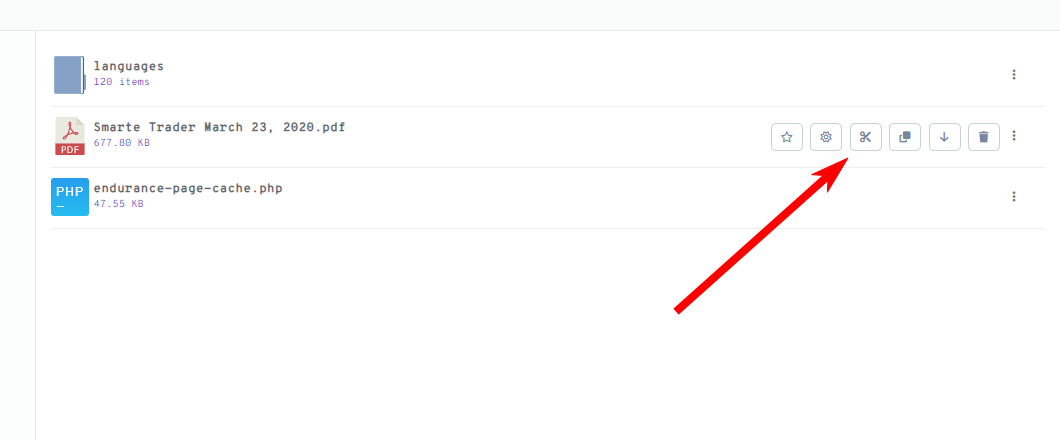
For #2, you can use the Downloads> Import & Export > Select Dir option and then import selected files option.
For #3, For setting options for All Packages globally, you can check our this add-on, https://www.wpdownloadmanager.com/download/wpdm-default-values/
Please kindly check and let me know.
Thank you and kind regards
Hello, Alex
I hope you are doing well and thanks for reaching out.
The search engine functions by targeting package titles only. However, you can use this shortcode to query all downloads associated with specified tag(s)
[wpdm_tag id="Tag Slug(s)" tag_field="slug" title="Custom Title" desc="Custom Dscription" toolbar="1" order_by="field name" order="asc or desc" items_per_page="10" template="temaplte name or ID" cols=4 colspad=2 colsphone=1]
Hello good
I need help since the plugin is not restarting the downloads, it resets the period but not the download limitation.
Let me explain better:
a user has 20 weekly downloads, the plugin resets the date but not the available downloads, so I have been manually doing the resets.
I hope you can help me
I look forward to your comments
greetings




