

All Add-ons
$249.00 — $399.00 Select License Pro For single installation $249.00 Developer Up-to…

Form Lock Plugin for WordPress Download Manager helps you to lock your download with a form so that users need to fill and submit that form to get access to download. As sometimes, you may need to collect data from visitors before they get the download. This add-on will link WordPress Download Manager Downloads with the forms built using popular WordPress Form Builder Plugins.
And if you are missing any form plugin that you are using which is not listed here, let us know.
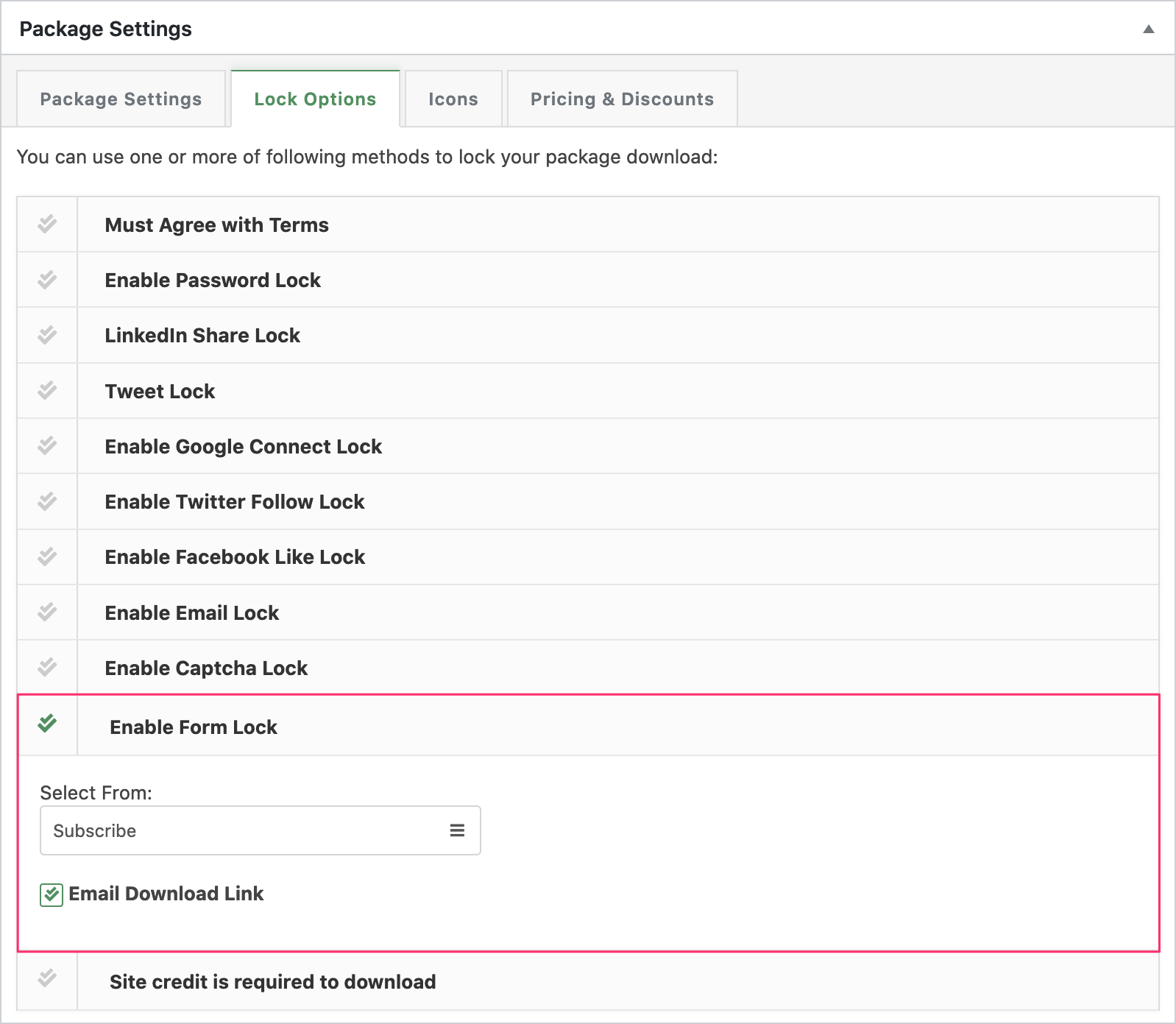
[wpdm_package_id] as a default value, the tag will be replaced by package ID automatically when rendering a form.Now, when someone wants to download the file, he/she must fill the selected form to get access to the download.
Form Lock Option Screenshot:
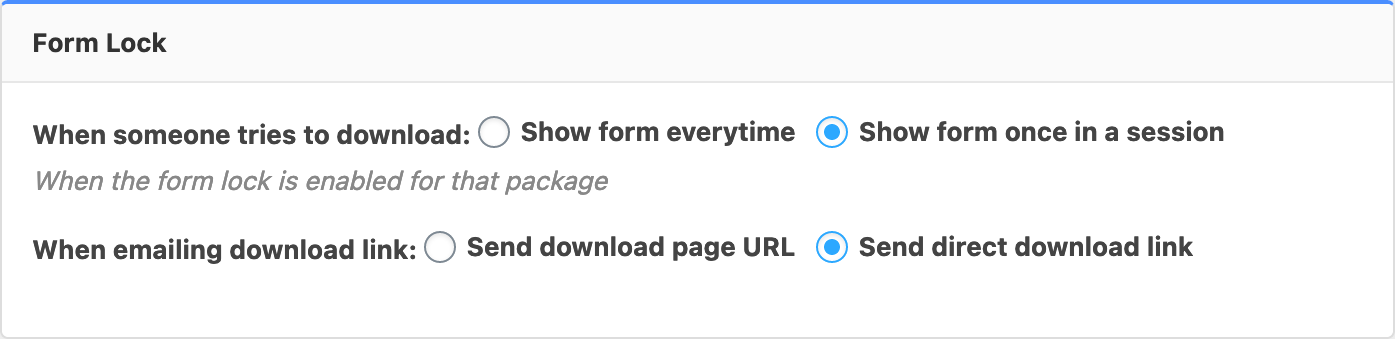
Form Visibility Settings:
$249.00 — $399.00 Select License Pro For single installation $249.00 Developer Up-to…

Version 1.1.1 Download 8 File Size 6.73 KB File Count 1 Create…

Download Version 2.0.0 Download 7187 File Size 436.74 KB File Count 1…

Login is required to access this page Login Version 2.6.0 Download 86…
54 Comments
In contactform7 (version 7.4.4. and up, https://contactform7.com/2016/01/27/html-is-not-allowed-in-messages/) HTML is not allowed anymore in the message. Your plugin hooks into ConTactForm7 and thus resulting in HTML response encoded 🙁 Please point me in the right direction of getting this working as it should.
CF7 works with this on our latest test, however, you also may use our live forms ( https://wpliveforms.com/ – free ). However, please create a post in the forum ( https://www.wpdownloadmanager.com/support/forum/download-manager-pro/ ) and add temporary wp-admin login info in a private reply to set this up there for you.
Can you bypass the model with the email lock? Can you take a normal form and intrigrate the download link into the submit button?
Yes, you can, in the page template use [download_link_extended] instead of [download_link] to embed the form on the page.
Possibility to fill in the form only once and not for each download in the same page (20 files to download in the same page)
Use : Live Forms + Enable Form Lock
I have made a form with Live Forms and select it in protect option
Parameter -> Form Lock
Select -> Show form once in a session -> this parameter don’t work
Is there another issue to complete only one time the form for the session ?
Does WPDM Pro. include email lock and form lock?
What about this?
I am considering purchasing this add-on. But I noticed thatI need Email/Form/SNS(Facebook/Twitter/Linkdin) Lock. Which add-on is suitable to buy?
I am using Free Download Manager.
For Facebook/Twitter/Linkedin lock, you also will need WPDM Pro.
Thanks. So WPDM Pro covers all my requirements? Email and Form Lock are included?
What about this?
Hello, I purchased the form lock plugin. Is it possible to have the subscriber added in the subscribers list ? Like it does for Email lock, Google and LinkedIn. Thanks for your answer
Sorry, no, as the form entries are handled by the form plugin you are using for the form lock.
Hello
I´d need to Form lock all downloads with the same form.
I bought the extension “Default Values”. But I cant see the option to From Lock all Downloads at once (it will be always the same form).
Is it possible in any way?
Best
Tom
That is not possible yet, but preparing a quick update with the support and releasing within next 24 hours. Thanks for your patience.
Thanks Shahjada! That would be amazing and really helpful!
Shahjada,
The problem is the form is working when it is called and opened in WP. However, when I use form lock and call the form from a download package it does not save the form data. I suspect that the submit in the popup is closing the popup but not processing submit on the form.
The form is opening correctly and shows the proper fields, however, data that is entered by users is not being stored. I have checked and the form is working properly if I open and submit on the form, it stores in “entries” in WP forms. Please advise.
Hi,
Form entries are handled by the form plugin you are using, wpdm doesn’t have anything to do there.
Hi
Is it possible to send an attached file (example a pdf) with this form by email?
Thanks
Fabio
Hi,
Instead of sending file as attachment, it will send the download link.
Therefore,
I have two products, I would like to put two different pdf files (technical data sheets) if a user is interested, click Download, does the system send an email with the link?
Can I customize lock form with html and css?
And where can I see the subscribers’ info?
Hi,
It will depend on the form plugin you are using there.
Hello can we use this with Smart Forms by Rednao?
Noted for integration.
Hi, do you plan to add Caldera Forms compatibility to WPDM Form Lock?
Sure, notes for the next update.
Hello,
when will the update be released for Caldera Forms?
As It looks like caldera form is retiring this year, so, we won’t be adding it anymore. We recommend LiveForms ( https://wpliveforms.com/ )
I have installed it, but how do i use it on a page or post? please advise.
You have to integrate Form Lock with a Form Plugin. Supported plugins are listed in above. You also need the Download Manager Pro. If need assistance with the setup please create a support ticket here https://www.wpdownloadmanager.com/support/forum/download-manager-pro/ I will set things up for you.
i purchased this add on but how do i install it?
When I upload the form lock as a plugin, it fails. heres the message:
“Installing Plugin from uploaded file: WPDM-Form-Lock.zip
Unpacking the package…
Installing the plugin…
The package could not be installed. No valid plugins were found.
Plugin installation failed.
Return to Plugin Installer”
Please advise.
The WPDM-Form-Lock.zip includes some other plugins. Please unzip the WPDM-Form-Lock.zip first. Then install the wpdm-form-lock.zip file as a plugin.
Wonderful! thank you.
how to enable facebook like look.?
Will the user have to fill out the form for each link on the page that has the form lock enabled or is it a fill it out once and all the links will be unlocked?
User need to fill form every time they try to download.
Will the Gravity Forms option work with their personal plan? I have found some plugins that require a higher plan level.
Yes, everything should work fine with the personal plan, in our premium plans, the only difference is the domain uses, features are same.
Will this work with the MailChimp add-on?
Not yet, but it is on our to-do list.
For tech support, please post in pro forum https://www.wpdownloadmanager.com/support/forum/download-manager-pro/. You may post here, only if you need any explanation about a feature.
Hi,
Can we have support please ?
When logged, i can’t download individual files with form lock.
I am interested in your plugin, but I would like to know if any addon does the following: I need to register first, and that each registered user can only download that file twice and enter a password to download.
Is it possible to lock downloads with email and forms, so that the user can choose?
Can i disable the lock form for logged users ?
Hello, it’s possible to try a demo of this add-on? (backend & frontend)
In the official demo there isn’t a Form Lock option.
Hi, can we use it with Fast Secure Contact Form?
Not yet, but noted for integration.
Hello, can you integrate this with the PDF Stamper Add-on?
To stamp the download PDF with their ’email’ and ‘name’?
Looking forward to hear from you,
kindly,
Steven
Thanks, noted for implementation.