
Forum Replies Created

Please turn off “auto renewal” for my account.
Order ID# WPDM5F086EB0DBC28
Order ID# WPDM5ECFB081F0AE1
User ID: ORDINEMORE
email: dr.cocchi86@gmail.com
I have removed the plug-in to install the last version and now seems to work.
Thank you
-
This reply was modified 5 years, 6 months ago by
Dario Cocchi.
Look at this!
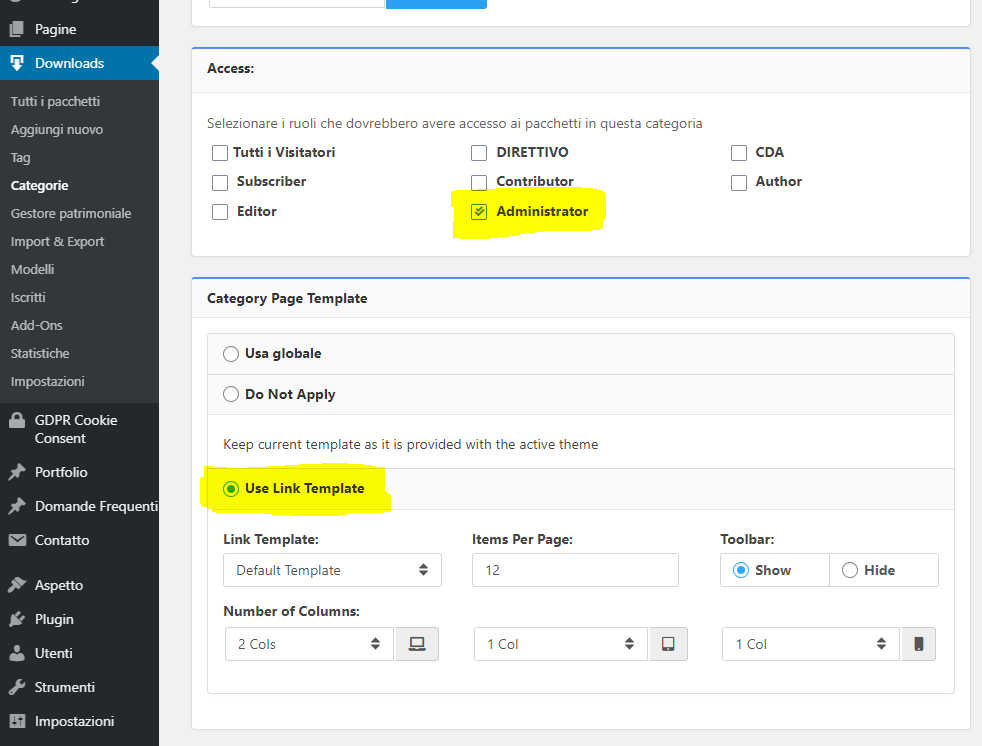
This is my configuration, it’s ok?
Because with this, i see the folder “Category Test” with a subscriber user and I don’t want this.
I want that this folder is invisible to subscriber user.
1) “before giving access to a certain category for a particular role you have to set Use Link Template option and your particular role,”
2) “then you have to make empty for Allow Access option or giving a particular role on package settings”
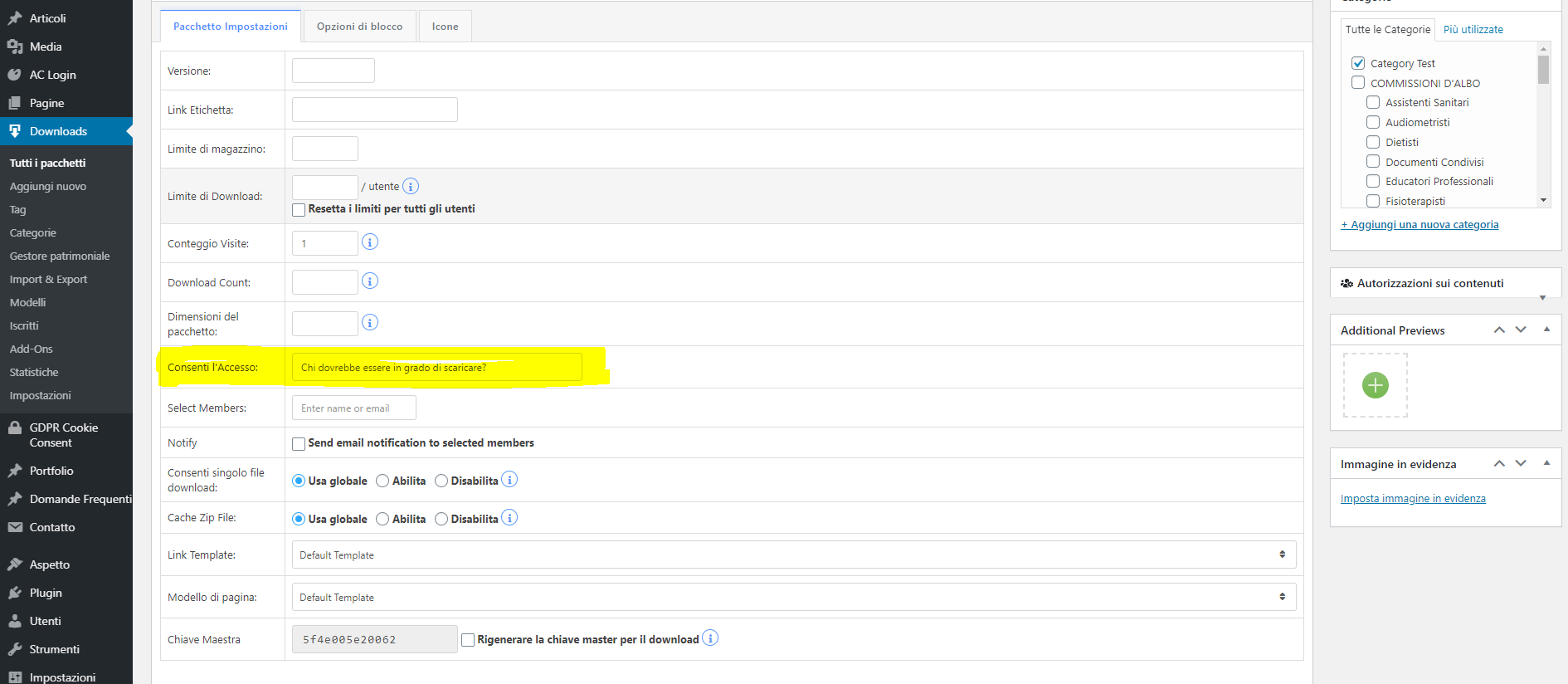
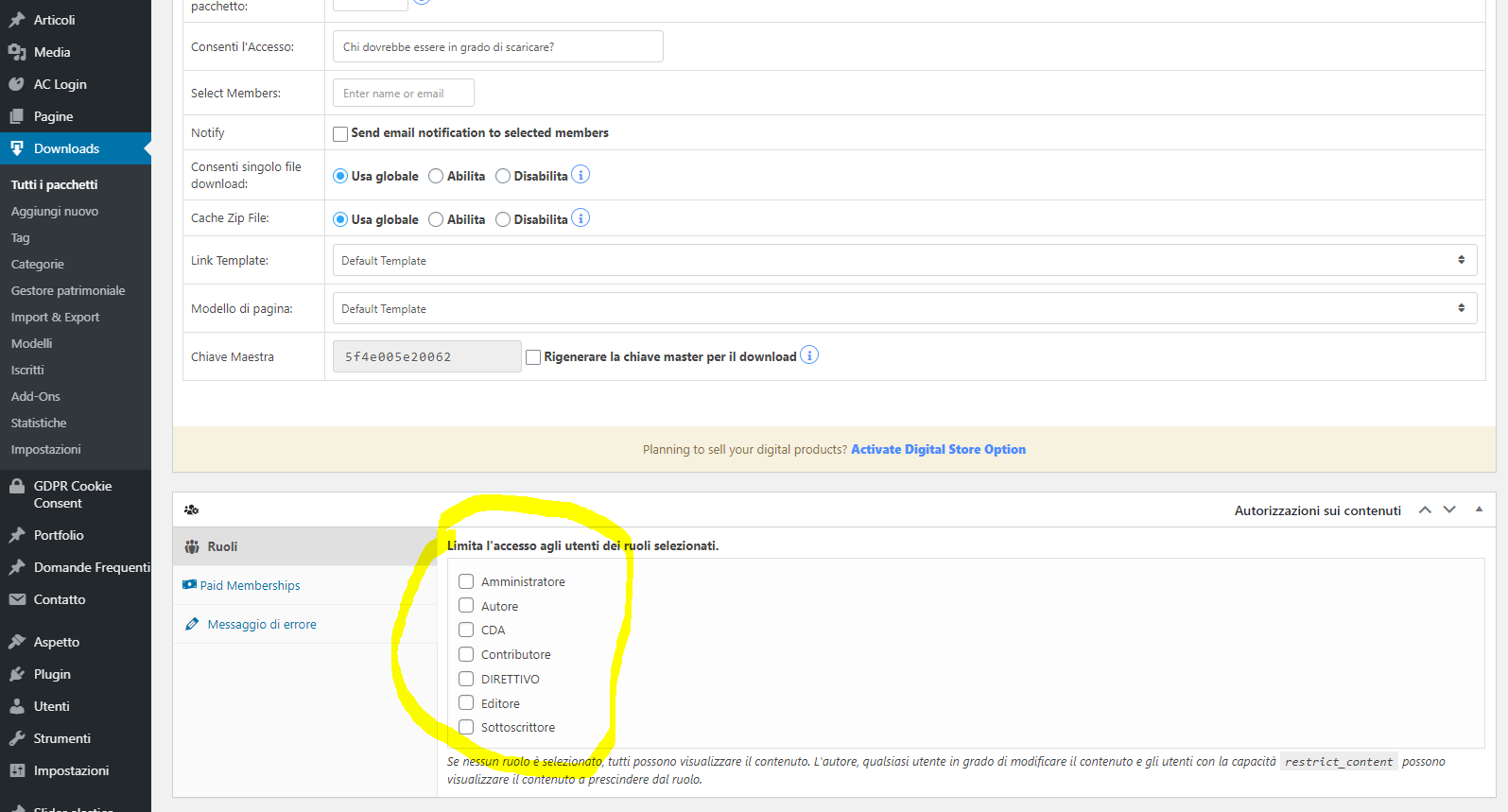
I have also set this:
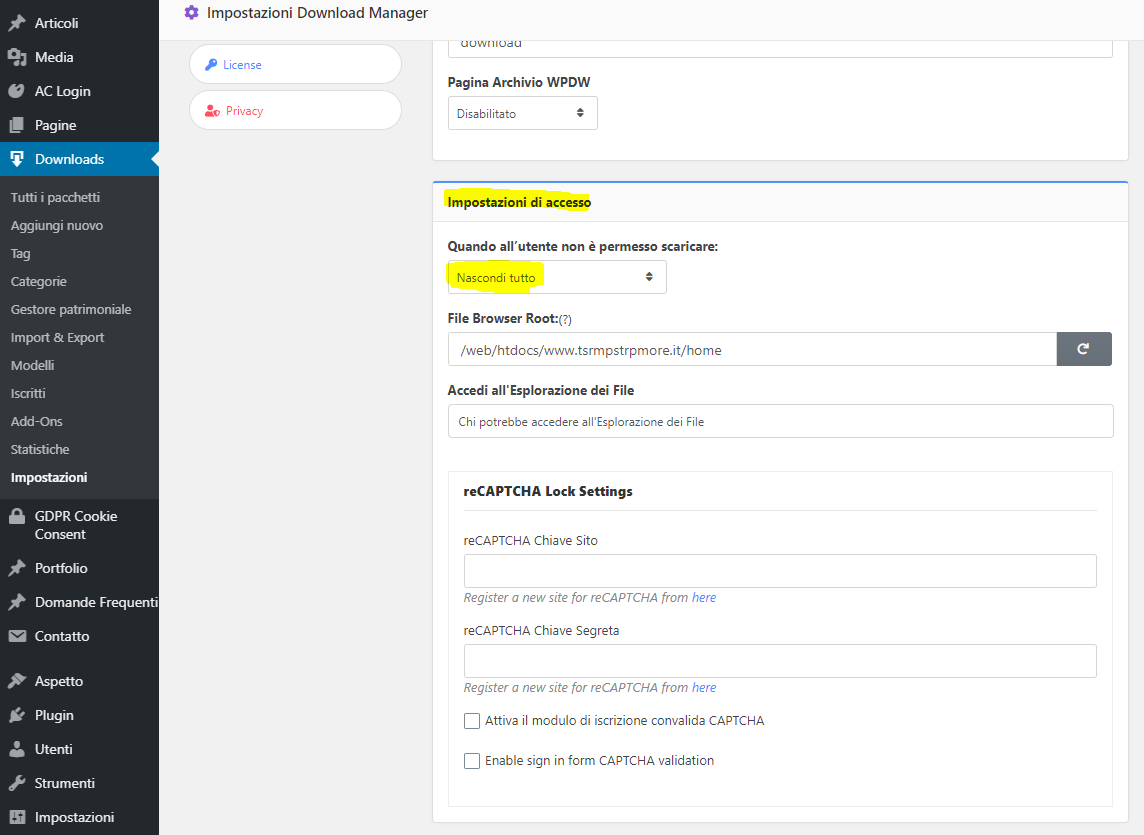
What can i do? There is an issue or i don’t have understood the configuration settings?
Yes i’m using this shortcode.

Hi Nayeem, i have this last version: Versione 5.1.17
I don’t have any other update.
What can i do?
With your configuration I can see the folder!
The folder currently contains no files. I want to do a very simple thing, to make sure that the folder can only be viewed by administrators and not by subscribers.
Now, however, a subscriber user can see the folder.
Is there a way, with this component that you made me buy, to show a folder only to administrator users?
Whenever you answer my question put the post as solved, the problem is not solved.
Every time you answer with the usual answer, but this answer of yours doesn’t solve my problem and you don’t answer my simple question.
This component, in the PRO version, allows you to make a folder (without file) visible only to administrators users ???
-
This reply was modified 5 years, 7 months ago by
Hi Nayeem Riddhi,
you have to help me because this situation is becoming frustrating.
Follow me…
I have two type of roles, one named “CDA” and another one named “DIRETTIVO”.
I need to do one simple thing.
I must create two different folders (category), one named CDA and one named DIRETTIVO.
I want that CDA user can see only the CDA folder (category) anche DIRETTIVO user can see only DIRETTIVO folder (category) ok?
I have tried the free varsion, I bought “Advanced Access Control” add-on for 49 dollars, then i have bought the PRO version for 59 dollars, but for the moment i can’t do what i want. It’s frustrating. 108 dollars for nothing!
****************************
Today i have tried to do this, like a test ok?
I have created a now folder named “Category Test”, i have followed your instruction…
STEP 1:
“…if anyone wants to hide packages, need to select the “Hide Everything” option from Access Settings ► When a user is not allowed to download: which available in PRO version …”
It’s ok for the packages, but not for the category visibility.
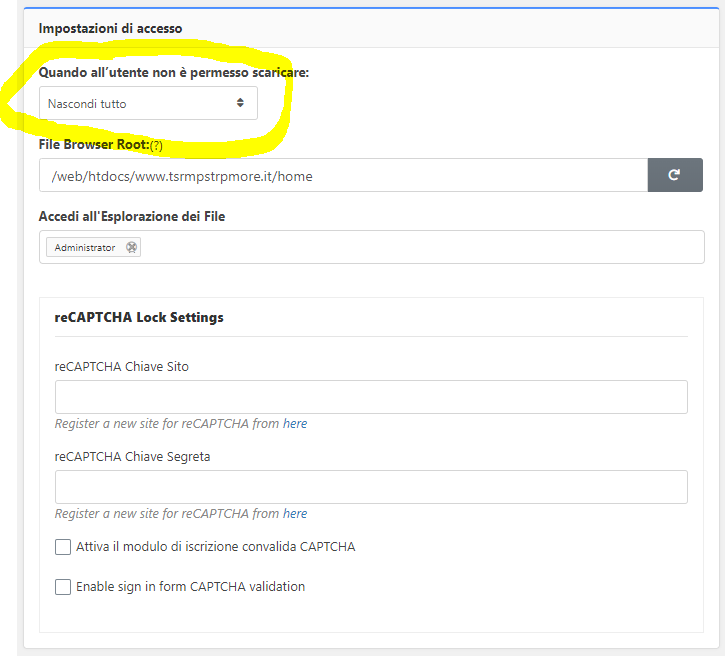
STEP 2:
I have set the setting of the category like you:
“before giving access to a certain category for a particular role you have to set like as I image attached, you should use Use Link Template option and your particular role,”
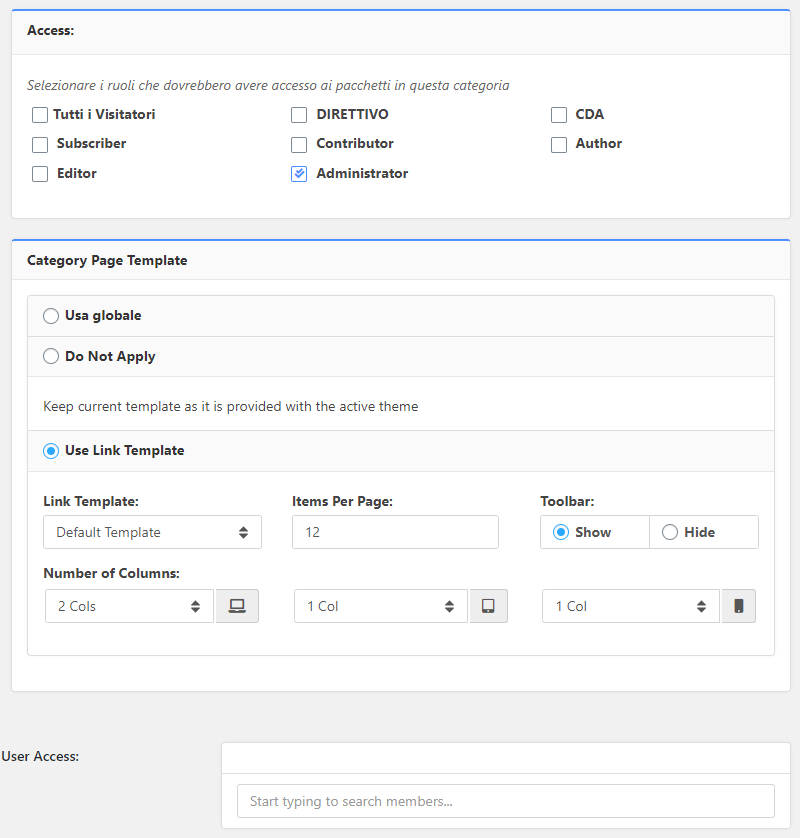
Only admin user can see this Category, but i have created e subscriber user and i can see it -.-
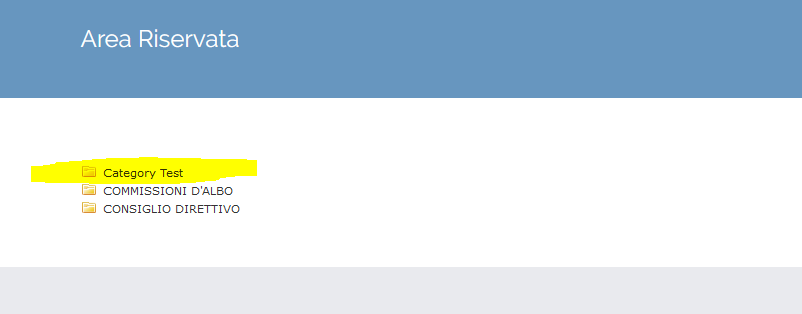
what can I do to show a category folder only to some users?
Hi Nayeem,
I have one question for you.
I bought “Advanced Access Control” add-on because I thought it could solve the problem, I paid 49 dollars.
Now I have to buy the PRO version which costs $ 59 and contains “Advanced Access Control” Is it possible to buy the pro version simply by adding the difference between 59 and 49?
Hi Nayeem, thanks.
I have the free version of the plug-in, now i have understood.
I can only blocks download access.
Thank you.
I see the same problem!
Try to make this…
You must create a category named “Test”, set the permssion of the category to “only for Admin”
I can see the category and all it’s file inside with a subscriber access.
This is a big problem because i can’t use this plug in and I also have purchased an add-on (Advanced Access Control).
************************
3.0.97
Improved asset manager
Fixed an issue with category handler
Fixed an issue with Package Info widget
************************
Have you solved the problem with this update?
I created a new user with subscriber permissions called CDA, I have two folders “Folder A” and “Folder B” I set that the CDA user can see the contents of folder A but not that of folder B, but it doesn’t work, I can see all the contents of the two folders.
I think the problem has not been resolved with this update.
At the moment it is not possible to configure the categories to choose which users to view the content.
I also purchased an add-on (Advanced Access Control) to use your plug in, please resolve it as soon as possible.
Up
Hi,
ten days have passed, are there any news? This is a serious problem.