
- This topic has 5 replies, 2 voices, and was last updated 4 years, 8 months ago by
Nayeem Riddhi.

Hello,
The Download manager is a great plugin the version 3.1.28 work fine
but I have updated 3.2.32 version and I have a problem with the package settings.
There are tabs : ‘package settings’ ; ‘Lock options’ ; ‘icons’
Package settings is the first tab (show by default).
Select tabs ‘Lock options’ or ‘Icons’ has no effect, only the Package settings is showed
Return to 3.1.28 version solved the problem
Thank you for your help

Hello jean-louis,
Hope you are well. I think there may have a conflict somewhere. Can you please enable/disable other plugins for checking, you may also switch theme to another for checking, please let me know then
Thank you and regards
Thank you for your answer.
Here screenshot of the ‘package settings’ (Download Manager menu ‘Settings’), sorry in french…
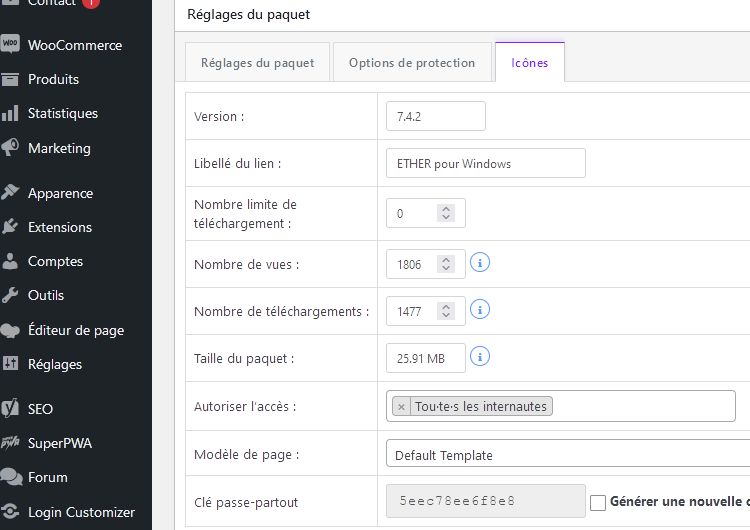
The ‘Icons’ tab is selected but the tab show always the ‘Package Settings’ options
However everything works perfectly on the website (ie https://www.alpheus-led.com/download/logiciel-ether-windows/
But to change the locking options I have to go back to a previous version (3.1.28)
-
This reply was modified 4 years, 8 months ago by
jean-louis cuquemelle.
Hello jean-louis,
Have you followed the above confliction checking procedure? please check and let me know. I hope there should be a conflict somewhere. It is working properly from my side.
Thank you and regards
Hello
Thank you for your support.
I disabled all other plugins but without success.
Changing the theme is a big job.
Is there a problem using version 3.1.28?
Happy New Year
Jean Louis
Hello jean-louis,
I think within your theme there may be a script that is conflicting with the package settings tab. so it was not working properly
Thank you and Happy New Year Too
The topic "Package settings tabs" is closed to new replies.