
- This topic has 7 replies, 2 voices, and was last updated 6 years, 8 months ago by
Salahuddin Ahmed.

I’m not able to format the download manager in the format that is on this page
https://demo.wpdownloadmanager.com/wpdmpro/package-list-in-responsive-table/
I want it to work, because I’m interested in registering the product, but without being sure that I’m going to get the desired result is unfeasible.
I have already seen some answers in the forum, but I have little knowledge and I can not make it work.
Someone help me?
I’m from Brazil, sorry if my English is not good
The link of how I want to, do not appeared in my post, I will repeat it here.
[https://demo.wpdownloadmanager.com/wpdmpro/package-list-in-responsive-table/]
Someone help me?

Hi Wenceslau,
Sorry to hear your trouble with WPDM. Please share your admin login in a private reply so that I can have a look inside and help you!
Cheers
Salahuddin Ahmed
Hi Wenceslau,
Actually, your shortcode was wrong, this should be the right shortcode >
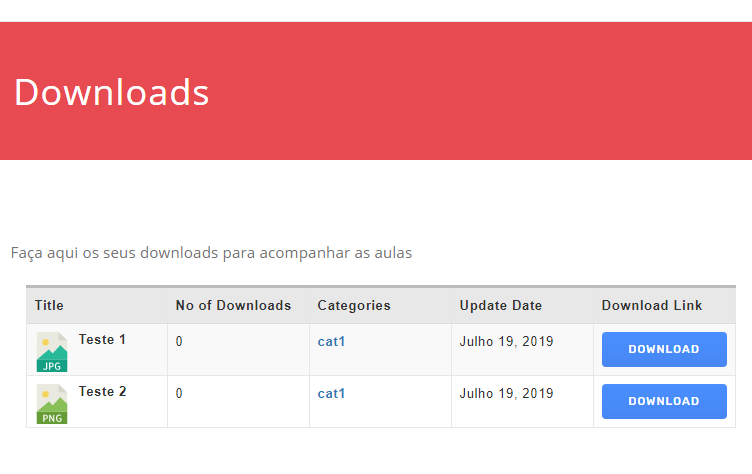
[wpdm_all_packages items_per_page="10" categories="cat1"jstable=1 order_by="title" order="ASC" cols="title|download_count|categories|update_date|download_link" colheads="Title|No of Downloads|Categories|Update Date|Download Link"]
See your table is looking like this now :
Thank you friend.
I have no words to thank you, thank you very much!
I have worked hard trying, to solve this, but I do not have much experience.
God bless you!
Strong hug.
You are most welcome!
The topic "Data tables not working" is closed to new replies.