

Download Limit
$49.00 — $99.00 Select License Pro For single installation $49.00 Developer Up-to…

Display your download packages in a modern, collapsible accordion organized by category. WPDM Accordion generates a clean, accessible multilevel accordion from your WordPress Download Manager categories and packages — with smooth animations, AJAX-loaded content, keyboard navigation, and full dark mode support.
aria-expanded, aria-controls, role="region"), keyboard navigation with Arrow keys, Home, End, Enter, and Spacewp_ajax hooks with nonce verification, input sanitization, and orderby whitelistingUse [wpdm-accordion] to display the full accordion. Available parameters:
[wpdm-accordion cats="1,2,3" template="link-template-panel.php" orderby="title" order="asc"]
Parameters:
link-template-panel.php)title, date, modified, download_count, package_size_b, view_countasc or descSearch for "Accordion" in the block inserter. The block provides sidebar controls for Category, Template, Order By, and Order — with a live server-side preview directly in the editor.
$49.00 — $99.00 Select License Pro For single installation $49.00 Developer Up-to…

Login is required to access this page Login Version 1.6.0 Download 132…

Download Version 3.0.0 Download 7831 File Size 5.4 MB File Count 1…

WordPress Contact Form, Drag and Drop Form Builder Plugin - Live Forms…
38 Comments
Your demo page for this does not work. Do you have other examples or is this plugin dead?
Just checked the demo and it is working https://demo.wpdownloadmanager.com/wpdmpro/accordion/ Could you please provide you device and browser info?
I have a theme called Divi and this plugin doesn’t seem to be working. I switched to another them and it worked perfectly. Have you seen this issue before?
Please create a support ticket in Pro forum and send temporary wp-admin login info there as a private reply. We will add some code to resolve the conflict or you can follow the suggested patch here https://www.wpdownloadmanager.com/support/topic/problem-with-accordion-add-on/
i bought the plugin but it does not work. When i click de category.. not accordion. I do not see the subcategories or files
Please create a support ticket here https://www.wpdownloadmanager.com/support/forum/download-manager-pro/ Send temporary wp-admin login info as a private reply there so we can check the issue on your installation.
a question. To use accordion do I need wpdm-directory?
You only need this ( WPDM Accordion ) add-on.
I have tested in two different domains and only the categories are displayed. Subcategories and files are not displayed. I have tried all the accordion options in the TinyMCE Advanced. When I click on the category, it does not display the subcategory. It is urgent for a town hall. I, m sorry for been boring
We need to login to your installation to check the issue. Please create a support ticket here https://www.wpdownloadmanager.com/support/forum/download-manager-pro/ Send temporary wp-admin login info as a private reply there.
hello, ji have purchased this plugin, but i have a dude:
is possible to auto expand all the accordion on page load?
thanks
Hi
Is there a way to show the category description?
Thanks
is there a way to specify a subcategory that I don’t want to display?
[wpdm-accordion cats=”770″] <—so for example I want all the subcategories of 770, except for 798
No option to exclude subcategory.
If you want to show just one subcategory why not just insert the shortcode for that subcategory?
Hi
Is there a way to show the category description for each category?
Thanks!
Thanks Shaon,
Could we know when it will be ok (days, week, months ?) ? Just to know il i’m waiting or if i need to find another solution. How can we be informed about that ?
Thx.
Hi, how I can change sort order? for example, if I want to order for title of subcategory??
That option is not available yet, but it seems like a good idea and noted for implementation.
Thank You Shahriar for your answer. I have installed WPDM Pro, Accordion add-on and used Panel Link Template. It’s great.
I still have a question. I have a lot of documents used by differents roles. A lot are commons, but some are for one or other group. In the accordion add-on, documents appear even if i restricted the access in “edit package > package settings > allow access” and even if i hide everything in General settings > basic. On the other hand, the page of package are well restricted but i don’t need the page.
Is there a tip or parameter i forgot?
Thanks a lot
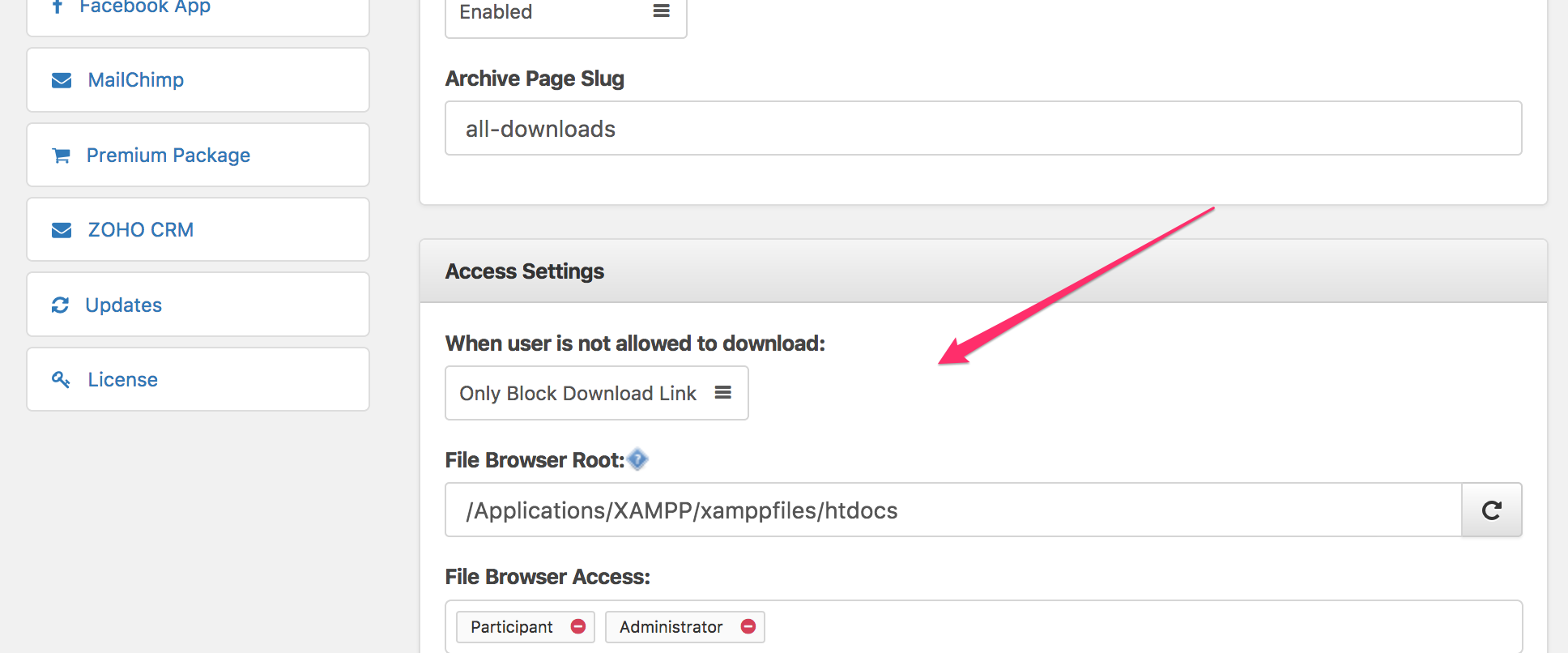
If though document appears, the download link is actually disabled. However, You can check hide everything option from wpdm settings page to hide all package data:
Sorry for the late answer.
I do that.
When user is not allowed to download, i hide everything.
The page, where my accordion is , is allowed to group M, admin and group P.
In this page, the first document is allowed for admin and group M only, not for group P.
But the group P access to and i don’t want to 🙁
In the package page of first document, i restricted the access to admin and group M, so i don’t understand…
Thx for help
It’s like i have no restriction on the link template in accordion. And i need restriction here.
We are adding the option and different sorting order options for categories, sub-categories and packages.
Hi,
Can i buy WPDM accordion plugin with free version of WPDM ?
How can I have the thumbnail of my document like in your green demo ?
Thanks
Yes, You can use Accordion add-on with free version of WPDM. Green accordion in demo using Panel Link Template, this link template is available on Pro version of WPDM.
THANK YOU SO MUCH FOR ADDING SORT OPTIONS! One more question – how can I change the color of the accordian? I can’t see how I could do this in the PHP file.
Additional parameters for color styles:
cat_style: top level accordion style, possible values “info” or “default” or “primary” or “warning” or “danger” or “inverse” or “success”
subcat_style: inner level accordion style, possible values “info” or “default” or “primary” or “warning” or “danger” or “inverse” or “success”
Thanks. I would really like to match the color to the rest of my theme though. Could you incorporate a style using HEX ‘ededed’ / RGB 237 237 237?
Noted for implementation 🙂
How can I change the sort order of the downloads? Right now, it is sorting by ID which I do not want it to do. I want to sort by download count.
Sorry, that is not possible for now, but we are already adding it for next update 🙂
how can I display a single category and all of its subcategories, including packages.
If I do something like [wpdm-accordion template=”link-template-default-icon” cats=”10″] I only get packages for that category when the accordion expands. But if does not show the subcategories.
Is there a demo of the accordion? the link http://demo.wpdownloadmanager.com/wpdmpro/accordion/
is not longer working.
We were rebuilding the demo, demo link ( http://demo.wpdownloadmanager.com/wpdmpro/accordion/ ) is active now
Is there a way to use this add on to do direct to download instead of clicking to the download page?
Yes, Possible, as you can use link template now. Please update your copy.
How do you install this???
Just like any other regular plugin installation:
Admin Menu >> Plugins >> Add New >> Upload