Please send username and password of the temporary user. I didn’t receive any verification code from the link above.
Have you applied the theme button class in your custom link template? I do not see any class associated with the download button.
https://www.evernote.com/l/AUehvEomqhVBP5TFmhrF1nGU1OqQzdSLEHUB/image.png
Aren’t you trying to change the indicated button style?
This issue has been fixed in v.4.6.9
It should work without any changes.
Yes, v.4.6.9 have the core WP update routine. Thanks.
Hi,
You are using the Free version of Download Manager. Frontend Upload and some other features are not available in the Free version. Please purchase and install the Pro version of WPDM to get Pro features.
Thanks.
Please save your license key in WPDM Settings License tab to get rid of this notice.
Please check this doc https://www.wpdownloadmanager.com/doc/where-is-my-license-key/ It explains where to generate your license key.
Make sure you are using the latest version of Download Manager ( v.4.6.9 )
Send temporary wp-admin login info in private reply if you have the key but it is not working.
Please send temporary wp-admin login info in private reply to check the issue.
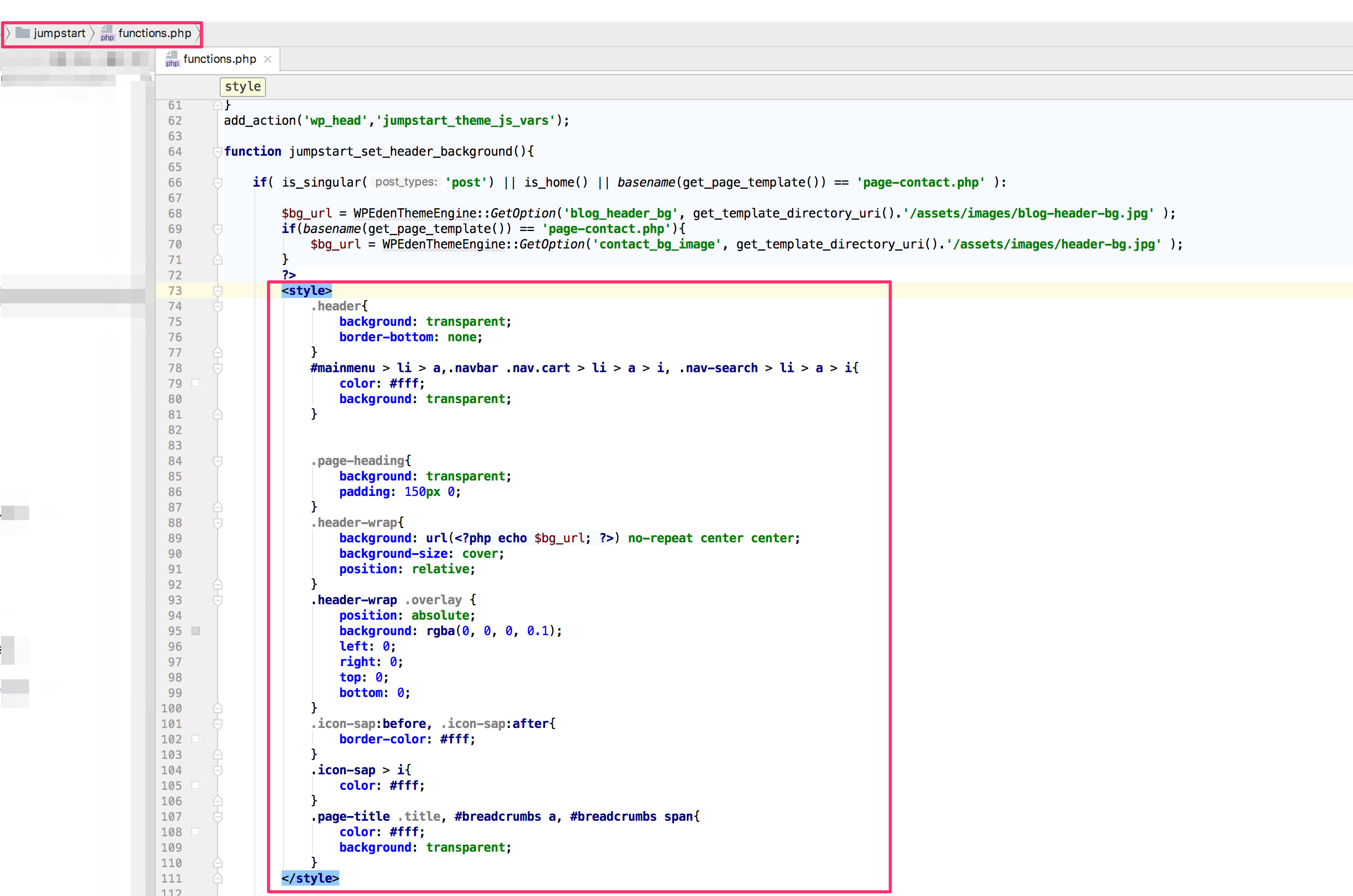
You can remove the css from /jumpstart/functions.php file,
https://www.evernote.com/l/AUdftnL_5VpKKq4zHK3hseyRjXurcF3JBSgB/image.png
Please try now. Make sure you are using the latest version of Download Manager ( v.4.6.9 )
Hi,
There is no option yet to choose the thumbnail size in this case. For now you can modify the plugin code to modify the thumb size.
https://www.evernote.com/l/AUcgkL1EYFtHWa8mHJhOvI7bjgW7H7Geu-AB/image.png
Thanks.
Please set the order_by value title. Like the following example order_by="title"
Please send me a link to check the issue. I could suggest you some JS to disable the button after the first click. You can add it in your theme/child-theme so it doesn’t get lost after plugin update.
From frontend user can only edit/delete their own packages.
You can list and edit all packages by modifying the template file /download-manager/tpls/list-packages-table.php ( remove marked code )
https://www.evernote.com/l/AUdGdv81qyxAYr9NBJRS8G4gfcTRBrD8sSUB/image.png
But to enable delete for other’s package core code change is required which is not recommended ( remove marked code ),
https://www.evernote.com/l/AUfgYcIF755E571OXKJ15oLrwDO_z3pnVH0B/image.png
If you are trying to modify frontend upload ( like hiding allow access field ) form then create a custom template for that. In that template you can remove all fields you do not need ( i.e. roles field ).
Please check template customization doc here https://www.wpdownloadmanager.com/doc/template-files/
Please send temporary wp-admin login info in private reply. I will do the initial setup for you and will inform you how to proceed from that point.
If you have a /download-manager/ directory in your plugins dir. Please delete it first ( using FTP ), then install the WPDM v.4.6.9
In the latest release of WPDM, we fixed the update issue that deletes the plugin. So, this is the last time you have to update manually.
Please send temporary wp-admin and FTP login info in private reply if you want me to install the latest version.
Please use “Single Column, Image Top, Extended” or any custom page template with [download_link_extended] template tag to embed the form in the page. As the popover is not working due to some js errors in your page.
I have tested with embedded form, It worked fine.
Verified your key. By the way, you are using an older version of Download Manager. We always recommend to use the latest version of WPDM.
Please try now.
I tested some packages and download worked as usual for those. Also, I created a new package by importing it from Bulk Import page, and that worked fine too.
Could you please send me a package URL where you have this issue?
Hi,
Unlocked your key. You can activate the key in your new domain now.
Best Regards.
Use [doc_preview] template tag to preview PDF files using Download Manager. You can create your custom template using the tag or use built-in “Single Column Doc Preview” page template.
You can add css in your custom template to modify the button color,
.w3eden a{color: #ddd!important; }
Adjust the color code to match your theme style.
There are lots of 403 errors in your page and page is not loaded properly.
https://www.evernote.com/l/AUcvlme9CiBOnJ7A2gRGqsYtHXlzrsNoHUIB/image.png
This doesn’t look like Archive Page add-on issue. After fixing the 403 issue install a fresh copy of Archive Add-on. Please send temporary wp-admin login info in private reply if archive issue still exists.
Please send temporary wp-admin login info in private reply to check the issue.